
Setup: Marshall Kilburn III Portable Loudspeaker User Manual
Content
Marshall Kilburn III Portable Loudspeaker
Introduction
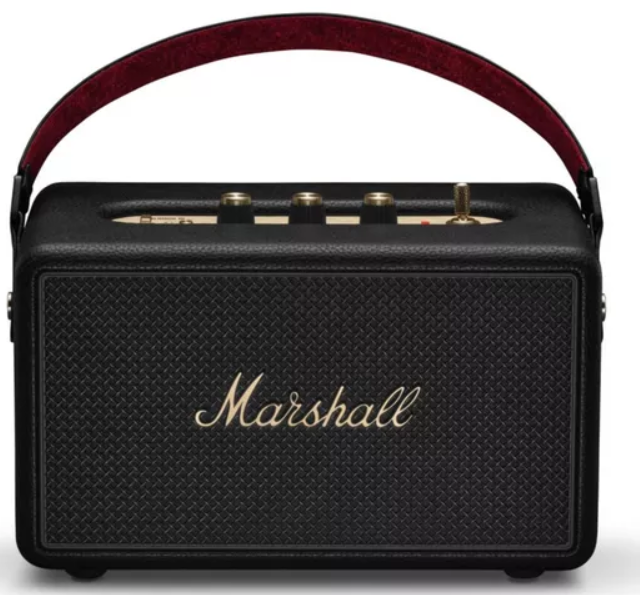
The Marshall Kilburn III Portable Loudspeaker represents a perfect fusion of iconic rock 'n' roll heritage and modern audio technology, designed to deliver legendary sound wherever you go. With its vintage-inspired design featuring brass-colored control knobs, a classic Marshall script logo, and a guitar-style leather strap, this speaker stands out both in style and substance. It is built for music lovers who demand not only impeccable sound quality but also portability and durability for both indoor and outdoor use.
Key benefits include its remarkable over 50 hours of playback time on a single charge, ensuring your music lasts throughout long days or nights. The Kilburn III offers true 360-degree stereophonic sound with a unique spatial audio experience, filling any room or open space without blind spots. Its IP54 dust and water-resistant rating means it can endure splashes and spills, making it ideal for outdoor adventures, poolside parties, or casual home use.
Targeted at audiophiles, casual listeners, and those seeking a stylish portable speaker with robust sound performance, the Kilburn III suits a variety of use cases—from backyard gatherings and travel to personal listening sessions. Available in classic black or cream vinyl finishes, its estimated price range typically falls between $300 and $350, making it a premium yet accessible choice. The speaker is widely available through major electronics retailers and online stores.
Technical Specifications and Key Features of the Marshall Kilburn III Portable Loudspeaker
- Amplification Power: 50 watts,, Class D amplifier for dynamic sound output
- Drivers: Three-driver array with two 2" full-range drivers (each 10W) and one 4" woofer (30W) in a bass reflex cabinet
- Sound Technology: 360° True Stereophonic sound delivering multi-directional audio with no blind spots
- Battery Life: Over 50 hours of wireless playback time with fast charging ability (8 hours in 20 minutes)
- Connectivity: Bluetooth 5.3 with multipoint connectivity, 3.5mm auxiliary input, and Auracast support for multi-speaker wireless pairing
- DurabilityIP54-rated dust and water resistance (splash-proof but not submersible)
- Controls: Brass knobs for bass, treble, and volume; tactile power toggle; and Marshall app support for custom EQ settings
- Weight & Dimensions: Approximately 2.8 kg; compact size under 30 cm wide and 15 cm high
- Materials: Made with 38% recycled materials and PVC-free components
Compared to similar portable speakers like JBL Charge series or Bose SoundLink, the Kilburn III excels in delivering rock-inspired tonal character, deeper bass with the Dynamic Loudness feature, and superior battery life, combined with a distinctive retro design for a unique user experience.
DEVICE LAYOUT
- MEDIA CONTROL
Control the audio directly from the top panel when playing via Bluetooth. - CUSTOMISABLE M-BUTTON
Push the M-button switch between EQ settings. The M-button can be customised in the Marshall Bluetooth app. - BLUETOOTH® BUTTON
Push and hold the Bluetooth button until the LED turns to a slow pulse to start pairing mode. - AUDIO CONTROLS
Kilburn III includes three controls for adjusting the audio. - BATTERY INDICATOR
The 10-segment battery indicator shows the battery charge. POWER SWITCH
Pull the power switch towards the front to turn the speaker on or off.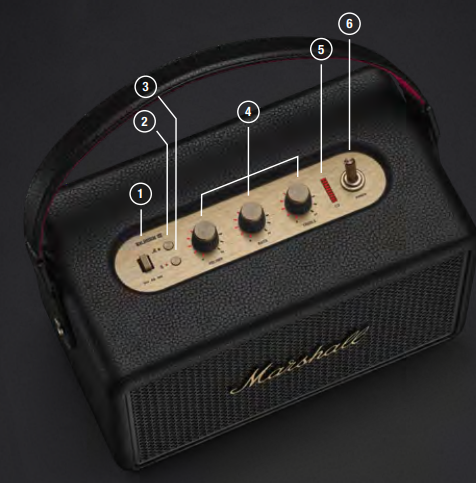
- AUX - 3.5 MM AUDIO INPUT
Plug in an audio device with an analogue output and a 3.5 mm stereo jack. USB-C - POWER INPUT/OUTPUT
Charge the speaker by plugging it into a USB power source,, or plug in a USB-C device and use the speaker as a charging bank.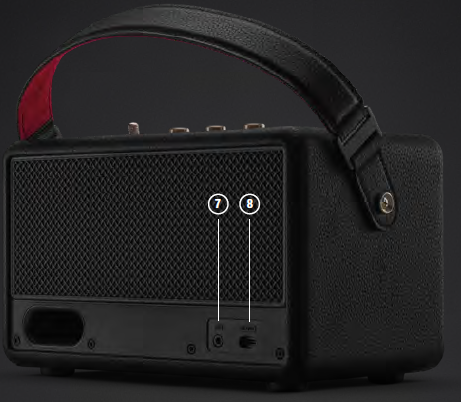
INSTRUCTIONS
GETTING STARTED
- Pull the power switch towards the front until the speaker turns on.
- Push and hold the Bluetooth button until the LED turns to a slow pulse.
- Select KILBURN III from your audio device’s Bluetooth list.
USING THE MEDIA CONTROL
Use the media control to manage your music playback when playing via Bluetooth.
- Push once to play/pause
- Push right/left to skip forward/back
- Hold right/left to fast forward/rewind
CHARGING THE SPEAKER
Use the included USB-C cable to connect the speaker to a USB power source (5 V / 9 V, 3 A). The USB-C power input port is located on the back of the speaker.
Note: Always make sure that the speaker is completely dry before charging it.
USING THE SPEAKER AS A CHARGING BANK
- Ensure that the speaker is on and has more than 20% battery charge.
- Plug in your phone, tablet, or other USB device to charge it from the speaker.
A separate lead with USB-C and a relevant jack for your device is required.
BATTERY INDICATOR
The 10-segment battery indicator shows the speaker battery charge. A rising animation indicates that the battery is charging.
CONNECTING AN AUX DEVICE
- Connect a lead with a 3.5 mm stereo jack to the AUX input on the back of the speaker.
- Connect the other end of the lead to the audio output on your audio source.
- Make sure all connected Bluetooth audio devices are paused.
Note: Audio leads are not included.
CLEANING THE SPEAKER
Clean your speaker regularly to keep it fresh and last longer.
Unplug any leads before cleaning the speaker,, and make sure everything is completely dry before plugging in a USB charger.
Remove the carry strap from the speaker and clean it with a soft brush. Gently clean the speaker and the leads with a lint-free cloth, slightly damp with either:
- water,
- 70% isopropyl alcohol, or
- 75% ethyl alcohol
Carefully clean the openings with a dry and soft brush, or a cotton swab.
- Do not use any sharp or metal objects.
- Do not use compressed air.
- Do not use products containing bleach or hydrogen peroxide.
- Do not submerge the speaker in any cleaning agents.
- Do not rinse the speaker under running water.
BATTERY CARE GUIDE
Your speaker comes equipped with high-performance lithium-ion batteries with a life span that is affected by charging and usage. Follow the guidelines below to keep your battery in great condition for as long as possible.
- Avoid using fast chargers if possible. Fast charging causes stress on the battery and will degrade it.
- Avoid letting the battery drain completely or charging it when it’s already full. Try to keep the charge between 30% and 80%.
- If the speaker is stored for a long time, it is recommended to charge the speaker to about half-charge and then do a factory reset. Store the speaker in a cool, dark, and dry place.
- Avoid using or charging the speaker in hot and unventilated places, 40°C/104°F and above, such as in a parked car or by a window in direct sunlight.
- Avoid charging the battery at low temperatures, below 10°C/50°F and using the speaker below 0°C/32°F.
- Avoid strong mechanical shocks, such as dropping the speaker on a hard surface,s as it might harm the batteries.
Download the Marshall Bluetooth app and select the battery preservation level that best suits you and your speaker.
PAIRING A NEW DEVICE
Kilburn III can be connected with 2 devices at a time and remembers up to 10 previously paired devices. When in range, it will try to reconnect with the last connected device.
- Make sure thathe t the speaker is on.
- Push and hold the Bluetooth button until the LED turns to a slow pulse.
- Select KILBURN III from your audio device’s Bluetooth list.
RESETTING THE SPEAKER
A factory reset will reset the speaker to its original settings, excluding any firmware updates.
Note: This will delete all user settings,, and the speaker will need to be set up again.
- Remove KILBURN III, and KILBURN III [LE] if present, from your sound device’s Bluetooth list.
- Ensure that the speaker is on.
- Push and hold both the M-button and the Bluetooth button for 10 seconds. The Bluetooth indicator turns quickly red, and the speaker restarts.
The speaker has returned to its factory settings and is ready to be paired, see the section Getting started.
MARSHALL BLUETOOTH APP
Download the Marshall Bluetooth app to get the most out of your speaker and keep it up to date with the latest software.

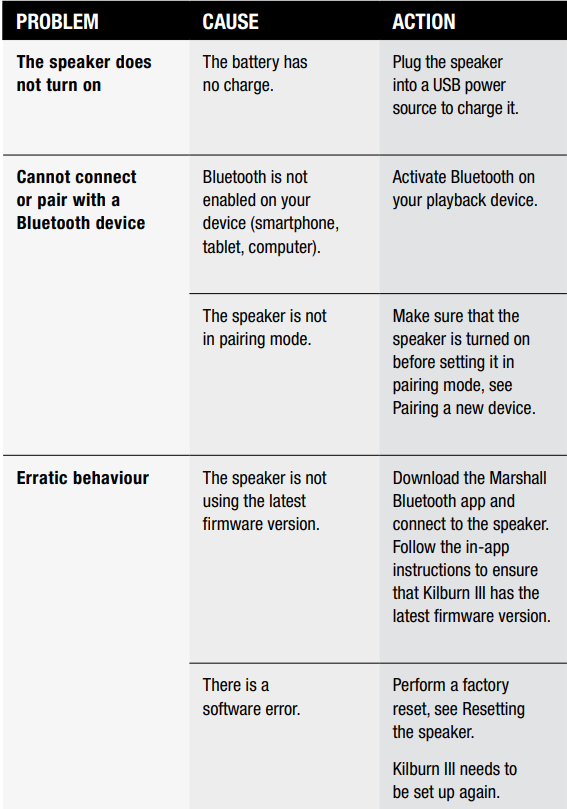
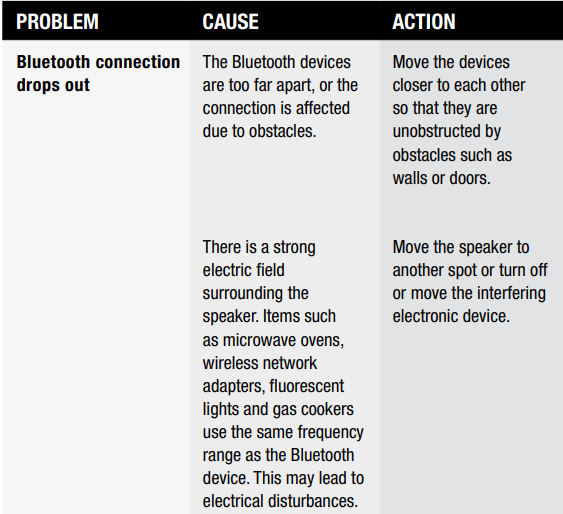
TROUBLESHOOTING
Pros & Cons of the Marshall Kilburn III Portable Loudspeaker
- Pros:
- Exceptional battery life exceeding 50 hours supports extended use without frequent charging
- Rich, warm bass with excellent clarity and 360° stereo sound,, perfect for both indoor and outdoor environments
- Robust IP54 rating protects against dust and water splashes for versatile use
- Classic Marshall design appeals to fans of vintage aesthetics and rock culture
- Intuitive tactile controls plus app-based EQ customization enhance user control over sound
- Auracast technology enables easy wireless multi-speaker setups for larger soundscapes
- Cons:
- IP54 rating does not allow full water immersion; care is needed around liquids
- Relatively heavier (2.8 kg) compared to some ultra-portable Bluetooth speakers
- Price is higher than entry-level portable speakers, reflecting its premium positioning.
- Bass can be slightly overpowering on complex music tracks,, ks but adjustable via app and onboard cont. rols
Customer Reviews and User Feedback on the Marshall Kilburn III Portable Loudspeaker
Users praise the Marshall Kilburn III for its long-lasting battery life and superior sound quality, highlighting the speaker's ability to fill rooms and outdoor spaces with rich, immersive audio. The 360-degree stereo effect is frequently mentioned as a standout feature, delivering consistent sound regardless of listener position. Many appreciate the tactile brass controls and vintage design that make the speaker not only functional but a stylish accessory.
Common complaints include its weight, which some find less convenient for extended carrying, and the fact that the IP54 rating limits water resistance to splashes only, requiring caution near pools or heavy rain. Some users note that the bass can dominate at times, but most find this manageable through the customizable equalizer in the Marshall Bluetooth app. Overall, the Kilburn III receives strong recommendations for those seeking a premium portable speaker with iconic aesthetics and versatile performance, often earning 4.5 to 5-star ratings across retail platforms.
Faqs
How do I set up the marshall Kilburn III Portable Loudspeaker for the first time?
What should I do if the marshall Kilburn III Portable Loudspeaker is not turning on?
How do I optimize the sound quality of the marshall Kilburn III Portable Loudspeaker?
Can I use the marshall Kilburn III Portable Loudspeaker as a power bank?
How often should I clean and maintain the marshall Kilburn III Portable Loudspeaker?
What devices are compatible with the marshall Kilburn III Portable Loudspeaker?
How do I troubleshoot a dropped Bluetooth connection on the marshall Kilburn III Portable Loudspeaker?
What are the key features that make the marshall Kilburn III Portable Loudspeaker unique?
More marshall manuals
- Setup: Marshall Minor IV True Wireless Earbuds User Manual
- Setup: Marshall Mid A.N.C On Ear Headphones User Manual
- Setup & Pairing: Marshall Monitor Bluetooth Over-Ear Headphones User Manual
- Setup: Marshall Motif A.N.C True Wireless Earbuds User Manual
- Setup: Marshall Mode II - True Wireless Earbuds User Manual
- Setup: Marshall Minor III True Wireless Earbuds User Manual
Leave a Comment