
Setup: Marshall Mode II - True Wireless Earbuds User Manual
Content
Marshall Mode II - True Wireless Earbuds
Introduction
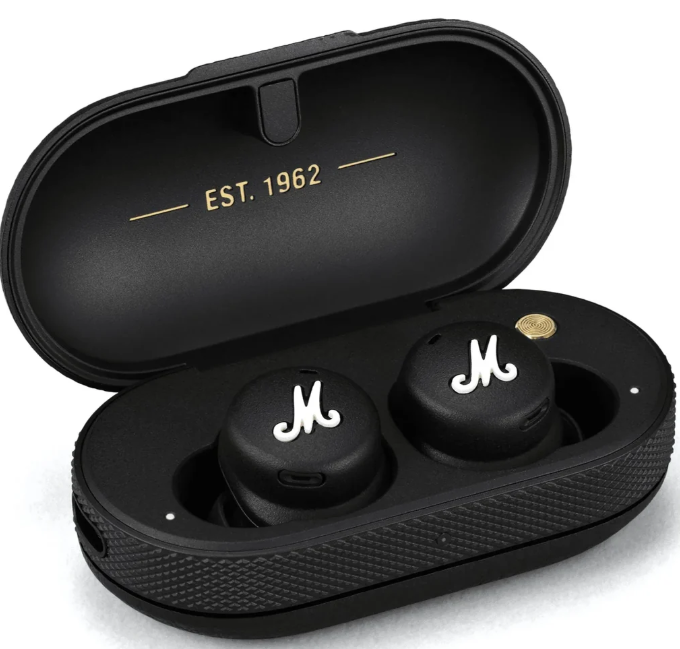
The Marshall Mode II - True Wireless Earbuds mark Marshall’s first foray into the true wireless audio market, bringing a distinctive rock-inspired design combined with high-quality sound performance. These earbuds are engineered for music enthusiasts who appreciate powerful, dynamic sound with growling bass, natural mids, and crisp treble, delivering a concert-like audio experience in a compact, wireless form.
Ideal for daily commuters, fitness lovers, and casual listeners seeking stylish yet functional earbuds, offersode II offers up to 25 hours of playback with the portable charger and boasts IPX5-rated water resistance for durability against sweat and light rain. The touch-sensitive controls allow seamless music and call management, while the customizable fit with multiple ear tip sizes ensures comfortable all-day wear. Compatible with voice assistants like Siri, Google Assistant, and Alexa, these earbuds are versatile companions for work, workouts, and leisure.
Retailing around $179, the Marpresentsode II presents an attractive alternative to premium earbuds such as Apple's AirPods Pro and Samsung Galaxy Buds Pro, especially for users prioritizing signature Marshall sound and classic aesthetics. Available through major retailers and online stores, they combine timeless style with modern wireless technology.
Specifications of Marshall Mode II - True Wireless Earbuds
- Driver: 6mm dynamic driver delivering detailed, balanced sound with low distortion
- Frequency Response: 20 Hz to 20 kHz for full-range audio reproduction
- Impedance: 16 ohms
- Sound Pressure Level (SPL): 100.5 dB for impactful volume
- Bluetooth Version: 5.1 with aptX, AAC, and SBC codec support
- Battery Life: 5 hours per charge, plus 20 hours from compact charging case
- Charging: USB-C fast charging and Qi wireless charging support for the case
- Water Resistance: IPX5-rated earbuds and IPX4-rated charging case for sweat and splash resistance
- Controls: Touch-responsive earbuds with customizable functions via the Marshall Bluetooth app
- Other Features: Transparency mode for ambient sound awareness, voice assistant compatibility, and customizable EQ settings
Compared to competitors like Apple AirPods Pro ($249) and Samsung Galaxy Buds Pro ($199), the Marshall Mode II focuses on sound quality and style over active noise cancellation, which they do not include. Their battery life is competitive but slightly less than some rivals, emphasizing premium sound and design.
GETTING STARTED
- Open the charging case..
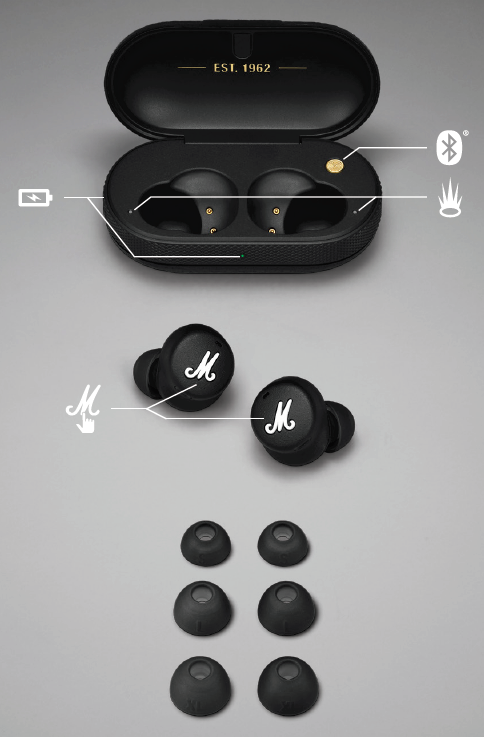
- Push and hold the brass pairing button until the earbud LEDs pulse blue.
- Select MODE II from your sound device’s Bluetooth® list.
- Download the Marshall Bluetooth app and follow the in-app instructions to complete the setup.
TOUCH CONTROLS
Touch the left or right earbud to control Mode II.
LEFT EARBUD
- 1 touch to toggle Transparency mode on/off
- 2 touches to activate your phone’s native voice assistant
RIGHT EARBUD
- 1 touch to play/pause
- 2 touches to skip forward
- 3 touches to skip backward
LEFT OR RIGHT EARBUD
- 1 touch to receive/end a call
- 2 touches to reject a call
CHARGING THE EARBUDS
Put the earbuds back in the case to charge them. The earbud LEDs blink white while charging and are steady white when full. The earbuds can be completely recharged 4 times from a fully charged case.
CHARGING THE CASE
Use a wireless charger or plug the case into a USB power source to charge it.
- The front LED lights up while charging, from red through orange to green (0–100%).
- Place the charging case with its back flat against the wireless charging pad.
- Make sure that the front LED lights up to indicate that the case is charging.
- Once the LED light has turned to a solid green light, the charging case is fully charged.
AUDIO ADJUSTMENTS
- Mode II comes with 4 sizes of ear tips,s and getting the best fit is important in ensuring you enjoy the best audio experience. Take the time to find the ear tips that best fit your ear. The ear tips should fit snugly in your ear but still feel comfortable. It is not uncommon to use different sizes for left and right.
- When you have selected well-fitting ear tips, fine-tune your EQ settings from the Marshall Bluetooth app to create your custom sound.
PAIRING A NEW DEVICE
Mode II remembers up to 4 previously paired devices and can reconnect with them automatically when in range. Follow the instructions below to pair Mode II with an additional device.
- Place your earbuds in the charging case.
- Push and hold the brass pairing button for 2 seconds, until the earbud LEDs turn blinking blue.
- Select MODE II from your sound device’s Bluetooth list.
CLEANING YOUR MODE II
- Earbuds come in close contact with your skin often and sometimes for long periods of time. This will, over time,e cause e build-up of dirt and grease that can affect performance and may cause skin irritation. Clean your earbuds regularly to keep them fresh and make them last longer.
- Unplug any cables before cleaning the case. Make sure everything is completely dry before using the earbuds, putting the earbuds back in the case, or plugging in a USB charger.
- Remove the silicone ear tips from the earbuds and clean them separately. Use a disinfectant wipe or a lint-free cloth, slightly damp with 70% isopropyl alcohol or 75% ethyl alcohol, to gently clean the ear tips, the exterior surfaces of the earbuds,s and the case. Avoid getting moisture in any openings or in the speaker mesh. Carefully clean those areas with a dry and soft brush, or a cotton swab.
- Do not use any sharp objects.
- Do not use compressed air.
- Do not use products containing bleach or hydrogen peroxide.
- Do not submerge the earbuds in any cleaning agents.
Troubleshooting Marshall Mode II - True Wireless Earbuds
- Issue: Earbuds not connecting via Bluetooth
Solution: Ensure Bluetooth 5.1 is enabled on your device, reset the earbuds by placing them in the case and holding the button for 10 seconds, then reconnect via the Marshall app. - Issue: Low or uneven volume
Solution: Clean the earbud mesh, check the fit with different t-ear tips, and adjust the volume through device or app settings. - Issue: Touch controls are unresponsive
Solution: Clean the touch surface, update the fthe firmware via Maand rshall the papp restart earbuds. - Error Codes: No specific error codes; connection and audio issues are typically resolved by resetting or app updates.
- Preventive Measures: Keep charging case and earbuds dry, use the provided ea ar tips for and secure fit, regularly update firmware.
Marshall offers a standard warranty covering manufacturing defects, and customer support can be reached through their official website or authorized retailers for further assistance.
Pros & Cons of Marshall Mode II - True Wireless Earbuds
Pros
- Signature Sound Quality: Powerful bass with clear mids and crisp highs, delivering a rich listening experience.
- Stylish Design: Retro Marshall amplifier-inspired look with durable rubberized finish and gold accents.
- Comfort and Fit: Ergonomic design with multiple ear tip sizes for extended wear without discomfort.
- Water Resistance: IPX5 earbuds and an IPX4 charging case are suitable for workouts and outdoor use.
- Convenient Features: Touch controls, transparency mode, customizable EQ, and wireless charging support.
Cons
- No Active Noise Cancellation: May not isolate noisy environments as effectively as some competitors.
- Battery Life: 5 hours per charge is moderate; some rivals offer longer playback.
- Limited Codec Support: No AAC codec support, which might affect audio quality on some Apple devices.
- Touch Controls: Lack of volume adjustment on earbuds and occasional responsiveness issues reported.
Overall, the Marshdeliverse II delivers excellent value for money for listeners valuing sound quality, type, and design but may lag for those seeking advanced noise cancellation or extended battery life.
Customer Reviews of Marshall Mode II - True Wireless Earbuds Users
Marshall the Marshallll Mode II - True Wireless Earbuds for their distinctive rock-inspired sound signature, highlighting powerful bass and clear vocal reproduction. Many appreciate the comfortable fit and the stylish, compact charging case. The transparency mode and touch controls receive positive feedback for their convenience, though some customers note minor issues with touch sensitivity and the absence of volume control on the earbuds.
Common complaints include the lack of active noise cancellation and moderate battery life, with some users expecting longer use per charge. Despite these, the majority recommend the earbuds for casual listening, workouts, and commuting, especially for fans of Marshall’s iconic audio profile.
Star ratings often hover around 4 out of 5, reflecting a strong overall satisfaction balanced with minor feature trade-offs.
Faqs
How do I set up the marshall Mode II - True Wireless Earbuds for the first time?
What should I do if my marshall Mode II earbuds are not connecting or drop connection frequently?
Can I use the marshall Mode II - True Wireless Earbuds with both iOS and Android devices?
How do I use the touch controls on marshall Mode II - True Wireless Earbuds to manage music and calls?
What is the battery life of the marshall Mode II - True Wireless Earbuds and how can I optimize it?
Are the marshall Mode II - True Wireless Earbuds water-resistant and suitable for workouts?
How can I clean and maintain my marshall Mode II - True Wireless Earbuds to ensure longevity?
Why don’t my marshall Mode II earbuds have active noise cancellation, and how does their transparency mode work?
More marshall manuals
- Setup & Pairing: Marshall Major III Bluetooth On Ear Headphones User Manual
- Setup & Pairing: Marshall Monitor Bluetooth Over-Ear Headphones User Manual
- Setup & Usage: Marshall Emberton II Portable Bluetooth Speaker User Manual
- Setup: Marshall Minor IV True Wireless Earbuds User Manual
- Setup : Marshall Middleton II Portable Loudspeaker User Manual
- Setup: Marshall Kilburn III Portable Loudspeaker User Manual
Leave a Comment