
Setup & Usage: Marshall Emberton II Portable Bluetooth Speaker User Manual
Content
Marshall Emberton II Portable Bluetooth Speaker
Introduction
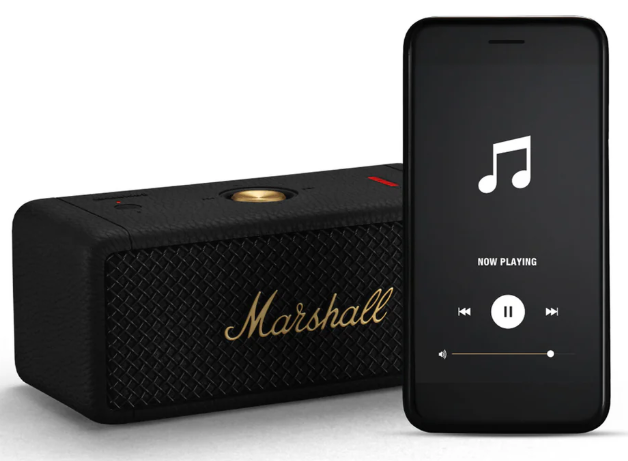
The Marshall Emberton II Portable Bluetooth Speaker redefines portable audio with its iconic design and powerful performance. Inspired by Marshall’s legendary rock ’n’ roll heritage, this compact speaker delivers rich, clear, and loud 360° sound using True Stereophonic technology, making every listening spot a sweet spot. Designed for on-the-go music lovers, the Emberton II offers up to 30+ hours of continuous playback on a single charge, supported by a fast USB-C recharge feature. Its rugged, IP67-rated waterproof and dustproof enclosure ensures durability in all environments, whether at the beach, poolside, or on outdoor adventures.
Perfect for audiophiles who want a balance of classic aesthetics and modern convenience, the Emberton II features Bluetooth 5.1 connectivity for stable wireless streaming and Stack Mode to link multiple speakers for an amplified stereo experience. Its multi-directional control knob simplifies music playback and volume control, while the Marshall Bluetooth app allows customization through EQ settings and firmware updates.
Available worldwide through major retailers and online stores, the Marshall Emberton II Portable Bluetooth Speaker is typically priced between $150 and $180, offering excellent value for those seeking a stylish yet resilient portable speaker with premium sound quality.
Specifications of the Marshall Emberton II Portable Bluetooth Speaker
- Audio Output: Two 2" full-range dynamic drivers with two passive radiators, powered by 20 watts total (10 W x 2)
- Sound Technology: True Stereophonic 360° multi-directional sound delivering immersive audio
- Frequency Response: 60 Hz to 20,000 Hz
- Maximum Sound Pressure Level: Approximately 87 dB SPL at 1 meter
- Connectivity: Bluetooth 5.1 with up to 30 feet (10 meters) wireless range
- Battery Life: Over 30 hours of playback per full charge
- Charging: USB-C port with fast charging – 20 20-minute charge provides 4 hours of playback; full recharge in 3 hours
- Durability: IP67 rated waterproof and dustproof, allowing submersion in water up to 1 meter for 30 minutes
- Controls: Multi-directional control knob for play, pause, skip tracks, and volume adjustment
- Dimensions & Weight: 6.3" W x 2.75" H x 3" D; weighs approximately 1.5 lbs (0.7 kg)
- Additional Features: Stack Mode for wireless stereo pairing, Marshall Bluetooth app support for EQ and firmware updates
Comparison: Compared to similar portable Bluetooth speakers like the JBL Flip 6, the Emberton II offers a distinctive rugged design with a higher IP67 rating, longer battery life, and a unique multi-directional soundstage, though it is slightly heavier than some competitors.
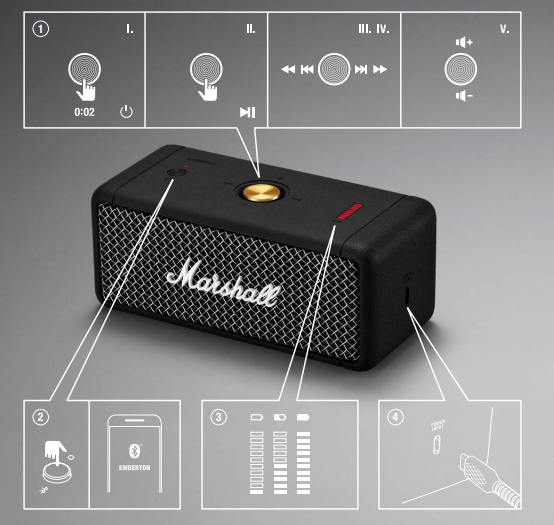
CONTROL KNOB
- POWER ON/OFF
Push and hold for 2 seconds - PLAY/PAUSE
Push once - SKIP FORWARD/BACK
Push to the right or the left - FAST FORWARD/REWIND
Push to the right or left and hold - TURN UP/DOWN THE VOLUME
Push upwards or downwards
BLUETOOTH® PAIRING BUTTON AND INDICATOR
- Push the Bluetooth® button until the indicator above starts blinking to initiate Bluetooth pairing mode.
BATTERY INDICATOR
The 10-segment battery indicator shows the battery charge.
USB PORT FOR CHARGING
- Connect the speaker to a power source via the included USB cable to charge the battery.
- The battery is fully charged when the battery indicator stops blinking.
GETTING STARTED
- Push the control knob for 2 seconds. The speaker turns on and is in pairing mode.
- Select EMBERTON from your audio device's Bluetooth list.
Troubleshooting Common Issues with the Marshall Emberton II Portable Bluetooth Speaker
- Speaker won't Turn On: Ensure the speaker is sufficiently charged. Connect to a USB-C charger and allow at least 20 minutes for a quick charge before attempting pto power on.
- Bluetooth Not Pairing: Confirm Bluetooth is enabled on your device. Press and hold the Bluetooth pairing button until the LED flashes. Delete previous pairings on your device and try again.
- No Sound or Distorted Audio: Verify volume levels on both the speaker and the connected device. Restart the speaker and device, and try reconnecting.
- Battery Drain: Disable any unused connections or features. Use the Marshall Bluetooth app to check for firmware updates that may improve battery management.
- Stack Mode Not Working: Ensure multiple Emberton II speakers are within Bluetooth range and updated to the latest firmware via the Marshall app.
Preventive Measures: Avoid exposing the speaker to extreme temperatures outside its operating range, regularly update firmware, and use the included USB-C cable for charging to maintain battery health.
Warranty & Support: The Marshall Emberton II is backed by a 1-year manufacturer's warranty. For additional help, visit the official Marshall support website or contact their customer service via phone or email provided in the user manual.
Pros & Cons of the Marshall Emberton II Portable Bluetooth Speaker
- Pros:
- Exceptional 360° True Stereophonic sound enhances listening from any angle
- Long battery life, exceeding 30 hours,,s supports extended outdoor use
- Rugged IP67 rating makes it resistant to water and dust for versatile environments
- Intuitive multi-directional control knob simplifies playback and volume management
- Stack Mode allows wireless pairing of multiple units for stereo sound expansion
- Marshall’s signature rock-inspired design appeals to style-conscious users
- Cons:
- Heavier weight (1.5 lbs) compared to some competitors,,ors limits ultra-light portable. ility
- Lack of built-in voice assistant support may deter some smart device users
- Bluetooth controls are not backlit, which can hinder use in low-light conditions
- Does not include a carrying case or strap, which may affect transport convenience
- Value for Money: The Emberton II is competitively priced given its sound quality, battery life, and durability, making it a solid investment for users prioritizing both aesthetics and performance.
Customer Reviews and Feedback on the Marshall Emberton II Portable Bluetooth Speaker
Users consistently praise the Marshall Emberton II Portable Bluetooth Speaker for its robust 360° sound and impressive battery life, often highlighting the clear mids and balanced tones that make it suitable for diverse music genres. The signature design and durable build also receive frequent commendations for style and resilience.
Some customers mention the speaker’s slightly heavier weight and absence of a carrying handle as minor inconveniences, while a few note the lack of voice assistant integration as a missing feature. The multi-directional knob and Bluetooth connectivity receive positive remarks for ease of use, although occasional Bluetooth pairing delays have been reported.
Overall, the Emberton II maintains a strong 4-star average rating across major retail platforms, with many recommending it for users seeking a stylish, durable, and high-performance portable Bluetooth speaker ideal for both indoor and outdoor settings.
Faqs
How do I set up the marshall Emberton II Portable Bluetooth Speaker for the first time?
What should I do if my marshall Emberton II Portable Bluetooth Speaker is not pairing with Bluetooth devices?
Can I connect multiple marshall Emberton II Portable Bluetooth Speakers together for stereo sound?
How long does the battery last on the marshall Emberton II Portable Bluetooth Speaker and how do I charge it efficiently?
Is the marshall Emberton II Portable Bluetooth Speaker waterproof and dustproof for outdoor use?
How do I optimize sound quality and control playback on the marshall Emberton II Portable Bluetooth Speaker?
What troubleshooting steps can I take if the marshall Emberton II Portable Bluetooth Speaker sound is distorted or too low?
How should I maintain and clean my marshall Emberton II Portable Bluetooth Speaker to ensure longevity?
More marshall manuals
- Setup : Marshall Middleton II Portable Loudspeaker User Manual
- Setup & Pairing: Marshall Major III Bluetooth On Ear Headphones User Manual
- Setup : Marshall Major II Bluetooth Headphones User Manual
- Setup: Marshall Mode II - True Wireless Earbuds User Manual
- Setup & Pairing: Marshall Heston 120 TV Soundbar User Manual
- Setup & Pairing: Marshall Monitor Bluetooth Over-Ear Headphones User Manual
Leave a Comment