
Setup & Pairing: Marshall Heston 120 TV Soundbar User Manual
Content
Marshall Heston 120 TV Soundbar
Introduction
The Marshall Heston 120 TV Soundbar marks Marshall’s pioneering entry into the TV soundbar market, blending over 60 years of audio expertise with modern home entertainment needs. Designed to elevate your viewing and listening experience, this innovative soundbar delivers immersive, spacious sound for both movies and music, making it an ideal choice for home cinema enthusiasts and music lovers alike.
Equipped with cutting-edge spatial audio technologies such as Dolby Atmos and DTS: :X, the Heston 120 creates a three-dimensional soundscape that brings your favorite content to life with lifelike special effects and powerful,, deep bass. Its elegant design, inspired by Marshall’s legendary amplifier aesthetics, features a woven salt-and-pepper grille and a PU leather finish, ensuring it complements any modern living room setup.
Targeted at discerning users who desire cinematic sound quality without the complexity of multiple speakers, this soundbar supports a broad range of connectivity options, including HDMI eARC, Wi-Fi streaming, and Bluetooth 5.3 with LE-audio technology. It seamlessly integrates with popular music streaming services like Spotify Connect and Tidal Connect, making it a versatile centerpiece for both TV audio and high-quality music playback.
Available globally through major electronics retailers and online, the Marshall Heston 120 typically ranges between $800 and $1000, positioning it as a premium option within its category. Whether you want to enhance movie nights or enjoy premium sound for your playlists, the Heston 120 is engineered to deliver an exceptional audio experience.
Technical Specifications
- Drivers and Amplification: 11 strategically positioned drivers with dedicated Class D amplifiers for a peak output of 150W
- Audio Formats Supported: Dolby Atmos, DT: S: :X for immersive 3D sound
- Connectivity: HDMI eARC (HDMI 2.1 input), HDMI pass-through, stereo RCA input, subwoofer output, Wi-Fi, Bluetooth 5.3 with LE-audio and Auracast™ support
- Streaming Services: Spotify Connect, Tidal Connect, Google Cast, Apple AirPlay 2, and Airable internet radio
- Dimensions: 7.6 cm (H) x 110 cm (W) x 15 cm (D) – note the longer length requires adequate space
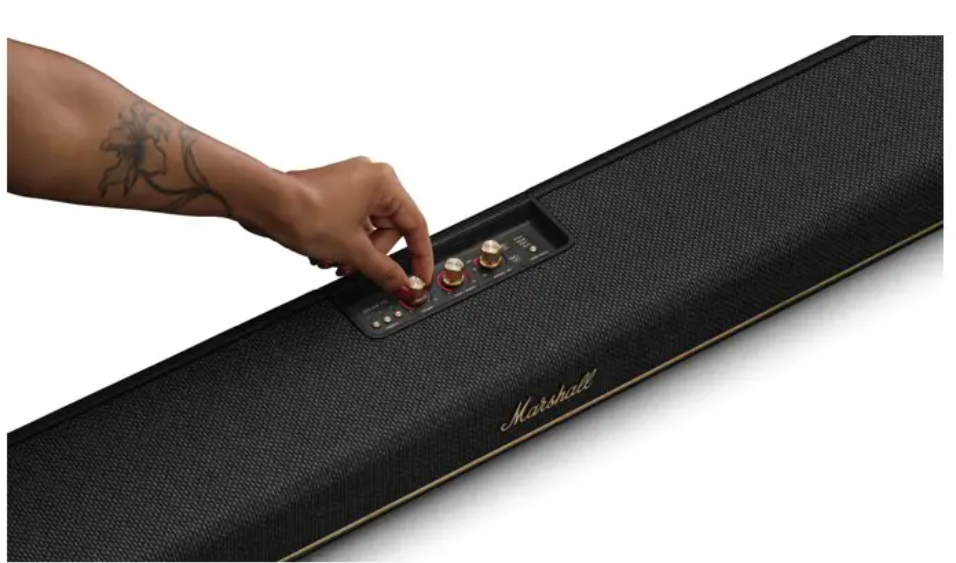
- Design: Classic Marshall aesthetic with woven grille and PU leather finish; reversible control panel and removable magnetic logo
- Room Calibration: Integrated microphones and the Marshall app provide adaptive sound tuning for optimal room acoustics
- Subwoofer: Built-in high-performance subwoofer with powerful bass output
- Comparison: While not as extensive as Sonos Arc Ultra’s 14 drivers and 9.1.4 configuration, the Heston 120 uniquely supports both Dolby Atmos and DTS: :X and offers a compelling balance of sound quality and connectivity for its class
TOP PANEL
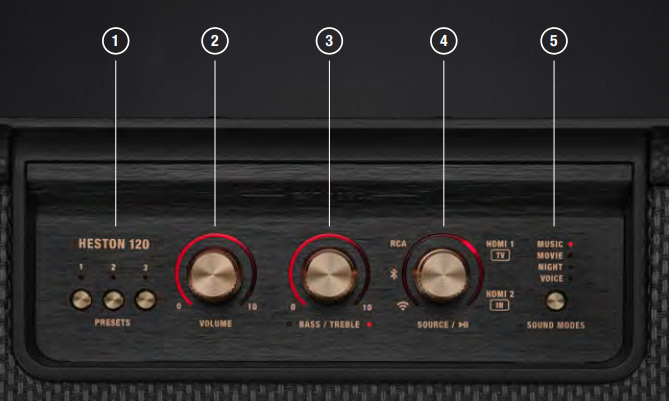
- PRESET BUTTONS
Push a button to start playing a custom playlist. Configure the buttons in the Marshall app. - VOLUME CONTROL
Turn the knob to adjust the volume. - BASS/TREBLE CONTROL
Push the knob to toggle between bass and treble, and then turn it to adjust. - SOURCE CONTROL
Turn on and push the source control to select the audio input source. When playing via Bluetooth® or Wi-Fi, push the knob to play/pause. - SOUND MODE BUTTON
Push the button to toggle the sound modes.
BACK PANEL
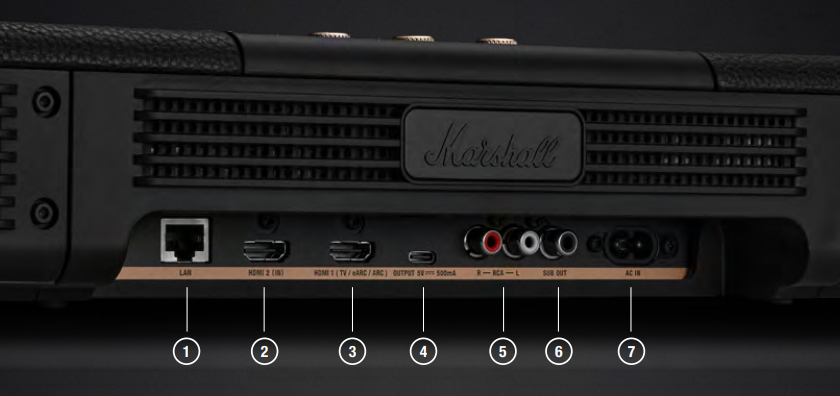
- LAN
Use an Ethernet cable to connect Heston 120 to the internet via a LAN port on your router or modem. - HDMI 2 (IN)
Connect an additional HDMI device,, such as a gaming console, DVD, or
Blu-ray player. The signal is passed through HDMI 1 to the TV. - HDMI 1 (TV / EARC / ARC)
Connect to an eARC/ARC compatible HDMI port on your TV. - USB-C POWER OUTPUT
Provides 5 V/500 mA to charge or power a USB-C device. - RCA INPUT (LEFT AND RIGHT)
Plug in an RCA audio device, such as a turntable with an RIAA preamp. - SUB OUT
Plug in an active subwoofer for extra bass (not included). - MAINNS POWER INPUT
Use the included mains lead to connect Heston 120 to the wall socket.
GETTING STARTED
- PLACE HESTON 120 UNDER YOUR TV
Place the soundbar on a flat surface, centred under your TV with at least 15 cm clearance above and on each side.
If Heston 120 is mounted on the wall, follow the instructions included with the wall mount brackets (wall brackets not included). - CONNECT TO YOUR TV
Connect one end of an HDMI cable to the HDMI 1 (TV) port on Heston 120 and the other end to an HDMI port supporting eARC / ARC on your TV. - PLUG IN MAINS POWER
Connect the mains lead to the mains input on Heston 120, then connect the mains plug to the wall socket.
Important: Always ensure that the mains lead, plug, and TV sound bar are compatible with your mains supply and wall socket.
Caution: Always unplug the mains lead from the wall socket before unplugging it from Heston 120. - DOWNLOAD THE MARSHALL APP
Download the Marshall app and complete the setup.
The app guides you through Wi-Fi setup, room correction, and is the remote control for Heston 120.
USING THE PRESET BUTTONS
- Push a preset button to start playing a custom playlist or internet radio station.
- The preset can be saved in the Marshall app or simply push a preset button for 2 seconds while playing anything via Spotify Connect or an internet radio station through Airable.
SELECTING AN AUDIO SOURCE
Turn on the source control to select the audio input source. When playing via Bluetooth or Wi-Fi, push the knob to play/pause.
PAIRING WITH A BLUETOOTH DEVICE
Heston 120 can be connected to 2 Bluetooth devices at a time and remembers up to 8 previously paired devices. When in range, it will try to reconnect with the last connected device.
- Use the Source control to select Bluetooth.
- Push the Source control for 2 seconds until the Bluetooth source LED turns to a slow pulse.
- Select Heston 120 from your audio device’s Bluetooth list.
CHANGING THE SOUND MODE
Push the sound mode button to toggle the sound modes.
- Music
The Marshall signature sound, perfectly balanced and tuned. The best way to enjoy music. - Movie
Big screen immersive sound with full spatial clarity for watching your favourite films. - Night
Lowers loud sounds while keeping the softer details clear, perfect for late-night viewing that won’t disturb others. - Voice
Makes dialogue crystal clear, great for when you don’t want to miss a word.
CONNECTING AN EXTERNAL SUBWOOFER
Heston 120 can be connected to an external active subwoofer (not included) for even more bass. Use an RCA cable to connect the active subwoofer to the SUB OUT port on the back of the soundbar.
HESTON 120 HDMI PORTS
Heston 120 comes with two HDMI ports:
HDMI 1 (TV / EARC / ARC)
Connects Heston 120 to your TV. Both Audio and audio control are handled through the HDMI lead, allowing you to control the volume of your soundbar with your TV remote.
HDMI 2 (IN)
Connects to an additional HDMI device, such as a gaming console, DVD, media, or Blu-ray player. The signal from HDMI 2 is automatically routed through Heston 120 to your TV via HDMI 1.
CONNECTING HESTON 120 TO THE INTERNET
Connecting Heston 120 to the internet to get the most out of it, with all features and options for customisation, as well as getting over-the-air updates to keep your soundbar up to date with the latest software. Open the Marshall app and follow the in-app instructions to connect Heston 120 to a Wi-Fi network.
If you don’t have access to a Wi-Fi network, use a an Ethernet cable and connect the LAN port on Heston 120 to your router or other internet access point. When using the LAN port, Wi-Fi is disabled,, and internet services are connected through Ethernet.
USING ROOM CORRECTION
Every room has a unique sonic quality that depends on the room size, material, how it is furnished, and where the speaker is placed. Heston 120 comes with a room correction feature that adjusts for these differences for you to make the most of your space with a perfect musical fit.
Go to Room correction in the app and follow the in-app instructions.
PLAYING VIA SPOTIFY CONNECT
Use your phone, tablet,, or computer as a remote control for Spotify.
Go to spotify.com/connect to learn how
PLAYING VIA TIDAL CONNECT
- In the TIDAL app, open the Now Playing screen while playing a track.
- From the Now Playing screen, select the device output icon.
- Choose a TIDAL Connect-enabled speaker from the list.
Ensure your mobile device is on the same network as the device you’re using for TIDAL Connect.
PLAYING VIA GOOGLE CAST
- Heston 120 works with Google Cast so you can stream music from your favourite apps on your phone, tablet, or laptop.
- Simply tap the Cast icon from apps you already know and love to stream music from your phone, tablet,,t or laptop to your TV soundbar.
PLAYING VIA APPLE AIRPLAY
- With Apple AirPlay, you can enjoy your favourite music or podcasts on your home audio system and speakers in any room — with a tap or by just asking Siri — right from your iPhone, iPad, HomePod, HomePod mini, or Apple TV.
- After installing your Heston 120, add it to the Apple Home app with a few simple steps using your iPhone or iPad.
- To use AirPlay with Heston 120, the latest version of iOS, iPadOS, or macOS is recommended..
PLAYING VIA AIRABLE
- People at airable know and love webradio. The airable internet radio catalogue contains more than 70.000 radio stations worldwide.
- Use the app and go to Internet radio in the Marshall app to find your favourite station.
CLEANING HESTON 120
- Clean your TV soundbar regularly to keep it fresh and last longer.
- Gently clean the non-fabric parts and the leads with a lint-free cloth, slightly damp with
- water,
- 70% isopropyl alcohol, or
- 75% ethyl alcohol
- Carefully clean the fret and openings with a dry and soft brush, or a cotton swab.
- Do not use any sharp or metal objects.
- Do not use compressed air.
- Do not use products containing bleach or hydrogen peroxide.
- Do not submerge the soundbar in any cleaning agents.
- Do not rinse the soundbar under running water.
POWER MODES
- Heston 120 will go into network standby or low power mode when left unused after the idle timeout has passed.
- Wake up the soundbar by turning on your TV, using the Marshall app with the soundbar, or using any button or knob.
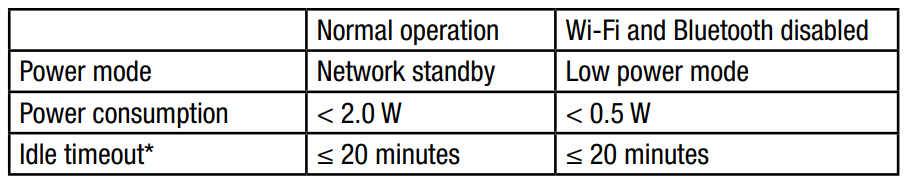
- The idle timeout can be configured in the Marshall app.
- Pushing the Preset 1 button for 30 seconds will enable or disable the low power mode.
- Note! Enabling low power mode will disable Wi-Fi and Bluetooth,, and therefore disable all features and services depending on those technologies.
- For information about EU compliance, see the Declaration of Conformity, available at marshall.com
RESETTING HESTON 120
A factory reset will reset the soundbar to its original settings, excluding any firmware updates.
Note: This will delete all settings, Playlists, Wi-Fi,, and Heston 120 will need to be set up again.
- Remove Heston 120 from the app and Heston 120, and Heston 120 [LE] if present, from your sound device’s Bluetooth list.
- Ensure that the soundbar is connected to mains power.
- Push Source control for 10 seconds until all LEDs blink and the soundbar restarts.
- Heston 120 has returned to its factory settings and is ready to be paired See the section Getting started.
TROUBLESHOOTING
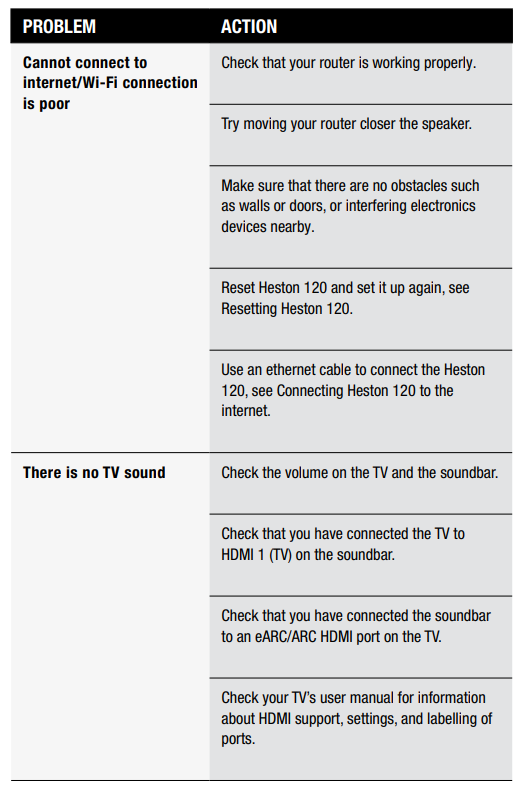
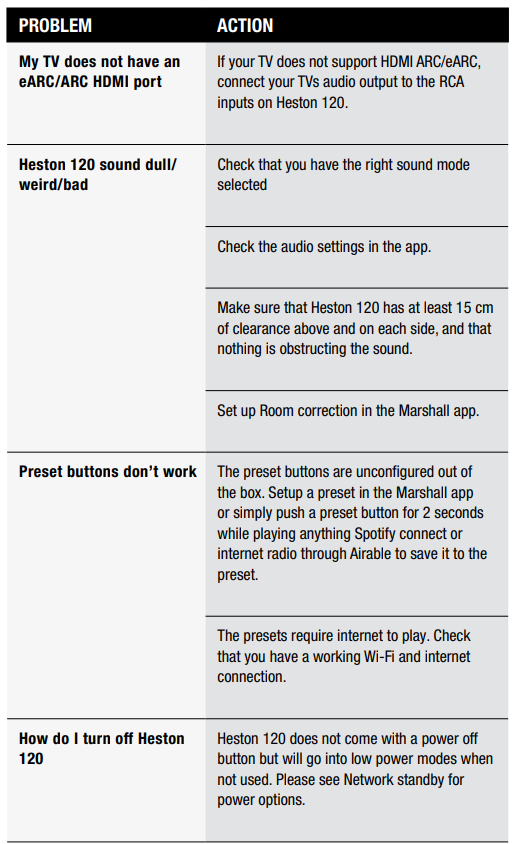
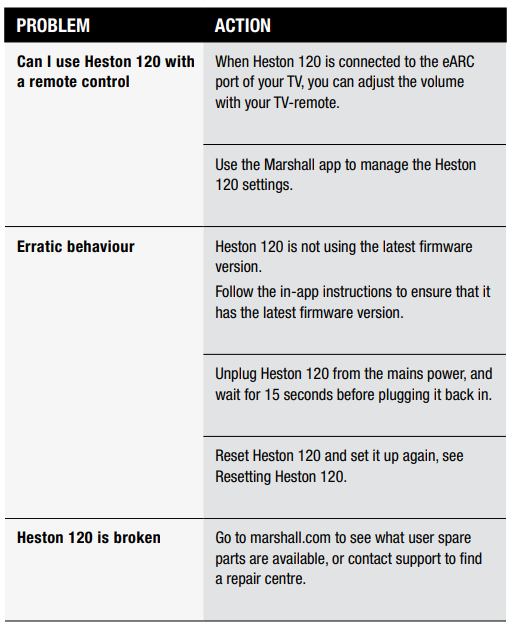
Pros and Cons of the Marshall Heston 120 TV Soundbar
Pros
- Exceptional Sound Quality: Immersive Dolby Atmos and DTS: create aaa cinematic listening experience with rich bass and clear dialogue.
- Versatile Connectivity: Supports multiple input options, including HDMI eARC, Wi-Fi streaming, and Bluetooth 5.3, catering to diverse setups.
- Stylish Design: Classic Marshall look with high-quality materials adds aesthetic value to any entertainment space.
- User-Friendly App: The Marshall app enables easy setup, room calibration, and control, enhancing the user experience.
- Music Streaming Support: Compatibility with popular services like Spotify and Tidal allows seamless music playback beyond TV use.
Cons
- Size Consideration: The 110 cm length requires a substantial space under the TV, which might be challenging for smaller setups.
- No Voice Control: Unlike some competitors, it lacks built-in voice assistant integration.
- Price Point: Positioned at a premium price, it may be less accessible for budget-conscious buyers compared to alternatives like Sonos or Bose.
- Limited Channel Configuration: Offers a 5.1.2 channel setup, which is less extensive than some higher-end soundbars.
Customer Reviews and Feedback on the Marshall Heston 120 TV Soundbar
Users consistently praise the Marshall Heston 120 TV Soundbar for its robust, immersive sound and impressive bass depth that transforms regular TV viewing into a cinematic experience. Positive reviews highlight the ease of setup using the Marshall app and the effective room calibration feature that adapts sound to different environments.
Many customers appreciate the stylish design and premium build quality, noting it as a standout feature against other soundbars in the same price range. Streaming capabilities, including Spotify Connect and Tidal support, receive favorable comments for convenience and audio fidelity.
On the downside, some users mention the soundbar’s considerable length requires ample space, which can be restrictive for smaller living rooms. A few reviews point out the absence of voice assistant integration as a missed opportunity for hands-free control. Common complaints also include the premium price, which may not suit all budgets.
Overall, the soundbar holds an average rating of approximately 4.5 stars out of 5, with many customers recommending it for those seeking a premium sound upgrade for both TV and music applications.
More marshall manuals
- Setup& Pairing: Marshall Motif II True Wireless A.N.C Earbuds User Manual
- Setup : Marshall Major II Bluetooth Headphones User Manual
- Setup & Pairing: Marshall Major V Bluetooth Headphone User Manual
- Setup : Marshall Middleton II Portable Loudspeaker User Manual
- Setup & Pairing: Marshall Major-IV On Ear Headphones User Manual
- Setup & Usage: Marshall Emberton II Portable Bluetooth Speaker User Manual
Leave a Comment