
Setup & Pairing: Marshall Major-IV On Ear Headphones User Manual
Content
Marshall Major-IV On-Ear Headphones
Introduction
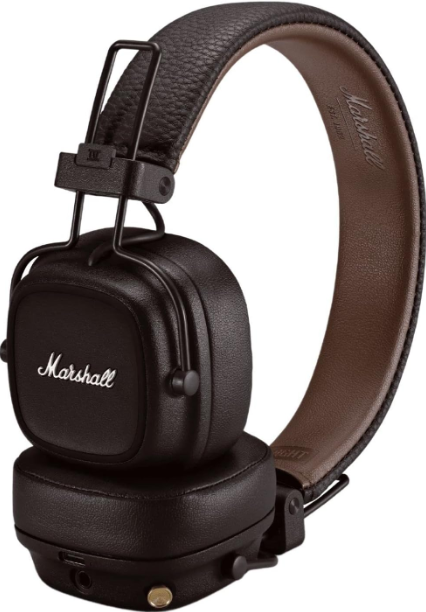
The Marshall Major-IV On-Ear Headphones represent the latest evolution in Marshall’s iconic line of on-ear headphones, combining classic design with cutting-edge wireless technology. Perfectly suited for music enthusiasts, commuters, and professionals who demand both style and substance, these headphones deliver the signature Marshall sound renowned for its rich bass, clear mids, and sparkling treble. Designed for everyday use, they boast an ergonomic, foldable build with durable materials, ensuring comfort and portability whether at home, work, or on the move.
Key benefits include an industry-leading 80+ hours of wireless playtime—offering more than two full days of uninterrupted listening—and a fast-charge feature that provides 15 hours of playback from just 15 minutes of charging. Equipped with Bluetooth 5.0 for seamless wireless connectivity and a 3.5 mm audio jack for wired use, these headphones cater to versatile listening needs. The integrated multi-function control knob makes managing music and calls intuitive and tactile, while compatibility with voice assistants like Google Assistant and Siri enhances hands-free convenience.
With an estimated retail price of around $139.99, the Marshall Major-IV headphones are widely available through leading electronics retailers and online platforms. Their blend of timeless aesthetics, robust performance, and exceptional battery life makes them ideal for users seeking durable and high-quality on-ear headphones.
Specifications and Key Features of Marshall Major-IV On-Ear Headphones
- Design: On-ear, foldable with classic Marshall vinyl texture and script, weighing approximately 165 grams (5.82 ounces)
- Sound Drivers: 40 mm dynamic drivers delivering 20 Hz to 20 kHz frequency response with a sensitivity of 99 dB and impedance of 32 Ohms
- Connectivity: Bluetooth 5.0 with multipoint pairing, 3.5 mm wired option included
- Battery Life: Over 80 hours of wireless playback, a 15-minute quick charge provides 15 hours of use, full recharge in about 3 hours
- Controls: Multi-directional control knob for play/pause, volume adjustment, track navigation, call management, and voice assistant activation
- Additional Features: Wireless charging capability, superior passive noise isolation (no active noise canceling), microphone for calls
- Compatibility: Works seamlessly with iOS and Android devices, supports Siri and Google Assistant.
- Warranty: 1-year parts and labor warranty
Comparison: Compared to other on-ear headphones like the Sennheiser HD 450BT, the Major-IV excels in battery life and iconic design but lacks active noise cancellation. Its sound signature favors a warm, bass-forward profile typical of Marshall, differentiating it from more neutral competitors.
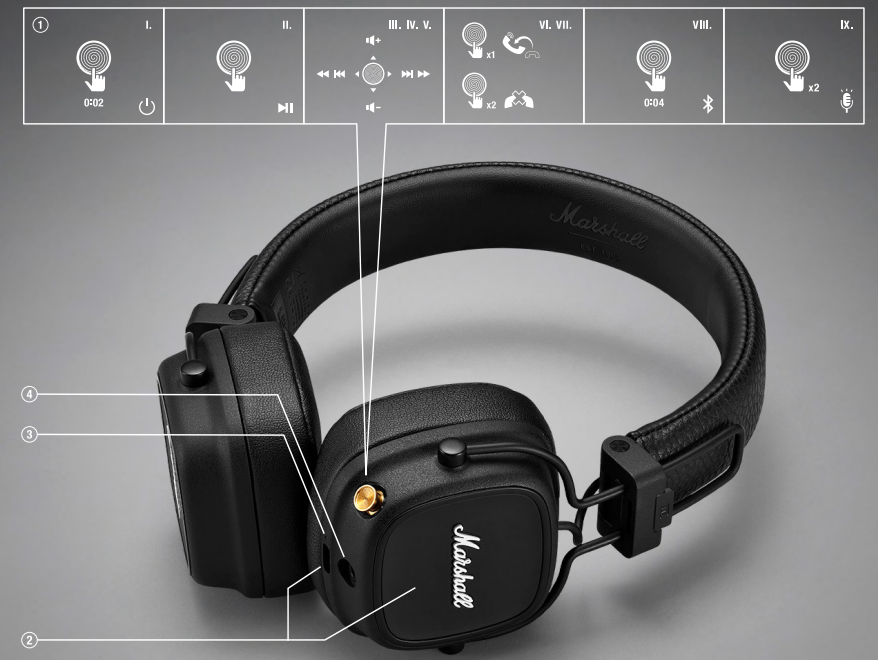
CONTROL KNOB
- POWER ON/OFF
Push and hold for 2 seconds - PLAY/PAUSE
Push once - SKIP FORWARD/BACK
Push to the right or left - FAST FORWARD/REWIND
Push and hold to the right or left - TURN UP/DOWN THE VOLUME
Push upwards or downwards - ANSWER OR END A CALL
Push once - REJECT AN INCOMING CALL
Push two times - BLUETOOTH PAIRING
Push and hold for 4 seconds - ACTIVATE VOICE ASSISTANT
Push two times
CHARGING
Place the headphones with the right ear cap facing down on a wireless charger or connect them to a power source via the included USB cable to charge the battery.
LED INDICATOR
The LED shows the battery level while charging, red through orange to green (0–100%). It blinks blue while in Bluetooth pairing mode and white while paused or searching for a device. The LED is steady white while playing.
3.5 mm INPUT/OUTPUT SOCKET
Share your audio by plugging in another pair of headphones.
GETTING STARTED
- Push and hold the control knob until the LED indicator blinks blue.
- Select Major IV from your sound device’s Bluetooth® list.
Troubleshooting Guide for Marshall Major-IV On-Ear Headphones
- No Power or Won't Turn On: Ensure headphones are charged; connect to power using USB-C cable. A full charge takes about 3 hours.
- Bluetooth Pairing Issues: Reset Bluetooth by holding the control knob for 4 seconds until the LED flashes blue, then select “Marshall Major IV” on your device. If problems persist, try a factory reset via the Marshall support guide.
- Audio Dropouts or Distortion: Keep the device within 10 meters and avoid physical obstructions. Make sure Bluetooth firmware and audio drivers are updated.
- Battery Drains Quickly: Avoid extreme temperatures; use wired mode if the wireless battery is low. Utilize the quick-charge feature to regain listening time fast.
- Controls Not Responding: Clean the control knob area gently; restart the headphones. Refer to the control knob guide for proper usage instructions.
For unresolved issues, Marshall offers a 1-year warranty covering parts and labor. Contact official support through their website or authorized retailers for repairs or replacements.
MARSHALL, Marshall Amps, their respective logos, “Marshall” and “Marshall” trade dress are trademarks and intellectual property of Marshall Amplification Plc and may not be used without permission. Permission granted to Zound Industries International AB.
The Bluetooth® wordmark and logos are registered trademarks owned by the Bluetooth SIG, Inc. a, nd any use of such marks by Zound Industries International AB is under license.
Pros & Cons of Marshall Major-IV On-Ear Headphones
Pros
- Exceptional Battery Life: 80+ hours of wireless playback significantly exceeds most competitors.
- Classic Marshall Sound: Robust bass and clear mids provide a rich listening experience, perfect for rock and bass-heavy genres.
- Ergonomic and Foldable Design: Lightweight, comfortable fit with compact foldability for easy portability.
- Versatile Connectivity: Bluetooth 5.0 multipoint pairing and wired option via 3.5 mm jack.
- Intuitive Control Knob: Unique multi-directional knob offers tactile and fun interaction.
Cons
- No Active Noise Cancellation: May not suit users wanting complete noise isolation in noisy environments.
- Unconventional Control Layout: Volume and track controls may take time to master due to directional button logic.
- Sound Signature: Warm and bass-forward, which may not appeal to listeners seeking a neutral or analytical sound.
- Price Point: Slightly higher than some competitors, offering additional features such as ANC or app customization.
Customer Reviews and Feedback on Marshall Major-IV On-Ear Headphones
Users overwhelmingly praise the Marshall Major-IV On-Ear Headphones for their extraordinary battery life and iconic sound quality, with many highlighting over two days of uninterrupted wireless listening as a standout feature. The headphones have received an average rating of around 4.6 out of 5 stars from over 400 reviews, indicating strong customer satisfaction.
Common praises include the comfortable fit for extended wear, the tactile and unique control knob, and the stylish, durable design faithful to Marshall’s aesthetic heritage. However, some customers mention that the lack of active noise cancellation and the unconventional control scheme can be drawbacks. Occasional complaints also focus on the warm sound profile, which may not suit all musical tastes.
Overall, buyers recommend the Major-IV as excellent value for money for those prioritizing battery life and classic rock-oriented sound, especially if ANC is not a priority.
Faqs
How do I set up marshall Major-IV On Ear Headphones for the first time?
What should I do if marshall Major-IV On Ear Headphones are not working properly?
Can I use marshall Major-IV On Ear Headphones with voice assistants like Siri or Google Assistant?
How often should I maintain marshall Major-IV On Ear Headphones?
What are the key features that make marshall Major-IV On Ear Headphones different?
Are marshall Major-IV On Ear Headphones compatible with all Bluetooth devices?
How can I improve the sound quality of marshall Major-IV On Ear Headphones?
What if marshall Major-IV On Ear Headphones run out of battery during use?
More marshall manuals
- Pairing & Usage: Marshall Major II On-Ear Headphones User Manual
- Setup & Pairing: Marshall Major V Bluetooth Headphone User Manual
- Pairing & Setup: Marshall Motif True Wireless A.N.C. Earbuds User Manual
- Setup& Pairing: Marshall Motif II True Wireless A.N.C Earbuds User Manual
- Setup & Pairing: Marshall Heston 120 TV Soundbar User Manual
- Setup : Marshall Major II Bluetooth Headphones User Manual
Leave a Comment