
Pairing & Setup: Marshall Motif True Wireless A.N.C. Earbuds User Manual
Content
Marshall Motif True Wireless A.N.C. Earbuds
Introduction
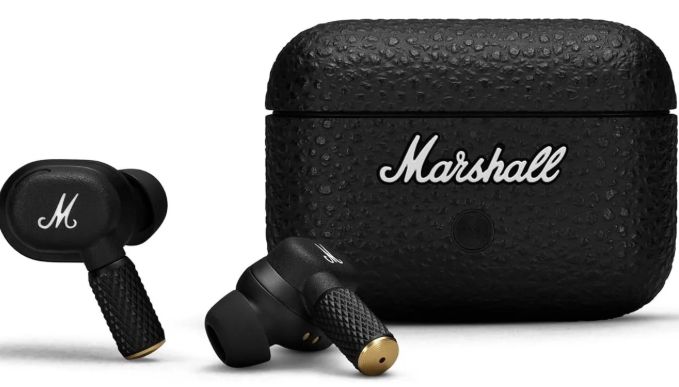
The Marshall Motif True Wireless A.N.C. Earbuds deliver a premium audio experience packed into a compact, stylish design that reflects Marshall’s iconic heritage. Combining advanced active noise cancellation (A.N.C.) technology with Marshall’s signature sound, these earbuds are ideal for music enthusiasts, commuters, fitness lovers, and professionals seeking immersive sound without distractions. Their rugged yet sleek design includes textured metal stems and a leather-look charging case, making them both durable and fashionable.
With up to 6 hours of playback on a single charge and a total of 30 hours using the wireless charging case, these earbuds support long listening sessions whether at home, the gym, or on the go. Enhanced Bluetooth 5.3 and Bluetooth LE Audio compatibility ensure a stable connection and future-proof wireless performance. Key features such as touch controls, transparency mode for awareness, and water resistance (IPX5 for earbuds, IPX4 for case) make them versatile for active lifestyles and daily wear.
Available in black with a price range around $179–$199 USD, the Marshall Motif True Wireless A.N.C. Earbuds strike a balance between premium sound quality, durability, and modern wireless convenience. They are widely available through authorized retailers and online platforms, catering to users who desire iconic style paired with cutting-edge audio technology.
Specifications of Marshall Motif True Wireless A.N.C. Earbuds
- Driver Size: 6 mm dynamic drivers delivering Marshall’s signature powerful sound
- Bluetooth Version: 5.3 with Bluetooth LE Audio support for improved connection and lower latency
- Battery Life: Up to 6 hours on earbuds alone with A.N.C. active; 30 hours total with charging case
- Charging: USB-C wired charging and wireless charging case; 15-minute quick charge provides 1 hour of playtime
- Noise Cancellation: Active Noise Cancellation with adjustable transparency mode for ambient awareness
- Water Resistance: IPX5 rating for earbuds; IPX4 rating for charging case, suitable for sweat and light rain
- Fit and Comfort: Lightweight earbuds at 4.3 grams each, with three sizes of ear tips for a secure fit during workouts
- Controls: Touch-sensitive controls customizable via the Marshall app for playback, calls, and voice assistant
- Dimensions: Approximately 0.98 x 0.83 x 1.26 inches per earbud
- Special Features: Custom EQ settings through the app, improved microphone performance for calls, rugged and stylish design
Compared to similar competitors like Soundcore Liberty Air 2 Pro or Sony WF-C500, the Marshall Motif A.N.C. earbuds emphasize iconic design and balanced sound signature, while offering competitive battery life and solid noise cancellation performance.
DEVICE LAYOUT
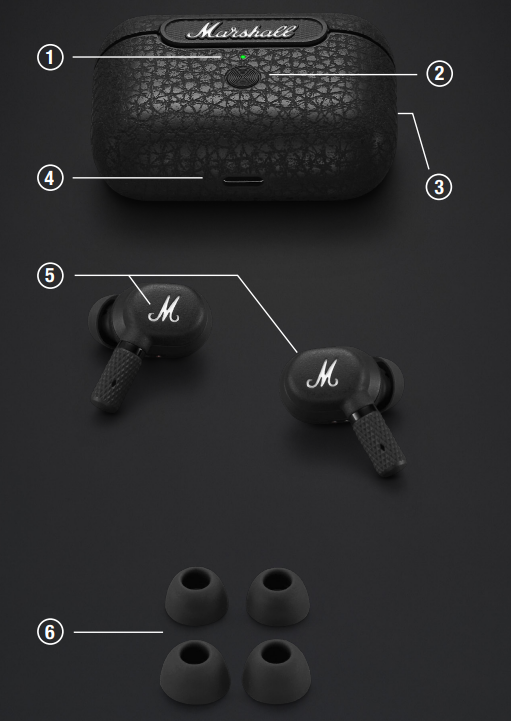
CHARGING CASE INDICATOR
- The LED shows the case battery charge, from red through yellow to green (0–100%). It pulses blue while in Bluetooth® pairing mode.
- CHARGING CASE BUTTON
Quickly press to see the charging case battery level. With the earbuds in the case and the lid open, push and hold for 2 seconds to initiate pairing. - WIRELESS CHARGING
Charge the case by placing it on a wireless charging pad. - USB-C POWER INPUT
Charge the case by plugging it into a USB power source. - TOUCH CONTROLS
Touch the left or right earbud to control your music, phone calls, and
more. The long touch behaviour can be customised in the app.- 1 touch to play/pause or receive/end a call
- 2 touches to skip forward or reject a call
- 3 touches to skip backward
- Long touch to toggle noise cancelling, transparency,y and ANC off.
- EAR TIPS
Motif A.N.C comes with 3 sizes of ear tips,ips and getting the best fit is important in ensuring you enjoy the best audio experience.
Take the time to find the ear tips that best fit your ear. The ear tips should fit snugly in your ear but still feel comfortable. It is not uncommon to use different sizes for left and right.
GETTING STARTED
- Open the charging case.
- Press and hold the button on the case until the LED turns to a slow blue pulse.
- Select MOTIF A.N.C. from your sound device’s Bluetooth® list.
- Download the Marshall Bluetooth app and follow the in-app instructions to complete the setup.
CHARGING THE EARBUDS
- Put your earbuds back in the case and close the lid to turn them off and begin charging.
CHARGING THE CASE
- Use a wireless charger or plug the case into a USB power source to charge it.
- The case is fully charged when the front-facing LED is steady green.
- To charge the case using a wireless charger, follow the instructions below.
- Place the charging case with its back flat against the wireless charging pad.
- Make sure that the front LED lights up to indicate that the case is charging.
- Once the LED light has turned steady green, reen the case is fully charged.
NOISE CONTROL
- Long touch either earbud to cycle through the noise control modes.
- Noise-canceling mode - blocks out your surroundings and lets you focus on the music.
- Transparency mode - allows you to hear your surroundings and hold conversations without removing your earbud.
- Off – noise control is turned off
- The amount of noise cancelling and transparency can be adjusted in the
- Marshall Bluetooth app.
BATTERY CARE GUIDE
Your earbuds come equipped with high-performance lithium-ion batteries,s and battery life span is affected by charging and usage. Follow the guidelines below to keep your batteries in great condition for as long as possible.
- Avoid using fast chargers if possible. Fast charging causes stress on the battery and will degrade it.
- Avoid letting the battery drain completely or charging it when it’s already full. Try to keep the charge between 30% and 80%.
- If the earbuds are stored for a long time, it’s recommended to charge the earbuds to about half-charge and then do a factory reset. Store the earbuds and case in a cool, dark, and dry place.
- Avoid using or charging the earbuds in hot and unventilated places, 45°C/113°F and above.
- Avoid charging the battery at low temperatures, below 10°C/50°F and using the earbuds below 0°C/32°F.
- Avoid strong mechanical shocks, such as dropping the earbuds or case on hard surfaces, as it might harm the batteries.
- Download the Marshall Bluetooth app and select the battery preservation level that best suits you and your earbuds.
CLEANING YOUR MOTIF A.N.C.
- Earbuds come in close contact with your skin often and sometimes for long periods of time. This will,l over time, cause a build-up of dirt and grease that can affect performance and may cause skin irritation. Clean your earbuds regularly to keep them fresh and make them last longer.
- Unplug any cables before cleaning the case. Make sure everything is completely dry before using the earbuds, putting the earbuds back in the case, or plugging in a USB charger.
- Remove the silicone ear tips from the earbuds and clean them separately.
- Use a disinfectant wipe or a lint-free cloth, slightly damp with 70% isopropyl alcohol or 75% ethyl alcohol, to gently clean the ear tips, the exterior surfaces of the earbuds,s and the case. Avoid getting moisture in any openings or in the speaker mesh.
- Carefully clean those areas with a dry and soft brush, or a cotton swab.
- Do not use any sharp objects.
- Do not use compressed air.
- Do not use products containing bleach or hydrogen peroxide.
- Do not submerge the earbuds in any cleaning agents.
PAIRING A NEW DEVICE
Motif A.N.C. remembers up to 3 previously paired devices and will try to reconnect with the last connected device.
- Place the earbuds in the case and keep the lid open.
- Press and hold the button on the case until the LED turns to a slow blue pulse.
- Select MOTIF A.N.C. from your sound device’s Bluetooth list.
- Note: Motif A.N.C. can be connected with one sound device at a time. Make sure to disconnect from the current device before reconnecting with a different device.
RESETTING THE EARBUDS
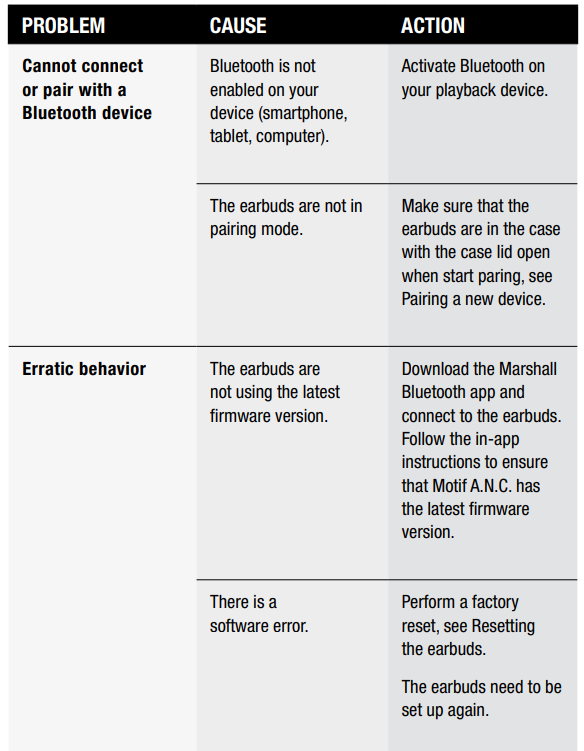
If your earbuds become erratic or unresponsive, follow the instructions below.
- Place the earbuds in the case and close the lid to restart the earbuds.
- If the problem persists, perform a hardware reset:
- Place the earbuds in the case and keep the lid open.
- Press and hold the touch surface on both earbuds for 4 seconds to reset the earbuds.
- If the problem persists, perform a factory reset.
- Note: This will delete all user settings, and the earbuds will need to be set up again.
- Place the earbuds in the case and keep the lid open.
- Press and hold the the button on the case for 10 seconds, until the LED turns purple, to reset the earbuds to factory settings.
- Remove MOTIF A.N.C. from your sound device’s Bluetooth list before pairing again
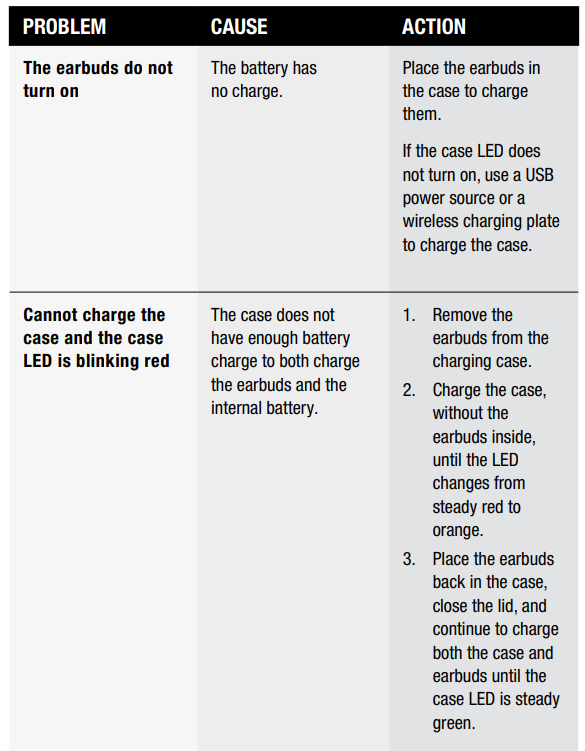
TROUBLESHOOTING
Pros & Cons of Marshall Motif True Wireless A.N.C. Earbuds
- Pros:
- Signature Marshall sound with balanced bass and clarity
- Effective active noise cancellation with transparency mode
- Long battery life: 6 hours per charge, 30 hours total with charging case
- Wireless charging case with quick charge feature
- Robust Bluetooth 5.3 with LE Audio support for stable connection
- Iconic, rugged design appealing to Marshall fans
- Water-resistant earbuds suitable for workouts and outdoor use
- Cons:
- Premium price may be high compared to some budget competitors
- Touch controls may require a learning curve and can sometimes misregister
- ANC not the strongest in class against flagship models (e.g., Sony WF-1000XM4)
- Limited support for advanced codecs beyond SBC and AAC
Customer Reviews of Marshall Motif True Wireless A.N.C. Earbuds
Users generally praise the Marshall Motif True Wireless A.N.C. Earbuds for their rich sound quality, stylish design, and solid battery performance. Many highlight the comfortable fit and effective noise cancellation as major positives, especially for daily commuting and workouts. Typical star ratings average around 4.0 out of 5 from verified buyers.
Common complaints include occasional touch control sensitivity issues and the price point relative to some competitors offering more advanced features. However, the majority recommend these earbuds for fans of Marshall’s audio signature and those seeking a blend of style and performance. Frequent buyers suggest pairing the earbuds with the Marshall app to fully customize sound and controls for an enhanced experience.
Faqs
How do I set up my marshall Motif True Wireless A.N.C. Earbuds for the first time?
What should I do if my marshall Motif True Wireless A.N.C. Earbuds are not pairing with my device?
How can I switch between noise cancelling and transparency modes on the marshall Motif True Wireless A.N.C. Earbuds?
Are marshall Motif True Wireless A.N.C. Earbuds compatible with both Android and iOS devices?
What can I do if my marshall Motif True Wireless A.N.C. Earbuds have low battery or won’t charge?
How do I maintain and clean my marshall Motif True Wireless A.N.C. Earbuds to ensure optimal performance?
Can I customize the touch controls on the marshall Motif True Wireless A.N.C. Earbuds?
What should I do if the LED on my marshall Motif True Wireless A.N.C. Earbuds is blinking red?
More marshall manuals
- Pairing & Usage: Marshall Major II On-Ear Headphones User Manual
- Setup & Pairing: Marshall Major-IV On Ear Headphones User Manual
- Setup & Pairing: Marshall Major V Bluetooth Headphone User Manual
- Setup& Pairing: Marshall Motif II True Wireless A.N.C Earbuds User Manual
- Setup & Pairing: Marshall Heston 120 TV Soundbar User Manual
- Setup : Marshall Major II Bluetooth Headphones User Manual
Leave a Comment