
Setup & Pairing: Marshall Major V Bluetooth Headphone User Manual
Content
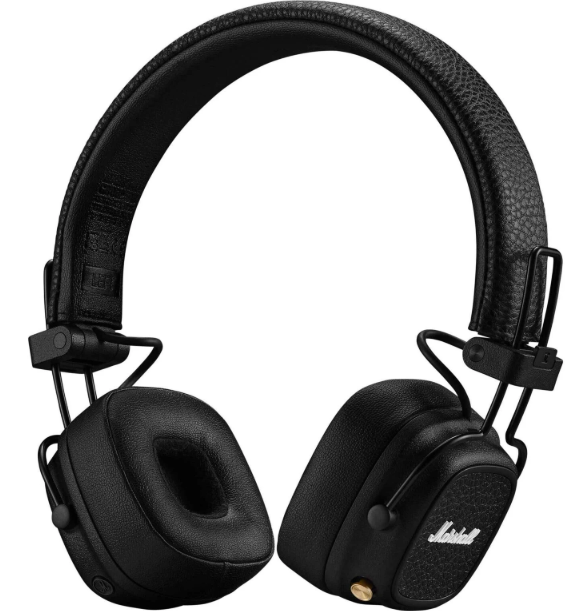
Marshall Major V Bluetooth Headphones
Introduction
The Marshall Major V Bluetooth Headphone is a modern classic, blending Marshall’s legendary rock ’n’ roll heritage with cutting-edge wireless audio technology. Designed for music lovers and adventurers alike, these on-ear headphones deliver the brand’s signature sound—thunderous bass, smooth midrange, and crystal-clear highs—all in a portable, foldable package that’s ready for anywhere life takes you.
Key benefits of the Marshall Major V Bluetooth Headphones include an astonishing 100+ hours of wireless playtime on a single charge, wireless charging capability, and Bluetooth 5.3 with LE Audio support for superior, future-ready connectivity. The customizable M-button lets you instantly access your favorite features, while the rugged, foldable design ensures durability and easy transport.
Targeting both daily commuters and travel enthusiasts, the Marshall Major V is ideal for anyone seeking long-lasting battery life, robust build quality, and iconic style. Whether you’re commuting, working remotely, or exploring the outdoors, these headphones are engineered to keep up with your lifestyle. Priced between $150 and $170, the Major V sits in the premium on-ear segment and is widely available through major electronics retailers and Marshall’s official channels. With eco-conscious materials and a battery preservation feature, Marshall also emphasizes sustainability without sacrificing performance.
Specifications
Core Features
- Driver Type: 40mm custom-tuned dynamic drivers for signature Marshall sound
- Frequency Response: 20 Hz – 20 kHz
- Impedance: 32 Ohms
- Sensitivity: 106 dB
- Weight: 186 grams
- Battery Life: 100+ hours of wireless playtime
- Charging: Wireless charging and USB-C cable included
- Connectivity: Bluetooth 5.3 with SBC, AAC, and LC3 codec support (LE Audio-ready)
- Controls: Gold multidirectional joystick (right earcup) for playback, calls, and volume; customizable M-button (left earcup) for quick access to Spotify Tap, EQ, or voice assistant
- Microphone: Upgraded built-in mic with improved wind noise reduction
- Design: Foldable, lightweight, on-ear (supra-aural) fit; 86% recycled plastic in construction
- App Support: Marshall Bluetooth app for customization and battery management
Performance Benchmarks
The Marshall Major V Bluetooth Headphone outperforms its predecessor, the Major IV, with longer battery life (100+ vs. 80 hours), higher sensitivity (106 dB vs. 99 dB), and the latest Bluetooth 5.3 technology (compared to 5.0). The addition of wireless charging and app-based customization further sets it apart in the competitive on-ear wireless headphones market.
Comparison with Similar Products
Compared to other premium on-ear wireless headphones, the Marshall Major V stands out for its extended battery life, wireless charging, and robust build. While it lacks active noise cancellation, it excels in portability, sound quality, and eco-friendly design.
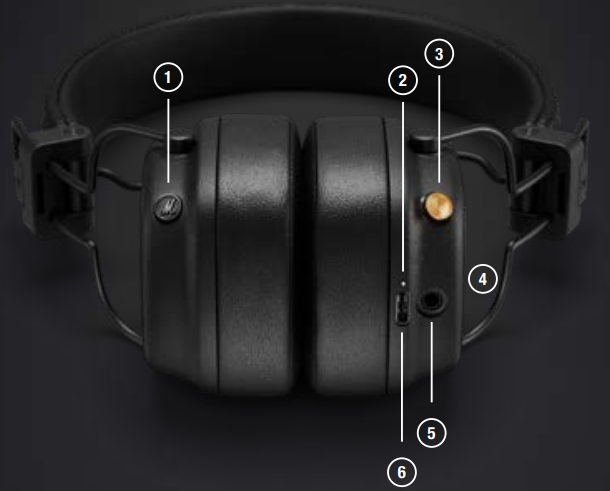
DEVICE LAYOUT
- CUSTOMISABLE M-BUTTON
Push the M-button to get the music started with Spotify Tap. The M-button can be customised in the Marshall Bluetooth app. - LED INDICATOR
The LED shows the battery level while charging, red through orange to green (0–100%). It pulses blue while in Bluetooth pairing mode and white while searching for a device.
The LED is steady white when connected. - CONTROL KNOB
Use the Control knob, located on the right ear cup,, to control your music, phone calls, and more. - WIRELESS CHARGING
Charge the headphones by placing the right ear cup facing down on a wireless charging pad. - 3.5 MM AUX INPUT/OUTPUT
Use the included 3.5 mm lead and connect to the analogue output of a sound device, or plug in another set of headphones and listen together. - USB-C POWER INPUT
Charge the headphones by plugging in a USB power source.
GETTING STARTED
- Push and hold the Control knob until the LED turns to a slow blue pulse.
- Select MAJOR V from your sound device’s Bluetooth® list.
- Download the Marshall Bluetooth app and follow the in-app instructions to complete the setup.
CONTROL KNOB
Use the Control knob, located on the right ear cup,, to control your music, phone calls, ls and more.
- Power on/off – push and hold for 1 second
- Play/pause – push once
- Skip backward/forward – push left/right
- Turn up/down the volume – push up/down
- Receive/end a call – push once
- Reject a call – push twice
- Bluetooth pairing, headphones are off – push and hold for 2 seconds
- Bluetooth pairing, headphones are on – push twice
CHARGING THE HEADPHONES
Use a wireless charger or plug the headphones into a USB power source to charge them. The headphones are fully charged when the LED indicator is steady green.
To charge the headphones using a wireless charger, follow the instructions below.
- Place the headphones with the right ear cup flat against the wireless charging pad.
- Make sure that the LED lights up to indicate that the headphones are charging.
- Once the LED indicator has turned steady green, the headphones are fully charged.
SPOTIFY TAP
Get straight to the music with Spotify Tap. Wherever your day takes you, Spotify Tap is the easiest, most personal way to take your music with you, and it’s ready in seconds.
- Push the M-button to play a recommendation based on your listening taste.
- Push the M-button again for the next recommendation made just for you. To use Spotify Tap, make sure your Spotify app is up to date.

M-BUTTON
Push the M-button to access a custom action, that can be selected in the Marshall Bluetooth app. By default, the M-button action is Spotify Tap.
CONNECTING A 3.5 MM SOUND DEVICE
Use the included audio lead to connect to an analogue audio output.
Note: Make sure that the sound device's volume is set to low before plugging in the headphones.
- Connect the audio lead to the 3.5 mm AUX port on the headphones, and the 3.5 mm stereo output on the sound device.
- Make sure that any Bluetooth audio is paused,, and start playing on the sound device.
CONNECTING HEADPHONES TO YOUR MAJOR V
Let a friend connect their headphones to the 3.5 mm AUX port on your Major V and listen together.
- Ensure that Major V is connected to your sound source via Bluetooth.
- Connect the 3.5 mm jack of the other headphones to the 3.5 mm AUX port on Major V.
CLEANING YOUR MAJOR V
Headphones come in close contact with your skin frequently and sometimes for long periods of time. This m, ay over t, time cause a build-up of dirt and grease that can affect performance and cause skin irritation. Clean your headphones regularly to keep them fresh and make them last longer.
Unplug any cables before cleaning the headphones. Make sure everything is completely dry before charging the batteries, plugging in any cables, or using the headphones.
Remove the ear cushions by turning them anticlockwise and clean them separately. To put back the ear cushions, place them on the ear cups, tilted at a 45° angle, and turn them clockwise to lock them in place.
Gently clean the headphones, headband, ear cushions,, and cables with a lint-free cloth, slightly damp with either:
- water,
- 70% isopropyl alcohol, or
- 75% ethyl alcohol
Avoid getting moisture in any openings or in the speaker mesh. Carefully clean those areas with a dry and soft brush, or a cotton swab.
- Do not use any sharp objects.
- Do not use compressed air.
- Do not use products containing bleach or hydrogen peroxide.
- Do not submerge the headphones in any cleaning agents.
- Do not rinse the headphones under running water.
BATTERY CARE GUIDE
Your headphones come equipped with high-performance lithium-ion batteries with a life span that is affected by charging and usage. Follow the guidelines below to keep your batteries in great condition for as long as possible.
- Avoid using fast chargers if possible. Fast charging causes stress on the battery and will degrade it.
- Avoid letting the battery drain completely or charging it when it’s already full. Try to keep the charge between 30% and 80%.
- If the headphones are stored for a long time, it’s recommended to charge them to about half-charge and then do a factory reset. Store the headphones in a cool, dark, and dry place.
- Avoid using or charging the headphones in hot and unventilated places, 45°C/113°F and above.
- Avoid charging the battery at low temperatures, below 10°C/50°F and using the headphones below 0°C/32°F.
- Avoid strong mechanical shocks,, such as dropping the headphones on hard surfaces, as it might harm the batteries.
Download the Marshall Bluetooth app and select the battery preservation level that best suits you and your headphones.
PAIRING A NEW DEVICE
Major V can be connected with two devices at a time and remembers up to 10 previously paired devices. When in range, they will try to reconnect with the last connected device.
- Start with the headphones turned on.
- Double-press the Control knob,, and the LED turns to a slow blue pulse.
- Select MAJOR V from your sound device’s Bluetooth list.
RESETTING THE HEADPHONES
If your headphones become erratic or unresponsive, follow the instructions below.
Push and hold the control jog for 10 seconds to restart the headphones.
If the problem persists, perform a factory reset.
Note: This will delete all user settings, and the headphones will need to be paired again.
- Remove MAJOR V, and MAJOR V [LE] if present, from your sound device’s Bluetooth list and the Marshall Bluetooth app.
- Push and hold both the control jog and the M-button for 10 seconds and release when the LED indicator turns purple.
- The headphones have returned to their factory settings and are ready to be paired. See the section Getting started.
MARSHALL BLUETOOTH APP
Download the Marshall Bluetooth app to get the most out of your headphones and keep them up to date with the latest software.

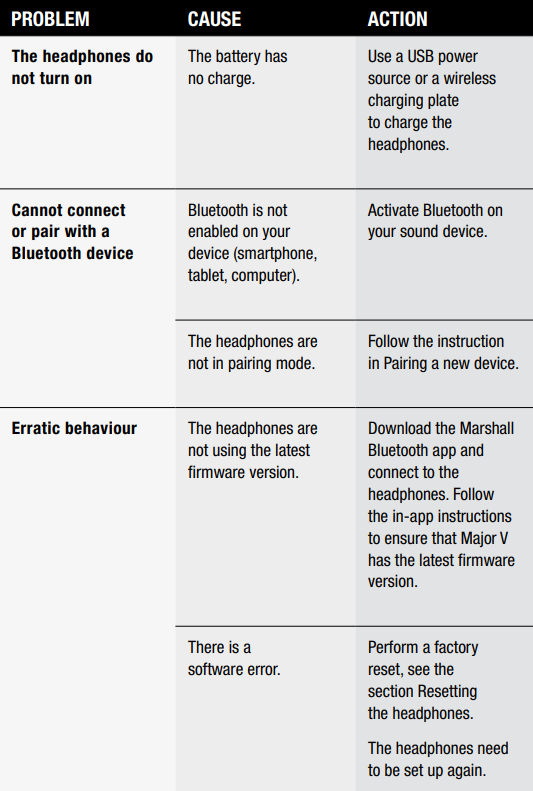
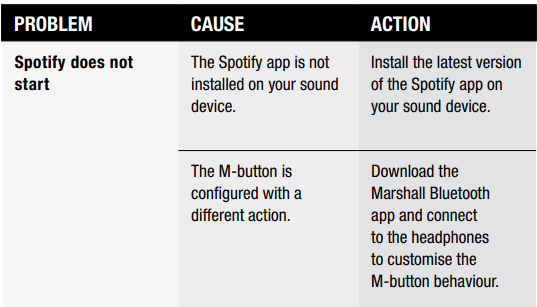
TROUBLESHOOTING
Pros & Cons: Balanced Assessment of the Marshall Major V Bluetooth Headphone
Pros
- Exceptional Battery Life: 100+ hours of playtime is among the best in its class, ideal for travelers and daily users.
- Wireless Charging: Convenient charging via Qi-compatible pads, a rarity in on-ear headphones.
- Signature Marshall Sound: Powerful bass and clear highs deliver an engaging listening experience.
- Durable, Foldable Design: Built to last and easy to carry, with a high percentage of recycled materials.
- Customizable Controls: The M-button and app support allow for personalized shortcuts and EQ adjustments.
- Bluetooth 5.3 & LE Audio: Future-proof connectivity with support for high-quality codecs.
Cons
- No Active Noise Cancellation: Lacks ANC, which may be a drawback for noisy environments.
- On-Ear Fit: May cause discomfort during extended use for some users, and offers minimal passive isolation.
- Slightly Heavier: At 186 grams, it’s a bit heavier than some competitors, though still portable.
- Premium Price: Priced higher than many on-ear options, though justified by features and build.
Value for Money
The Marshall Major V Bluetooth Headphone offers excellent value for those prioritizing battery life, wireless convenience, and iconic design. While the price is premium, the feature set and durability make it a compelling choice over alternatives with shorter battery life or fewer customization options.
Customer Reviews: Real-World Feedback on the Marshall Major V Bluetooth Headphone
Users consistently praise the Marshall Major V for its marathon battery life and wireless charging, calling these features “game-changers” for daily use and travel. The signature Marshall sound receives high marks for its energetic, well-balanced profile, appealing to both casual listeners and audiophiles. Many appreciate the rugged, foldable design and the use of recycled materials, aligning with eco-conscious values.
Common complaints include the lack of active noise cancellation and the on-ear fit, which may not suit everyone for long sessions. Some users note that the headphones are slightly heavier than expected, though most find them comfortable for typical use. The customizable M-button and app integration are highlighted as standout features, offering flexibility that’s rare in this category.
Star ratings from major retailers and tech sites typically range from 4 to 4.5 out of 5, reflecting strong overall satisfaction. Purchase recommendations emphasize the Marshall Major V Bluetooth Headphones for users who value longevity, style, and wireless convenience over ANC. Frequently mentioned issues are minimal and mostly relate to personal fit preferences rather than technical flaws.
Faqs
How do I set up and pair my marshall Major V Bluetooth Headphone with my Android or iPhone for the first time?
Why is the battery life on my marshall Major V Bluetooth Headphone shorter than advertised and how can I extend it?
How do I customize the M-button on my marshall Major V Bluetooth Headphone to control EQ or voice assistant?
Can I use my marshall Major V Bluetooth Headphone wired and how does the sound quality compare to wireless mode?
What should I do if my marshall Major V Bluetooth Headphone is not connecting to my device or keeps disconnecting?
Are the marshall Major V Bluetooth Headphone compatible with Bluetooth LE Audio and Auracast for future audio sharing?
How do I clean and maintain my marshall Major V Bluetooth Headphone to ensure long-lasting performance?
Can I use my marshall Major V Bluetooth Headphone for phone calls and is the microphone quality good in noisy environments?
More marshall manuals
- Setup & Pairing: Marshall Major-IV On Ear Headphones User Manual
- Setup& Pairing: Marshall Motif II True Wireless A.N.C Earbuds User Manual
- Pairing & Usage: Marshall Major II On-Ear Headphones User Manual
- Setup & Pairing: Marshall Heston 120 TV Soundbar User Manual
- Pairing & Setup: Marshall Motif True Wireless A.N.C. Earbuds User Manual
- Setup : Marshall Major II Bluetooth Headphones User Manual
Leave a Comment