
Pairing & Usage: Marshall Major II On-Ear Headphones User Manual
Content
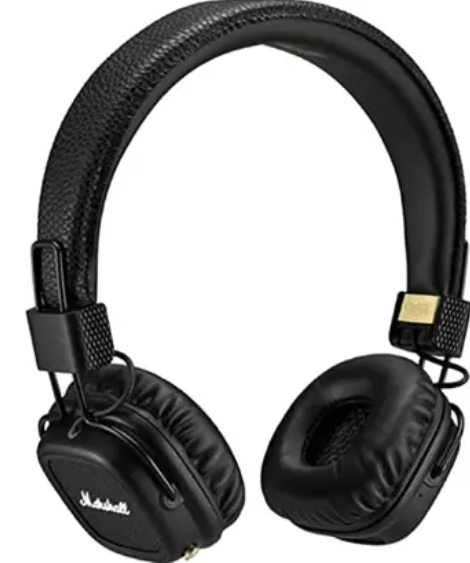
Marshall Major II On-Ear Headphones
Introduction
The Marshall Major II On-Ear Headphones represent a fusion of classic style and modern audio technology, designed for music enthusiasts seeking a durable, comfortable, and stylish listening companion. Building on the legacy of the original Major headphones, the Major II are tailored with customized 40mm drivers that deliver deep bass, clear midranges, and detailed highs, culminating in an engaging sound experience ideal for everyday use.
These headphones are perfect for casual listeners, commuters, and anyone who values iconic Marshall aesthetics combined with practical features like a detachable coil cable with built-in microphone and remote, enabling effortless music control and phone calls. The design also incorporates improved ergonomics with rotating ear caps and a flexible headband, ensuring comfort during extended listening sessions, whether at home, on the go, or in the studio.
Available in multiple colors, including black, white, and brown, the Major II headphones typically range from $100 to $150, depending on the retailer and region. They are widely accessible through major electronics and music stores, both online and offline. Their blend of vintage Marshall appeal and modern audio functionality makes them a compelling choice for those wanting both style and substance in an on-ear headphone.
Technical Specifications of Marshall Major II On-Ear Headphones
- Driver Size: 40 mm dynamic drivers with customized tuning for enhanced bass and clarity
- Frequency Response: 10 Hz – 20 kHz, covering the full audible range
- Sensitivity: Approximately 99 dB SPL, ensuring loud and clear playback
- Impedance: 64 Ohms (wired version), suitable for mobile devices and audio equipment
- Connectivity: Wired detachable double-ended coil cable with microphone and remote; wireless Bluetooth version also available with aptX codec support
- Weight: Around 202 grams (lightweight for on-ear comfort)
- Battery Life (Bluetooth model): Up to 30+ hours of wireless playback on a single charge
- Design: Foldable earcups with rotating caps and a robust vinyl finish for durability
Compared to other on-ear headphones in the mid-range category, the Major II stands out for its iconic design, decent sound quality with a warm, slightly bass-emphasized profile, and versatile wired and wireless options. While not boasting active noise cancellation, its passive isolation is average, suitable for moderate ambient noise environments.
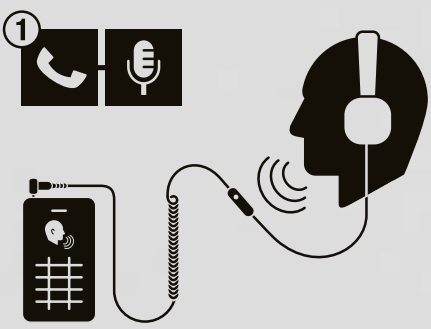
MICROPHONE
BUILT-IN MICROPHONE ALLOWS YOU TO TAKE CALLS OR RECORD VOICE MEMOS THROUGH YOUR DEVICE.
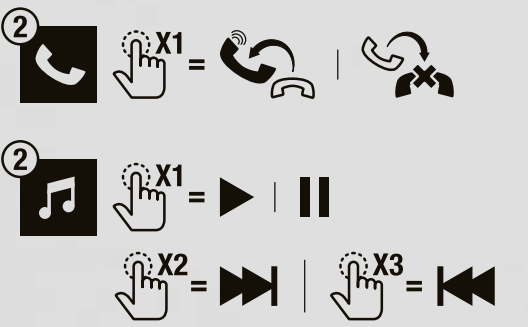
REMOTE
CLICK ONCE TO ANSWER INCOMING CALLS OR HANG UP, AS WELL AS PLAY AND PAUSE YOUR MUSIC. CLICK TWICE TO FAST FORWARD YOUR MUSIC. CLICK THREE TIMES TO REWIND.
DETACHABLE 3.5 MM CORD
THE DOUBLE-ENDED COIL CORD WITH MIC AND REMOTE IS COMPLETELY DETACHABLE, SO YOU CAN DECIDE WHICH SIDE YOU PREFER TO WEAR IT. USE THE EMPTY 3.5MM SOCKET TO SHARE YOUR MUSIC WITH SOMEONE ELSE. COMPATIBLE WITH ANY MUSIC PLAYER THAT RECEIVES A 3.5 MM JACK.

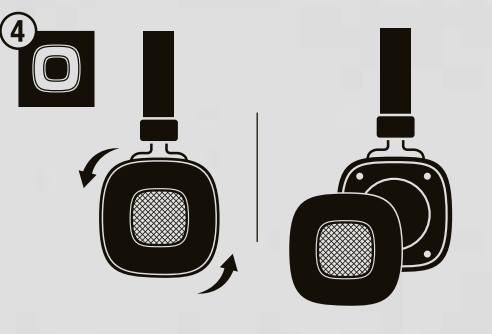
REMOVABLE EAR CUSHIONS
HOLD THE EAR CUSHION AND TURN ANTICLOCKWISE
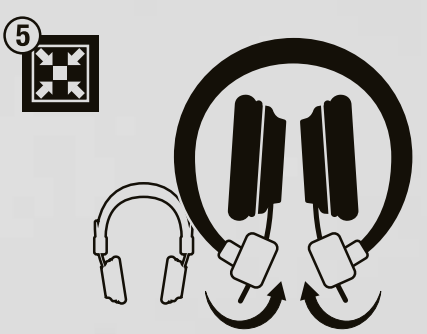
COLLAPSIBLE
COLLAPSIBLE DESIGN FOR EASY STORAGE AND TRANSPORTATION.
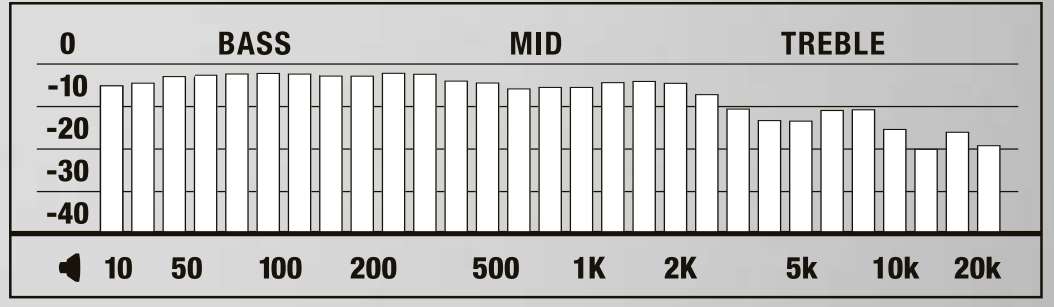
TECHNICAL
- TRANSDUCER: 40 mm, DYNAMIC
- IMPEDANCE: 64 ohms
- FREQUENCY RANGE: 10 Hz-20 kHz
- SENSITIVITY: 100 mV @ 1 kHz = 99 dB SPL
Troubleshooting Marshall Major II On-Ear Headphones
- No sound or one side not working: Check that the detachable coil cable is securely connected to the preferred earcup jack; try swapping the cable to the other side to isolate cable faults.
- Bluetooth connectivity issues (wireless model): Ensure the headphones are charged and in pairing mode; restart the headphones and your device; remove previous Bluetooth pairings if necessary.
- Microphone or remote not functioning: Verify the cable with the mic and remote is properly plugged in; test on another device to confirm; clean the jack to remove debris.
- Audio distortion or imbalance: Lower the volume on your device; inspect the cable for damage; reset device audio settings if via Bluetooth.
- Preventive Tips: Avoid exposing the headphones to moisture or extreme temperatures; store them folded in protective cases; handle cables gently to prolong life.
Marshall offers a standard limited warranty covering manufacturing defects. For assistance, customers can contact Marshall support via their official website or authorized retailers.
Pros & Cons of Marshall Major II On-Ear Headphones
- Pros:
- Stylish and iconic design: Classic Marshall vinyl finish with a retro yet modern appeal.
- Comfortable fit: Adjustable headband and rotating ear caps that adapt to various head sizes.
- Good sound quality: Warm, bass-forward sound with clear mids and usable highs, great for casual listening.
- Versatile connectivity: Detachable coil cable with mic and remote, plus Bluetooth wireless option with long battery life.
- Robust battery life: Over 30 hours of wireless playback, suitable for daily use and travel.
- Cons:
- Build quality concerns: Some users report hinges and materials feeling less durable compared to premium models.
- Limited soundstage: On-ear, closed-back design creates a more confined sound experience versus over-ear models.
- No active noise cancellation: Passive noise isolation is moderate, not ideal for very noisy environments.
- Sound signature: Bass emphasis may overwhelm mids and highs for audiophiles seeking neutral, detailed sound.
- Lack of voice assistant support: The Control knob does not trigger Siri or Google Assistant.
Customer Reviews and Feedback on Marshall Major II On-Ear Headphones
Users consistently praise the Marshall Major II On-Ear Headphones for their iconic look and comfortable fit, rating them generally between 4 to 4.5 stars. Many appreciate the rich bass response and the convenience of the detachable coil cable with mic and remote for calls and music control.
Common compliments highlight the excellent battery life of the Bluetooth version, often exceeding 30 hours, and the lightweight design that allows long wearing without discomfort. However, some reviewers note build quality issues, especially concerning the hinge durability and the plastic feel of materials, cautioning careful handling.
Sound quality reviews are mixed; casual listeners enjoy the warm, bass-forward sound suitable for pop, rap, and electronic music, while audiophiles miss more clarity and detail in mid and high frequencies. Several users recommend the headphones for daily casual use and commuting, but suggest alternatives for professional audio work or noise-critical environments.
Faqs
How do I set up my Marshall Major II On-Ear Headphones for the first time?
What should I do if my Marshall Major II On-Ear Headphones are not producing sound?
Can Marshall Major II On-Ear Headphones be used with smartphones and tablets?
How do I maintain and clean my Marshall Major II On-Ear Headphones to ensure longevity?
What are the key sound features of the Marshall Major II On-Ear Headphones?
How do I optimize the performance and comfort of my Marshall Major II On-Ear Headphones?
Why do my Marshall Major II On-Ear Headphones feel uncomfortable after prolonged use, and how can I fix this?
How do I troubleshoot Bluetooth connectivity issues with the Marshall Major II On-Ear Headphones?
More marshall manuals
- Pairing & Setup: Marshall Motif True Wireless A.N.C. Earbuds User Manual
- Setup & Pairing: Marshall Major-IV On Ear Headphones User Manual
- Setup & Pairing: Marshall Major V Bluetooth Headphone User Manual
- Setup& Pairing: Marshall Motif II True Wireless A.N.C Earbuds User Manual
- Setup & Pairing: Marshall Heston 120 TV Soundbar User Manual
- Setup : Marshall Major II Bluetooth Headphones User Manual
Leave a Comment