
Setup : Marshall Middleton II Portable Loudspeaker User Manual
Content
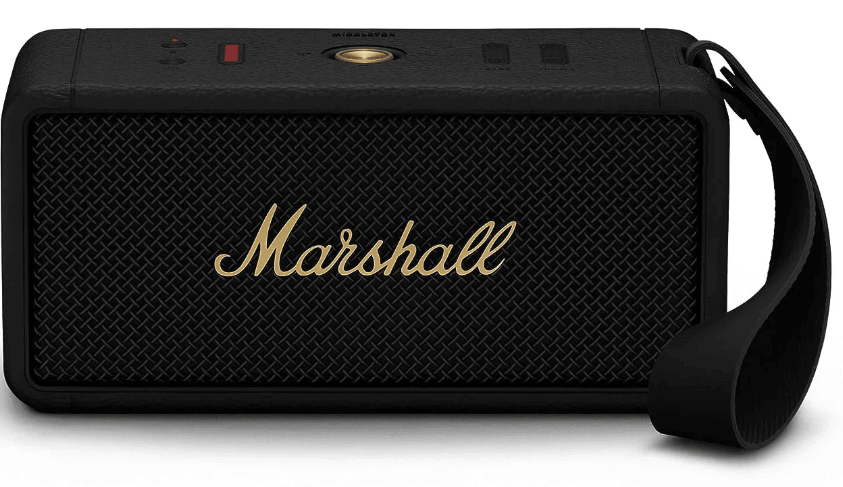
Marshall Middleton II Portable Loudspeaker
Introduction
The Marshall Middleton II Portable Loudspeaker is a premium Bluetooth speaker designed for audiophiles and casual listeners alike who seek a powerful yet portable sound solution. Building on Marshall's iconic rock’n’roll heritage, this speaker combines classic aesthetics with cutting-edge audio technology to deliver an immersive 360-degree sound experience. Whether you are hosting an outdoor party, camping, or enjoying music at home, the Middleton II offers rich, concert-quality audio with deep bass and crisp highs.
Key benefits include a robust quad-driver configuration, ultra-long battery life exceeding 30 hours, and a rugged IP67 waterproof and dustproof design, making it a reliable companion for any environment. It's built-in microphone supports hands-free calls, while the speaker doubles as a portable power bank, enabling you to charge your phone on the go. Targeted to music enthusiasts who value both style and substance, this loudspeaker appeals to outdoor adventurers, home entertainers, and professionals seeking versatile, high-fidelity sound.
Available globally through select retailers and authorized online stores, the Marshall Middleton II typically retails in the $320-$350 USD range, reflecting its position as a premium portable speaker option in 2025.
Technical Specifications and Features of the Marshall Middleton II Portable Loudspeaker
- Audio Drivers: Quad-driver system with two 3-inch woofers (30W each) and two 0.6-inch dome tweeters (10W each), delivering a total of 80 watts RMS power.
- Sound Technology: 360° True Stereophonic multi-directional soundstage for consistent audio from all angles; Dynamic Loudness for tonal balance adjustment across volumes.
- Frequency Response: 45 Hz to 20 kHz, offering wide-range audio clarity and detail.
- Battery Life: Over 30 hours of continuous playback; fast charging provides 5 hours of playtime with just 20 minutes of charge; full recharge in approximately 3 hours.
- Connectivity: Bluetooth with Auracast support for wireless multi-speaker pairing; AUX input for wired connections.
- Durability: IP67 certified waterproof and dustproof, withstands immersion up to 1 meter for 30 minutes.
- Additional Features: Built-in microphone for hands-free calls, multi-directional control knob for playback and volume control, portable power bank function to charge external devices.
- Dimensions & Weight: Compact size suitable for portability, though heavier than ultra-light models — ideal for picnics and parties, but less suited for long hikes.
Compared to similar portable speakers like the JBL Charge 6, the Marshall Middleton II excels with its proprietary True Stereophonic sound technology and superior build quality, while offering competitive battery life and advanced multi-speaker connectivity.
DEVICE LAYOUT
- POWER BUTTON
Push and hold the power button to turn the speaker on or off. - BLUETOOTH BUTTON
Push and hold the Bluetooth® button until the LED turns to a slow blue pulse to start pairing mode. - BATTERY INDICATOR
The 10-segment battery indicator shows the battery charge and volume, bass, or treble while adjusted. - CONTROL KNOB
Use the control knob to manage your music playback, phone calls, and more. - MICROPHONE
The microphone lets you use Middleton II as a speaker phone. Push the Bluetooth button to toggle the call between the speaker and your phone. - BASS AND TREBLE CONTROL
Use the bass and treble controls to adjust the audio balance. The 10-segment indicator shows the bass or treble level while adjusting. CARRYING STRAP HINGE
Attach the included carrying strap to the hinge, see Attaching the carrying strap.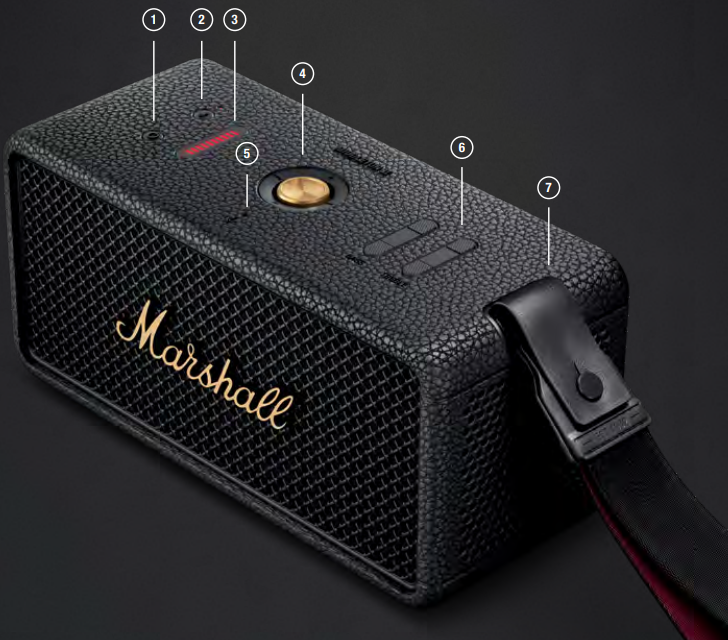
- AUX - 3.5 MM AUDIO INPUT
Plug in an audio device with an analogue output and a 3.5 mm stereo jack. USB-C - POWER INPUT/OUTPUT
Charge the speaker by plugging it into a USB power source or plug in a USB-C device and use the speaker as a charging bank.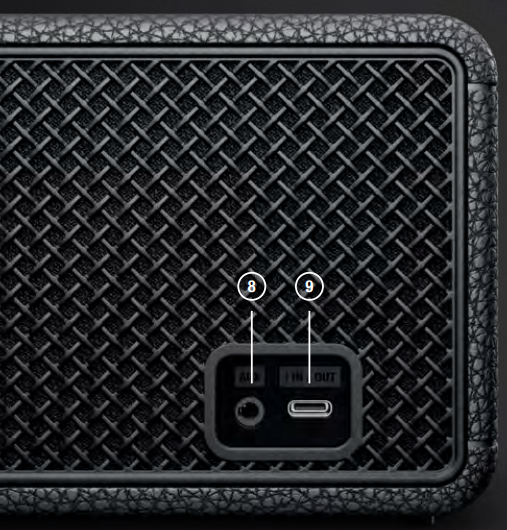
INSTRUCTIONS
GETTING STARTED
- Push and hold the Power button until the speaker turns on.
- Push and hold the Bluetooth button until the LED turns to a slow blue pulse.
- Select MIDDLETON II from your audio device’s Bluetooth list.
USING THE CONTROL KNOB
- Play/pause – push once
- Skip backward/forward – push left/right
- Turn up/down the volume – push up/down
- Receive/end a call – push once
- Reject a call – push twice
CHARGING THE SPEAKER
Use the included USB-C cable to connect the speaker to a USB power source (5V/9V/12V/20V = 3A). The USB-C power input port is located on the back of the speaker.
Note: Always make sure that the speaker is completely dry before charging it.
USING THE SPEAKER AS A CHARGING BANK
- Ensure that the speaker is on and has more than 20% battery charge.
- Plug in your phone, tablet, or other USB device to charge it from the speaker.
A separate lead with USB-C and a relevant jack for your device is required.
BATTERY INDICATOR
The 10-segment battery indicator shows the speaker battery charge. Adjusting the volume, bass, or treble will show the level for the adjusted control. A rising animation indicates that the battery is charging.
ATTACHING THE CARRYING STRAP
- Open the end of the carrying strap.
- Thread the strap end around the speaker hinge, starting from the bottom.
- Fold back the end of the strap and push the button through the hole until it is secure.
Make sure the carrying strap is secured to the speaker before use.
CONNECTING AN AUX DEVICE
- Connect a lead with a 3.5 mm stereo jack to the AUX input on the back of the speaker.
- Connect the other end of the lead to the audio output on your audio source.
- Make sure all connected Bluetooth audio devices are paused. Note: Audio leads are not included.
USING MIDDLETON II AS A SPEAKER PHONE
Middleton II comes with a built-in microphone that lets you use it as a speakerphone. While connected, the ringtone of any incoming calls will sound through the speaker.
- Push the control knob once to answer an incoming call in speaker phone mode.
- To reject the call, push the control knob twice.
- To end a call, push the control knob once.
While in a call, you can push the Bluetooth button to switch between using the Middleton II and your phone for a more private conversation.
CLEANING THE SPEAKER
Clean your speaker regularly to keep it fresh and last longer.
Unplug any leads before cleaning the speaker , and make sure everything is completely dry before plugging in a USB charger.
The silicone sleeve can be removed and cleaned separately. Gently clean it and the leads with a lint-free cloth, slightly damp with either:
- water,
- 70% isopropyl alcohol, or
- 75% ethyl alcohol
Carefully clean the speaker mesh and openings with a dry and soft brush, or a cotton swab.
- Do not use any sharp or metal objects.
- Do not use compressed air.
- Do not use products containing bleach or hydrogen peroxide.
- Do not submerge the speaker in any cleaning agents.
- Do not rinse the speaker under running water.
BATTERY CARE GUIDE
Your speaker comes equipped with high-performance lithium-ion batteries with a life span that is affected by charging and usage. Follow the guidelines below to keep your battery in great condition for as long as possible.
- Avoid using fast chargers if possible. Fast charging causes stress on the battery and will degrade it.
- Avoid letting the battery drain completely or charging it when it’s already full. Try to keep the charge between 30% and 80%.
- If the speaker is stored for a long time, it is recommended to charge the speaker to about half-charge and then do a factory reset. Store the speaker in a cool, dark, and dry place.
- Avoid using or charging the speaker in hot and unventilated places, 40°C/104°F and above, such as in a parked car or by a window in direct sunlight.
- Avoid charging the battery at low temperatures, below 10°C/50°F and using the speaker below 0°C/32°F.
- Avoid strong mechanical shocks, such as dropping the speaker on a hard surface,s as it might harm the batteries.
Download the Marshall Bluetooth app and select the battery preservation level that best suits you and your speaker.
PAIRING A NEW DEVICE
Middleton II can be connected with 2 devices at a time and remembers up to 8 previously paired devices. When in range, it will try to reconnect with the last connected device.
- Push and hold the power button until the speaker turns on.
- Push and hold the Bluetooth button until the LED turns to a slow blue pulse.
- Select MIDDLETON II from your audio device’s Bluetooth list.
RESETTING THE SPEAKER
A factory reset will reset the speaker to its original settings, excluding any firmware updates.
Note: This will delete all user settings, gs, and the speaker will need to be set up again.
- Remove MIDDLETON II, and MIDDLETON II [LE] if present, from your sound device’s Bluetooth list.
- Ensure that the speaker is on.
- Push and hold the Bluetooth button for 7 seconds. The Bluetooth indicator turns quickly red, and the speaker restarts.
- The speaker has returned to its factory settings and is ready to be paired, see the section Getting started.
MARSHALL BLUETOOTH APP
Download the Marshall Bluetooth app to get the most out of your speaker and keep it up to date with the latest software.

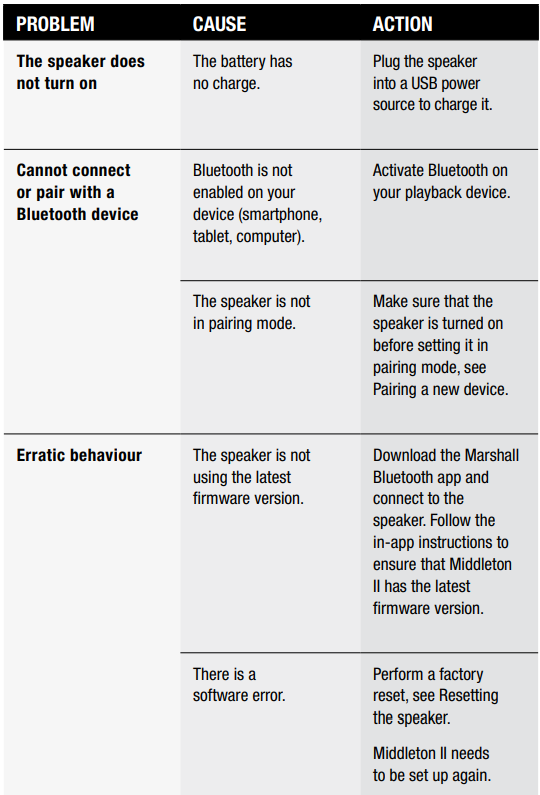
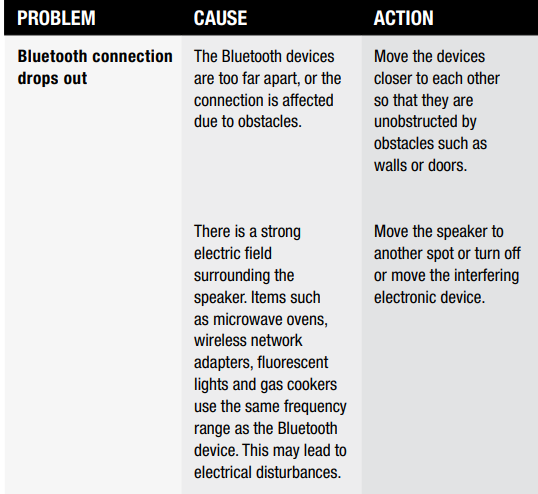
TROUBLESHOOTING
Pros & Cons of the Marshall Middleton II Portable Loudspeaker
Pros
- Impressive Audio Quality: Rich, balanced sound with deep bass and clear highs, achieving an immersive 360-degree listening experience.
- Long Battery Life: Over 30 hours of playback surpasses many competitors, ideal for extended outdoor use.
- Durability: IP67 rating protects against water and dust, making it highly suitable for various outdoor environments.
- Versatile Features: Includes a built-in microphone for calls and functions as a power bank, adding practical value.
- Multi-Speaker Support: Auracast technology allows seamless Bluetooth linking of multiple units for an amplified soundscape.
Cons
- Size and Weight: While portable, it is bulkier and heavier than some ultra-compact models, limiting ease of carrying on long hikes.
- Bass Compression at High Volume: Some users report bass flattening when volume reaches maximum levels, reducing dynamic range.
- Bluetooth Latency: A Slight delay in audio-video sync was noted, which can affect watching videos without a wired connection.
- Premium Price Point: At around $320-$350, it is more expensive than many entry-level portable speakers, demanding that value-conscious buyers to consider alternatives.
Overall, the Marshall Middleton II offers strong value for consumers who prioritize sound quality and durability over ultra-light portability.
Customer Reviews and Feedback on the Marshall Middleton II Portable Loudspeaker
Users commonly praise the Marshall Middleton II Portable Loudspeaker for its stellar sound performance and extended battery life, often highlighting the clarity and immersive nature of its 360-degree sound. Testimonials frequently mention its rugged design as a major plus for outdoor use. The built-in microphone and power bank features receive positive remarks for enhancing convenience during travel or gatherings.
On the downside, some customers note the speaker's weight as a drawback for prolonged carrying and mention occasional bass compression at top volume levels. A few reviewers point out Bluetooth latency issues when streaming videos, but acknowledge that this can be mitigated by using the AUX input. Overall, the speaker rates highly,y with many giving it 4 to 4.5 stars out of 5, recommending it as a reliable choice for both casual listeners and serious audiophiles seeking a portable yet powerful loudspeaker.
Faqs
How do I set up the Marshall Middleton II Portable Loudspeaker for the first time?
What should I do if my Marshall Middleton II Portable Loudspeaker is not connecting via Bluetooth?
Can the Marshall Middleton II Portable Loudspeaker be used with multiple speakers simultaneously?
How does the Dynamic Loudness feature enhance the Marshall Middleton II Portable Loudspeaker's sound quality?
Is the Marshall Middleton II Portable Loudspeaker suitable for outdoor use and how durable is it?
How can I maximize battery life on the Marshall Middleton II Portable Loudspeaker during extended use?
What maintenance is recommended to keep the Marshall Middleton II Portable Loudspeaker in good condition?
Can I use the Marshall Middleton II Portable Loudspeaker for hands-free calls and how effective is the microphone?
More marshall manuals
- Setup : Marshall Major II Bluetooth Headphones User Manual
- Setup & Usage: Marshall Emberton II Portable Bluetooth Speaker User Manual
- Setup & Pairing: Marshall Heston 120 TV Soundbar User Manual
- Setup & Pairing: Marshall Major III Bluetooth On Ear Headphones User Manual
- Setup& Pairing: Marshall Motif II True Wireless A.N.C Earbuds User Manual
- Setup: Marshall Mode II - True Wireless Earbuds User Manual
Leave a Comment