
Setup & Pairing: Marshall Major III Bluetooth On Ear Headphones User Manual
Content
Marshall Major III Bluetooth On-Ear Headphones
Introduction
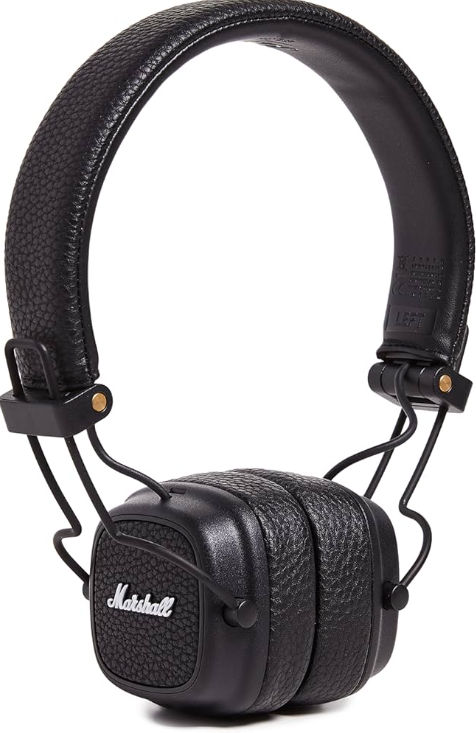
The Marshall Major III Bluetooth On-Ear Headphones are designed for music lovers seeking a blend of iconic style, wireless freedom, and robust sound quality. As a third-generation model from Marshall—a brand renowned for its legendary amplifiers—these headphones deliver punchy, immersive audio with a signature rock-inspired design. The Major III Bluetooth stands out with its classic Tolex finish, collapsible form factor, and intuitive on-ear controls, making it a stylish and practical choice for daily listening.
Key benefits include seamless Bluetooth aptX connectivity for high-quality wireless listening, up to 30 hours of battery life for all-day use, and a built-in microphone for hands-free calls. The headphones also feature a wired 3.5mm option, ensuring compatibility with non-Bluetooth devices and extending usability when the battery runs low. The target audience includes students, commuters, and professionals who value both audio performance and portability. These headphones are ideal for use at home, at work, or on the go, offering comfort and convenience without sacrificing style.
The Marshall Major III Bluetooth On-Ear Headphones typically retail between $100 and $150, depending on the region and retailer. They are widely available online and in electronics stores, making them accessible to a broad range of consumers.
Whether you're streaming music, taking calls, or sharing audio with a friend, the Marshall Major III Bluetooth On-Ear Headphones deliver a reliable, high-performance listening experience wrapped in unmistakable Marshall heritage.
DEVICE LAYOUT
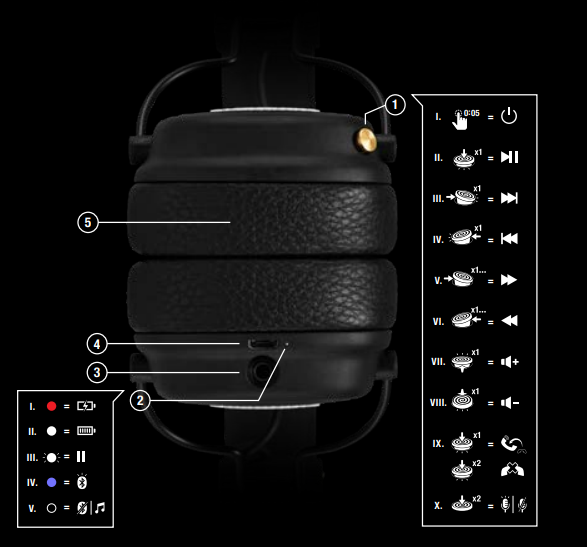
CONTROL KNOB
- POWER ON/OFF
PUSH AND HOLD FOR 5 SECONDS - PLAY/PAUSE
SINGLE-CLICK - SKIP FORWARD
PUSH TO THE RIGHT - SKIP BACK
PUSH TO THE LEFT - FAST FORWARD
PUSH TO THE RIGHT AND HOLD - REWIND
PUSH TO THE LEFT AND HOLD - TURN UP THE VOLUME
PUSH UPWARDS - TURN DOWN THE VOLUME PUSH DOWNWARDS
- HANDLE CALLS
- SINGLE-CLICK TO ANSWER OR END CALL
- DOUBLE-CLICK TO REJECT AN INCOMING CALL
- ACTIVATE/STOP SIRI*
- DOUBLE-CLICK
LED INDICATOR
- CHARGING
- FULLY CHARGED
- AUDIO PAUSED BLUETOOTH® PAIRING MODE BLUETOOTH OFF OR PLAYING
3.5 mm INPUT/OUTPUT SOCKET
SHARE YOUR AUDIO BY PLUGGING IN ANOTHER PAIR OF HEADPHONES INTO THE 3.5 mm SOCKET.
IF YOU ARE LOW ON POWER, SIMPLY USE THE DOUBLE-ENDED 3.5 mm CORD WITH BUILT-IN REMOTE AND MICROPHONE.
- SINGLE-CLICK TO PLAY, PAUSE, ANSWER CALLS, OR HANG UP.
- DOUBLE-CLICK FOR NEXT SONG OR TO REJECT CALLS.
- TRIPLE-CLICK FOR PREVIOUS SONG.
USB PORT FOR CHARGING BATTERY
- WHEN THERE IS LESS THAN 1 HOUR OF CHARGE, A BATTERY LOW ALERT WILL SOUND.
- PLUG YOUR HEADPHONES TO A USB POWER SOURCE VIA THE MICRO USB CABLE TO CHARGE THE BATTERY.
- A FULL BATTERY RECHARGE TAKES APPROXIMATELY 3 HOURS.
- REMOVABLE EAR CUSHIONS
- HOLD THE EAR CAP AND TURN IT COUNTER-CLOCKWISE.
Specifications
- Type: On-ear, wireless Bluetooth headphones with wired option
- Drivers: 40mm dynamic
- Frequency Response: 20Hz – 20kHz
- Impedance: 32 ohms
- Sensitivity: 97 dB SPL
- Battery Life: Up to 30 hours (at medium volume)
- Charging Time: 3 hours for a full charge
- Wireless Range: 10 meters (30 feet)
- Bluetooth: aptX enabled for high-quality audio streaming
- Wired Connectivity: 3.5mm audio input (cable included)
- Built-in Microphone: Yes, for hands-free calls and voice commands
- Controls: Multidirectional control knob for volume, track navigation, and call management
- Design: Collapsible, height-adjustable, and rotatable ear cups; classic Marshall Tolex finish
- Weight: 178g (6.28 oz)
- Color: Black
- Included Accessories: Micro USB charging cable, 3.5mm audio cable with mic and remote, user manual
Compared to similar mid-range wireless on-ear headphones, the Marshall Major III Bluetooth offers superior battery life, aptX support, and a unique retro aesthetic. While it lacks active noise cancellation, its passive isolation and robust build quality provide a comfortable, long-wearing experience for daily use.
Troubleshooting
Common Issues and Solutions
- Can't connect to Bluetooth: Ensure headphones are in pairing mode (LED flashes blue). Forget the device on your phone and reconnect. If issues persist, perform a hardware reset (hold the power button for 10+ seconds).
- Sound drops out or no sound: Check Bluetooth range (stay within 10 meters/30 feet). Ensure the audio source is working and the headphone battery is charged. Try using the wired cable to isolate the issue.
- Can't charge: Verify the Micro USB cable and power source are functional. Clean the charging port if necessary. If the LED doesn't light up during charging, contact support.
- Microphone/remote not working: Test with different devices. Ensure the cable is fully inserted. If using Bluetooth, check that the headset profile is enabled on your device.
- Comfort issues: The on-ear design may cause slight pressure during extended use. Take breaks if needed. Replacement ear cushions are available from Marshall.
Preventive Measures
Keep your Marshall Major III Bluetooth On-Ear Headphones clean and store them in a dry place. Avoid exposing them to extreme temperatures. Regularly update your device’s Bluetooth drivers for optimal performance.
Warranty and Support
The Marshall Major III Bluetooth comes with a standard manufacturer’s warranty. For warranty claims, repairs, or further assistance, visit the official Marshall support website or contact their customer service team.
For additional help, consult the user manual or visit the Marshall support portal for guides on charging, connecting, and using all features.
Pros & Cons
Advantages
- Iconic Design: The classic Marshall look with Tolex finish and gold accents stands out in a crowd.
- Long Battery Life: Up to 30 hours of playtime on a single charge, ideal for travel and daily commutes.
- Bluetooth aptX: Delivers high-quality, low-latency wireless audio for an immersive listening experience.
- Versatile Connectivity: Use wirelessly or with the included 3.5mm cable for non-Bluetooth devices.
- Comfortable Fit: Adjustable, padded ear cups provide a snug, comfortable fit for most users.
- Built-in Mic and Controls: Easy access to volume, track navigation, and call management.
- Collapsible Design: Folds for compact storage and portability.
Disadvantages
- No Active Noise Cancellation: Passive isolation only; background noise may be noticeable in loud environments.
- On-Ear Design: May cause ear fatigue during extended listening sessions for some users.
- Sound Signature: Bass-heavy and slightly exaggerated highs may not appeal to those seeking neutral sound.
- Basic Controls: Single-button remote limits advanced functionality compared to multi-button alternatives.
- Micro USB Charging: Lacks USB-C, which is increasingly common in modern devices.
Overall, the Marshall Major III Bluetooth On-Ear Headphones offer excellent value for users who prioritize style, battery life, and wireless convenience. They compete well with other mid-range wireless headphones but may not satisfy audiophiles seeking neutral sound or advanced features like ANC.
Customer Reviews
Users consistently praise the Marshall Major III Bluetooth On-Ear Headphones for their striking design, robust build quality, and impressive battery life. Many highlight the headphones’ ability to deliver powerful, bass-forward sound that enhances rock, pop, and electronic music—true to Marshall’s musical heritage. The collapsible design and included accessories are also frequently mentioned as practical benefits for travelers and daily commuters.
Common complaints include the lack of active noise cancellation and the potential for ear discomfort during prolonged use due to the on-ear design. Some users note that the sound profile, while fun and energetic, may lack the precision and neutrality preferred by critical listeners. Despite these minor drawbacks, the majority of reviews recommend the Major III Bluetooth for its style, durability, and reliable performance at its price point.
Star ratings typically range from 4 to 4.5 out of 5, reflecting strong user satisfaction. Testimonials often emphasize the headphones as a great choice for those who want a blend of fashion and function in their audio gear. If you value iconic design, wireless freedom, and all-day battery life, the Marshall Major III Bluetooth On-Ear Headphones are a solid purchase—especially for fans of the Marshall brand.
Faqs
How do I set up Marshall Major III Bluetooth On Ear Headphones for the first time?
Can I use Marshall Major III Bluetooth On Ear Headphones with my PS4?
What should I do if my Marshall Major III Bluetooth On Ear Headphones are not connecting to Bluetooth?
How do I maintain and care for Marshall Major III Bluetooth On Ear Headphones?
Are Marshall Major III Bluetooth On Ear Headphones compatible with devices without Bluetooth?
Can I use the Marshall Major III Bluetooth On Ear Headphones for voice calls?
How do I optimize the sound quality of Marshall Major III Bluetooth On Ear Headphones?
What are the key features that make Marshall Major III Bluetooth On Ear Headphones different?
More marshall manuals
- Setup & Usage: Marshall Emberton II Portable Bluetooth Speaker User Manual
- Setup: Marshall Mode II - True Wireless Earbuds User Manual
- Setup : Marshall Middleton II Portable Loudspeaker User Manual
- Setup & Pairing: Marshall Monitor Bluetooth Over-Ear Headphones User Manual
- Setup : Marshall Major II Bluetooth Headphones User Manual
- Setup: Marshall Minor IV True Wireless Earbuds User Manual
Leave a Comment