
Setup & Pairing: Marshall Monitor Bluetooth Over-Ear Headphones User Manual
Content
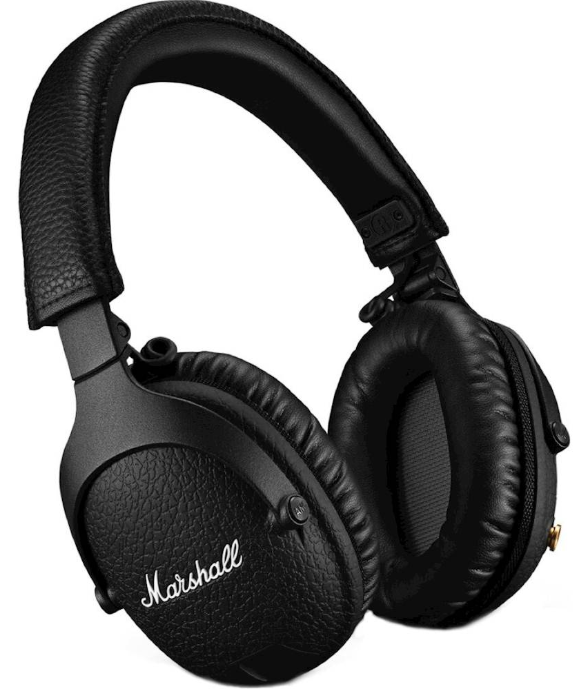
Marshall Monitor Bluetooth Over-Ear Headphones
Introduction
The Marshall Monitor Bluetooth Over-Ear Headphones are designed to deliver exceptional sound quality and durability, making them an excellent choice for music enthusiasts and professionals alike. These headphones feature a closed over-ear design, ideal for use with Bluetooth-enabled devices such as smartphones, tablets, and computers. Key benefits include a built-in microphone, integrated volume control, and the ability to connect via Bluetooth or a detachable audio cable. The headphones are priced between $150 to $250, depending on the retailer, and are widely available online and in-store.
Targeted at individuals who value both form and function, the Marshall Monitor Bluetooth headphones are perfect for daily use, whether commuting, working out, or simply relaxing to music. They offer a robust build quality and stylish design that reflects Marshall's iconic aesthetic.
Specifications
Here are the key features and specifications of the Marshall Monitor Bluetooth Over-Ear Headphones:
- Driver Size: 40mm dynamic drivers
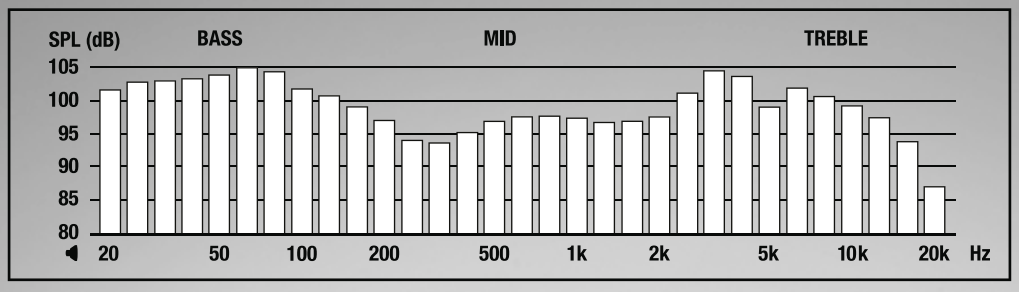
- Frequency Response: 20 Hz to 20 kHz
- Impedance: 28 ohms
- Sensitivity: Approximately 98 dB/mW
- Weight: Approximately 271g
- Battery Life: Up to 30 hours on a single charge
- Connectivity: Bluetooth, with a range of about 33 feet
- Additional Features: Built-in microphone, integrated volume control, and a detachable coiled audio cable with a built-in mic and control button
- Accessories: Includes a carrying bag and USB charging cable
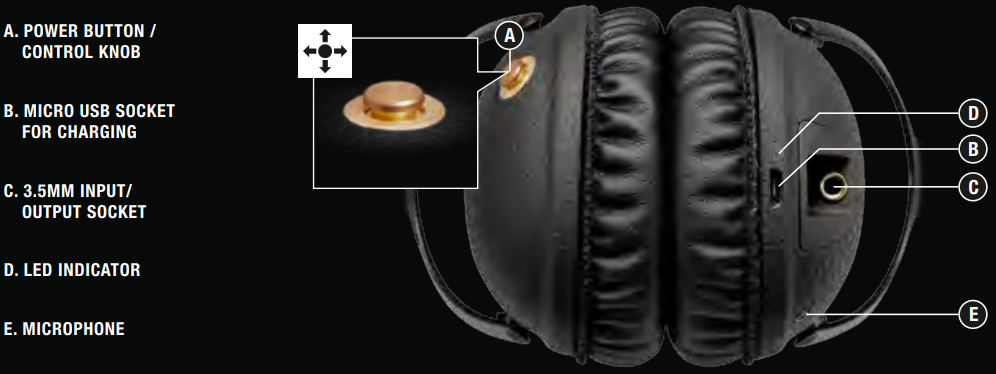
DEVICE LAYOUT
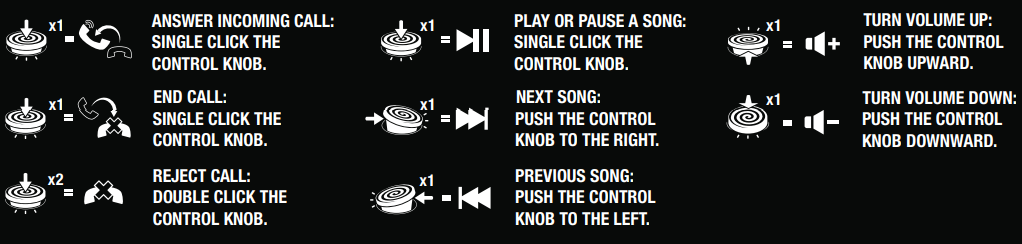
CONTROLS
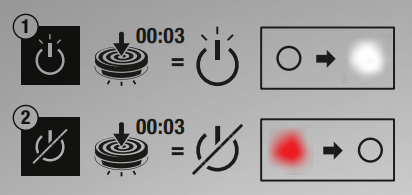
POWER ON/OFF
- PUSH AND HOLD THE POWER BUTTON FOR 3 SECONDS TO TURN ON.
- PUSH AND HOLD THE POWER BUTTON FOR 3 SECONDS TO TURN OFF.
NOTE: IF NOT CONNECTED TO A SOUND SOURCE, THE HEADPHONES WILL AUTOMATICALLY TURN OFF AFTER 10 MINUTES.
CHARGING
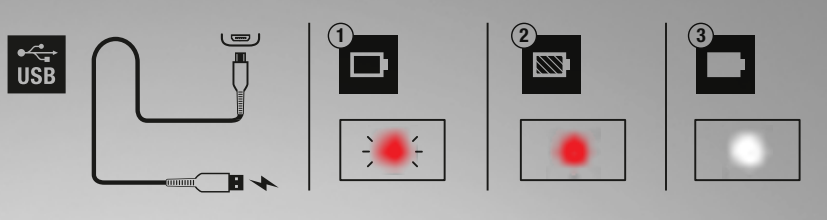
THE LED INDICATOR STARTS BLINKING RED WHEN THE BATTERY LEVEL IS LOW.
- PLUG THE INCLUDED USB-C cable INTO THE MICRO USB SOCKET ON THE HEADPHONE.
- PLUG THE OTHER END OF THE CABLE INTO A USB POWER SOURCE. THE LED INDICATOR STAYS LIT WHEN CHARGING.
- WHEN THE BATTERY IS FULLY CHARGED, THE LED INDICATOR TURNS WHITE.
NOTE: CHARGE THE BATTERY BEFORE USING THE HEADPHONES THE FIRST TIME. 2 CHARGE GIVES APPROXIMATELY 8 HOURS OF PLAYBACK AT MEDIUM VOLUME.
BLUETOOTH® PAIRING
- WHEN OFF: PRESS AND HOLD POWER BUTTON FOR 5 SECONDS.
- WHEN ON: FIRST POWER OFF, THEN PRESS AND HOLD POWER BUTTON FOR 5 SECONDS.
- ENABLE BLUETOOTH ON YOUR DEVICE. SELECT “MONITOR BLUETOOTH” IN THE BLUETOOTH LIST AND ACCEPT PAIRING. THE LED INDICATOR TURNS OFF WHEN THE PAIRING IS COMPLETED.
NOTE: UNIT ENTERS PAIRING MODE WHEN POWERED ON FOR THE FIRST USE. AFTER THE INITIAL PAIRING, THE HEADPHONES WILL AUTOMATICALLY CONNECT TO THE DEVICE WHEN TURNED ON AGAIN.

PHONE FUNCTIONALITY
SHARING
REMOVABLE EAR CUSHIONS
COLLAPSIBLE

DETACHABLE 3.5 MM CORD

TECHNICAL INFO
- TRANSDUCER:
- 40 MM, DYNAMIC IMPEDANCE:
- 28 OHM
- FREQUENCY RANGE:
- 20Hz-20kHz
- SENSITIVITY:
- 100 mV @ 1 kHz = 92 dB SPL
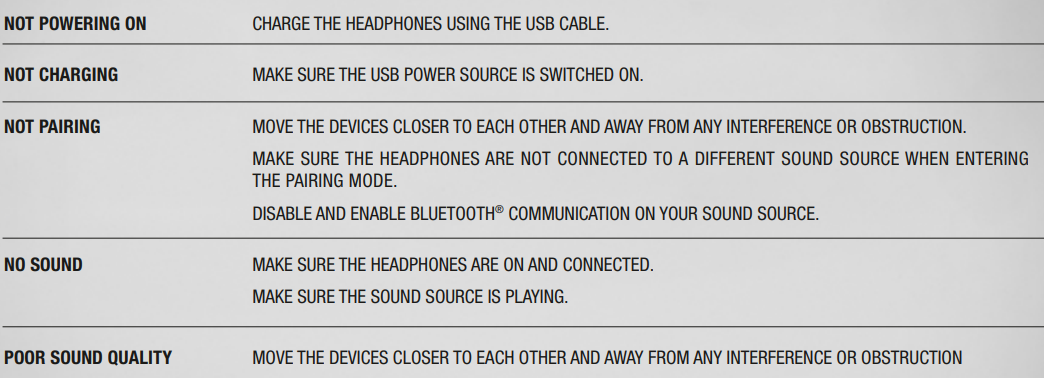
TROUBLESHOOTING
Pros & Cons
Pros
- Sound Quality: Strong performance with a focus on bass, making them great for electronic music.
- Portability: Foldable design for easy storage and transport.
- Value for Money: Offers a good balance between price and features.
- Durability: Built with a rugged design to withstand regular use.
Cons
- Lack of Noise Cancellation: No active noise cancellation, which might be a drawback in noisy environments.
- Limited Multi-Device Connectivity: Unlike some competitors, it does not support connecting multiple devices simultaneously.
- Sound Balance: Some users find the sound leans heavily on bass, which might not be ideal for all genres.
Customer Reviews
Users of the Marshall Monitor Bluetooth Over-Ear Headphones generally praise their sound quality and build. Many appreciate the stylish design and the convenience of the foldable structure. However, some users note that the bass can be overpowering for certain music types. Overall, the headphones are rated highly for their value and performance.
Star Rating: 4.5/5 based on user testimonials.
Recommendation: Suitable for those seeking a stylish, durable pair of headphones with a strong bass response.
Faqs
How do I set up my marshall Monitor Bluetooth Over-Ear Headphones for the first time?
What should I do if my marshall Monitor Bluetooth Over-Ear Headphones won’t connect to Bluetooth?
Can I use the marshall Monitor Bluetooth Over-Ear Headphones with non-Bluetooth devices?
How do I activate and customize the ANC feature on marshall Monitor Bluetooth Over-Ear Headphones?
How long does the battery last on marshall Monitor Bluetooth Over-Ear Headphones and how do I charge them?
What should I do if the audio on my marshall Monitor Bluetooth Over-Ear Headphones is cutting out or distorted?
Are marshall Monitor Bluetooth Over-Ear Headphones compatible with voice assistants like Siri or Google Assistant?
How do I properly clean and maintain my marshall Monitor Bluetooth Over-Ear Headphones to ensure longevity?
More marshall manuals
- Setup: Marshall Mode II - True Wireless Earbuds User Manual
- Setup: Marshall Minor IV True Wireless Earbuds User Manual
- Setup & Pairing: Marshall Major III Bluetooth On Ear Headphones User Manual
- Setup: Marshall Kilburn III Portable Loudspeaker User Manual
- Setup & Usage: Marshall Emberton II Portable Bluetooth Speaker User Manual
- Setup: Marshall Mid A.N.C On Ear Headphones User Manual
Leave a Comment