
Setup: Marshall Minor III True Wireless Earbuds User Manual
Content
Marshall Minor III True Wireless Earbuds
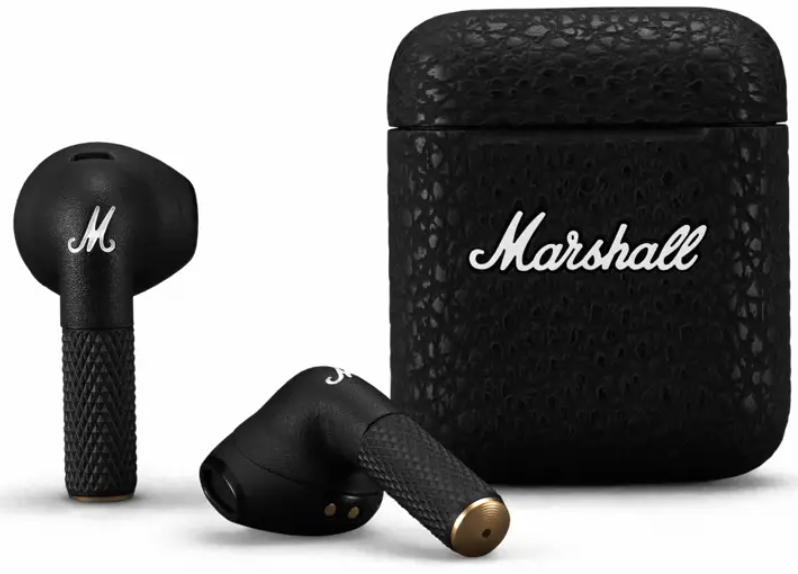
Introduction
The Marshall Minor III True Wireless Earbuds are designed for music enthusiasts who seek classic Marshall sound quality combined with modern wireless convenience. These earbuds deliver the iconic Marshall signature sound, featuring enhanced bass, smooth mids, and clear highs, all tuned through custom 12mm dynamic drivers. With a sleek and compact design available in Black, Cream, and Burgundy, they offer a stylish and comfortable fit for daily use.
Ideal for commuters, gym-goers, and casual listeners, the Minor III earbuds provide up to 25 hours of wireless playback—5 hours from the earbuds themselves plus an additional 20 hours from the portable charging case. Their IPX4 water resistance rating makes them suitable for workouts and light rain, while Bluetooth 5.2 ensures a stable connection and support for the aptX codec for high-quality audio streaming. Intuitive touch controls allow seamless management of music and calls, enhancing the user experience.
These earbuds are priced at around $99.99 and are available through Marshall’s official website and authorized retailers. The Minor III earbuds offer a compelling balance of premium sound, portability, and affordability, making them a strong contender in the competitive true wireless earbuds market.
Specifications of Marshall Minor III True Wireless Earbuds
- Bluetooth Version: 5.2 with aptX codec support for superior audio quality
- Driver Size: Custom-tuned 12 mm dynamic drivers
- Frequency Response: 20 Hz – 20 kHz, covering the full human hearing range
- Sensitivity: 93 dB SPL at 1 kHz / 179 mV
- Impedance: 32 Ohms
- Battery Life: 5 hours per charge plus 20 additional hours with charging case (25 hours total)
- Charging: USB-C and wireless charging enabled, quick charge 15 min for 1.5 hours of playtime
- Weight: Earbuds 4 g each, charging case 40 g
- Water Resistance: IPX4 splash-resistant
- Controls: Mirrored touch-sensitive earbuds with auto-pause/play functionality
- Wireless Range: Up to 10 meters (32.8 feet)
- Additional Features: Single-earbud operation, no active noise cancellation
Compared to similar products, the Minor III excels in design and sound tuning but lacks active noise cancellation found in some competitors like Sony WF-1000XM4 or Apple AirPods Pro. Its wireless charging and aptX codec support are notable advantages in its price range.
Features
GETTING STARTED
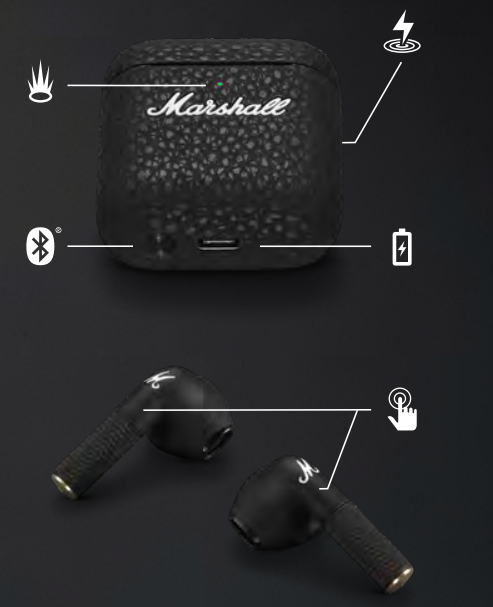
- Open the charging case.
- Press and hold the button on the bottom of the case until the LED turns to a slow blue pulse.
- Select MINOR III from your sound device’s Bluetooth® list.
TOUCH CONTROLS
Touch the left or right earbud to control your music and phone calls.
- touch to play/pause or receive/end a call
- touches to skip forward or reject a call
- touches to skip backward
CHARGING THE EARBUDS
Put your earbuds back in the case and close the lid to turn them off and begin charging.
CHARGING THE CASE
Use a wireless charger or plug the case into a USB power source to charge it. The case is fully charged when the front-facing LED is steady green.
To charge the case using a wireless charger, follow the instructions below.
- Place the charging case with its back flat against the wireless charging pad.
- Make sure that the front LED lights up to indicate that the case is charging.
- Once the LED light has turned steady green,, the case is fully charged.
LED INDICATOR
The LED shows the case battery charge, from red through yellow to green (0–100%). It pulses blue while in Bluetooth pairing mode.
PAIRING A NEW DEVICE
Minor III remembers up to 6 previously paired devices and will try to reconnect with the last connected device.
- Place the earbuds in the case and keep the lid open.
- Press and hold the button on the bottom of the case until the LED turns to a slow blue pulse.
- Select MINOR III from your sound device’s Bluetooth list.
Note: Minor III can be connected with one sound device at a time. Make sure to disconnect from the current device before reconnecting with a different device.
RESETTING THE EARBUDS
If your earbuds become erratic or unresponsive, follow the instructions below.
Place the earbuds in the case and close the lid to restart the earbuds.
If the problem persists, perform a factory reset.
Note: This will delete all user settings, and the earbuds will need to be paired again.
- Place the earbuds in the case and keep the lid open.
- Press and hold the Bluetooth pairing button for 10 seconds, until the LED turns purple, to reset the earbuds to factory settings.
- Remove MINOR III from your sound device’s Bluetooth list before pairing again.
If the problem persists, perform a hardware reset.
Note: This will delete all user settings, and the earbuds will need to be paired again.
- Place the earbuds in the case and keep the lid open.
- Press and hold the Bluetooth pairing button for 15 seconds to reset the earbuds.
- Remove MINOR III from your sound device’s Bluetooth list before pairing again.
CLEANING YOUR MINOR III
Earbuds come in close contact with your skin often and sometimes for long periods of time. This will, over time,, cause the build-up of dirt and grease that can affect performance and may cause skin irritation. Clean your earbuds regularly to keep them fresh and make them last longer.
Unplug any cables before cleaning the case. Make sure everything is completely dry before using the earbuds, putting the earbuds back in the case, or plugging in a USB charger.
Use a disinfectant wipe or a lint-free cloth, slightly damp with 70% isopropyl alcohol or 75% ethyl alcohol,, to gently clean the exterior surfaces of the earbuds and the case. Avoid getting moisture in any openings or in the speaker mesh. Carefully clean those areas with a dry and soft brush, or a cotton swab.
- Do not use any sharp objects.
- Do not use compressed air.
- Do not use products containing bleach or hydrogen peroxide.
- Do not submerge the earbuds in any cleaning agents.
Troubleshooting Marshall Minor III True Wireless Earbuds
- Problem: Earbuds won’t connect via Bluetooth.
Solution: Ensure Bluetooth 5.2 compatibility on your device; reset earbuds by placing them in the case and holding touch controls for 10 seconds; re-pair with your device. - Problem: One earbud is not working.
Solution: Check battery levels; clean the earbud and charging contacts; reset the earbuds and reconnect. - Problem: Low sound quality or unstable fit.
Solution: Adjust earbud position to achieve a secure fit; try different ear tips; ensure firmware is up to date via the Marshall app if available. - Error Codes: No specific error codes reported; general Bluetooth errors follow device prompts.
- Preventive Measures: Keep charging case and earbuds clean; avoid exposure to excessive moisture beyond IPX4 rating; charge regularly to maintain battery health.
- Warranty & Support: Marshall offers a 1-year parts and labor warranty. For assistance, contact Marshall customer support via their official website or an authorized dealer.
Pros & Cons of Marshall Minor III True Wireless Earbuds
Pros
- Sound Quality: Custom-tuned 12 mm drivers deliver rich bass and balanced mids/highs, true to Marshall’s iconic sound signature.
- Battery Life: Up to 25 hours with the charging case and quick charge feature.
- Design: Stylish, lightweight, available in multiple colors with classic Marshall aesthetics.
- Connectivity: Bluetooth 5.2 with aptX codec ensures stable and high-quality audio streaming.
- Charging Convenience: Supports both USB-C and wireless charging.
Cons
- Fit Issues: Some users report unstable fit affecting sound quality; may require trying different ear tips.
- No Active Noise Cancellation: Lacks ANC, which may be a drawback in noisy environments compared to competitors.
- Limited Voice Assistant Support: Does not integrate with Siri, Google Assistant, or Alexa.
- Touch Controls Disabled by Default: Must be enabled manually via the app, which may be inconvenient.
Overall, the Minor III offers strong value for money, especially for users who value sound fidelity and design over advanced noise cancellation features.
Customer Reviews of Marshall Minor III True Wireless Earbuds
Users consistently praise the Marshall Minor III True Wireless Earbuds for their exceptional sound quality and iconic design, with many highlighting the powerful bass and clear mids as standout features. The 25-hour battery life and wireless charging capabilities receive positive mentions for convenience during daily use.
Common complaints focus on the earbuds’ fit, as some customers experience instability during physical activities, impacting sound performance. A few users also note the absence of active noise cancellation and limited voice assistant integration as drawbacks.
On average, the earbuds receive a rating of 4 out of 5 stars, with recommendations emphasizing suitability for casual listeners who prioritize audio quality and style at an affordable price point. Many reviewers suggest trying different ear tips to improve comfort and sound isolation.
Faqs
How do I set up marshall Minor III True Wireless Earbuds for the first time?
What should I do if my marshall Minor III True Wireless Earbuds are not working properly?
Can I use marshall Minor III True Wireless Earbuds with Apple devices like iPhones and iPads?
How often should I clean and maintain my marshall Minor III True Wireless Earbuds?
What are the key features that make marshall Minor III True Wireless Earbuds different?
How do I use the touch controls on my marshall Minor III True Wireless Earbuds?
Do marshall Minor III True Wireless Earbuds support voice assistants like Siri or Google Assistant?
Can I use marshall Minor III True Wireless Earbuds while exercising or in wet conditions?
More marshall manuals
- Setup: Marshall Motif A.N.C True Wireless Earbuds User Manual
- Setup: Marshall Mid Bluetooth On-Ear Headphone User Manual
- Setup: Marshall Mid A.N.C On Ear Headphones User Manual
- Usage: Marshall Mode EQ In-Ear Headphones User Manual
- Setup: Marshall Kilburn III Portable Loudspeaker User Manual
- Setup: Marshall Kilburn - Portable Active Stereo Speaker User Manual
Leave a Comment