
Mi 10000mAh Power Bank 2S User Manual
Content
Overview
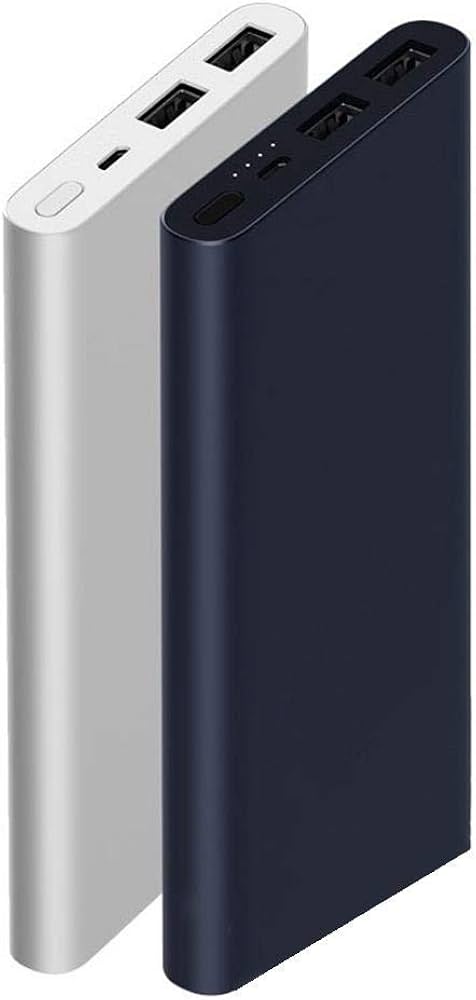
The 10000mAh Power Bank 2S is a compact portable charger built for everyday phone, tablet, and accessory charging. It is designed for users who want a reliable backup battery with dual USB output, fast charging support, and automatic power management in a travel-friendly size.
This model suits commuters, travelers, students, and anyone who needs a practical power bank for smartphones, wireless earbuds, smart bands, and other USB-powered devices.
Specifications
- Model: PLM09ZM
- Battery type: Li-polymer battery
- Battery capacity: 10000mAh 3.7V (37Wh)
- Rated capacity: 6500mAh 5.1V (typical, 1A)
- Input port: Micro-USB
- Output port: USB-A
- Input: 5.0V 2.0A / 9.0V 2.0A / 12.0V 1.5A
- Single-port output: 5.1V 2.4A / 9.0V 1.6A max / 12.0V 1.2A max
- Dual-port output: 5.1V 2.4A (15W max)
- Operating temperature: 0°C to 40°C
- Dimensions: 147 × 71.2 × 14.2 mm
- Approximate charging time: 3.5 hours with a 9V/2A or 12V/1.5A adapter; 5.5 hours with a 5V/2A adapter
Detailed description
The 10000mAh Power Bank 2S uses a lithium-polymer cell together with charge and discharge control circuitry to manage power delivery safely and efficiently. It automatically detects when it is charging or discharging, so it does not use a traditional power button for normal operation.
The main body includes two USB-A output ports, a Micro-USB input port, a power check button, and a row of indicator LEDs that show charging status, remaining capacity, and special operating states. The power check button is mainly used to wake the display, check battery level, and activate low-current mode for small accessories.
Built-in charging control supports common fast-charging voltages and helps the power bank work with a wide range of smartphones, tablets, and other USB devices.
Safety
This power bank includes protection against overcharging, over-discharging, overheating, and short circuits. It should not be opened or disassembled, since the battery cell can be damaged and create hazards.
Do not crush, puncture, short-circuit, or expose the unit to water, fire, or temperatures above 60°C. Use a standard charging cable when charging the power bank or a connected device, and make sure the device shows the charging icon during use.
For first use, fully charge the 10000mAh Power Bank 2S before relying on it. If the device enters protection mode and the LEDs stay off after pressing the power check button, connect it to an external charger to recover normal operation.
Setup and operation
Charging the power bank
Connect the power bank to a compatible charger using the Micro-USB input. A higher-power adapter shortens charging time, while a standard 5V/2A adapter takes longer.
The LEDs provide a simple capacity readout during charging. The light pattern changes as the battery moves from low charge to full charge, and an error pattern appears if charging does not proceed normally.
Charging your device
Use a USB cable to connect your phone or other device to one of the USB-A output ports. The 10000mAh Power Bank 2S automatically begins output when a device is connected and stops when the device is unplugged.
When charging one device, the power bank supports fast charging up to 5.1V/2.4A, 9V/1.6A, or 12V/1.2A depending on device compatibility. When both output ports are used together, total output is limited to 15W.
If the indicator lights turn off while charging a device, recharge the power bank soon, since it may be near empty.
LED indicators
- One light blinking: very low charge or undervoltage state
- One to four lit LEDs: increasing charge levels from low to full
- All indicators on: battery is fully charged or nearly full
- Blinking pattern during charging: charging error or abnormal input condition
Low-current discharge mode
Double-press the power check button when the power bank is not charging to enter low-current discharge mode. This mode is useful for small accessories such as Bluetooth headphones and smart bands that need a gentler power draw.
In this mode, the LEDs light in sequence to show that the special low-current output is active. Press the power check button again to exit this mode.
Troubleshooting
- If no LEDs light after pressing the power check button, the power bank may be in protection mode and should be recharged with an external charger.
- If the connected device does not show a charging icon, check the cable, confirm the device is compatible, and reconnect the power bank.
- If all indicators go off during device charging, recharge the power bank soon because the stored energy is low.
- If charging seems abnormal or stops unexpectedly, use a standard cable and verify that the input power source matches the supported charging range.
Pros & Cons
- Pros: The 10000mAh Power Bank 2S offers dual output ports, fast charging support, broad device compatibility, and built-in safety protection.
- Pros: Low-current mode makes it useful for small wearables and accessories.
- Pros: The slim design and Micro-USB input keep it practical for daily carry and easy recharging.
- Cons: It uses Micro-USB for input rather than USB-C.
- Cons: Fast-charging performance depends on the connected device and cable quality.
Faqs
How do I charge the 10000mAh Mi Power Bank 2S for the first time?
What do the LED indicator lights mean on the 10000mAh Power Bank 2S?
How many devices can the 10000mAh Mi Power Bank 2S charge at once?
Does the 10000mAh Power Bank 2S support fast charging?
How long does it take to fully charge the 10000mAh Mi Power Bank 2S?
How do I use low-current discharge mode for Bluetooth headphones or smart bands?
What should I do if the 10000mAh Mi Power Bank 2S enters protection mode?
What safety precautions should I follow when using the 10000mAh Power Bank 2S?
More mi manuals
Leave a Comment