
Midea VCR S10 Plus Robot Vacuum Cleaner User Manual
Content
Midea VCR S10 Plus Robot Vacuum Cleaner: Full Product Manual and Buying Guide
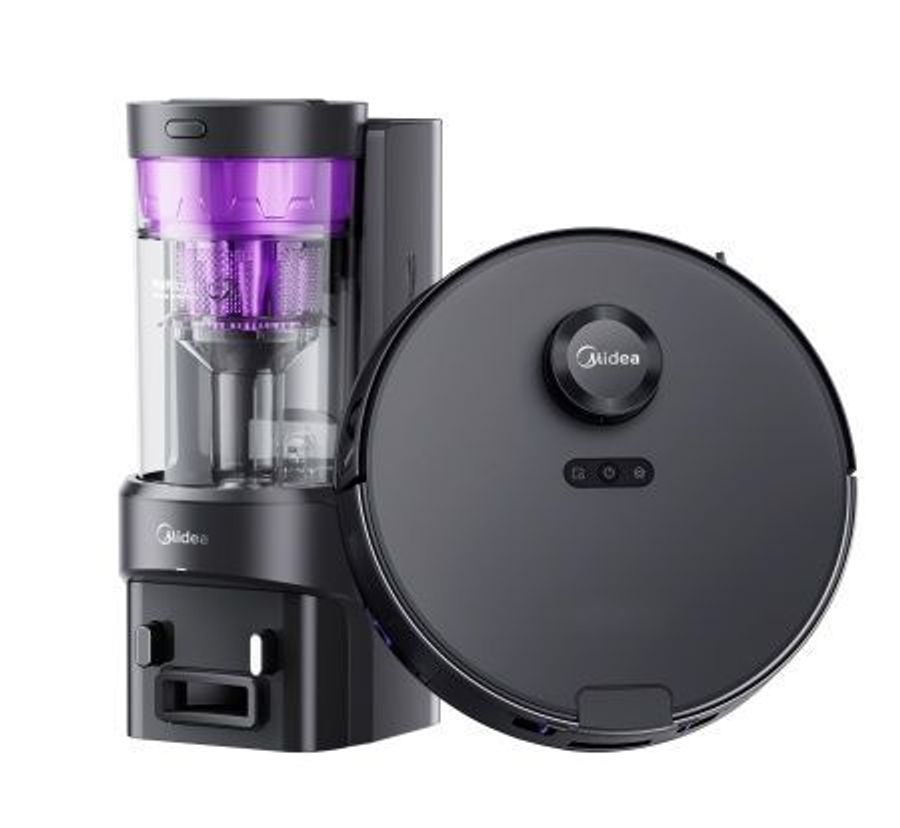
The Midea VCR S10 Plus Robot Vacuum Cleaner is a premium 2-in-1 robotic cleaner designed for homes that need powerful suction, smart navigation, and low-maintenance cleaning. With 4000Pa suction, LiDAR-based mapping, app control, and an auto-empty station, it stands out as a practical choice for busy households, pet owners, and anyone who wants hands-free floor care. The combination of dry and wet cleaning makes it especially useful for mixed flooring, including tile, laminate, hardwood, and low-pile carpets.
This robot vacuum is built for users who want more than basic cleaning. Its 5200mAh battery supports up to 180 minutes of runtime in quiet mode, making it suitable for larger apartments and multi-room homes. The compact robot body helps it move under furniture, while the self-emptying base reduces the need for frequent dustbin emptying. Voice assistant compatibility and mobile app controls add convenience for everyday use.
In terms of pricing, the Midea VCR S10 Plus Robot Vacuum Cleaner is typically positioned in the mid-to-premium range, with common retail prices around $250 to $400 depending on region, promotions, and bundled accessories. Availability is strongest through major online marketplaces and appliance retailers, with stock varying by market. For shoppers comparing robot vacuum cleaners with self-empty stations, the VCR S10 Plus offers a strong balance of smart features, cleaning performance, and value for money.
Technical Specifications of Midea VCR S10 Plus Robot Vacuum Cleaner
- Suction power: 4000Pa for deep cleaning on hard floors and carpets
- Battery: 5200mAh Li-Ion battery for extended runtime
- Runtime: Up to 180 minutes in quiet mode
- Cleaning modes: Dry and wet vacuuming with mopping function
- Dustbin capacity: 0.2L in the robot, with a self-empty station capacity of about 3L
- Water tank capacity: 0.22L for wet cleaning
- Navigation: LDS LiDAR with infrared sensors for room mapping and obstacle awareness
- Connectivity: Wi-Fi app control with smart home support
- Voice assistant support: Works with major assistants such as Alexa, Google Assistant, and Alice in supported markets
- Dimensions: Approx. 350 × 350 × 97 mm
- Noise level: Around 65 dB in typical operation
- Charging base: Self-empty dock with high-capacity dust collection system
Compared with entry-level robot vacuums, the Midea VCR S10 Plus Robot Vacuum Cleaner offers stronger suction, smarter navigation, and a more convenient self-emptying design. Against similarly priced rivals, it competes well with models that prioritize automated maintenance and long battery life, though premium brands may still offer more advanced obstacle recognition or richer app ecosystems.
Pros and Cons of Midea VCR S10 Plus Robot Vacuum Cleaner
Pros
- Powerful 4000Pa suction: Handles dust, crumbs, pet hair, and everyday debris effectively.
- Long battery life: Up to 180 minutes of cleaning time helps cover larger spaces in one session.
- Self-emptying station: Reduces manual dust disposal and supports a more hands-free experience.
- LiDAR navigation: Improves room mapping, route planning, and repeatable cleaning performance.
- Dry and wet cleaning: Useful for households that want vacuuming and light mopping in one device.
- Good value for money: Offers many premium features at a lower cost than flagship robot vacuum cleaners.
Cons
- Not ideal for deep carpet cleaning: Works best on hard floors and low-pile rugs rather than thick carpets.
- Mopping is basic: Suitable for light maintenance, not heavy stains or sticky spills.
- App experience may vary: Some users report setup complexity or occasional connectivity issues.
- Obstacle handling is good, not perfect: Cables, small toys, and clutter can still require pre-cleaning.
- Large dock footprint: The self-empty station takes more floor space than a standard charging base.
For buyers comparing robot vacuum cleaners with self-empty stations, this model is a strong mid-range option. It is especially appealing if you want automation and long runtime without paying flagship-brand pricing.
Customer Reviews for Midea VCR S10 Plus Robot Vacuum Cleaner
Customer feedback for the Midea VCR S10 Plus Robot Vacuum Cleaner is generally very positive, with many users praising its suction power, quiet operation, and reliable room mapping. Typical ratings fall around 4.8 to 4.9 out of 5 stars across retailer review pages, reflecting strong satisfaction with performance and convenience.
- Rating: 4.8/5
- Rating: 4.9/5
- Common praise: “Cleans pet hair well and returns to the dock without issues.”
- Common praise: “The self-empty station saves a lot of time.”
- Common complaint: “Mopping is better for maintenance than for deep cleaning.”
- Common complaint: “Needs a clear floor area to navigate efficiently.”
Most buyers recommend the model for families, pet owners, and users looking for a smart robot vacuum with low upkeep. It is a smart purchase if you want strong performance, automated dust collection, and dependable everyday cleaning. Shoppers who need advanced stain scrubbing or premium obstacle avoidance may prefer higher-end alternatives.
Faqs
How do I set up the midea VCR S10 Plus Robot Vacuum Cleaner for the first time?
Why is my midea VCR S10 Plus Robot Vacuum Cleaner not charging on the dock?
How can I improve suction and cleaning performance on the midea VCR S10 Plus Robot Vacuum Cleaner?
What should I do if the midea VCR S10 Plus Robot Vacuum Cleaner keeps getting stuck?
Is the midea VCR S10 Plus Robot Vacuum Cleaner compatible with smart home apps and voice control?
How often should I clean and maintain the midea VCR S10 Plus Robot Vacuum Cleaner?
Can the midea VCR S10 Plus Robot Vacuum Cleaner handle pet hair and mixed floor types?
What do I do if the midea VCR S10 Plus Robot Vacuum Cleaner shows navigation or sensor errors?
More midea manuals
Leave a Comment