
Setup: Mobvoi TicNote AI Voice Recorder User Manual
Content
Mobvoi TicNote AI Voice Recorder: Comprehensive Product Manual and Review.
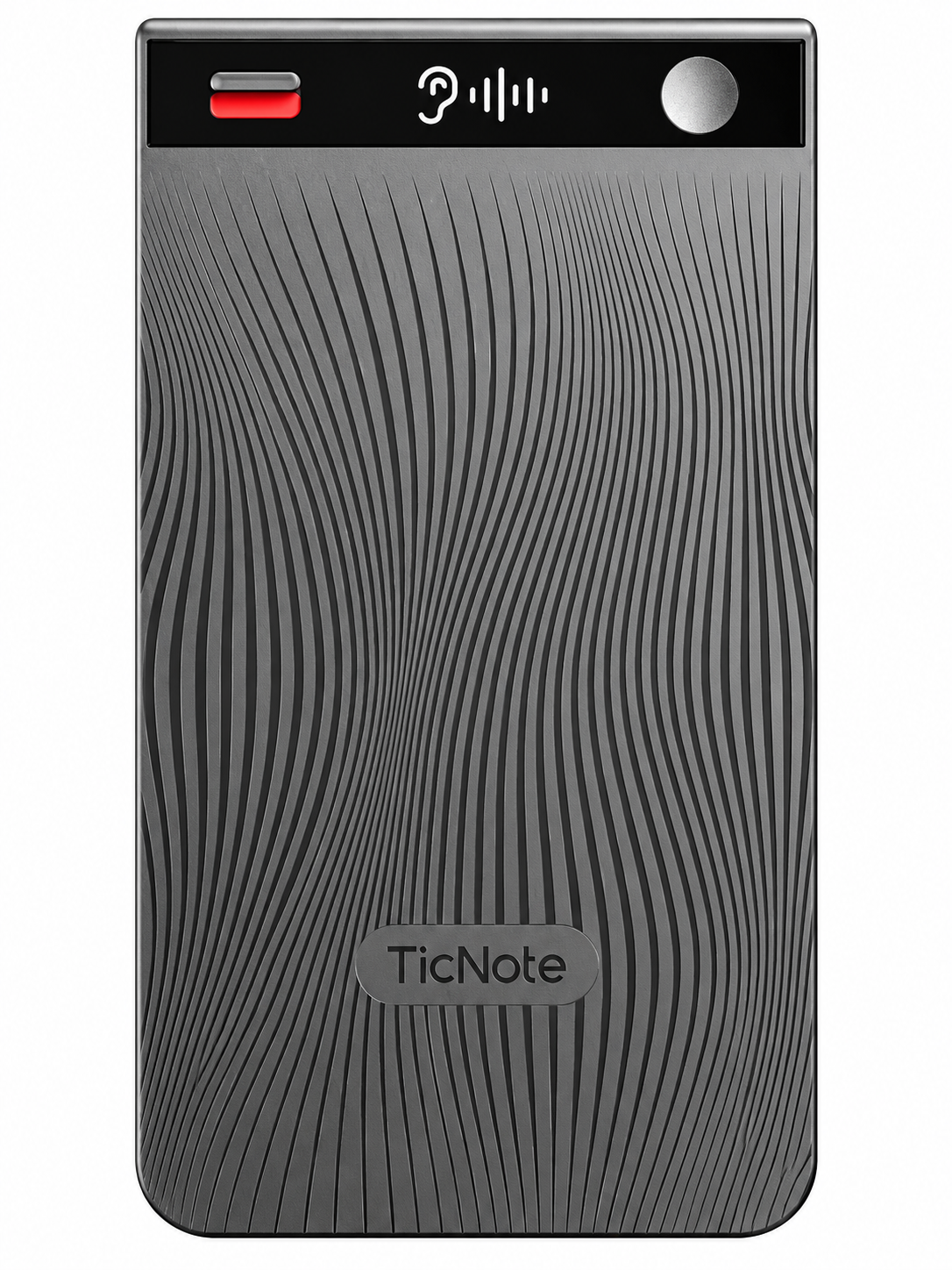
Introduction to Mobvoi TicNote AI Voice Recorder
The Mobvoi TicNote AI Voice Recorder is the world's first agentic AI voice recorder, revolutionizing how professionals capture, transcribe, and analyze audio for maximum productivity. This slim, powerful device goes beyond traditional recording with AI-powered features like real-time transcription, summarization, mind maps, and deep research via its innovative Shadow AI assistant. Record meetings, lectures, phone calls, or interviews effortlessly, and let the AI transform raw audio into actionable insights, podcasts, or translated notes in 100 languages.
Key benefits include dual-mode precision recording—speaker mode for meetings and earphone mode for calls—ensuring crisp audio capture with dual-mic noise cancellation and AGC algorithm for clear sound even in noisy environments. Unique selling points are its 64GB storage for up to 834 hours of audio, 25 hours of continuous battery life, and seamless Bluetooth/Wi-Fi connectivity to your phone's TicNote app.Target audiences include business professionals, students, journalists, and anyone needing a reliable "second brain" for note-taking.
Use cases span conference calls, classroom lectures, and on-the-go interviews, with AI podcast mode turning discussions into engaging summaries. Priced around $150-$200 based on official listings, the Mobvoi TicNote AI Voice Recorder is available on Mobvoi's site and major retailers like Amazon, making it an accessible upgrade for smart recording needs in 2025 and beyond.
Mobvoi TicNote AI Voice Recorder Specifications and Key Features
The Mobvoi TicNote AI Voice Recorder packs advanced specs into a compact design, outperforming rivals like Plaud Note and Plaud Pin in AI depth and storage. Here's a detailed breakdown:
- Storage: 64GB, supporting up to 834 hours of audio recording (or 434 hours per some tests).
- Battery: 470mAh capacity, up to 25 hours continuous use, 20+ days standby; 4500 minutes recording per charge.
- Recording Modes: Dual-mode (speaker for meetings/interviews, earphone for calls); dual-mic with noise cancellation and AGC for crisp audio.
- AI Capabilities: Real-time transcription/summarization in 100 languages, mind maps, AI podcast mode, Shadow AI for deep research/translation; 600 mins/month free AI functions, unlimited cloud storage.[2][4][6]
- Connectivity: Bluetooth (standard), Wi-Fi acceleration; OLED display for status/battery; one-tap record/power button.
- Other: Supports phone calls on speaker, app integration for editing/export; U.S.-based secure cloud.
Compared to Plaud devices, TicNote excels in agentic AI (beyond basic transcription) and longer battery, ideal for extended workflows.
Setup
- Search for "Mobvoi TicNote" in the App Store or Google Play to download the app.
- Create your Mobvoi TicNote account.
- Tap (0.5s) the power button to turn on your TicNote.
- The device displays a pending binding status, indicating that your TicNote is ready to be paired.
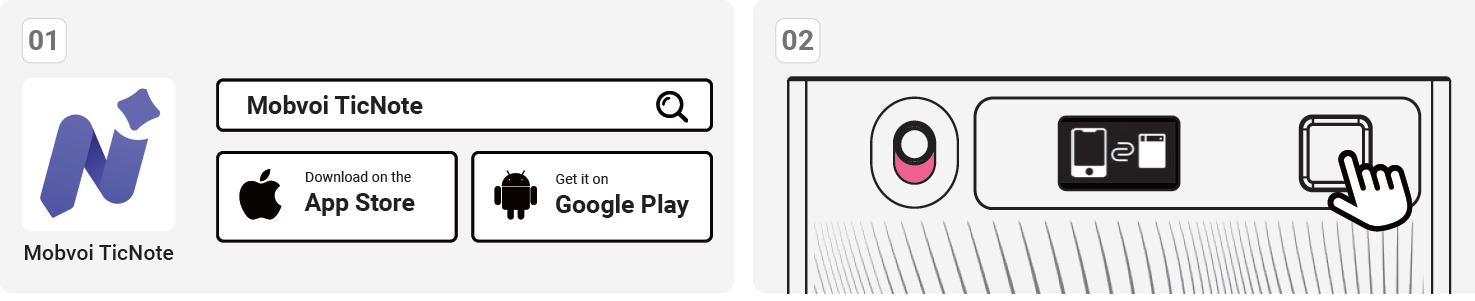
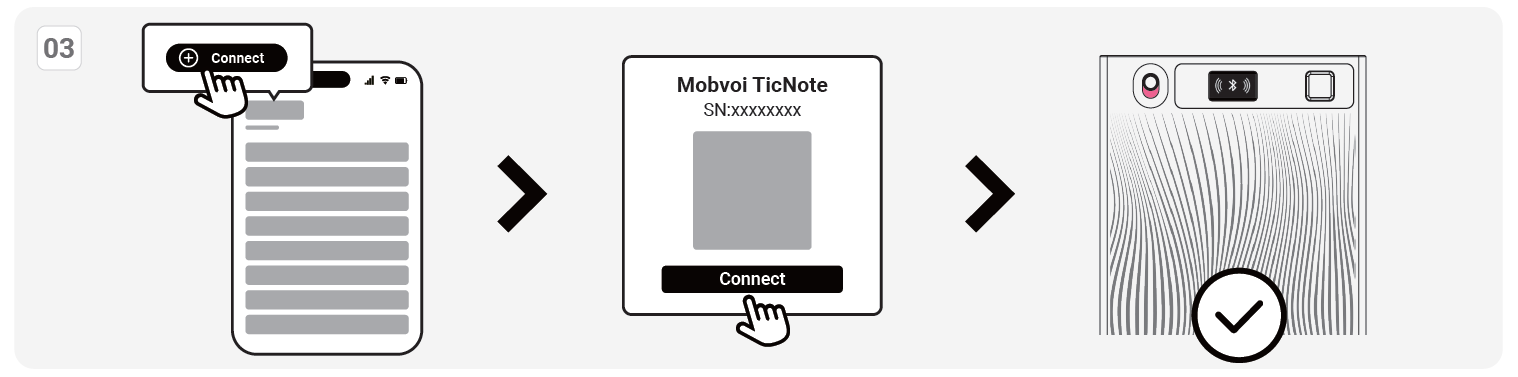
- Open the "Mobvoi TicNote" app and follow the on-screen instructions to complete the binding process.
- Once binding is successful, the device will display the Bluetooth icon shown above.
Start Recording

Recording mode:
Speaker mode
- When the switch is toggled down, it is in speaker mode.
- In this mode, you can hold TicNote in your hand or place it on a desk to start recording.
Earphone mode
- When the switch is toggled down, it is in speaker mode.
- In this mode, TicNote can capture the vibration of the phone, providing accurate records.
- Note: To use this mode, make sure your phone is in regular call mode (not on a Bluetooth call), and use the included magnetic case to attach TicNote to the back of your phone.
Start recording
- In either recording mode, press and hold the power button for 2 seconds. TicNote will vibrate once, and the display will show the recording status, indicating that recording has started.
End recording
- Press and hold the power button for 2 seconds. TicNote will vibrate twice, and the display will return to the Bluetooth icon, indicating that recording has ended.
Recording File Sync
File Sync Mode:
- Bluetooth Mode
Bluetooth mode is the default file sync method for TicNote. Once TicNote is connected to the app, it will automatically begin the transfer. - Wi-Fi Fast Transfer
For large recording files, TicNote offers the ability to sync files to the app via Wi-Fi fast transfer. When fast transfer is enabled, TicNote will activate a hotspot, and once the app successfully connects to the hotspot, TicNote will automatically sync the files to the app.
Troubleshooting Mobvoi TicNote AI Voice Recorder Common Issues
Encounter problems with your Mobvoi TicNote AI Voice Recorder? Most are simple fixes. Common issues include connectivity drops, poor transcription in noise, or battery drain.
- No Recording/Bluetooth Pairing Fails: Ensure slider is in correct mode (push up for calls); restart app/device, toggle Wi-Fi acceleration. Reset via power button hold.
- Low Audio Quality/Transcription Errors: No advanced noise reduction—position closer to source; avoid heavy background noise. Test in speaker mode for meetings.
- AI Features Not Working (e.g., Shadow AI timeouts): Check 600 mins/month limit; update app for real-time transcription. Use cloud upload for deep research.
- Battery Drains Fast: Disable unused AI during recording; charge fully (typical time not specified, but quick via USB).
- Error Codes: Flashing OLED indicates low battery—charge immediately; app errors resolve with logout/login.
Prevent issues by updating firmware via TicNote app and storing securely.
Pros and Cons of Mobvoi TicNote AI Voice Recorder
Pros
- Exceptional AI features like Shadow AI for transcription, summarization, and research outperform basic recorders.
- Impressive 25-hour battery and 64GB storage (834 hours audio) suit heavy users.
- Crisp dual-mic recording with modes for versatile use; easy one-tap operation.
- Great value at $150-$200—better than Plaud alternatives in AI depth and cloud perks.
- Secure U.S. cloud and 100-language support enhance privacy/productivity.
Cons
- Lacks strong noise cancellation—struggles in very loud settings vs. pro mics.
- AI limited to 600 mins/month free; heavy users may need premium.
- App-dependent for full features; minor setup learning curve.
- Volume not super high in calls; compression affects max quality.
Overall, pros dominate for AI-focused users, offering strong value over competitors.
Customer Reviews and Feedback on Mobvoi TicNote AI Voice Recorder
Users rave about the Mobvoi TicNote AI Voice Recorder, averaging 4.5/5 stars across YouTube reviews and Mobvoi listings. Praises highlight Shadow AI's speed: "Transcription in 100 languages is a game-changer for meetings—turns hours into minutes!" says one reviewer, demoing real-time summaries. Battery life earns kudos: “25 hours non-stop? Perfect for lectures.”
Common complaints: Noise in crowded tests—"handles it, but no ANC hurts." App glitches fixed via updates. Testimonials recommend for pros: “Better than Plaud—slim design, unlimited cloud wins.” Ideal buy if AI note-taking is key; addresses pain points like manual notes effectively.
Faqs
How do I set up mobvoi TicNote AI Voice Recorder for the first time?
What should I do if mobvoi TicNote AI Voice Recorder won't connect to the app?
How does Shadow AI work on mobvoi TicNote AI Voice Recorder?
Is mobvoi TicNote AI Voice Recorder compatible with iPhone and Android devices?
How can I optimize battery life on mobvoi TicNote AI Voice Recorder?
How do I clean and maintain mobvoi TicNote AI Voice Recorder?
Why is audio quality poor on my mobvoi TicNote AI Voice Recorder?
How much storage and recording time does mobvoi TicNote AI Voice Recorder offer?
More mobvoi manuals
Leave a Comment