
Setup: Mobvoi TicWatch Atlas Owner Manual
Content
Mobvoi TicWatch Atlas: Comprehensive Product Manual and Review Guide
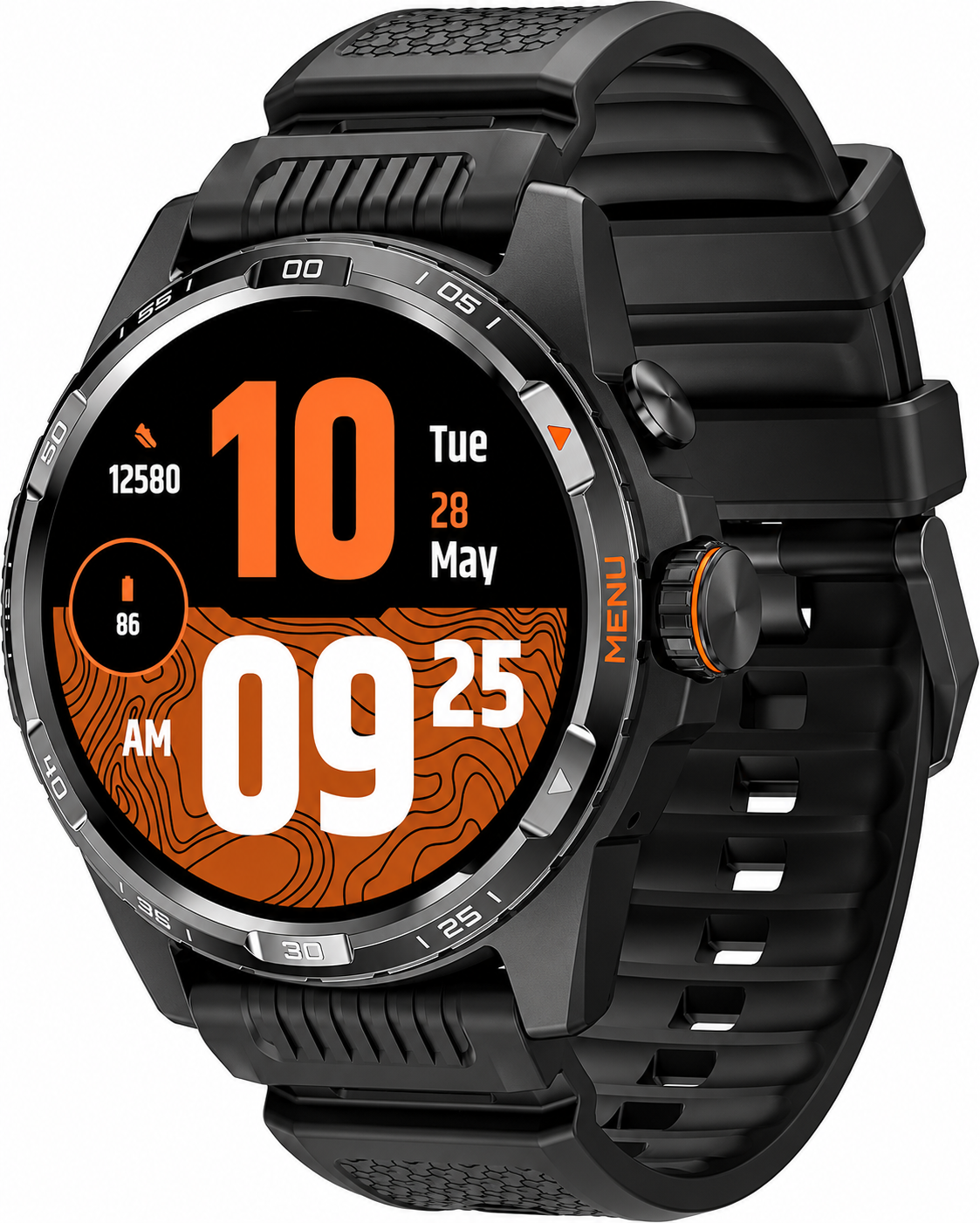
Introduction to the Mobvoi TicWatch Atlas Smartwatch
The Mobvoi TicWatch Atlas is a rugged, high-performance Android smartwatch designed for adventure enthusiasts, fitness trackers, and everyday users seeking exceptional battery life and robust features. Powered by Wear OS 4 and the Qualcomm Snapdragon W5+ Gen 1 platform, this wearable combines a premium 1.43-inch OLED display with an Ultra Low-Power (ULP) secondary screen for unmatched endurance—up to 90 hours in smart mode or 45 days in essential mode. Its durable build, featuring stainless steel, 7000-series aluminum, high-strength nylon with fiberglass, and sapphire crystal glass, makes it ideal for outdoor activities like hiking, swimming, and extreme sports, certified with 5ATM water resistance and MIL-STD-810H military standards.
Key benefits include advanced health monitoring (heart rate, SpO2, skin temperature, stress, respiratory rate), over 100 workout modes, GPS navigation, fall detection, emergency SOS, and Google Wallet NFC payments. Unique selling points like the rotating crown for navigation, Heat Map activity tracking, and one-tap multi-metric measurements set it apart in the TicWatch Atlas lineup. Target audiences range from athletes needing VO2 Max and recovery time insights to professionals wanting Bluetooth calls and notifications on their wrist.
Priced around $350-$400, the mobvoi TicWatch Atlas is available on Mobvoi's official site and major retailers, offering great value compared to pricier rivals like the Samsung Galaxy Watch or Google Pixel Watch. Whether tracking runs, monitoring sleep, or navigating trails, this smartwatch delivers reliability and innovation for active lifestyles.
Mobvoi TicWatch Atlas Specifications and Key Features
The Mobvoi TicWatch Atlas boasts top-tier specs for a rugged Wear OS smartwatch. Here's a detailed breakdown:
- Dimensions and Weight: 52.2 x 47.8 x 12.05mm, 47.2g—lightweight yet tough for all-day wear.
- Display: 1.43-inch 466x466 OLED (326ppi) + Ultra Low-Power Display, sapphire crystal for scratch resistance.
- Processor and Memory: Qualcomm Snapdragon W5+ Gen 1, 2GB RAM, 32GB storage for smooth performance.
- Battery: 628mAh, up to 90 hours (4 days typical), 45 days essential mode; fast charging (65% in 30 mins).
- Sensors: Accelerometer, gyro, HD PPG heart rate, SpO2, skin temperature, barometer, compass, off-body sensor.
- Connectivity: Bluetooth 5.2, Wi-Fi 2.4GHz, NFC (Google Wallet), GPS + multi-GNSS (Beidou, GLONASS, Galileo, QZSS).
- Durability: 5ATM (open water swim), MIL-STD-810H; interchangeable 24mm fluororubber straps.
- Features: Wear OS 4, Google Assistant, 100+ workouts, Afib alerts, VO2 Max, recovery time, Heat Map, fall detection, SOS via rotating crown.
Compared to Samsung Galaxy Watch 6 (lighter aluminum, shorter battery) or Google Pixel Watch 2 (premium AMOLED but less rugged), the TicWatch Atlas excels in battery and durability benchmarks.
Button & functions
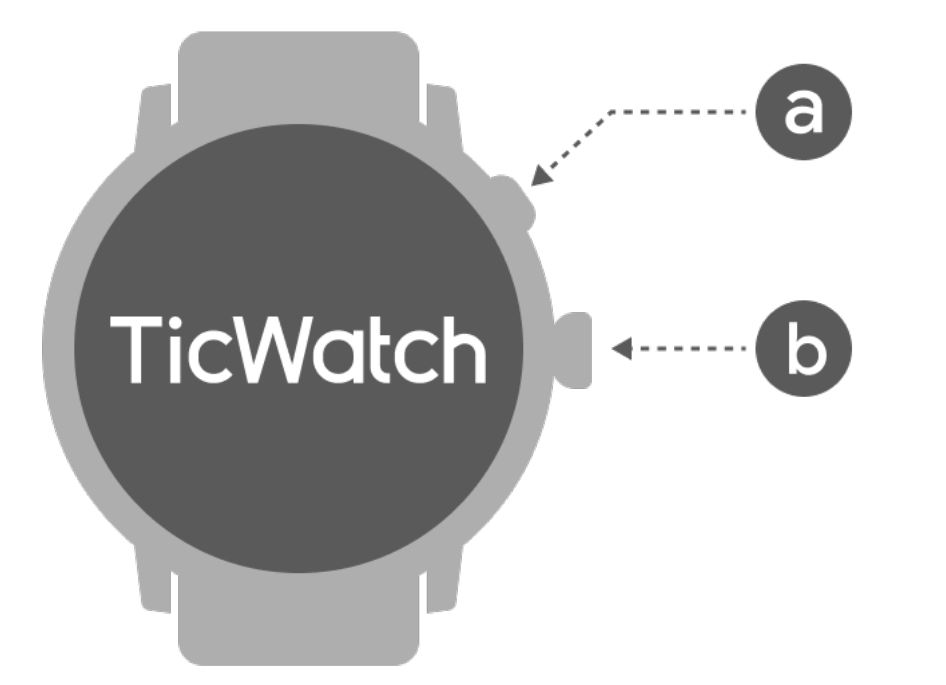
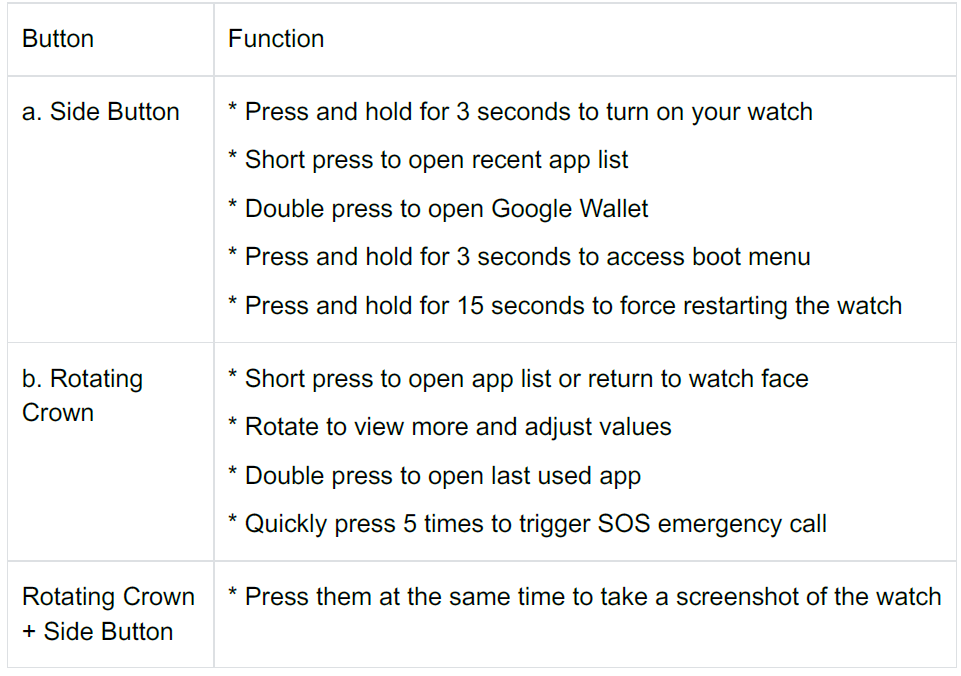
Setup
Rotating crown
Rotate the crown clockwise or anticlockwise to easily control various watch functions.
Rotate to view tiles:
- On the home screen, rotate to view tiles.
- The function can be enabled in Settings → General → Rotate for tiles.
Rotate to view watch faces:
- Long-press the home screen and rotate to view watch faces.
Rotate to scroll pages.
Rotate to adjust values, including volume, numbers, brightness, etc.
Wear the watch
- Accurate data on heart rate during exercise can be obtained through correct use of the watch. Inaccurate data on heart rate will be obtained if it is worn too tightly or loosely.
- The watch should be worn 1–2 horizontal fingers above the wrist bone. The watch should fit the arm. Shake the hand a few times to ensure comfortable wear.
- Keep the wrist clean. Long-term use of the watch on the same area may constrict blood vessels. It is recommended to adjust the position.
Turn the watch on and off
Turn on the watch
Press and hold the side button for a few seconds to turn on the watch.
Turn off the watch
Press and hold the side button for a few seconds.
Install the Mobvoi Health app on your phone
To connect your watch to a smartphone, please install the Mobvoi Health app on your phone first.
- Search and download "Mobvoi Health" in the Google Play Store.
- The Mobvoi Health app is only compatible with TicWatch that runs on the Wear OS 3 platform. If you have other types of TicWatch, you may need to install the Mobvoi app and follow the instructions.
- If you already have the Wear OS by Google app or Mobvoi app installed, please uninstall them before pairing.
Connect your watch to a smartphone
- Turn on the watch.
- Tap and select a language.
- On-screen instructions for launching the Mobvoi Health app will appear.
- Launch the Mobvoi Health app on your smartphone.
- Tap the [Device] tab and tap [Add a new device].
- Select your watch on the screen.
- Follow the on-screen instructions to complete the pairing process.
Pair with multiple watches
For Android devices, it is possible to pair with multiple TicWatches at the same time.
- Launch the Mobvoi Health app on your smartphone.
- Tap the [Device] tab.
- Tap the [+] icon in the top right corner to start the pairing process.
Remove the paired watch
- Open the Mobvoi Health app and tap Settings.
- Tap the Unpair and reset button at the bottom to unpair the watch from the app.
How to maintain connection stability?
After the watch is paired, please make sure to maintain a stable connection between the watch and mobile phone to ensure normal functions such as message notifications.
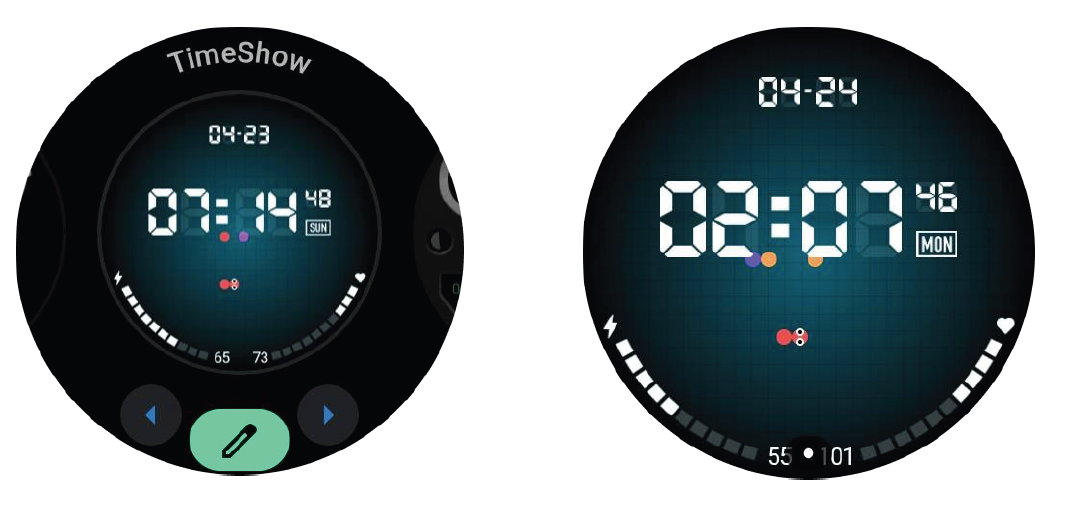
TimeShow - Browse more watch faces
- Long-press on the watch face to enter the watch face edit list.
- Tap the TimeShow watch face to apply.
- You can choose different watch faces from the TimeShow app on both your watch and phone. Make sure you set TimeShow as your current watch face.
Browse watch faces on your watch
- Press the rotating crown to enter the application list menu.
- Tap the TimeShow app.
- You can browse watch faces from the daily recommendation or featured list.
- Tap the watch face to preview it.
- You can download a free watch face and apply it directly.
- Or you can purchase paid watch faces.
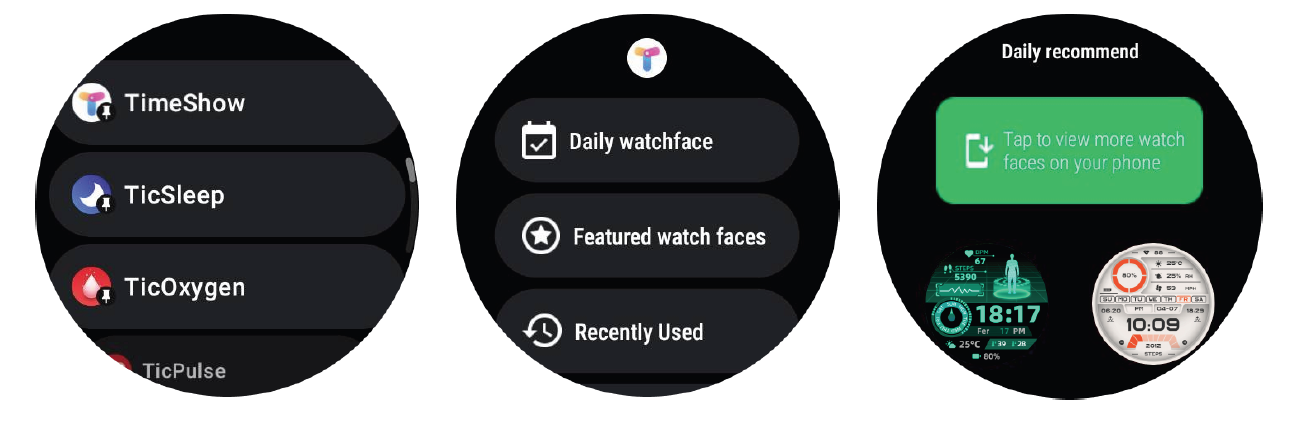
View TimeShow on your phone
You can find more watch faces through the following methods:
- Download and install the TimeShow app on your phone.
- You can use your Mobvoi registered email address and password to log into TimeShow directly or log in with a Google account.
- If you want to sync watch faces, please tap the sync button and make sure your phone and watch are connected via Bluetooth.
- If you want to subscribe, please tap the shopping cart button and follow the instructions.
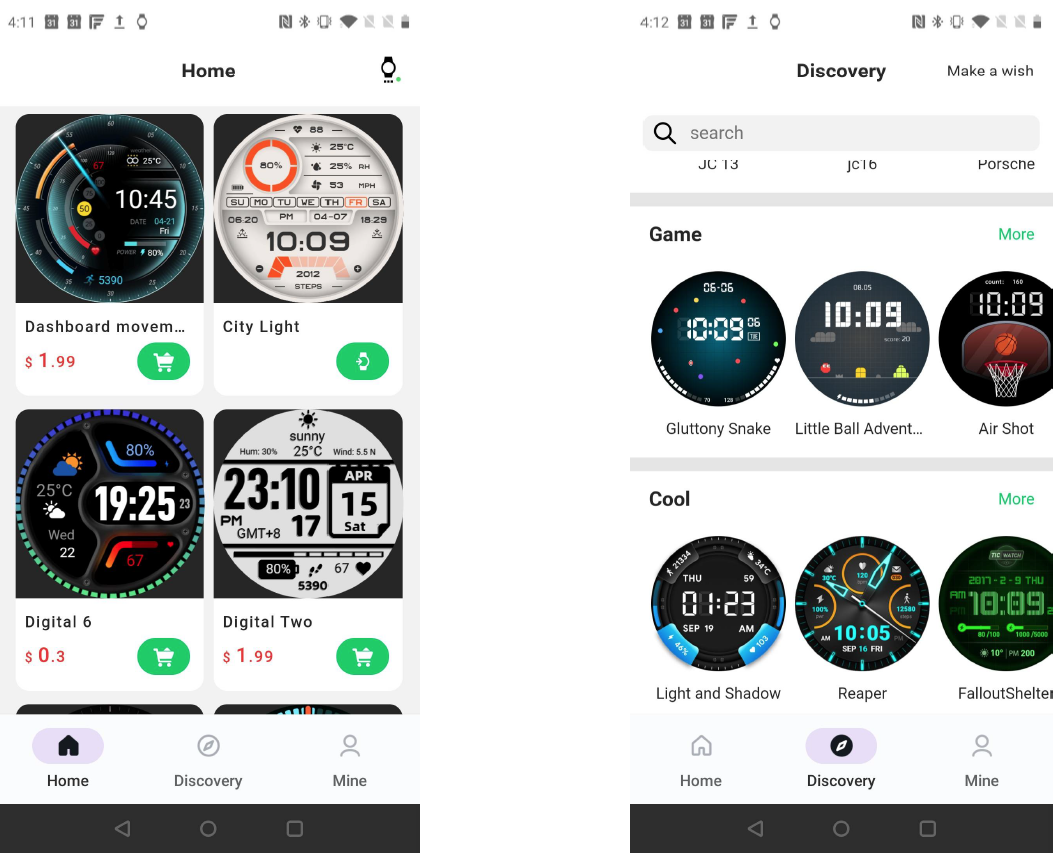
Edit watch faces
Some customizable watch faces have an "Edit" button. You can edit them according to your preferences.
- Tap the settings icon.
- Swipe left or right on the screen to select the desired customization option.
- Use the rotating crown or swipe up or down to change the color or other settings.
- To change the complications, tap the highlighted area you want and then set them.
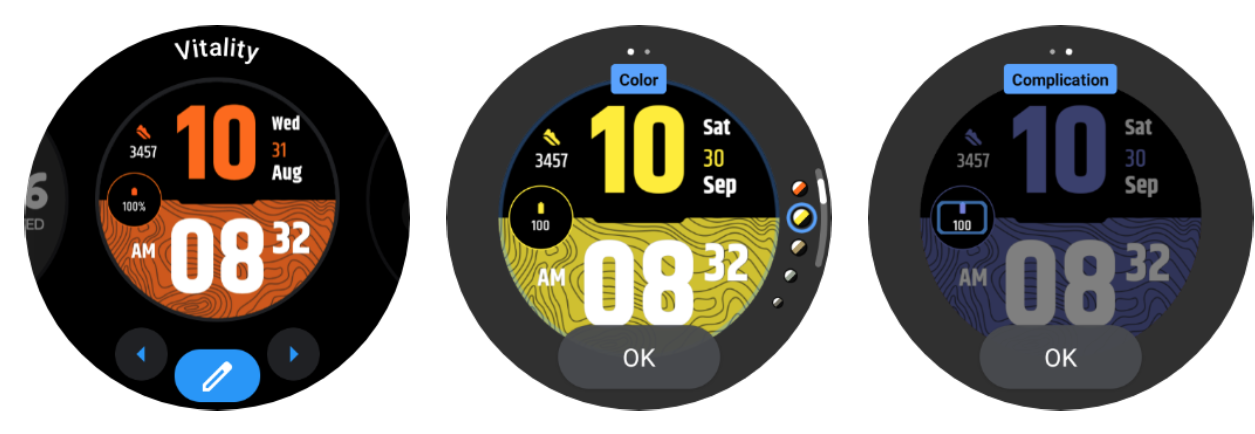
Edit quick settings
- Tap the edit button to edit quick setting icons.
- Tap [+] to add the icons to appear on the QSS tray.
- Tap [-] to remove icons from the QSS tray.
- Tap [Save] to save changes.
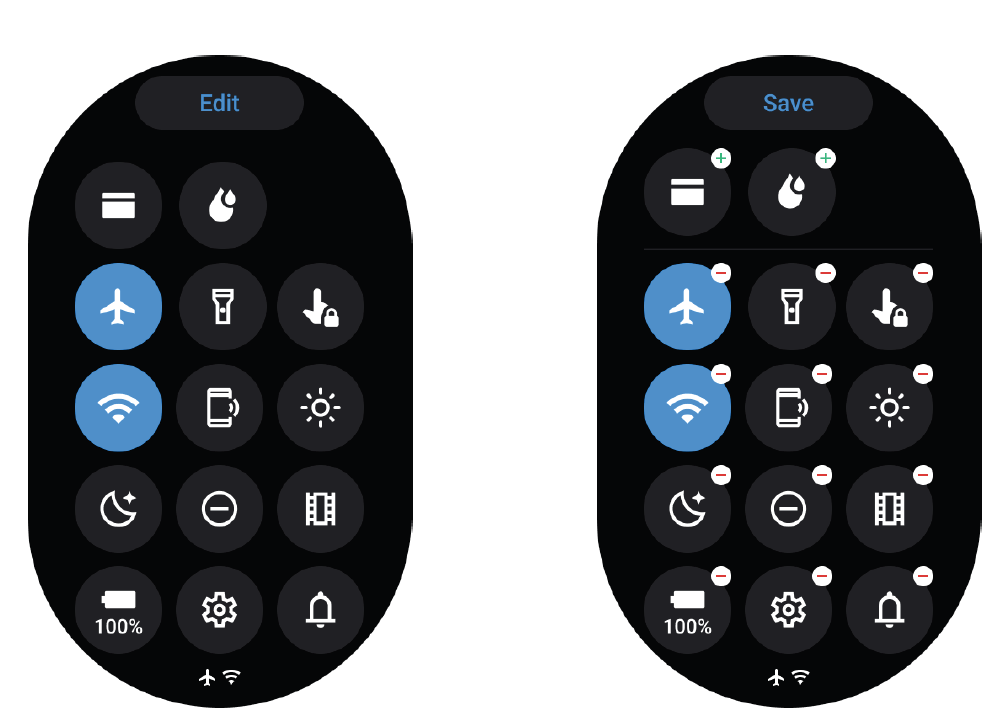
The UI of the ULP display
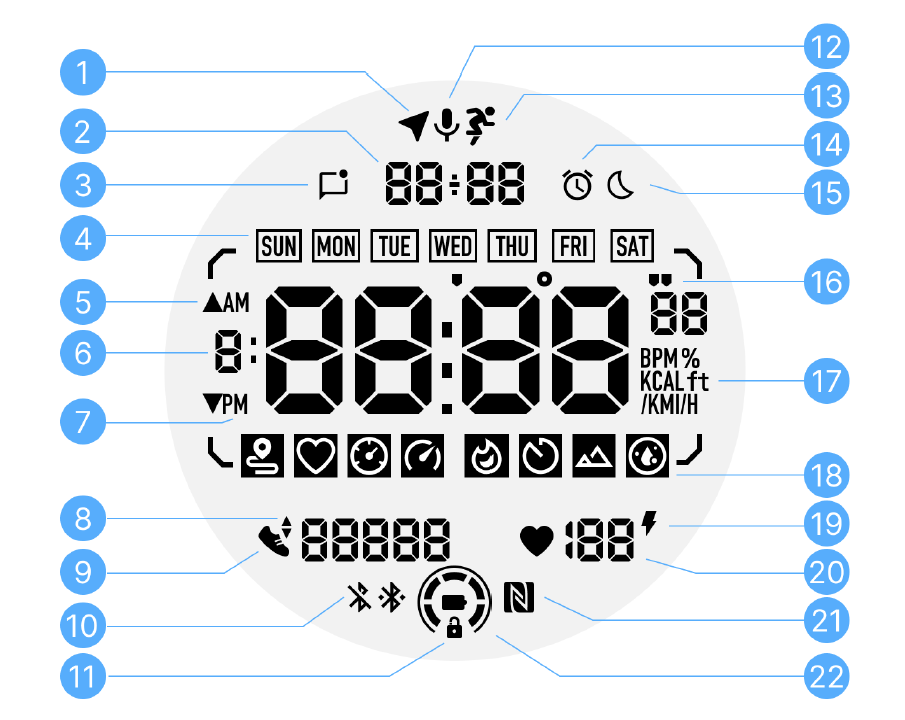
The operations of the ULP display
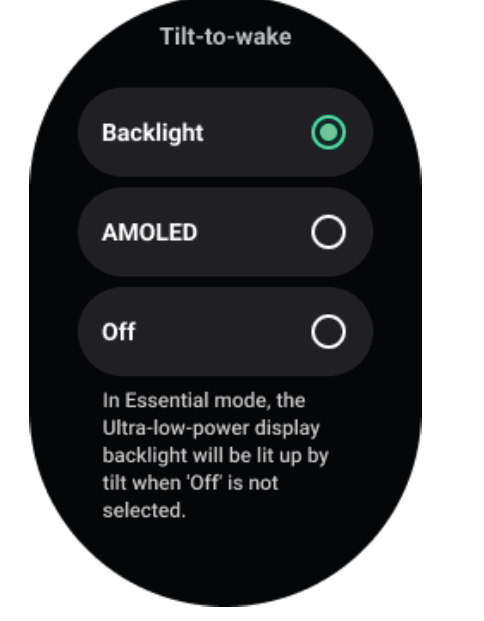
How to turn on and off the backlight?
- The tilt-to-wake backlight option is on by default.
- Please go to "Settings → Display → Tilt-to-wake" for details.
- In general, there are two methods to activate the backlight: raising your wrist or rotating the crown more than 180 degrees. The backlight will automatically turn off after a timeout or when you lower your wrist. Additionally, the ULP display will be locked to prevent accidental operations.
- In essential mode, you can also toggle the backlight on or off by clicking the side button.
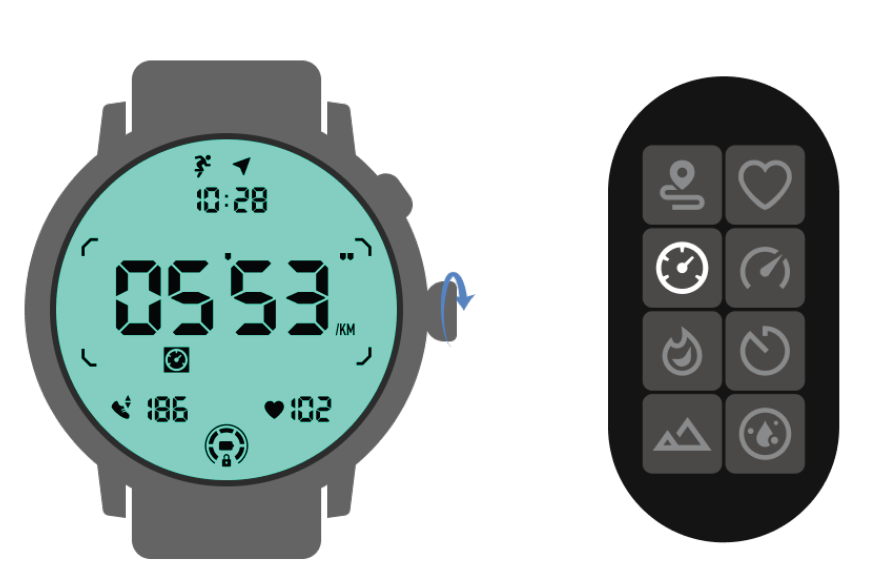
How to switch ULP tiles?
After unlocking the ULP display, rotating the crown clockwise or counterclockwise will sequentially switch ULP tiles in ascending and descending order.
Troubleshooting Common Mobvoi TicWatch Atlas Issues
Encountering problems with your mobvoi TicWatch Atlas? Here are solutions for frequent issues:
- Battery Drains Quickly: Enable ULP mode or essential tier; disable unused sensors. Charge via magnetic USB-A pogo pins—full in under an hour.
- Display Not Responding: Restart via crown + button hold (10s); check for Wear OS updates in settings.
- Sensor Inaccuracies (e.g., Heart Rate/SpO2): Clean sensors, ensure snug fit; recalibrate GPS outdoors. Use one-tap measurement for quick checks.
- Connectivity Drops (Bluetooth/Wi-Fi): Forget/re-pair device; toggle airplane mode. Supports BT calls—test in quiet areas.
- Accidental SOS Triggers: Disable in settings if sensitive; triggered by 5x crown presses—useful for emergencies.
- App Crashes: Clear cache via TicWatch app; update to latest Wear OS 4 firmware.
Prevent issues by updating software regularly and avoiding extreme temperatures. Mobvoi offers 1-year
Pros and Cons of the Mobvoi TicWatch Atlas
Pros
- Exceptional battery life (90+ hours) beats competitors like Galaxy Watch.
- Rugged build quality with sapphire glass and MIL-STD-810H for outdoor use.
- Rich health tracking including VO2 Max, recovery, and Heat Map features.
- Smooth Wear OS 4 performance with rotating crown navigation.
- Great value at $350-$400—superior endurance vs. pricier alternatives.
Cons
- Bulky design (47.2g, large case) may not suit small wrists.
- Limited third-party ULP app support initially, though expanding.
- SOS sensitivity can trigger accidentally during workouts.
- No LTE option; relies on phone for calls/data.
Overall, pros outweigh cons for active users, offering premium features at mid-range pricing compared to Samsung or Garmin alternatives.
Customer Reviews and Feedback on Mobvoi TicWatch Atlas
Users rave about the Mobvoi TicWatch Atlas, averaging 4.5/5 stars across reviews. Praises include "insane battery life—lasts a week with heavy use" and "rugged yet light, perfect for hikes" from Android Central and TechRadar testers. Fitness fans love the accurate GPS, heart rate monitoring, and 100+ modes: "VO2 Max and recovery insights are game-changers" (Live Science).
Common complaints: bulky fit for smaller wrists and occasional SOS false triggers, fixable in settings. One YouTube reviewer noted, “Best Wear OS battery champ under $500—highly recommend for outdoors.” Most suggest it over Pixel Watch for endurance, confirming strong value for TicWatch Atlas buyers.
Faqs
How do I set up mobvoi TicWatch Atlas with my Android phone for the first time?
What should I do if mobvoi TicWatch Atlas won't pair with my smartphone?
How do I enable fall detection and emergency SOS on mobvoi TicWatch Atlas?
Is mobvoi TicWatch Atlas compatible with iPhone and what are the requirements?
How do I activate essential mode and optimize battery on mobvoi TicWatch Atlas?
How do I troubleshoot mobvoi TicWatch Atlas screen not waking or responding?
What health tracking features does mobvoi TicWatch Atlas offer and how to use them?
How do I maintain and care for mobvoi TicWatch Atlas to ensure longevity?
More mobvoi manuals
- Setup: Mobvoi TicWatch Pro 5 User Manual
- Setup: Mobvoi Ticwatch Pro 5 Enduro Smartwatch Instruction Guide
- Setup: Mobvoi Treadmill Ultra T4226 User Manual
- Setup: Mobvoi TicNote AI Voice Recorder User Manual
- Setup: Mobvoi Treadmill SE Incline T4089 User Manual
- Setup: Mobvoi Walking Treadmill Edge TM10 User Manual
Leave a Comment