
Setup: Mobvoi Ticwatch Pro 5 Enduro Smartwatch Instruction Guide
Content
Mobvoi TicWatch Pro 5 Enduro Smartwatch: Comprehensive Product Manual
Introduction to Mobvoi TicWatch Pro 5 Enduro Smartwatch
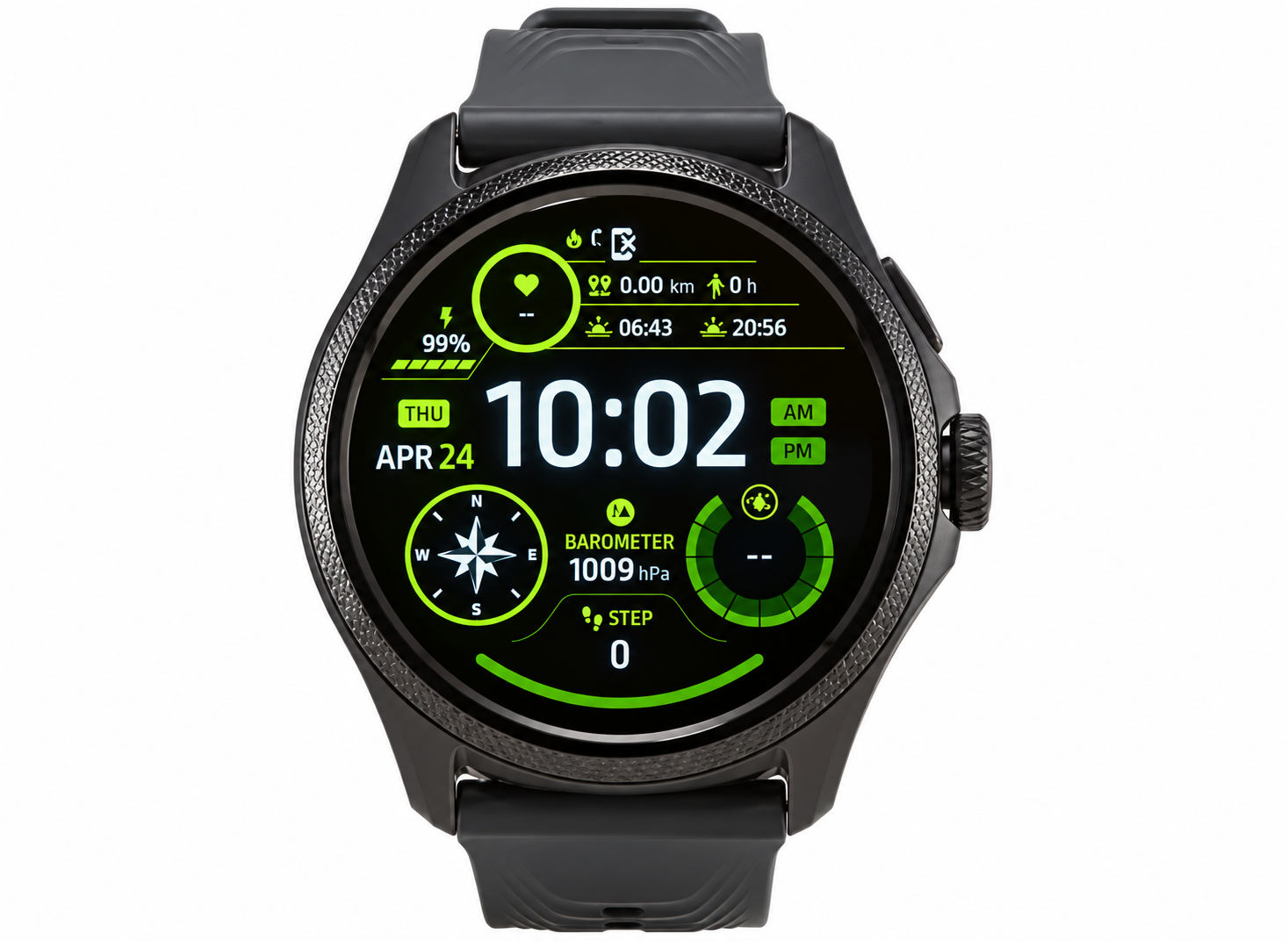
The Mobvoi TicWatch Pro 5 Enduro Smartwatch stands out as a rugged, feature-packed wearable designed for adventurers and fitness enthusiasts seeking exceptional battery life and robust performance. Powered by the Snapdragon W5+ Gen 1 chipset, this smartwatch combines a vibrant 1.43-inch AMOLED display with an innovative Ultra-Low-Power (ULP) secondary display, delivering up to 90 hours in Smart Mode and an astonishing 45 days in Essential Mode. Key benefits include advanced health tracking like heart rate monitoring with AFib detection, SpO2, sleep analysis, VO2 Max, and over 110 workout modes, making it ideal for outdoor activities such as hiking, swimming, and cross-country skiing.
Targeted at athletes, outdoor explorers, and daily users who demand durability, the TicWatch Pro 5 Enduro features a 7000-series aluminum and fiberglass-reinforced nylon case, Sapphire Crystal glass, 5ATM water resistance, and MIL-STD-810H certification for extreme conditions. Unique selling points like the rotating crown with haptic feedback, one-tap multi-metric health checks, and dual-display system ensure uninterrupted access to essentials like steps, calories, and compass even in low power.[1][3] Priced around $349 / £329, it's widely available on Mobvoi's official site and major retailers, offering premium Wear OS 3.5 functionality at a competitive value compared to rivals like the Apple Watch Ultra.
Detailed Specifications of Mobvoi TicWatch Pro 5 Enduro Smartwatch
- Display: 1.43-inch circular AMOLED, 466x466 resolution, 326 ppi, Sapphire Crystal protection, Full Color Always-On OLED + Ultra-Low-Power Display for extended visibility.
- Processor and Memory: Qualcomm Snapdragon W5+ Gen 1 (4nm), 2GB RAM, 32GB storage, Wear OS 3.5 for smooth app performance.
- Battery: 628mAh, up to 90 hours Smart Mode, 45 days Essential Mode, 30-minute fast charge for 2 days use.
- Build and Durability: 50.15 x 48 x 11.95mm, 44.7g (without band), 7000-series aluminum + high-strength nylon/fiberglass, fluororubber 24mm straps, 5ATM water-resistant, MIL-STD-810H.
- Sensors and Health Features: Accelerometer, gyro, PPG heart rate (AFib), SpO2, skin temperature, barometer, compass; 110+ sports modes, TicExercise heart zone lighting, snore detection, VO2 Max.
- Connectivity: Bluetooth 5.2, Wi-Fi 2.4GHz, multi-GNSS (GPS, Beidou, GLONASS, Galileo, QZSS), NFC (Google Wallet), speaker, microphone.
Compared to the TicWatch Pro 5, the Enduro matches internals but enhances ruggedness; it outperforms Apple Watch in battery (90hrs vs 18hrs) while rivaling Samsung Galaxy Watch in Wear OS features.
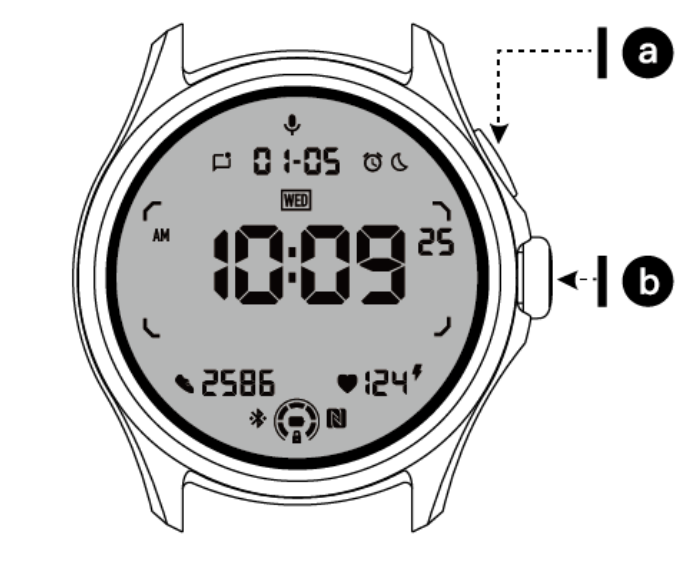
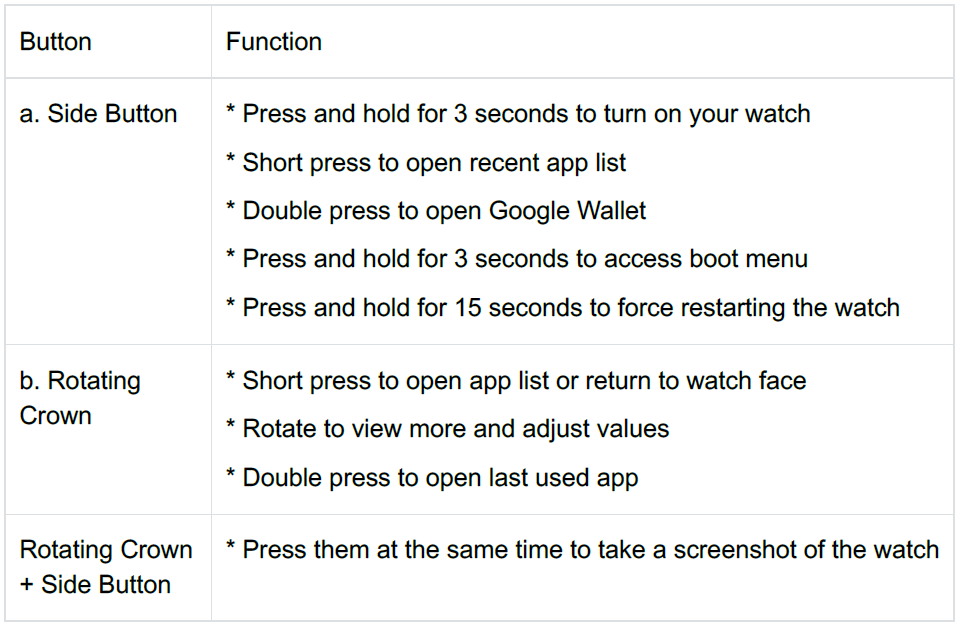
Button & functions
Usage
Rotating crown
Rotate the crown clockwise or anticlockwise to easily control various watch functions.
- Rotate to view tiles:
- On the home screen, rotate to view tiles.
- The function can be enabled in Settings → General → Rotating for tiles.
- Rotate to view watch faces:
- Long-press the home screen and rotate to view watch faces.
- Rotate to scroll pages.
- Rotate to adjust values, including volume, numbers, brightness, etc.
Wear the watch
- Accurate data on heart rate during exercise can be obtained through correct use of the watch. Inaccurate data on heart rate will be obtained if it is worn too tightly or loosely.
- The watch should be worn 1–2 horizontal fingers above the wrist bone. The watch should fit the arm. Shake the hand a few times to ensure comfortable wear.
- Keep the wrist clean. Long-term use of the watch on the same area may constrict blood vessels. It is recommended to adjust the position.
Turn the watch on and off:
Turn on the watch
Press and hold the side button for a few seconds to turn on the watch.
- Turn off the watch
- Press and hold the side button for a few seconds.
- Tap Power off.
Force restart
If your watch is frozen and unresponsive, press and hold the side button for 15 seconds to restart it.
Pair your watch with your phone:
Install the Mobvoi Health app on your phone
To connect your watch to a smartphone, please install the Mobvoi Health app on your phone first.
- Search and download "Mobvoi Health" in the Google Play store.
- Mobvoi Health app is only compatible with TicWatch that runs on the Wear OS 3 platform. If you have other types of TicWatch, you may need to install the Mobvoi app and follow the instructions.
- If you already have the Wear OS by Google app or Mobvoi app installed, please uninstall them before pairing.
Connect your watch to a smartphone
- Turn on the watch.
- Tap and select a language.
- On-screen instructions for launching the Mobvoi Health app will appear.
- Launch the Mobvoi Health app on your smartphone.
- Tap the Device tab and tap Add a new device.
- Select your watch on the screen.
- Follow the on-screen instructions to complete the pairing process.
Pair with multiple watches
For Android devices, it is possible to pair with multiple TicWatches at the same time.
- Launch the Mobvoi Health app on your smartphone.
- Tap the Device tab.
- Tap the + icon in the top right corner to start the pairing process.
Remove the paired watch
- Open the Mobvoi Health app and tap Settings.
- Tap the unpair and reset button at the bottom to unpair the watch from the app.
How to maintain connection stability?
After the watch is paired, please make sure to maintain a stable connection between the watch and mobile phone to ensure normal functions such as message notifications.
For Android:
- It can be connected via Bluetooth or Wi-Fi. Please make sure your Bluetooth is turned on.
- Or keep the watch and phone connected to the same Wi-Fi network.
Watch face
Introduce new types of watch faces
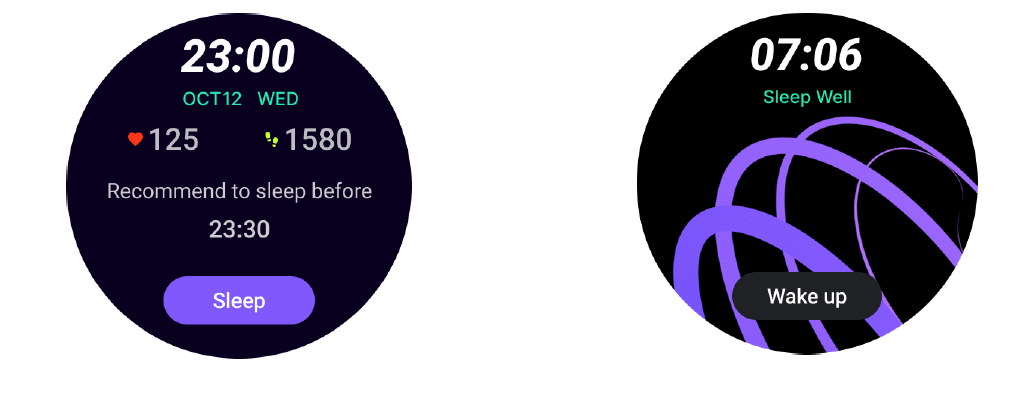
Sleep coach watch face
The Sleep Coach watch face displays different states and provides suggestions based on your sleep cycle and sleep records. You can check your sleep information at a glance on the watch face every morning.
How to use
- Long-press the watch face to enter the watch face edit list.
- Select the Sleep Coach watch face and apply it.
- Set your sleep cycle. Please go to TicSleep → Settings → Sleep cycle to modify your bedtime and wake-up time.
Bedtime reminder
Starting one hour before your bedtime, the Sleep Coach watch face will remind you to go to bed on time.
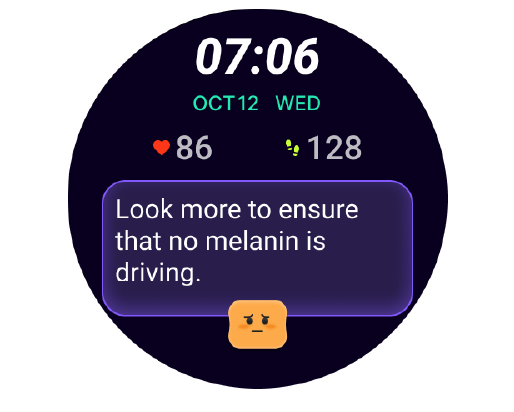
Sleep tips
Every day at different time periods, sleep tips that are beneficial to improving sleep quality will be displayed. Click on the dialog box to view complete content.
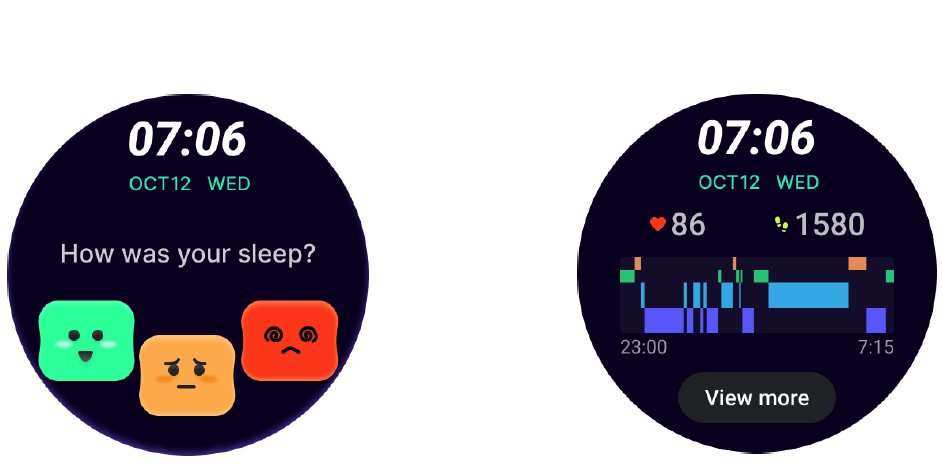
Sleep data overview
After waking up each day, you can quickly check last night's sleep data and provide subjective feedback on your sleep experience. Click on "View more" to enter TicSleep to view details.
Happy rotation watch face
A very fun watch face that can interact with the rotating button.
How to use
- Long press the watch face to enter the watch face edit list.
- Select the Happy Rotation watch face and apply it.
- Tap "Play" to enter the game mode, and rotate the rotating button to switch to different images.
- Swipe from left to right to exit the game mode and apply the current image.
Edit watch face on your phone
- You can apply and customize the watch face on your phone. Launch the Mobvoi Health app on your phone.
- Tap the Device tab.
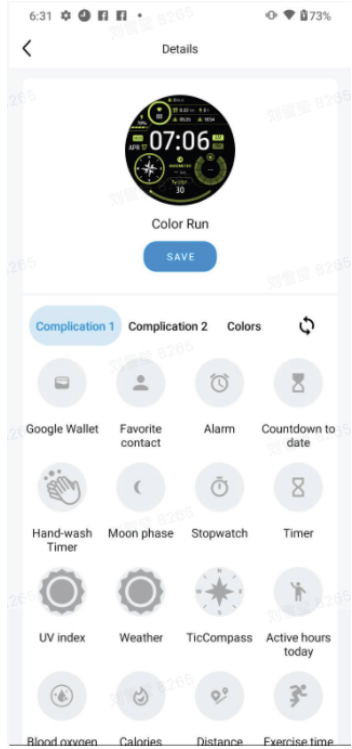
Please make sure your phone and watch are connected via Bluetooth.
Quick setting panel
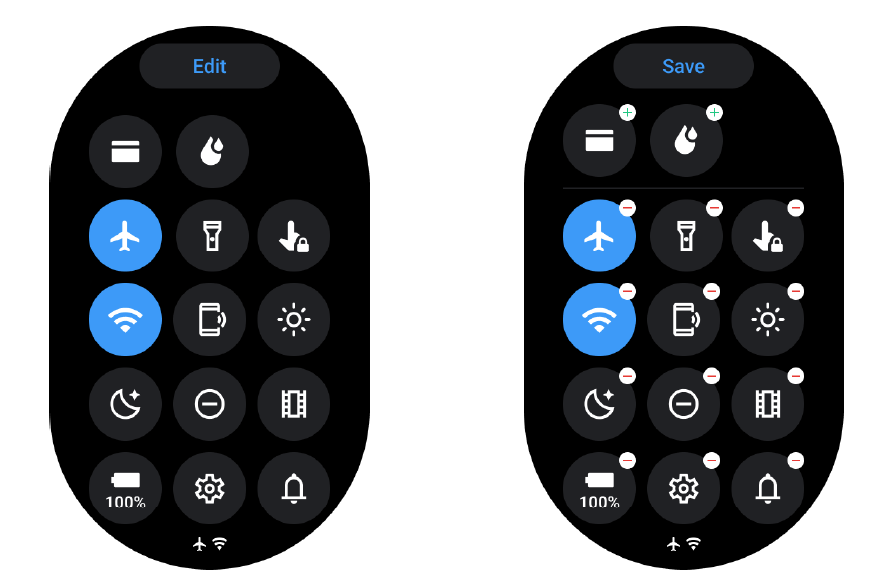
It allows you to view and edit the quick settings. To open the quick setting panel, swipe upwards on the home screen. Use the rotating crown or swipe upwards and downwards to view more setting icons.
Edit quick settings
Tap the Edit button to edit quick setting icons.
- Tap + to add the icons to appear on the QSS tray.
- Tap - to remove from the QSS tray.
- Tap Save to save changes.
The UI of the ULP display
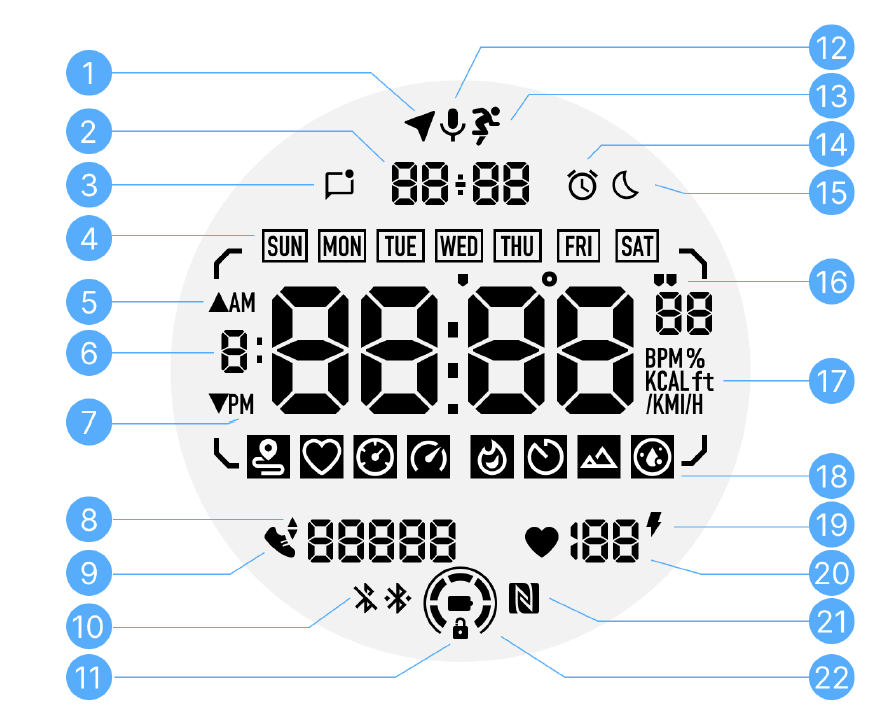
The operations of the ULP display
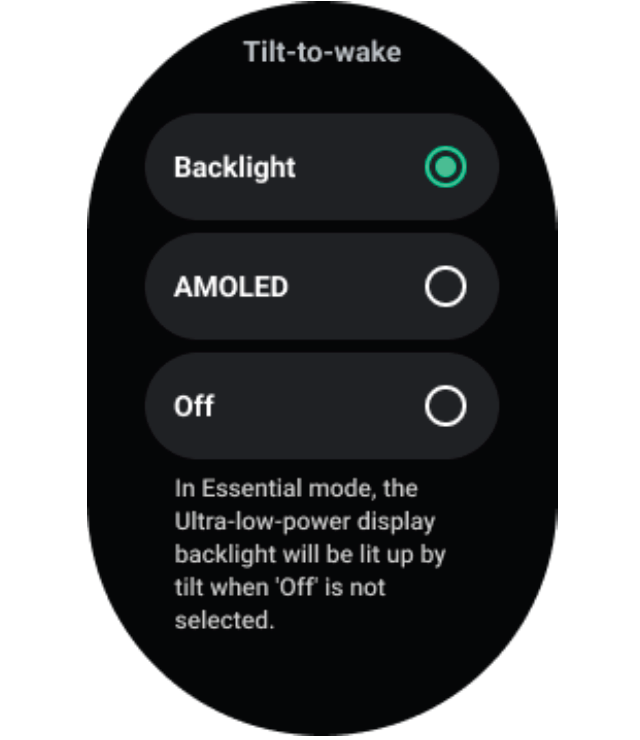
How to turn on and off the backlight?
- The Tilt-to-wake backlight option is on by default.
- Please go to Settings → Display → Tilt-to-wake for details.
- In general, there are two methods to activate the backlight: raising your wrist or rotating the crown more than 180 degrees. The backlight will automatically turn off after a timeout or when you lower your wrist. Additionally, the ULP display will be locked to prevent accidental operations.
- In Essential mode, you can also toggle the backlight on or off by clicking the side button.
How to unlock/lock the ULP display?
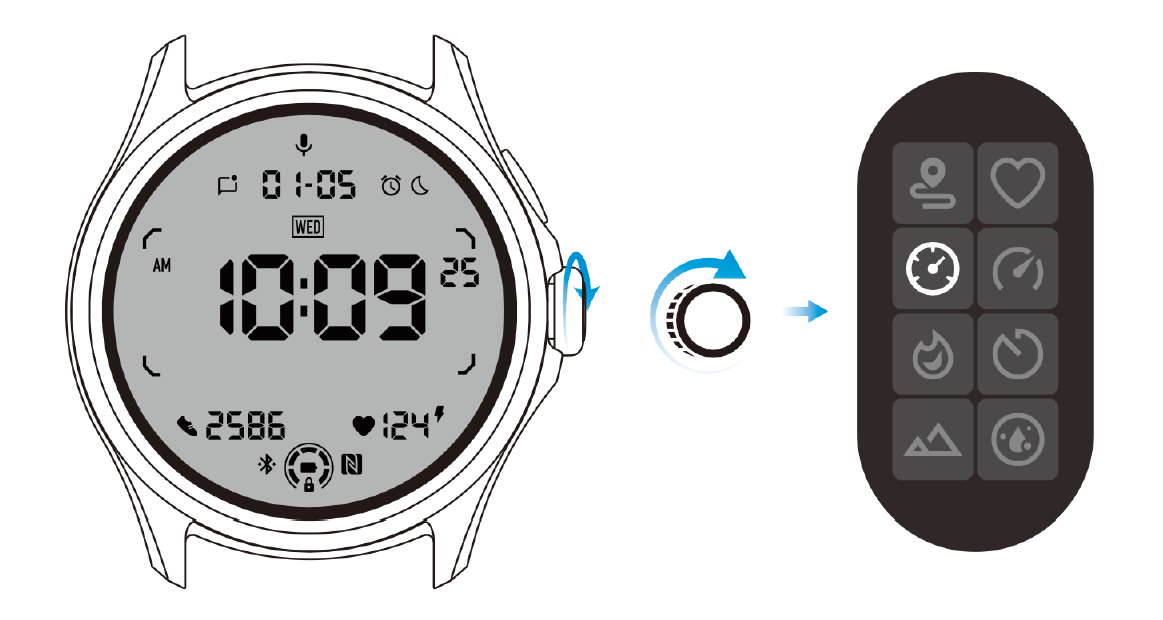
- To unlock the ULP display, you should continuously rotate the rotating crown clockwise or counterclockwise for more than 180 degrees.
- By lowering your wrist or after a timeout, the ULP display will automatically be locked to prevent accidental operations.
How to switch ULP tiles?
After unlocking the ULP display, rotating the crown clockwise or counterclockwise will sequentially switch ULP tiles in ascending and descending order.
Troubleshooting Guide for Mobvoi TicWatch Pro 5 Enduro Smartwatch
- Battery Drains Quickly: Switch to Essential Mode via settings; disable unused notifications or Always-On display. Charge fully with official cable—expect 90hrs Smart Mode.
- Display Not Responding or Stuttering: Restart watch (hold crown + button 10s); clear app cache in settings. Occasional lag noted due to Wear OS, resolved by reboot. Check for software updates.
- GPS or Heart Rate Inaccurate: Calibrate compass/barometer outdoors; ensure snug fit for sensors. Multi-GNSS locks quickly—test in open areas.
- Connection Drops (Bluetooth/Wi-Fi): Re-pair with phone; toggle Airplane mode. Supports Bluetooth 5.2—keep within 10m.
- App Crashes or Notifications Fail: Force stop the TicWatch app on phone, reinstall. Common with heavy use—2GB RAM handles most.
Pros & Cons of Mobvoi TicWatch Pro 5 Enduro Smartwatch
Pros
- Exceptional battery life (90hrs Smart/45 days Essential) outlasts competitors like Apple Watch Ultra.
- Rugged build with MIL-STD-810H and Sapphire Crystal suits extreme sports.
- Advanced health tracking (AFib, VO2 Max, 110+ modes) with accurate GPS.
- Smooth Wear OS performance via Snapdragon W5+ and 2GB RAM.
- Great value at ~$349, superior battery-to-price ratio vs. Samsung Galaxy Watch.
Cons
- Occasional software stutters or app glitches on Wear OS 3.5.
- Bulky 50mm size may not fit smaller wrists comfortably (44.7g).
- ULP display limited to basics; full OLED needed for rich features.
- No LTE option; relies on phone for calls/data.
Overall, strong value for battery-focused users over premium alternatives.
Customer Reviews and Feedback on Mobvoi TicWatch Pro 5 Enduro Smartwatch
Users rave about the Mobvoi TicWatch Pro 5 Enduro Smartwatch's battery, with 4.5/5 average ratings on sites like Android Central: “90-hour battery is a game-changer for multi-day hikes.” Praises include precise GPS tracking and dual-display convenience, as one reviewer noted, “ULP mode shows HR/steps instantly without draining power.” Health features earn high marks for AFib detection and workout modes.
Common complaints: Minor Wear OS lag ("occasional stutters during apps") and bulky fit ("too large for small wrists"). Testimonials recommend it for athletes: “Best Wear OS battery life—worth upgrading from Pro 5.” Addresses issues like connectivity via updates. Ideal purchase for rugged smartwatch seekers.
Faqs
How do I set up mobvoi Ticwatch Pro 5 Enduro Smartwatch with my Android phone for the first time?
What should I do if mobvoi Ticwatch Pro 5 Enduro Smartwatch won't pair with my smartphone?
How can I install apps on mobvoi Ticwatch Pro 5 Enduro Smartwatch?
Is mobvoi Ticwatch Pro 5 Enduro Smartwatch compatible with iPhone, and how do I connect it?
How do I switch between smart mode and essential mode on mobvoi Ticwatch Pro 5 Enduro Smartwatch for battery optimization?
How do I troubleshoot GPS not working on mobvoi Ticwatch Pro 5 Enduro Smartwatch during workouts?
What is the best way to maintain and care for mobvoi Ticwatch Pro 5 Enduro Smartwatch battery life?
How do I customize watch faces and tiles on mobvoi Ticwatch Pro 5 Enduro Smartwatch?
More mobvoi manuals
Leave a Comment