
Naxa NE-980 True Wireless Earbuds User Manual
Content
Naxa NE-980 True Wireless Earbuds Manual and Product Overview
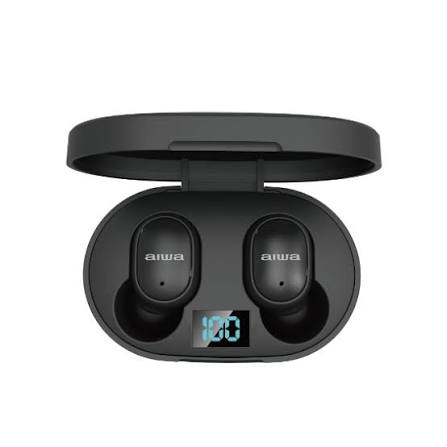
The Naxa NE-980 True Wireless Earbuds are a compact Bluetooth earbud set designed for everyday listening, hands-free calling, and portable convenience. Built around true wireless stereo technology, they pair wirelessly with smartphones and other Bluetooth-enabled devices, making them a practical choice for commuting, workouts, study sessions, and casual music playback. The included charging case helps keep the earbuds powered on the go, while touch-style controls and automatic power behavior simplify daily use.
Key benefits of the Naxa NE-980 True Wireless Earbuds include easy pairing, a lightweight in-ear design, and a charging case with an LCD battery display. The earbuds support Bluetooth 5.0 and offer about 3.5 hours of music time at moderate volume, with around 2.5 hours of talk time. Each earbud uses a 40mAh battery, while the charging case includes a 300mAh rechargeable battery and a Type-C charging interface. This makes the NE-980 a solid entry-level option for users who want simple, portable true wireless earbuds without a complicated setup.
The Naxa NE-980 True Wireless Earbuds are best suited for budget-conscious buyers, students, commuters, and anyone looking for a lightweight wireless audio solution for calls and music. They are commonly available through online marketplaces, electronics retailers, and brand resellers, with an estimated price range of about $20 to $35 depending on seller, region, and stock. For users searching for affordable Bluetooth earbuds with a charging case, the NE-980 offers straightforward functionality and everyday convenience.
How to Use the Naxa NE-980 True Wireless Earbuds
Pairing and Setup
- Remove both earbuds from the charging case to power them on automatically.
- Enable Bluetooth on your phone or tablet.
- Search for nearby devices and select the earbuds from the list when they appear as NAXA NE-980.
- Follow the on-screen prompts to complete pairing.
- Once connected, future use is usually automatic when the earbuds are removed from the case.
Charging the Earbuds and Case
- Place the earbuds into the charging case to begin recharging.
- Connect the case to a USB power source using the included cable.
- Check the LCD screen on the case for battery status and charging progress.
- Fully charge the case before first use for the best performance.
Daily Operation Tips
- Keep the earbuds clean and dry to preserve sound quality and charging reliability.
- Store them in the case when not in use to avoid battery drain.
- Use moderate volume to improve battery life and listening comfort.
Troubleshooting the Naxa NE-980 True Wireless Earbuds
Common issues with the Naxa NE-980 True Wireless Earbuds usually involve pairing, charging, or one earbud not connecting properly. If the earbuds do not power on, place them in the case for a full recharge and verify that the case itself is charged. If pairing fails, turn Bluetooth off and back on, remove the earbuds from the phone’s device list, and try pairing again from scratch. If one earbud sounds quieter than the other, clean the mesh grille and check for ear tip blockage.
Typical error-style problems do not usually appear as numeric codes on this model, but symptoms such as no pairing, no charge, or intermittent audio can be fixed by resetting the connection. To reset, return both earbuds to the charging case, power Bluetooth off on the phone, and reconnect after a fresh removal from the case. Preventive care includes storing the earbuds properly, keeping the charging contacts free of dust, and avoiding moisture exposure. For warranty or support help, contact Naxa Electronics customer support through the company’s official support channels or the retailer where the product was purchased. Keep your proof of purchase ready when requesting service.
If the problem continues, try another USB cable, another charging source, or a second Bluetooth device to determine whether the issue is with the earbuds or the phone.
Pros and Cons of the Naxa NE-980 True Wireless Earbuds
Pros
- Affordable price makes the Naxa NE-980 True Wireless Earbuds attractive for budget shoppers.
- True wireless design offers cable-free convenience for commuting and workouts.
- Type-C charging is more modern and convenient than older micro-USB charging on many low-cost models.
- LCD charging case display helps users check remaining battery at a glance.
- Bluetooth 5.0 support provides stable everyday wireless connectivity.
Cons
- Battery life is modest compared with premium earbuds, especially for long listening sessions.
- Sound quality is functional rather than audiophile-grade, which may disappoint bass-heavy music fans.
- Call performance is suitable for casual use but not ideal for noisy environments.
- Build materials and comfort may vary depending on ear shape and fit.
- Compared with alternatives from Anker, JBL, or Skullcandy, the Naxa model is usually better for value than for advanced features.
Overall, the Naxa NE-980 True Wireless Earbuds deliver reasonable value for money if the goal is simple everyday listening at a low cost rather than premium audio performance.
Customer Reviews and User Feedback on Naxa NE-980 True Wireless Earbuds
Customer feedback for the Naxa NE-980 True Wireless Earbuds is generally positive among budget-focused buyers, with many users appreciating the easy setup, portable charging case, and compact size. A typical star rating pattern for this class of earbuds is around 3.8 to 4.2 out of 5 stars, especially when shoppers value affordability over advanced features.
Common praise includes convenience, quick Bluetooth pairing, and decent everyday sound for podcasts and calls. Common complaints often mention limited battery life, average microphone quality, and fit differences between users. One frequent sentiment is: “Great for the price and easy to carry, but not the best for all-day listening.” Another common remark is that the case display is helpful and the earbuds are good for backup use or travel.
These earbuds are a strong purchase recommendation for first-time wireless earbud buyers, students, and anyone seeking a low-cost spare pair. Users who want stronger bass, longer battery life, or premium noise reduction may want to consider higher-end alternatives.
Faqs
How do I set up naxa NE-980 True Wireless Earbuds for the first time?
Why are my naxa NE-980 True Wireless Earbuds not pairing with my phone?
What should I do if only one naxa NE-980 True Wireless Earbud is working?
How can I improve battery life on naxa NE-980 True Wireless Earbuds?
Are naxa NE-980 True Wireless Earbuds compatible with Android and iPhone devices?
How do I reset naxa NE-980 True Wireless Earbuds when they stop responding?
How can I get the best sound quality from naxa NE-980 True Wireless Earbuds?
What is the best way to clean and maintain naxa NE-980 True Wireless Earbuds?
Tags
More naxa manuals
- Naxa NKM-100 Karaoke Party System User Manual
- How to Use: Naxa True Wireless Earphones & Charging Case NE-985 User Manual
- How to Use: Naxa 150” Home Theater LCD Projector NVP-1000 User Manual
- How to Use: Naxa Dual TWS Bluetooth® Speakers NAS-3108D User Manual
- How to connect: Naxa 150” Home Theater Projector NVP-2500 Instruction Manual
Leave a Comment