
Naxa NKM-100 Karaoke Party System User Manual
Content
Naxa NKM-100 Karaoke Party System Review and Product Manual
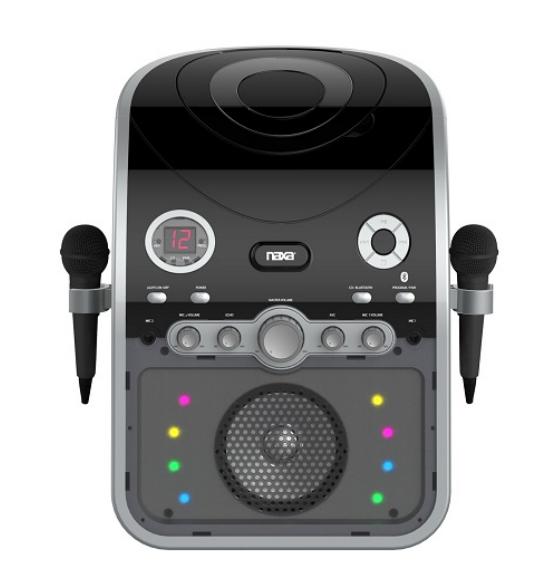
Introduction: Naxa NKM-100 Karaoke Party System Overview
The Naxa NKM-100 Karaoke Party System is a compact, all-in-one home karaoke machine designed for casual singers, family gatherings, and small party setups. Built around a Bluetooth-enabled audio platform, it combines a CD player, CD+G support, dual microphone inputs, and built-in voice controls to deliver a straightforward karaoke experience without complicated setup. For users searching for a budget-friendly karaoke party system for home use, the Naxa NKM-100 offers the core features most people need: wireless music streaming, lyric playback on a TV, and included microphones right out of the box.
This model is especially appealing to families, beginners, and anyone who wants a simple party speaker with karaoke functionality rather than a professional stage system. It supports Bluetooth streaming from compatible devices, plays CD, CD-R/RW, and CD+G discs, and includes RCA composite video and stereo audio outputs for connecting to a television or external sound system. The system also includes echo control, automatic voice control, independent microphone volume adjustments, and multicolor LED light effects for added atmosphere.
In terms of value, the Naxa NKM-100 Karaoke Party System typically falls into an affordable price range, often found around the lower-budget karaoke category and commonly listed roughly between $40 and $100 depending on retailer, availability, and condition. It is widely available through online electronics stores and marketplace sellers, though stock can vary because this is a long-running budget model. For shoppers wanting a beginner-friendly karaoke machine with Bluetooth and CD+G support, the Naxa NKM-100 remains a practical entry-level choice.
Pros and Cons of the Naxa NKM-100 Karaoke Party System
- Pros: Easy to use, making it ideal for first-time karaoke users and family entertainment.
- Pros: Includes two microphones and microphone cables, so it is ready to use with minimal extra purchases.
- Pros: Supports Bluetooth streaming, CD, CD-R/RW, and CD+G discs for flexible playback options.
- Pros: Offers helpful controls such as master volume, mic volume, echo, and automatic voice control for better vocal balance.
- Pros: RCA video and stereo audio outputs make it easy to connect to a TV for lyric display and better sound.
- Pros: Good value for money if you want a basic karaoke system rather than a premium professional unit.
- Cons: The built-in speaker output is modest, so it is better suited for small rooms than large parties.
- Cons: AC-only operation limits portability compared with battery-powered karaoke machines.
- Cons: Bluetooth 2.1 is older technology, so pairing and range may not feel as seamless as newer systems.
- Cons: Users looking for strong bass, loud output, or advanced digital features may prefer larger alternatives from karaoke brands or powered party speakers.
Compared with higher-end karaoke machines, the Naxa NKM-100 focuses on simplicity and affordability rather than high output or premium build quality. It is a solid entry-level pick, but buyers wanting louder sound, more modern Bluetooth, or app-based controls may want to compare it with newer Bluetooth karaoke speakers or portable PA systems.
Customer Reviews: What Buyers Say About the Naxa NKM-100 Karaoke Party System
Customer feedback for the Naxa NKM-100 Karaoke Party System is generally positive among budget shoppers, with many users rating it around 4 out of 5 stars for home entertainment value. Buyers often praise the easy setup, included microphones, and CD+G support for lyric-based singing nights. A common sentiment is that it works well for family fun, birthday parties, and casual sing-alongs without requiring much technical knowledge.
Typical praise includes comments like, “Perfect for karaoke nights with the kids,” and “Great value for the price.” Common complaints usually mention limited volume, older Bluetooth performance, and the need for a TV connection to fully enjoy CD+G discs. Some users also note that the sound is best in smaller spaces and that the unit is not built for heavy-duty use. For most buyers, it is recommended as a budget karaoke machine for home use rather than a professional-grade system.
Key Features of the Naxa NKM-100 Karaoke Party System
- Bluetooth wireless audio streaming
- Built-in CD player with CD, CD-R/RW, and CD+G support
- Two microphone inputs for duet singing
- Echo and automatic voice control for vocal effects
- RCA composite video output for karaoke lyrics on TV
- RCA stereo audio output for external connection
- USB charging port for external devices
- Multicolor LED light effects for party ambiance
Technical Specifications at a Glance
- Media support: CD, CD-R/RW
- Playable formats: CD-audio, CD+G
- Wireless source: Bluetooth version 2.1
- Microphone inputs: MIC 1 and MIC 2, both 1/4 inch
- Outputs: RCA composite video and RCA stereo audio
- Controls: Master volume, MIC 1, MIC 2, echo, AVC
- Speaker output power: 3 W
- USB charge output: DC 5 V, 1 A
- Power source: AC 120 V, 60 Hz
Who Should Buy the Naxa NKM-100 Karaoke Party System?
The Naxa NKM-100 Karaoke Party System is best for families, beginners, kids, and casual entertainers who want a simple and affordable karaoke setup. It is a smart choice for users who already own CD+G discs or want an easy way to stream music from a Bluetooth device. If your goal is a fun home karaoke machine for small rooms, the NKM-100 delivers solid core features without unnecessary complexity.
If you need a louder system for big events, a battery-powered portable karaoke speaker, or a more advanced karaoke machine with newer wireless technology, you may want to look at upgraded alternatives. For budget buyers, though, the Naxa NKM-100 Karaoke Party System remains a dependable and practical option.
Faqs
How do I set up the naxa NKM-100 Karaoke Party System for the first time?
Why is my naxa NKM-100 Karaoke Party System not pairing with Bluetooth devices?
What devices are compatible with the naxa NKM-100 Karaoke Party System?
How can I stop microphone feedback on the naxa NKM-100 Karaoke Party System?
What should I do if the naxa NKM-100 Karaoke Party System has low sound output?
How do I get the best karaoke sound performance from the naxa NKM-100 Karaoke Party System?
Can I use the naxa NKM-100 Karaoke Party System for outdoor parties?
How should I clean and maintain the naxa NKM-100 Karaoke Party System?
More naxa manuals
- Naxa NE-980 True Wireless Earbuds User Manual
- How to Use: Naxa True Wireless Earphones & Charging Case NE-985 User Manual
- How to Use: Naxa 150” Home Theater LCD Projector NVP-1000 User Manual
- How to Use: Naxa Dual TWS Bluetooth® Speakers NAS-3108D User Manual
- How to connect: Naxa 150” Home Theater Projector NVP-2500 Instruction Manual
Leave a Comment