
How to Use: Naxa True Wireless Earphones & Charging Case NE-985 User Manual
Content
Introduction to the Naxa True Wireless Earphones & Charging Case NE-985
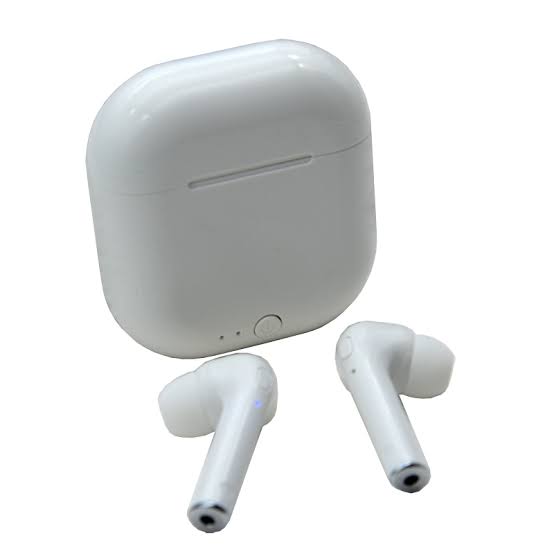
The Naxa True Wireless Earphones & Charging Case NE-985 is a compact Bluetooth earphone set designed for everyday listening, hands-free calling, and portable convenience. Built around true wireless stereo (TWS) functionality, it delivers cable-free audio for commuting, workouts, study sessions, and casual use. With Bluetooth 5.0, the NE-985 offers reliable wireless connectivity, quick pairing, and broad compatibility with smartphones, tablets, laptops, and other Bluetooth-enabled devices.
One of the biggest advantages of the NE-985 is its lightweight in-ear design paired with a pocket-friendly charging case. The earbuds are made for users who want simple controls, easy charging, and a no-fuss wireless listening experience. Support for HSP, HFP, A2DP, and AVRCP makes it suitable for music playback, call management, and media control. The included charging case extends usability between charges, making the model practical for travel and daily routines.
This product is a strong fit for students, commuters, office users, and first-time true wireless buyers looking for an affordable entry into wireless audio. Typical pricing for the Naxa True Wireless Earphones & Charging Case NE-985 usually falls in the budget range, often around $20 to $40 depending on retailer, color, and availability. It is commonly available in black and white through online marketplaces and electronics stores.
Specifications for Naxa NE-985 True Wireless Earphones
- Wireless technology: Bluetooth 5.0 for stable short-range connectivity
- Design: True wireless stereo earphones with charging case
- Battery capacity: Earbuds 35 mAh each; charging case 400 mAh
- Playback time: Up to 3 hours, with real-world use varying by volume and content
- Charging time: About 1.5 hours
- Power input: Micro USB
- Audio range: 20 Hz to 20 kHz
- Impedance: 32 ohms
- Supported profiles: HSP, HFP, A2DP, AVRCP
- Available colors: Black and white
In practice, the NE-985 is comparable to other budget true wireless earphones that prioritize simplicity over premium features. It focuses on essential wireless audio performance rather than extras like active noise cancellation, wireless charging, or advanced app controls. For users seeking an inexpensive Bluetooth earbuds set for voice calls and everyday music, it offers solid baseline functionality.
Setup Guide: How to Pair and Use the NE-985 Wireless Earphones
Start by fully charging both the earbuds and the case using the included micro USB cable. A full charge typically takes about 1.5 to 2 hours depending on battery level. Once charged, remove both earbuds from the case to power them on automatically. They should enter pairing mode and appear in your phone’s Bluetooth list as a new device.
Open Bluetooth settings on your smartphone, tablet, or laptop, then select the NE-985 to connect. If only one earbud connects, place both earbuds back in the case, close it for a few seconds, and try again. For the best performance, keep your device within about 10 meters of the earbuds and avoid heavy interference from walls or crowded wireless environments.
Safety matters during setup. Do not expose the charging case to water, high heat, or direct sunlight for long periods. Use only standard 5V USB charging sources, and avoid forcing the earbuds into the case. If pairing fails, reset Bluetooth on the host device and repeat the pairing process from scratch.
Troubleshooting the Naxa True Wireless Earphones & Charging Case NE-985
- Problem: Earbuds will not pair. Reset Bluetooth on the phone, return both earbuds to the case, then remove them again to re-enter pairing mode.
- Problem: Sound only plays in one ear. Re-sync the earbuds by placing both back in the charging case for several seconds and reconnecting them together.
- Problem: Short battery life. Lower the volume, recharge fully before use, and avoid leaving the case uncharged for long periods.
- Problem: Weak Bluetooth signal. Stay within the recommended 10-meter range and reduce obstacles between the earbuds and the device.
- Problem: Charging is slow or inconsistent. Clean the charging contacts and use a reliable USB power source.
The NE-985 does not typically use complex error codes, so most issues are solved through reset, recharge, and re-pair steps. Preventive care includes storing the earbuds in the case when not in use, keeping the contacts clean, and avoiding exposure to moisture. For warranty and support, users should check the retailer’s return policy and Naxa’s support center for manuals, FAQs, and accessory guidance. Customer service details are usually listed on the product packaging, retailer invoice, or official support pages.
Pros and Cons of the Naxa NE-985 Bluetooth Earbuds
Pros
- Affordable true wireless option for budget-conscious buyers
- Bluetooth 5.0 improves connection stability and ease of pairing
- Compact charging case makes daily carry simple
- Supports common audio and calling profiles for broad compatibility
- Good choice for casual listening, commuting, and light workouts
Cons
- Battery life is limited compared with premium wireless earbuds
- No active noise cancellation or advanced app features
- Micro USB charging feels dated versus USB-C alternatives
- Audio performance is basic and best suited for everyday use, not audiophile listening
- Call and mic quality may be acceptable but not class-leading
Overall, the Naxa True Wireless Earphones & Charging Case NE-985 offers strong value for money if the goal is simple, low-cost wireless audio. Compared with higher-priced alternatives, it trades advanced features for accessibility and convenience. It is best for users who want an inexpensive spare pair or a first-time true wireless headset.
Customer Reviews and User Feedback on the NE-985
Typical customer feedback for the NE-985 leans positive on convenience and price, with many users rating it around 4 out of 5 stars for everyday use. Buyers often praise the easy setup, pocket-sized case, and lightweight feel. Common compliments include decent sound for the price and quick Bluetooth pairing with Android and iPhone devices.
Frequent complaints usually focus on battery life, which some users find short for long listening sessions, and on the limited feature set compared with more expensive earbuds. A common testimonial style comment is: “Great for casual use and travel, especially at this price.” Another recurring note is that the earbuds work well for basic music and calls, but users wanting richer bass or noise cancellation should consider higher-end models.
For shoppers who want an affordable true wireless starter set, the NE-985 is often recommended as a practical buy rather than a premium one.
Faqs
How do I set up naxa True Wireless Earphones & Charging Case NE-985 for the first time?
Why are my naxa True Wireless Earphones & Charging Case NE-985 not pairing with my phone?
How do I reset naxa True Wireless Earphones & Charging Case NE-985 when only one earbud connects?
What devices are compatible with naxa True Wireless Earphones & Charging Case NE-985?
How can I improve battery life on naxa True Wireless Earphones & Charging Case NE-985?
What should I do if sound is low or uneven on naxa True Wireless Earphones & Charging Case NE-985?
How do I clean and maintain naxa True Wireless Earphones & Charging Case NE-985 safely?
Can I use naxa True Wireless Earphones & Charging Case NE-985 for calls and online meetings?
More naxa manuals
- Naxa NE-980 True Wireless Earbuds User Manual
- How to Use: Naxa 150” Home Theater LCD Projector NVP-1000 User Manual
- Naxa NKM-100 Karaoke Party System User Manual
- How to Use: Naxa Dual TWS Bluetooth® Speakers NAS-3108D User Manual
- How to connect: Naxa 150” Home Theater Projector NVP-2500 Instruction Manual
Leave a Comment