
Netgear RS700 Nighthawk WiFi 7 Tri-Band Router User Manual
Content
Netgear RS700 Nighthawk WiFi 7 Tri-Band Router Overview
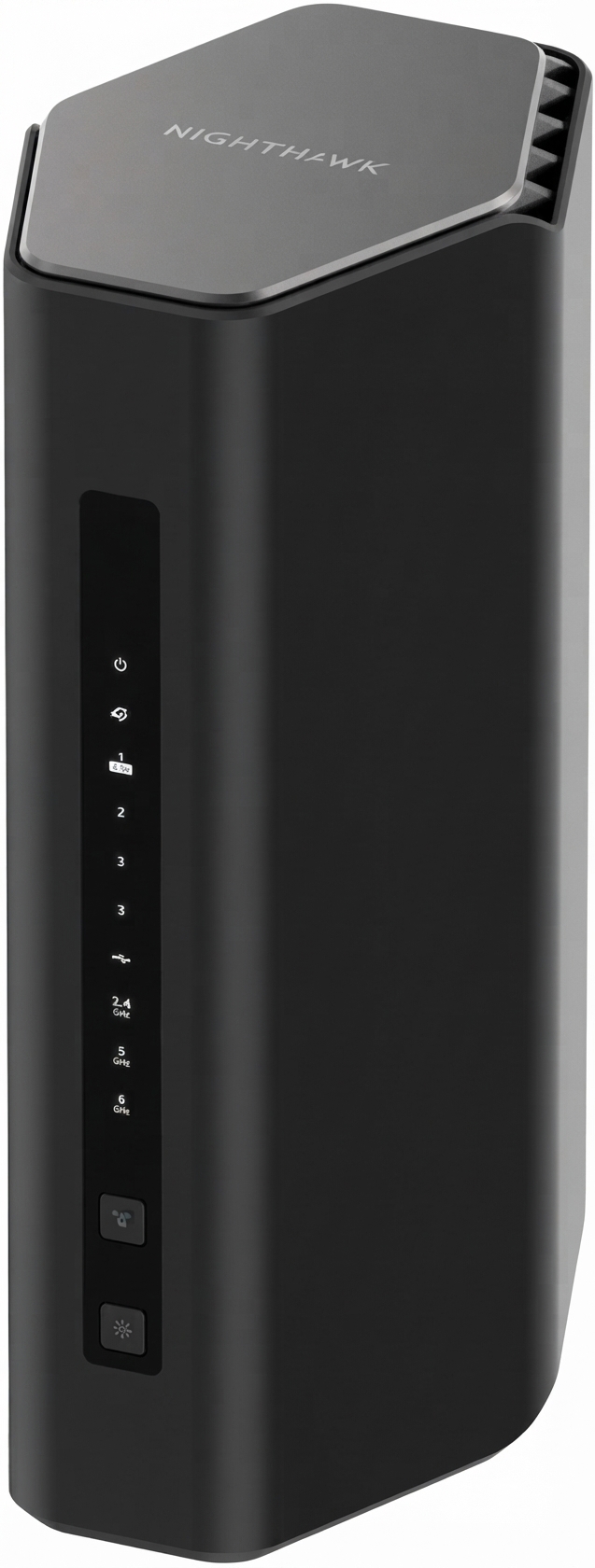
The Netgear RS700 Nighthawk WiFi 7 Tri-Band Router is a high-performance wireless router designed for users who want cutting-edge speed, low latency, and strong whole-home coverage. Built on WiFi 7 (802.11be), it combines tri-band connectivity across 2.4 GHz, 5 GHz, and 6 GHz with a combined theoretical speed of up to 19 Gbps, making it a strong fit for 4K/8K streaming, competitive gaming, large file transfers, and busy smart homes. Its tower-style design also helps with airflow and signal performance while keeping the footprint relatively compact for a premium router.
This model is aimed at power users, tech enthusiasts, gamers, remote workers, and households with multiple high-bandwidth devices. It is especially useful for multi-gig internet plans, mesh-free large-home coverage, and setups that rely on fast wired backhaul or NAS storage. The router includes a 10GbE Internet port, a 10GbE LAN port, four Gigabit LAN ports, USB storage support, and advanced WiFi 7 features such as 320 MHz channels and 4096-QAM. These features help maximize performance on compatible devices while maintaining strong backward compatibility with older WiFi standards.
Estimated pricing typically falls in the premium range, often around the $500 to $700 mark depending on region, promotions, and package version. Availability is generally through major electronics retailers and Netgear’s direct channels, though stock can vary because this is a flagship product. For buyers searching for a future-ready WiFi 7 router with serious wired and wireless capability, the RS700 remains one of the most compelling options in Netgear’s Nighthawk lineup.
Specifications for Netgear RS700 Nighthawk WiFi 7 Tri-Band Router
- Wireless standard: WiFi 7 (802.11be) with backward compatibility for WiFi 6, 6E, 5, 4, and earlier standards.
- Band support: Tri-band operation on 2.4 GHz, 5 GHz, and 6 GHz.
- Maximum combined speed: Up to 19 Gbps theoretical throughput.
- Per-band performance: 2.4 GHz up to 1.4 Gbps, 5 GHz up to 5.8 Gbps, and 6 GHz up to 11.5 Gbps.
- Channel width: Up to 320 MHz on 6 GHz for higher-capacity connections.
- Modulation: 4096-QAM for improved efficiency and speed on compatible devices.
- Ethernet ports: One 10GbE WAN port, one 10GbE LAN port, and four 1GbE LAN ports.
- USB: One USB 3.x Type-A port for network storage or sharing.
- Coverage: Designed for large homes, with strong signal reach and beamforming-style performance.
- Comparison: Compared with many WiFi 6E routers, the RS700 adds wider 320 MHz support, higher peak throughput, and stronger multi-gig wired connectivity.
In practical use, the RS700 competes with other flagship WiFi 7 routers such as premium tri-band models from ASUS and TP-Link, but it stands out for its clean tower design, dual 10GbE ports, and balanced mix of wireless and wired performance.
Detailed Description of the Netgear RS700 Nighthawk WiFi 7 Tri-Band Router
The netgear RS700 Nighthawk WiFi 7 Tri-Band Router is built to act as the central networking hub for demanding homes and small offices. It uses three radios to distribute traffic intelligently across the 2.4 GHz, 5 GHz, and 6 GHz bands, reducing congestion and improving responsiveness when multiple devices are online at once. WiFi 7 features such as 320 MHz channels and 4K QAM help compatible laptops, phones, and desktops achieve faster transfers and lower latency in ideal conditions.
The router is especially effective in real-world scenarios like cloud backups, 4K streaming on multiple TVs, video conferencing while gaming, and transferring large media files to a NAS or local server. The 10GbE WAN port lets it take advantage of very fast fiber or cable plans, while the 10GbE LAN port supports high-speed wired devices and workstations. The four additional Gigabit LAN ports add flexibility for consoles, smart TVs, or switches.
Build quality feels premium, with a vertical chassis designed to improve heat dissipation and fit better into modern living spaces. The external finish and internal antenna architecture are aimed at consistent performance rather than flashy styling. In day-to-day use, the interface is approachable for casual users but still offers enough control for advanced configuration, including guest networking, parental controls, and wireless tuning.
Setup Guide: How to Install and Configure the RS700 Router
- Unbox the router, power adapter, and Ethernet cable, then place the unit in an open, central location away from thick walls and large metal objects.
- Connect the modem or ONT to the 10GbE Internet port using the included or a certified high-speed Ethernet cable.
- Plug in the power adapter and wait for the status lights to indicate that the router has booted properly.
- Use a phone or computer to connect to the default WiFi network or connect directly by Ethernet for first-time setup.
- Open the Netgear setup page or mobile app, then follow the prompts to create an administrator account, set the WiFi name, and choose a secure password.
- Enable WPA2/WPA3 security if available, and configure separate SSIDs for 2.4 GHz, 5 GHz, and 6 GHz if you want manual band control.
- Update firmware immediately after setup to ensure the latest security patches and performance improvements.
For best results, place the router high and unobstructed, keep the firmware current, and use multi-gig cabling for high-speed ports. Avoid covering the ventilation areas or stacking the unit near heat sources. If pairing fails, restart the router and modem, then reconnect after the status lights stabilize.
Troubleshooting the Netgear RS700 Nighthawk WiFi 7 Tri-Band Router
- No internet connection: Check the WAN cable, power-cycle the modem and router, and confirm your ISP credentials or DHCP settings.
- Slow WiFi speeds: Move closer to the router, test on the 5 GHz or 6 GHz band, update firmware, and reduce interference from nearby electronics.
- Devices cannot see 6 GHz WiFi: Confirm the device supports WiFi 6E or WiFi 7, since older hardware cannot access the 6 GHz band.
- Frequent disconnects: Reposition the router, avoid enclosed cabinets, and check for overheating or conflicting extenders.
- Port speed issues: Use certified Cat 6A or better cables for 10GbE connections and verify that the connected device supports multi-gig speeds.
- Reset needed: Use the reset button only when necessary, as it restores factory defaults and erases custom settings.
Preventive maintenance includes regular firmware updates, periodic rebooting if performance degrades, and keeping the router in a cool, open area. Netgear support and warranty service are typically handled through the manufacturer’s support portal and retailer channels, with regional help desks available for setup and hardware issues. If problems persist after basic checks, escalate with firmware version details, ISP information, and a description of the error behavior.
Pros & Cons of the Netgear RS700 Nighthawk WiFi 7 Tri-Band Router
Pros
- Excellent WiFi 7 performance with tri-band support and very high theoretical throughput.
- Dual 10GbE ports make it a strong choice for multi-gig internet and wired devices.
- Good for large homes, heavy streaming, gaming, and smart home environments.
- Strong future-proofing thanks to 320 MHz channels and 4096-QAM support.
- Premium tower design looks cleaner than many traditional gaming routers.
Cons
- Premium pricing puts it above many WiFi 6E and midrange WiFi 7 routers.
- Best features require compatible WiFi 7 or 6E client devices.
- Advanced users may prefer routers with deeper customization or mesh expansion options.
- Value is strongest for households that can actually use multi-gig speeds.
Compared with more affordable alternatives, the RS700 delivers stronger wired connectivity and higher top-end wireless performance, but budget-conscious buyers may find better value in WiFi 6E models if they do not need 10GbE or WiFi 7.
Customer Reviews of the RS700 Nighthawk WiFi 7 Router
Customer feedback for the Netgear RS700 Nighthawk WiFi 7 Tri-Band Router is generally positive, especially from users who upgraded from older WiFi 5 or WiFi 6 hardware. Many reviewers praise the strong signal range, fast multi-device performance, and easy setup experience. A common rating pattern is around 4 to 4.5 stars out of 5 for users who prioritize speed and future-proofing.
Typical praise includes comments such as, “My fiber connection finally feels fully utilized,” and “Gaming latency dropped noticeably on the 6 GHz band.” Common complaints usually involve price, the need for compatible devices to unlock the best performance, and occasional setup confusion for less technical users. Buyers who have multi-gig internet, a large home, or several high-end devices tend to recommend it most strongly. For users who only need basic coverage, a lower-cost router may be the smarter purchase.
Faqs
How do I set up the netgear RS700 Nighthawk WiFi 7 Tri-Band Router for the first time?
What should I do if my netgear RS700 Nighthawk WiFi 7 Tri-Band Router is not connecting to the internet?
Which devices are compatible with the netgear RS700 Nighthawk WiFi 7 Tri-Band Router?
How can I get the best WiFi 7 performance from the netgear RS700 Nighthawk WiFi 7 Tri-Band Router?
Why is the 6 GHz band important on the netgear RS700 Nighthawk WiFi 7 Tri-Band Router?
How many devices can the netgear RS700 Nighthawk WiFi 7 Tri-Band Router handle at once?
What ports and wired connections does the netgear RS700 Nighthawk WiFi 7 Tri-Band Router include?
How should I maintain the netgear RS700 Nighthawk WiFi 7 Tri-Band Router for reliable long-term performance?
More netgear manuals
- Netgear Nighthawk AX6AX2700 WiFI Cable Modem CAX30 User Manual
- Netgear Orbi Pro Tri-Band Mesh WiFi System Router SRR60 User Manual
- Netgear Orbi RBR750 Tri-Band Mesh WiFi 6 System User Manual
- Netgear AX1600 4-Stream WiFi 6 Mesh Extender EAX12 User Manual
- Netgear Nighthawk X6S AC3000 Tri-Band WiFi Extender User Manual
- Netgear Nighthawk WiFi 7 Tri-Band Router RS500 User Manual
Leave a Comment