
Netgear Nighthawk AX6AX2700 WiFI Cable Modem CAX30 User Manual
Content
Netgear Nighthawk AX6 AX2700 WiFi Cable Modem CAX30 Product Manual
Introduction
The netgear Nighthawk AX6AX2700 WiFI Cable Modem CAX30 is a powerful all-in-one cable modem router designed to simplify home networking while delivering fast, reliable Wi-Fi 6 performance. Built for households that want to replace separate modem and router hardware, this combo unit combines a DOCSIS 3.1 cable modem with AX2700 dual-band Wi-Fi, helping users enjoy smoother streaming, lower latency gaming, and stable connections for multiple devices at once. It is especially appealing for families, remote workers, streamers, and gamers who want high-speed internet without the clutter of multiple networking devices.
One of its biggest selling points is convenience. With integrated cable modem support and Wi-Fi 6, the device reduces compatibility issues and can improve overall network efficiency compared with older Wi-Fi 5 modem-router combos. It also includes four Gigabit Ethernet ports for wired devices, link aggregation support, and a USB 3.0 port for storage sharing. These features make it practical for smart homes, work-from-home setups, and entertainment systems that need both wireless flexibility and wired speed.
As of current market listings, the estimated price range is typically around $250 to $300, depending on retailer, condition, and availability. The unit is commonly sold through major electronics retailers and online marketplaces, with refurbished options often priced lower. For cable internet subscribers who want a future-ready, space-saving upgrade, the netgear Nighthawk AX6AX2700 WiFI Cable Modem CAX30 offers strong value and broad appeal.
Specifications
- Model: NETGEAR Nighthawk CAX30
- Product type: DOCSIS 3.1 cable modem and Wi-Fi 6 router combo
- Wireless standard: 802.11ax dual-band Wi-Fi 6
- Wi-Fi class: AX2700
- 2.4 GHz band: Up to 0.9 Gbps
- 5 GHz band: Up to 1.8 Gbps
- DOCSIS support: DOCSIS 3.1 and DOCSIS 3.0 compatibility
- Downstream / upstream channel support: 32 x 8 DOCSIS 3.0
- LAN ports: 4 Gigabit Ethernet ports
- Port aggregation: Dual Gigabit Ethernet port aggregation supported
- USB: 1 USB 3.0 port
- Physical dimensions: Approximately 10.0 x 8.3 x 4.3 in
- Weight: About 2.10 lb
Compared with older DOCSIS 3.0 modem-router combos, the CAX30 provides better efficiency, improved Wi-Fi 6 capacity, and stronger support for multiple concurrent devices. Compared with higher-end Wi-Fi 6 models such as AX6000 units, it delivers less raw wireless throughput but remains a practical midrange choice for most homes that do not need multi-gigabit wireless performance.
Detailed Description
The netgear Nighthawk AX6AX2700 WiFI Cable Modem CAX30 is built to work as both the internet gateway and the wireless access point for a home network. The integrated modem connects directly to coaxial cable service, while the router portion distributes internet access across wireless devices and wired Ethernet connections. This two-in-one design reduces setup complexity and eliminates the need for a separate standalone modem and router.
In real-world use, the device is well suited for 4K streaming, online gaming, video conferencing, and connected home devices such as smart TVs, cameras, and voice assistants. The AX2700 Wi-Fi 6 design helps improve efficiency in busy homes with many connected devices, especially when multiple users are streaming or working at the same time. The four Ethernet ports are useful for gaming consoles, desktop PCs, and media players that benefit from stable wired performance.
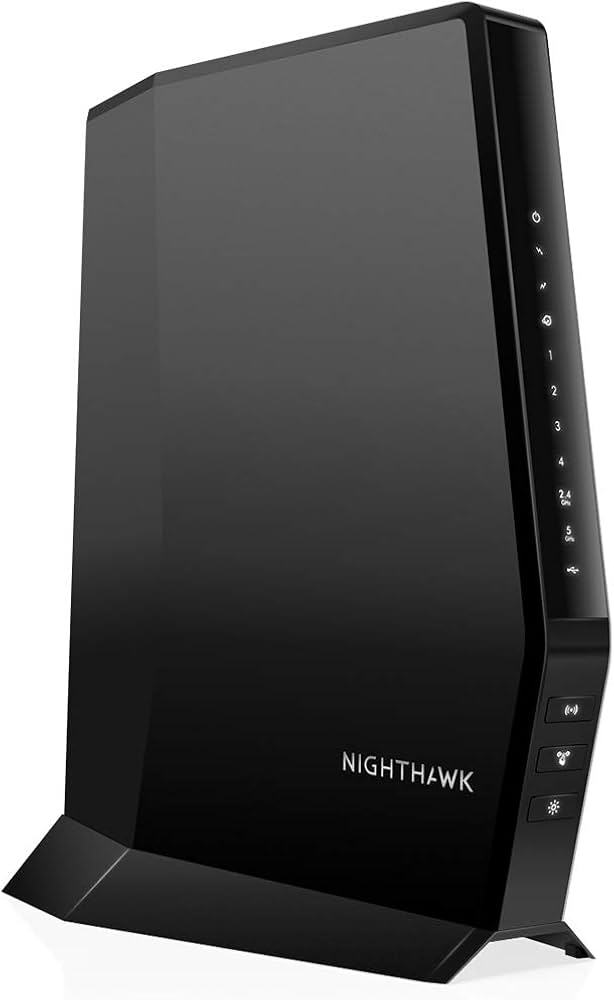
The unit has a compact but solid build, with a functional black chassis and ventilation designed for continuous operation. Its materials and layout feel appropriate for a premium consumer networking product, while the front-panel indicators make basic status checks straightforward. For everyday users, the experience is centered on convenience: fewer cables, fewer devices to manage, and more dependable home connectivity.
Setup Guide: How to Install the CAX30 Cable Modem Router
- Place the modem router in a central, open area with good ventilation and close to the coaxial outlet.
- Connect the coaxial cable from your wall jack to the cable input on the CAX30.
- Plug in the power adapter and wait for the status lights to stabilize.
- Use an Ethernet cable to connect a computer if you prefer initial setup by wire.
- Follow your internet service provider activation steps, which may include logging in through a browser or using the provider’s activation portal.
- Create a new Wi-Fi network name and password, or keep the default settings temporarily during activation.
- Test connectivity on a phone, laptop, and streaming device before moving the unit to a permanent location.
For best performance, use modern WPA2 or WPA3 security settings when available and avoid placing the unit near thick walls, metal surfaces, or microwaves. If pairing fails, restart both the modem and connected device, then confirm that the ISP account is fully activated. Never place the modem router in a closed cabinet, as heat buildup can reduce performance and long-term reliability.
Troubleshooting
- No internet connection: Check coaxial cable seating, verify ISP activation, and reboot the modem router.
- Wi-Fi not appearing: Confirm wireless broadcasting is enabled and that the device is within range.
- Slow speeds: Test with a wired connection, reduce interference, and confirm your internet plan supports the expected rate.
- Frequent drops: Inspect cables for damage, move the unit to a cooler location, and check for firmware updates through the management interface.
- Port issues: Try a different Ethernet cable or port if a wired device does not connect.
Common status-light issues usually point to activation, signal, or connection problems rather than hardware failure. If the modem remains offline after multiple resets, contact your internet service provider to confirm provisioning. The product is covered by NETGEAR support channels and the standard warranty terms supplied with the unit, and buyers should keep purchase records for support or replacement requests. If you need further help, use the official NETGEAR support website or the service provider’s customer support line.
Pros & Cons
Pros
- All-in-one design reduces clutter and simplifies home networking.
- DOCSIS 3.1 support helps future-proof the connection for modern cable service.
- Wi-Fi 6 AX2700 delivers strong performance for streaming, gaming, and remote work.
- Four Gigabit Ethernet ports are ideal for wired gaming consoles and PCs.
- USB 3.0 port adds storage-sharing flexibility for home media use.
- Good value for users replacing separate modem and router hardware.
Cons
- Not the best choice for users who want multi-gig Ethernet or very high-end Wi-Fi 6 throughput.
- Compatibility depends on your cable provider, so activation should be confirmed first.
- Less flexible than separate modem and router setups for advanced networking upgrades.
- Higher upfront cost than basic DOCSIS 3.0 alternatives, though the feature set is stronger.
Compared with basic modem-router combos, the netgear Nighthawk AX6AX2700 WiFI Cable Modem CAX30 offers noticeably better wireless capacity and a more modern feature set. Compared with premium alternatives, it is a more balanced midrange purchase that focuses on stability, simplicity, and everyday speed rather than extreme performance.
Customer Reviews
Average user sentiment for the netgear Nighthawk AX6AX2700 WiFI Cable Modem CAX30 is generally positive, often landing around 4 to 4.5 out of 5 stars in retail listings. Customers frequently praise the convenience of the modem-router combo, the strong Wi-Fi range, and the easy reduction in equipment clutter.
Typical comments include: “Setup was quick and my home network is much cleaner now,” and “Great speeds for streaming and working from home.” Common complaints focus on ISP activation delays, occasional setup confusion, and the fact that performance depends heavily on the cable provider’s service quality.
For best results, buyers who want a reliable all-in-one cable modem router for a medium to large home will likely be satisfied. Users with advanced networking needs, multi-gig plans, or enterprise-style requirements may want to compare it against higher-tier alternatives before purchasing.
Faqs
How do I set up the netgear Nighthawk AX6AX2700 WiFI Cable Modem CAX30 for the first time?
What cable provider compatibility should I check before buying the netgear Nighthawk AX6AX2700 WiFI Cable Modem CAX30?
Why is my netgear Nighthawk AX6AX2700 WiFI Cable Modem CAX30 not connecting to the internet after setup?
How can I improve WiFi speed on the netgear Nighthawk AX6AX2700 WiFI Cable Modem CAX30?
What do the Ethernet ports and USB 3.0 port on the netgear Nighthawk AX6AX2700 WiFI Cable Modem CAX30 do?
How do I fix overheating on the netgear Nighthawk AX6AX2700 WiFI Cable Modem CAX30?
Can the netgear Nighthawk AX6AX2700 WiFI Cable Modem CAX30 handle multiple devices for streaming and gaming?
What routine maintenance should I do for the netgear Nighthawk AX6AX2700 WiFI Cable Modem CAX30?
More netgear manuals
- Netgear Orbi RBR750 Tri-Band Mesh WiFi 6 System User Manual
- Netgear RS700 Nighthawk WiFi 7 Tri-Band Router User Manual
- Netgear Nighthawk X6S AC3000 Tri-Band WiFi Extender User Manual
- Netgear Orbi Pro Tri-Band Mesh WiFi System Router SRR60 User Manual
- Netgear 4-Stream AX1800 WiFi 6 Router RAX10 User Manual
- Netgear AX1600 4-Stream WiFi 6 Mesh Extender EAX12 User Manual
Leave a Comment