
Netgear Orbi Pro Tri-Band Mesh WiFi System Router SRR60 User Manual
Content
Netgear Orbi Pro Tri-Band Mesh WiFi System SRR60 Overview
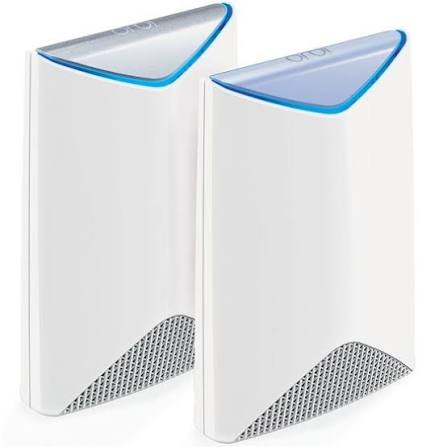
The netgear Orbi Pro Tri-Band Mesh WiFi System SRR60 is a business-focused wireless router designed to deliver fast, reliable coverage for small offices, retail spaces, and professional work environments. Built around tri-band Wi-Fi and a dedicated backhaul channel, it helps reduce congestion while maintaining stable performance for multiple connected devices. The result is smoother video conferencing, faster file transfers, and stronger whole-building coverage than a traditional single-router setup.
This system is especially useful for companies that need secure guest access, consistent connectivity across multiple rooms, and simple expansion as network demands grow. It supports business-friendly features such as captive portal support, guest networking, beamforming, and cloud-based management options, making it a practical choice for administrators who want control without complex enterprise infrastructure. The SRR60 also includes four Gigabit Ethernet ports, which is useful for wired printers, desktops, and point-of-sale devices.
In terms of pricing, the SRR60 typically appears in the mid-range business Wi-Fi category, with availability varying by region and seller. It is often found through networking retailers, business resellers, and marketplace listings, especially as a standalone router or part of the broader Orbi Pro system. For organizations looking for a compact mesh-ready solution with business-oriented features, this model remains a strong value proposition.
Technical Specifications for Netgear Orbi Pro Tri-Band Mesh WiFi System SRR60
- Wi-Fi class: AC3000 tri-band mesh router
- Combined wireless speed: up to 3000 Mbps total
- 5 GHz band 1: 1733 Mbps, 4x4 stream configuration
- 5 GHz band 2: 866 Mbps, 2x2 stream configuration
- 2.4 GHz band: 400 Mbps, 2x2 stream configuration
- Antennas: six internal high-performance antennas with amplifiers
- Ethernet: four Gigabit Ethernet ports
- WAN: one Gigabit Internet port
- Wireless standards: 802.11a/b/g/n/ac
- Coverage: designed for broad whole-home or small-office coverage, with common listings citing up to about 2,500 square feet for the router
- Security: WPA/WPA2 support
- Business features: guest access, captive portal, beamforming, MU-MIMO, dedicated backhaul
Compared with consumer mesh systems in the same class, the SRR60 stands out for its business-oriented management tools and wired connectivity options. Compared with entry-level dual-band routers, it delivers better traffic separation and more stable multi-device performance.
Detailed Product Description
The netgear Orbi Pro Tri-Band Mesh WiFi System SRR60 is engineered to distribute wireless traffic across three separate bands so that client devices and mesh backhaul traffic do not compete as heavily for airtime. This design improves responsiveness in environments where many users are online at once. In practical use, that means better performance for cloud apps, VoIP calls, streaming, and shared office devices.
The unit uses a compact desktop-style enclosure with a professional look and solid build quality suited to office shelving or network closets. Its internal antenna array and amplifiers are designed for strong signal propagation, while the Ethernet ports allow direct wired connections for devices that should remain stable and low-latency. The router integrates naturally into a mesh deployment, making it suitable for expanding coverage in larger workspaces or mixed-floor environments.
User experience is generally focused on simplicity: setup is straightforward, and the system is intended to reduce dead zones without demanding advanced networking knowledge. It is well suited to cafes, boutiques, consultancies, shared offices, and home offices that need business-grade Wi-Fi with minimal maintenance.
Setup Guide for Orbi Pro SRR60 Mesh WiFi Router
- Place the router in a central, elevated location away from large metal objects, thick walls, and microwaves.
- Connect the modem to the yellow Internet port using an Ethernet cable.
- Plug in the power adapter and wait for the status LED to become ready.
- Use the Orbi management app or a web browser to begin the setup wizard.
- Create an admin password, choose the Wi-Fi network name, and set a strong wireless password.
- Configure guest access if needed for visitors, customers, or temporary staff.
- Add compatible Orbi Pro satellites if you need wider coverage in large spaces.
- Test connectivity on laptops, phones, printers, and POS devices.
For best results, keep firmware updated and avoid placing the router inside cabinets. If the router fails to connect, power-cycle the modem first, then the SRR60. Use only the included power adapter and maintain adequate ventilation to prevent overheating. If pairing a satellite, position it midway between the router and the weak-signal area for a stronger backhaul link.
Troubleshooting Netgear Orbi Pro SRR60 Problems
- No internet connection: Check the modem, verify the WAN cable, and restart both modem and router in that order.
- Weak Wi-Fi signal: Reposition the router to a central location, reduce physical obstructions, or add a satellite.
- Slow speeds: Confirm that devices are connecting to the correct band and avoid excessive interference from nearby wireless networks.
- Setup failure: Reset the router if the configuration becomes corrupted, then run the setup wizard again.
- Device drops off the network: Update firmware, check DHCP settings, and make sure power-saving modes are not interfering.
- LED issues: A blinking or amber light often indicates startup, connection, or sync problems that usually resolve after rebooting and rechecking cable placement.
Preventive maintenance includes periodic firmware updates, careful cable management, and sensible placement away from wireless interference. If problems continue, warranty service and support are typically available through Netgear support channels, authorized resellers, or the original retailer. Keep the model number SRR60 and purchase details handy when requesting help.
Pros and Cons of the Netgear Orbi Pro Tri-Band Mesh WiFi System SRR60
Pros
- Strong tri-band design with dedicated backhaul for stable performance
- Business-friendly features such as captive portal and guest access
- Four Gigabit Ethernet ports for wired office devices
- Simple setup compared with many enterprise access point systems
- Good fit for small businesses that want mesh coverage without complex administration
Cons
- Older Wi-Fi generation compared with newer Wi-Fi 6 and Wi-Fi 6E alternatives
- Availability can be inconsistent depending on region
- Best value depends on whether the user needs business features or only basic home Wi-Fi
- Some buyers may prefer newer systems with faster peak speeds and improved efficiency
Overall value for money is strongest for organizations that need reliable coverage and wired connectivity more than cutting-edge wireless standards. Compared with modern consumer mesh kits, the SRR60 is less advanced on paper but more practical for business management and guest-network scenarios.
Customer Reviews of the SRR60 Mesh WiFi System
Average user sentiment is generally positive, with many owners praising the stable coverage, easy setup, and strong performance in multi-device environments. A common pattern in reviews is a 4 out of 5 star experience, especially for office users who want dependable wireless without complicated IT administration.
Typical praise includes stronger signal consistency, good roaming behavior, and useful business features. Common complaints focus on the older hardware platform, occasional setup quirks, and pricing that may feel high compared with consumer-only mesh systems. One frequently repeated comment is that it performs best when paired with the right satellite placement and updated firmware.
It is a good purchase for small business owners, managed offices, and advanced home users who value network stability and guest access. Buyers focused only on the latest speed standards may want to compare it with newer Wi-Fi 6 mesh alternatives before deciding.
Frequently Asked Questions About Netgear Orbi Pro Tri-Band Mesh WiFi System SRR60
What is the SRR60 best used for?
It is best used for small offices, retail spaces, and work environments that need secure, stable, wide-area Wi-Fi with wired device support.
Does the SRR60 support mesh expansion?
Yes, it is designed to work as part of the Orbi Pro mesh ecosystem for broader coverage.
Is the SRR60 still worth buying in 2026?
It can still be a strong choice if business features, tri-band performance, and Gigabit Ethernet ports matter more than the newest wireless standard.
Faqs
How do I set up the netgear Orbi Pro Tri-Band Mesh WiFi System SRR60 for the first time?
What should I do if the netgear Orbi Pro Tri-Band Mesh WiFi System SRR60 is not connecting to the internet?
Can I manage the netgear Orbi Pro Tri-Band Mesh WiFi System SRR60 with the NETGEAR Insight app?
What devices and internet speeds are compatible with the netgear Orbi Pro Tri-Band Mesh WiFi System SRR60?
How can I improve WiFi coverage and performance on the netgear Orbi Pro Tri-Band Mesh WiFi System SRR60?
How do I add an Orbi Pro satellite to the netgear Orbi Pro Tri-Band Mesh WiFi System SRR60?
Why does my netgear Orbi Pro Tri-Band Mesh WiFi System SRR60 keep disconnecting or dropping speed?
How should I maintain the netgear Orbi Pro Tri-Band Mesh WiFi System SRR60 for reliable long-term use?
More netgear manuals
- Netgear RS700 Nighthawk WiFi 7 Tri-Band Router User Manual
- Netgear AX1600 4-Stream WiFi 6 Mesh Extender EAX12 User Manual
- Netgear Nighthawk AX6AX2700 WiFI Cable Modem CAX30 User Manual
- Netgear Nighthawk WiFi 7 Tri-Band Router RS500 User Manual
- Netgear Orbi RBR750 Tri-Band Mesh WiFi 6 System User Manual
- Netgear 4-Stream WiFi 6 Mesh Extender EAX10 User Manual
Leave a Comment