
Netgear AX1600 4-Stream WiFi 6 Mesh Extender EAX12 User Manual
Content
Netgear AX1600 4-Stream WiFi 6 Mesh Extender EAX12 Review and Manual
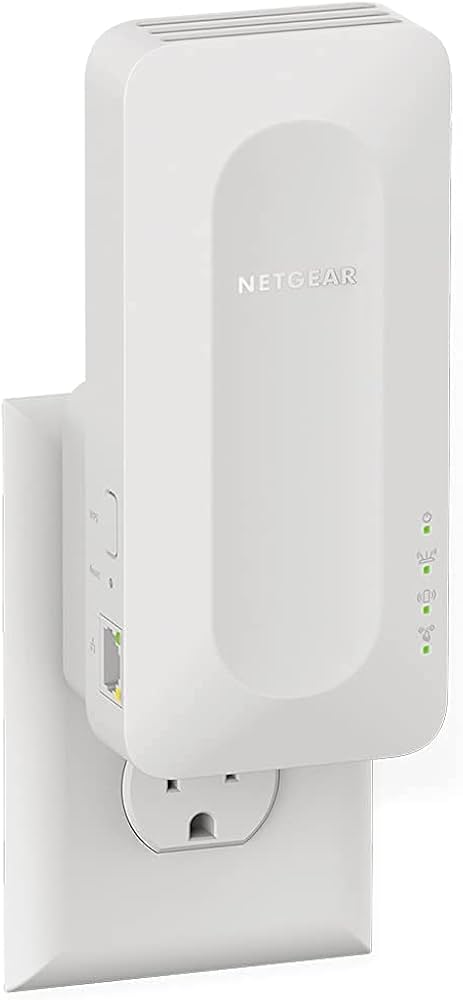
The Netgear AX1600 4-Stream WiFi 6 Mesh Extender EAX12 is a compact wall-plug range extender designed to improve wireless coverage, reduce dead zones, and deliver smoother connectivity across a home or small office. With WiFi 6 technology, dual-band operation, and mesh support, it is built for users who want faster, more stable internet without replacing their existing router. The Netgear AX1600 4-Stream WiFi 6 Mesh Extender EAX12 is especially useful for streaming 4K video, online gaming, smart home devices, video calls, and everyday browsing in rooms where signal strength is weak.
Its main selling points include AX1600 performance, 4-stream WiFi, seamless roaming, and a Gigabit Ethernet port for wired devices such as smart TVs, game consoles, and desktop PCs. The wall-plug design keeps setup simple and saves space, while internal antennas help maintain a clean, unobtrusive appearance. It is a strong fit for households that need coverage in bedrooms, basements, garages, or upper floors where a router alone may not reach reliably.
Estimated pricing for the Netgear AX1600 4-Stream WiFi 6 Mesh Extender EAX12 typically falls in the budget-to-midrange category, with common market listings around $35 to $80 depending on retailer, region, and promotions. Availability is generally good through major electronics stores and online marketplaces. For shoppers comparing WiFi 6 extenders, this model offers a practical balance of speed, mesh convenience, and value.
Specifications for Netgear AX1600 4-Stream WiFi 6 Mesh Extender EAX12
- WiFi standard: WiFi 6 (802.11ax) with backward compatibility for 802.11a/b/g/n/ac devices
- Performance class: AX1600 dual-band extender
- Speed rating: up to 1.6 Gbps combined theoretical throughput
- Band speeds: up to 300 Mbps on 2.4 GHz and up to 1201 Mbps on 5 GHz
- Stream design: 4-stream WiFi for improved capacity and efficiency
- Mesh features: supports seamless roaming and mesh network integration
- Ethernet: 1 Gigabit Ethernet port for wired connections
- Security: WPA3 support for modern wireless protection
- Dimensions: approximately 5.9 x 2.7 x 2.1 inches
- Weight: approximately 0.49 lb / 222 g
- Form factor: wall-plug design with internal antennas
- Performance context: typically positioned below AX1800 and higher-capacity tri-band mesh extenders
Compared with similar WiFi 6 extenders, the EAX12 is lighter and more compact than higher-end mesh nodes, but it also offers fewer Ethernet ports and less total throughput than AX1800 or AX3000 models. It is best viewed as a simple, affordable coverage extender rather than a full mesh router replacement.
Detailed Product Description: How the EAX12 Mesh Extender Works
The Netgear AX1600 4-Stream WiFi 6 Mesh Extender EAX12 connects to an existing router and rebroadcasts the wireless signal to extend coverage into weak-signal areas. Once paired, it can create a more unified home network experience with smart roaming, allowing compatible devices to move between the router and extender with less interruption. This makes it a strong choice for homes that need reliable connectivity across multiple rooms.
In real-world use, the extender is ideal for streaming services, online meetings, smart doorbells, connected cameras, and devices that sit far from the main router. The Gigabit Ethernet port adds flexibility for gaming consoles, streaming boxes, and laptops that benefit from a stable wired link. The compact wall-plug build and internal antennas keep installation discreet, while the plastic housing is practical and lightweight rather than premium or heavy-duty.
User experience is generally straightforward, with the device designed for fast pairing and minimal ongoing maintenance. As a WiFi 6 extender, it is better suited for modern homes with several connected devices than older WiFi 5 range boosters.
Setup Guide for Netgear AX1600 4-Stream WiFi 6 Mesh Extender EAX12
- Plug the extender into a wall outlet halfway between your router and the area with weak signal.
- Wait for the power LED to stabilize before beginning setup.
- Press the WPS button on your router, then press the WPS button on the extender to pair automatically.
- If WPS is unavailable, use the web or app-based setup method and follow the on-screen prompts.
- Choose the preferred network name strategy, either matching the router for mesh roaming or using a separate extender SSID if desired.
- Test coverage in the target room and reposition the extender if the signal is still weak.
- Connect wired devices to the Gigabit Ethernet port if you need a stable LAN connection.
For best performance, place the extender away from thick walls, microwaves, metal objects, and cordless phone bases. Avoid installing it in enclosed cabinets or behind televisions. If pairing fails, reboot the router and extender, then try again closer to the router during initial setup. Always use a properly grounded indoor outlet and avoid overloading power strips.
Troubleshooting Common EAX12 Problems
- Weak signal after setup: move the extender closer to the router and reconnect.
- Pairing failure: restart both devices and retry WPS or manual setup.
- Slow speeds: check router placement, update firmware, and test on the 5 GHz band.
- No internet on wired device: verify the Ethernet cable is seated correctly and the router has internet access.
- LED issue or unresponsive unit: power cycle the extender and confirm the outlet is functioning.
Common error behavior usually comes from placement, interference, or outdated firmware rather than hardware failure. Preventive measures include keeping firmware updated, using optimal placement, and avoiding saturated channels on the main router. If problems persist, NETGEAR support typically provides setup guides, firmware downloads, and warranty assistance for eligible devices. Contact support through the manufacturer’s official customer service channels or the retailer if the product was recently purchased.
Pros and Cons of the Netgear AX1600 4-Stream WiFi 6 Mesh Extender EAX12
Pros
- WiFi 6 support improves efficiency for multiple connected devices
- AX1600 performance is strong for the price
- Compact wall-plug design saves space and is easy to position
- Gigabit Ethernet port adds wired flexibility
- Mesh roaming helps reduce disruptions when moving around the home
- Good value for users who need simple coverage expansion
Cons
- Not as fast or feature-rich as AX1800 or tri-band mesh systems
- Only one Ethernet port limits wired expansion
- Best suited for range extension, not advanced networking features
- Performance depends heavily on router quality and placement
For buyers comparing affordable WiFi 6 extenders, the Netgear AX1600 4-Stream WiFi 6 Mesh Extender EAX12 offers a solid balance of speed, simplicity, and mesh convenience. It is a better value than many older WiFi 5 extenders, though users with large homes or very high bandwidth needs may want a higher-tier alternative.
Customer Reviews and User Feedback on the EAX12
Customer feedback for the EAX12 is generally positive, with many users praising the easy setup, compact design, and noticeable improvement in weak-signal rooms. Common star ratings in retail listings often cluster around 4 out of 5 stars, especially from buyers using it to extend coverage for streaming and smart home devices.
Typical praise includes stable connections, better upstairs coverage, and reliable performance for everyday household use. Common complaints focus on speed drops when the extender is placed too far from the router and the fact that only one Ethernet port is available. Users who expect full mesh-router performance may feel it is best for moderate rather than heavy networking demands. Overall, it is a smart purchase for anyone needing an affordable WiFi 6 mesh extender with straightforward setup and dependable coverage improvement.
Faqs
How do I set up the netgear AX1600 4-Stream WiFi 6 Mesh Extender EAX12 for the first time?
Why is my netgear AX1600 4-Stream WiFi 6 Mesh Extender EAX12 not connecting to my router?
What routers are compatible with the netgear AX1600 4-Stream WiFi 6 Mesh Extender EAX12?
How can I improve speed and coverage with the netgear AX1600 4-Stream WiFi 6 Mesh Extender EAX12?
What does 4-stream WiFi 6 mean on the netgear AX1600 4-Stream WiFi 6 Mesh Extender EAX12?
Why does my netgear AX1600 4-Stream WiFi 6 Mesh Extender EAX12 keep dropping connection?
How do I reset the netgear AX1600 4-Stream WiFi 6 Mesh Extender EAX12 without losing my network setup?
How should I maintain the netgear AX1600 4-Stream WiFi 6 Mesh Extender EAX12 for reliable long-term use?
More netgear manuals
- Netgear Orbi Pro Tri-Band Mesh WiFi System Router SRR60 User Manual
- Netgear Nighthawk WiFi 7 Tri-Band Router RS500 User Manual
- Netgear RS700 Nighthawk WiFi 7 Tri-Band Router User Manual
- Netgear 4-Stream WiFi 6 Mesh Extender EAX10 User Manual
- Netgear Nighthawk AX6AX2700 WiFI Cable Modem CAX30 User Manual
- Netgear Orbi 5G WiFi Mesh System NBR750 User Manual
Leave a Comment