
Netgear Orbi 5G WiFi Mesh System NBR750 User Manual
Content
Introduction to the Netgear Orbi 5G WiFi Mesh System NBR750
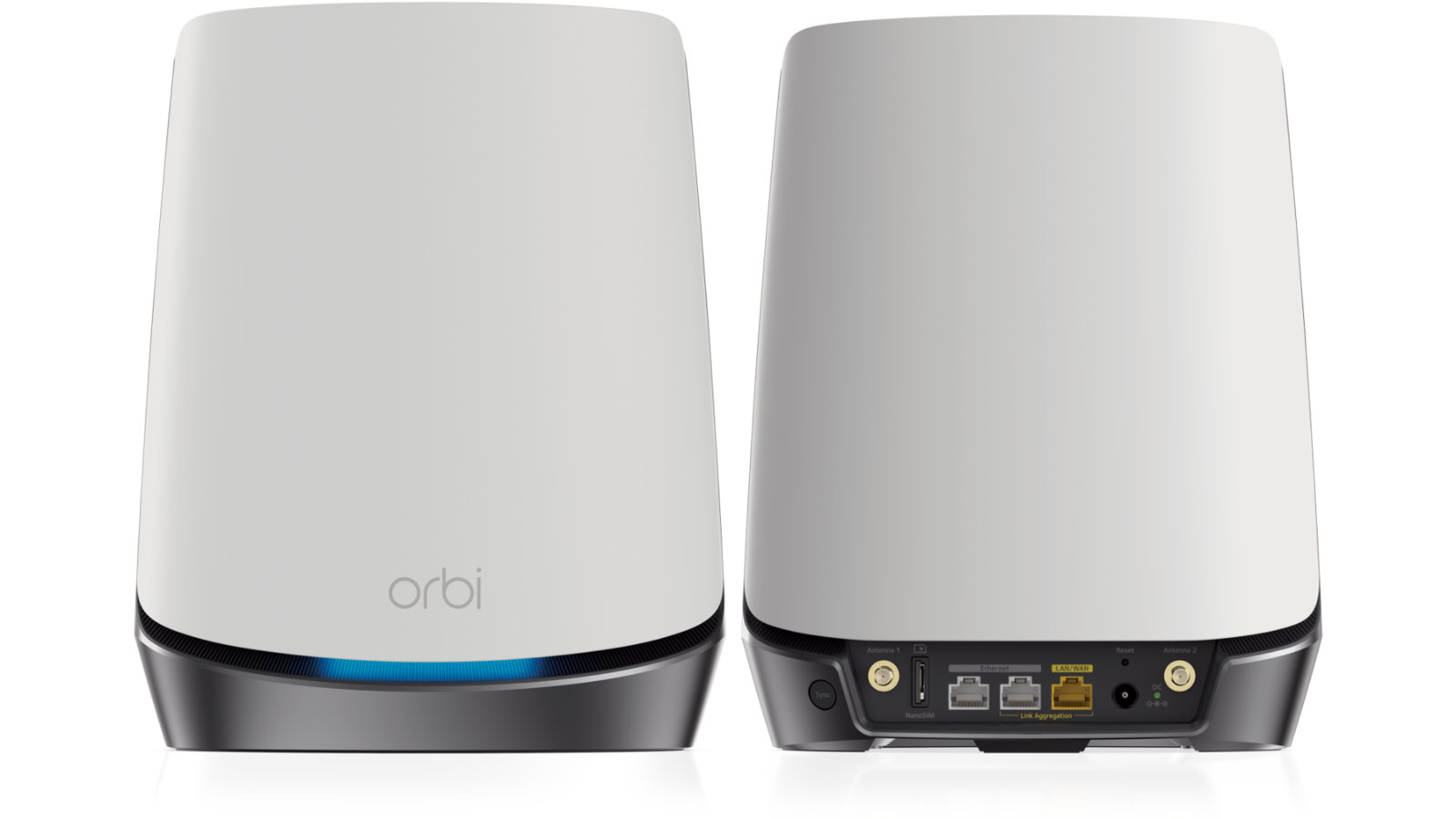
The Netgear Orbi 5G WiFi Mesh System NBR750 is a premium 5G home internet router designed to deliver fast, reliable wireless coverage in areas where traditional broadband is limited, inconsistent, or unavailable. Built as part of Netgear’s Orbi AX4200 family, it combines 5G cellular connectivity with WiFi 6 mesh performance to provide a powerful all-in-one networking solution for homes, small offices, remote work setups, and high-demand households. It is especially useful for users who need backup internet, live in rural or underserved locations, or want a flexible primary connection without a fixed-line ISP.
One of its biggest strengths is the combination of 5G mobile internet support and tri-band WiFi 6 technology, which helps multiple devices stay connected with lower congestion and better performance. The system supports strong throughput, gigabit Ethernet ports, and mesh expansion with compatible Orbi satellites, making it suitable for streaming, video conferencing, gaming, smart home devices, and large multi-room environments. In real-world use, it offers a simple way to bring high-speed wireless networking into spaces where installing fiber or cable is difficult.
The estimated price range for the Netgear Orbi 5G WiFi Mesh System NBR750 typically falls in the mid-to-premium tier, often around the low-to-mid hundreds depending on the retailer, region, carrier compatibility, and bundle configuration. Availability can vary by market and mobile network support, so buyers should confirm local 5G band compatibility before purchase.
Specifications for the Netgear Orbi NBR750 5G WiFi 6 Mesh Router
- Model: NBR750
- Wireless class: AX4200 tri-band WiFi 6 mesh router
- Maximum wireless rate: Up to 4.2 Gbps combined class rating
- Cellular support: 5G and 4G LTE connectivity with carrier-dependent band support
- WiFi bands: 2.4 GHz and dual 5 GHz radios
- Processor: Quad-core 1.4 GHz processor
- Memory: 1 GB RAM and 512 MB NAND flash
- Ethernet: Two Gigabit LAN ports and one Gigabit WAN port
- SIM support: Nano-SIM slot for cellular service
- Security: WPA3 support, firewall features, and parental controls depending on region and firmware
- Antenna design: Internal high-performance antennas with beamforming support
- Mesh capability: Compatible with Orbi satellite units for whole-home coverage
Compared with standard WiFi 6 routers, the NBR750 stands out because it adds integrated 5G mobile broadband. Compared with traditional mesh systems, it offers greater flexibility for users who need internet without a wired line, while still providing strong mesh-style coverage and gigabit wired expansion.
Detailed Description of the Orbi 5G WiFi Mesh System
The Netgear Orbi 5G WiFi Mesh System NBR750 works by using a mobile data connection through a supported 5G or LTE SIM card and then distributing that connection across your home using WiFi 6 mesh networking. This makes it a practical choice for homes that need fast setup without broadband installation delays. Once activated, the router broadcasts a high-capacity wireless network and can extend coverage further with compatible Orbi satellites.
The hardware is built with a clean, modern enclosure and a compact vertical design suited for shelf placement or desktop use. Internal antennas reduce clutter while maintaining a professional appearance. The build quality feels solid and durable, with a focus on stable long-term operation rather than portability. The inclusion of gigabit Ethernet ports also makes it easy to connect desktop PCs, gaming consoles, smart TVs, or network switches.
In everyday use, the system is well suited for remote work, large video calls, 4K streaming, and smart home control. Users benefit from simple app-based management, consistent mesh handoff, and the convenience of using mobile internet as a home network. The experience is strongest in areas with good 5G signal strength, where the router can deliver excellent speed and latency for a wide range of household tasks.
Setup Guide for the Netgear Orbi NBR750
Setting up the Netgear Orbi 5G WiFi Mesh System NBR750 is straightforward and designed for quick deployment. Start by inserting a compatible nano-SIM card, then connect the power adapter and place the router near a window or elevated area where 5G signal quality is strongest. Wait for the status lights to stabilize before beginning configuration.
- Download the Orbi mobile app or access the router web interface from a connected device.
- Follow the on-screen prompts to detect the SIM card and activate the network connection.
- Create a WiFi network name and password.
- Adjust wireless settings, guest access, or parental controls if needed.
- Add Orbi satellites by placing them within range and using the sync process.
- Test wired ports by connecting a laptop or streaming device to the gigabit LAN ports.
Troubleshooting during setup usually involves checking SIM compatibility, confirming network activation, or relocating the unit for better reception. Avoid placing the router near metal objects, thick walls, or other electronics that may interfere with wireless performance. For safety, use only the supplied power adapter and ensure ventilation around the unit.
Troubleshooting the Orbi 5G Mesh Router NBR750
Common issues with the Orbi 5G WiFi Mesh System NBR750 usually relate to SIM setup, weak signal, or satellite pairing. If the internet connection is unstable, confirm that the SIM card is active and that the carrier supports the router’s 5G and LTE bands in your region. If speeds are lower than expected, move the router closer to a window or higher location to improve signal reception.
- No internet connection: Recheck SIM insertion, carrier activation, and APN settings.
- Weak WiFi coverage: Reposition the router or add an Orbi satellite.
- Satellite not syncing: Power-cycle both units and restart the pairing process.
- Slow performance: Reduce interference, update firmware, and limit background downloads.
- Port not working: Try another Ethernet cable or device and verify LAN settings.
Preventive maintenance includes periodic firmware updates, keeping the device dust-free, and checking for improved carrier settings after network changes. Netgear support options typically include online documentation, product registration, firmware downloads, and warranty assistance through authorized support channels.
Pros and Cons of the Netgear Orbi 5G WiFi Mesh System NBR750
Pros
- 5G flexibility: Works as a primary internet source where wired broadband is unavailable.
- WiFi 6 performance: Supports modern devices with better efficiency and capacity.
- Mesh-ready coverage: Can expand with Orbi satellites for larger homes.
- Gigabit ports: Useful for stable wired connections to TVs, PCs, and consoles.
- Easy setup: Straightforward app-based installation and network management.
Cons
- Carrier dependence: Performance depends heavily on local 5G availability and SIM compatibility.
- Higher cost: More expensive than standard WiFi 6 routers without mobile broadband.
- Region limitations: Not every market or carrier supports the same bands.
- Mesh extras may cost more: Full whole-home coverage can require additional satellites.
For buyers comparing alternatives, the NBR750 is best suited to users who need a wireless internet gateway first and a mesh router second. It offers stronger flexibility than many traditional routers, though standard fiber-ready mesh systems may deliver lower total cost if a fixed-line connection is already available.
Customer Reviews and User Feedback
Customer feedback for the Netgear Orbi 5G WiFi Mesh System NBR750 is generally positive, with many users praising the convenience of plug-and-play internet access and strong mesh performance. Common satisfaction points include fast setup, dependable home coverage, and the ability to use 5G as a full-time broadband replacement. A typical rating pattern is around 4 out of 5 stars for users with good carrier support and strong signal conditions.
Frequently mentioned complaints include inconsistent speeds in weak coverage areas, the need to verify carrier band support, and the added cost of expanding the mesh system. One common testimonial theme is that the router works especially well for remote homes and temporary setups where traditional internet installation would be slow or impractical. Buyers who live in 5G-friendly areas tend to recommend it more strongly than users in marginal signal zones.
Overall, the Orbi NBR750 is a solid recommendation for users who value flexibility, premium wireless performance, and mesh expandability in one package.
Faqs
How do I set up the netgear Orbi 5G WiFi Mesh System NBR750 for the first time?
Why is my netgear Orbi 5G WiFi Mesh System NBR750 showing weak internet speed even though the signal looks strong?
What devices and internet plans are compatible with the netgear Orbi 5G WiFi Mesh System NBR750?
How do I improve coverage from the netgear Orbi 5G WiFi Mesh System NBR750 in a large home?
What should I do if the netgear Orbi 5G WiFi Mesh System NBR750 keeps dropping connection?
How secure is the netgear Orbi 5G WiFi Mesh System NBR750, and what settings should I change after setup?
Can the netgear Orbi 5G WiFi Mesh System NBR750 work as a backup internet solution during outages?
How often should I maintain the netgear Orbi 5G WiFi Mesh System NBR750, and what routine checks matter most?
More netgear manuals
- Netgear 4-Stream WiFi 6 Mesh Extender EAX10 User Manual
- Netgear AX6 Nighthawk WiFi Router RAX50 User Manual
- Netgear Nighthawk WiFi 7 Tri-Band Router RS500 User Manual
- Netgear Nighthawk AX8 8-Stream WiFi Extender EAX80 User Manual
- Netgear AX1600 4-Stream WiFi 6 Mesh Extender EAX12 User Manual
- Netgear RAX45 Nighthawk AX6 WiFi Router User Manual
Leave a Comment