
Netgear AX6 Nighthawk WiFi Router RAX50 User Manual
Content
netgear AX6 Nighthawk WiFi Router RAX50: Overview and Buyer Guide
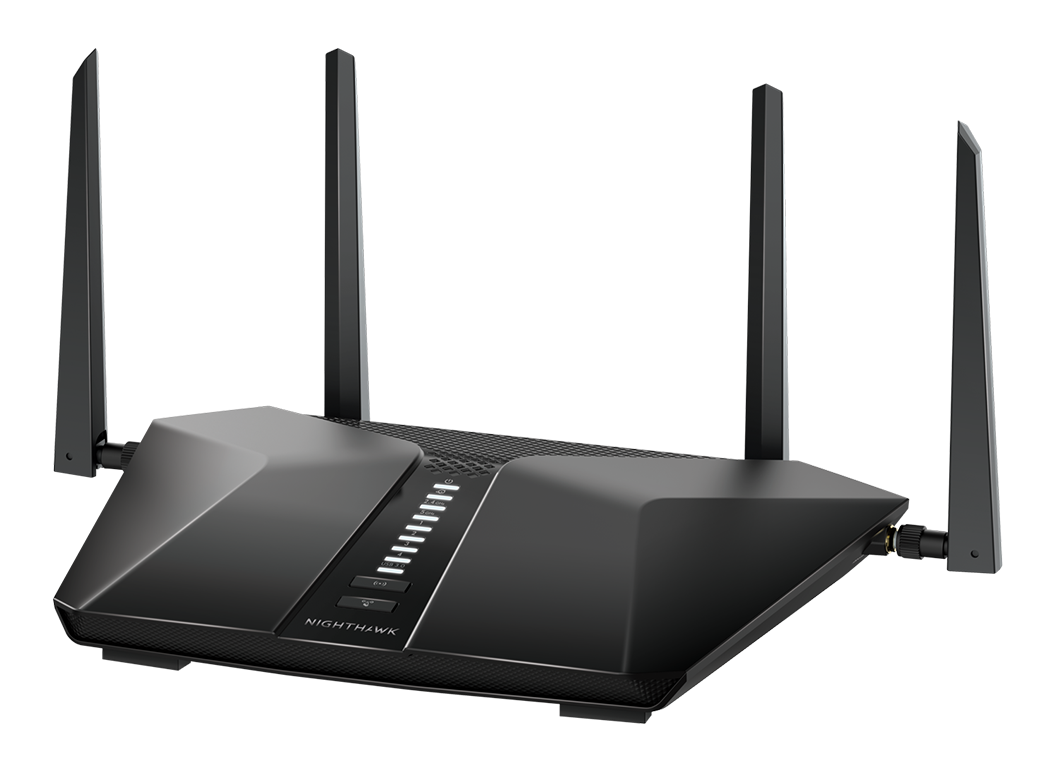
The netgear AX6 Nighthawk WiFi Router RAX50 is a dual-band Wi-Fi 6 router built for households that need fast wireless performance, strong coverage, and easy device handling across multiple rooms. It is positioned as an AX5400-class router, with Wi-Fi 6 support, 4x4 5 GHz performance, 2x2 2.4 GHz performance, four Gigabit LAN ports, one Gigabit WAN port, and a USB 3.0 port for shared storage or printer access. In everyday use, that makes it a solid choice for streaming 4K video, online gaming, video calls, and busy smart homes with many connected devices.
This model is especially appealing to users who want a step up from older Wi-Fi 5 routers without moving into premium tri-band or mesh systems. The Nighthawk mobile app and web interface make setup and basic management straightforward, while WPA3 support and guest networking add practical security features. Typical pricing has been seen in the roughly $160 to $300 range depending on retailer, promotions, and bundle options, and it remains widely available through major electronics stores and online marketplaces. For shoppers looking for a balanced mix of performance, features, and value, the netgear AX6 Nighthawk WiFi Router RAX50 remains a competitive mainstream option. Its strongest use cases include medium to large homes, multi-device family networks, and users who want reliable Wi-Fi 6 without paying for mesh hardware.
Troubleshooting netgear AX6 Nighthawk WiFi Router RAX50 Common Problems
Common issues with the netgear AX6 Nighthawk WiFi Router RAX50 usually involve setup failures, dropped connections, slow speeds, or app sign-in problems. If the router shows no internet access, restart the modem first, then reboot the router, and confirm the WAN cable is firmly connected. If the Nighthawk app cannot detect the router, use the web browser setup page instead and make sure the phone or laptop is connected to the router’s default Wi-Fi network.
Error-style setup failures are often caused by outdated firmware, incorrect ISP login settings, or modem compatibility issues. Updating to the latest firmware, resetting the router to factory defaults, and re-running setup usually resolves most startup problems. To prevent recurring outages, place the router in an open location, avoid interference from microwaves and thick walls, and keep firmware updated. NETGEAR typically backs this model with a one-year hardware warranty, and extended protection or support plans may be available in some regions. For help, NETGEAR Support can be reached through the official support contact number at 1-888-638-4327, while business support uses 1-855-776-7233. If the issue persists, a factory reset and manual reconfiguration are often the fastest recovery steps.
Pros and Cons of the Nighthawk RAX50 WiFi 6 Router
Pros
- Strong Wi-Fi 6 performance for homes with many devices, including streaming boxes, phones, laptops, and smart home gear.
- 4x4 5 GHz and AX5400-class speeds deliver excellent real-world throughput for gaming and 4K streaming.
- Four Gigabit LAN ports plus USB 3.0 give it good wired and shared-storage flexibility.
- WPA3, guest networking, and the Nighthawk app improve security and basic network management.
- Good value for users who want a capable Wi-Fi 6 router without stepping up to mesh or premium multi-gig models.
Cons
- No multi-gig WAN or LAN port, so it is less future-proof for very fast internet plans.
- Single-router coverage is good, but large or multilevel homes may still need mesh expansion.
- Advanced features can feel limited compared with higher-end Nighthawk or mesh systems.
- Subscription-based extras such as parental controls can reduce long-term value for some buyers.
- Alternatives like mesh Wi-Fi systems may be better for whole-home coverage, while higher-end Wi-Fi 6E routers offer more headroom.
Overall, the router offers strong value for money if the goal is reliable Wi-Fi 6 performance at a mainstream price point. It is a practical middle ground between budget routers and premium alternatives.
Customer Reviews for netgear AX6 Nighthawk WiFi Router RAX50
Customer feedback for the netgear AX6 Nighthawk WiFi Router RAX50 is generally positive, with many users praising its easy setup, strong signal strength, and stable performance for streaming and gaming. A common rating pattern is around 4 out of 5 stars, especially from buyers upgrading from older Wi-Fi 5 hardware. One typical user comment is: “Setup was quick, and the speed jump over my old router was immediate.”
Frequent complaints focus on app glitches, inconsistent performance in very large homes, and the extra cost of premium software features. Another common remark is: “Great router for the price, but I wish it had stronger whole-home coverage without needing extenders.” Buyers who live in medium-sized homes or apartments usually recommend it most strongly, while users with very large spaces often prefer mesh alternatives. For shoppers wanting a dependable Wi-Fi 6 upgrade, this model is usually considered a safe purchase with good everyday performance.
Frequently Asked Questions About the Nighthawk RAX50
Is the netgear AX6 Nighthawk WiFi Router RAX50 good for gaming? Yes, it offers low-latency Wi-Fi 6 performance and strong 5 GHz throughput that works well for online gaming.
Does it support WPA3? Yes, WPA3 is supported for stronger wireless security.
Is the router suitable for large homes? It can work well in medium to large homes, but very large houses may need mesh expansion or extenders.
What internet speed can it handle? It is designed for fast broadband connections and Wi-Fi 6 devices, but the lack of multi-gig ports may limit ultra-high-speed wired service plans.
Faqs
How do I set up netgear AX6 Nighthawk WiFi Router RAX50 for the first time without missing any important steps?
What should I do if netgear AX6 Nighthawk WiFi Router RAX50 keeps dropping WiFi or disconnecting devices?
Which internet plans and devices are compatible with netgear AX6 Nighthawk WiFi Router RAX50?
How can I improve speed and coverage on netgear AX6 Nighthawk WiFi Router RAX50 in a large home?
How do I log in to the admin settings on netgear AX6 Nighthawk WiFi Router RAX50 and change security options?
Why is netgear AX6 Nighthawk WiFi Router RAX50 not showing up during setup, and how can I fix it?
What makes netgear AX6 Nighthawk WiFi Router RAX50 a good choice for gaming, streaming, and multiple users?
How often should I maintain netgear AX6 Nighthawk WiFi Router RAX50 to keep it running smoothly?
More netgear manuals
- Netgear Orbi 5G WiFi Mesh System NBR750 User Manual
- Netgear Nighthawk AX8 8-Stream WiFi Extender EAX80 User Manual
- Netgear 4-Stream WiFi 6 Mesh Extender EAX10 User Manual
- Netgear RAX45 Nighthawk AX6 WiFi Router User Manual
- Netgear Nighthawk WiFi 7 Tri-Band Router RS500 User Manual
- Netgear RAX200 Nighthawk Tri-Band AX WiFi Router User Manual
Leave a Comment