
Netgear Nighthawk AX8 8-Stream WiFi Extender EAX80 User Manual
Content
Introduction to the NETGEAR Nighthawk AX8 8-Stream WiFi Extender EAX80
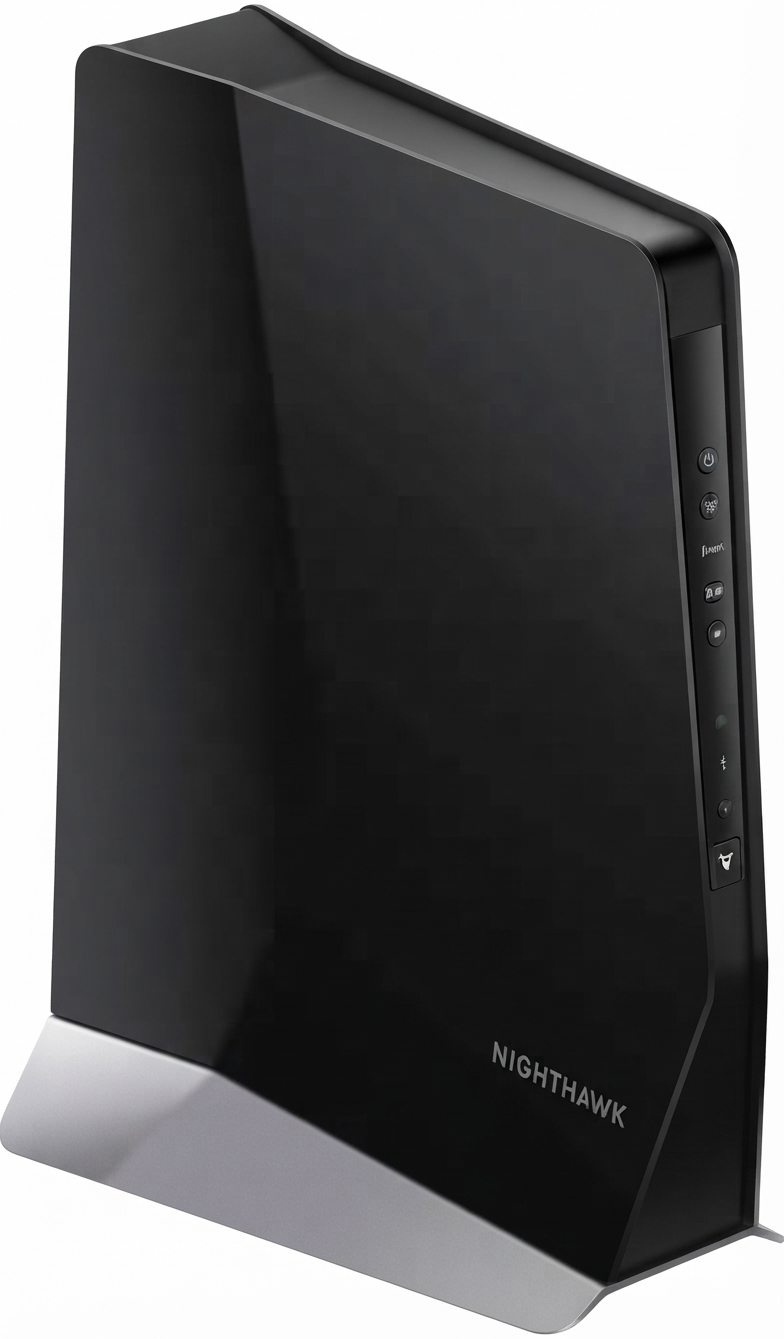
The NETGEAR Nighthawk AX8 8-Stream WiFi Extender EAX80 is a premium Wi-Fi 6 mesh extender built to eliminate dead zones and deliver faster, more reliable wireless coverage across large homes and busy households. Designed for users who need strong whole-home connectivity, it uses AX6000 dual-band performance to extend an existing router’s signal while supporting smooth streaming, low-latency gaming, video calls, and multiple smart home devices at once.
One of the biggest advantages of the EAX80 is its combination of high-speed wireless extension and wired expansion. With four Gigabit Ethernet ports and a USB 3.0 port, it works not only as a wireless range extender but also as a practical connectivity hub for smart TVs, consoles, desktop PCs, and storage devices. Its 8-stream design and Smart Roaming support help devices move seamlessly around the home without repeated disconnects. This makes it especially appealing for larger homes, multi-floor layouts, and users upgrading from older Wi-Fi 5 extenders.
As of 2026, the NETGEAR Nighthawk AX8 8-Stream WiFi Extender EAX80 is typically positioned in the premium extender segment, with an estimated price range of about $200 to $250 depending on retailer availability and sales. Availability remains generally good through major online electronics stores and selected retailers, though stock may vary. For users seeking one of the best Wi-Fi 6 range extenders with strong throughput and wired flexibility, the EAX80 remains a top-tier option.
NETGEAR Nighthawk AX8 EAX80 Specifications and Key Features
- Wi-Fi standard: Wi-Fi 6 / IEEE 802.11ax on 2.4 GHz and 5 GHz bands
- Performance class: AX6000 dual-band extender with up to 6 Gbps combined speed
- Stream design: 8-stream architecture for better capacity and multi-device performance
- Band speeds: Up to 1.2 Gbps on 2.4 GHz and up to 4.8 Gbps on 5 GHz
- Ethernet: Four Gigabit Ethernet ports with auto-sensing technology
- USB: One USB 3.0 port for shared storage or connected devices
- Processor: Dual-core 1.8 GHz processor
- Coverage: Commonly marketed for up to 2,500 sq. ft. of extended coverage
- Physical size: Approximately 10 x 7.75 x 4.2 in
- Weight: About 1.9 lb
Compared with smaller Wi-Fi 5 extenders, the EAX80 offers significantly higher capacity, better efficiency, and stronger wired connectivity. Compared with lower-cost Wi-Fi 6 extenders, it stands out for its four LAN ports and more powerful hardware, making it better suited for demanding homes that need both speed and stability.
Detailed Product Description for the Nighthawk AX8 EAX80
The Nighthawk AX8 EAX80 is designed to work with an existing router or mesh system and rebroadcast a stronger, more capable Wi-Fi signal into weak coverage areas. Rather than simply repeating a signal, it intelligently extends a Wi-Fi 6 network with support for Smart Roaming, helping devices stay connected to the best available access point as users move around the home.
This extender is ideal for real-world situations such as streaming 4K video in a basement, keeping video conferences stable in a home office, or improving signal strength in a bedroom far from the main router. The four Gigabit Ethernet ports are especially useful for wired devices that benefit from low latency and stable throughput, including gaming consoles, smart TVs, and desktop PCs.
Build quality is clearly aimed at premium positioning. The large upright chassis, external antennas, and sturdy enclosure give it a substantial feel compared with compact plug-in extenders. The design prioritizes heat management, stronger radios, and improved signal performance over portability. In everyday use, users typically value its fast setup, strong coverage, and ability to handle many connected devices without major slowdowns.
Setup Guide: How to Install the NETGEAR Nighthawk AX8 8-Stream WiFi Extender EAX80
- Place the extender in the same room as your router for the initial setup.
- Plug the EAX80 into a power outlet and wait for the power light to become stable.
- Connect to the extender through the WPS method or the web-based setup page.
- Select your home Wi-Fi network and enter the router password when prompted.
- Choose whether to use the same SSID for seamless roaming or a separate network name for manual control.
- After setup, move the extender to a location halfway between the router and the weak-signal area.
- Test device connections and adjust placement if the signal is still weak.
For best results, avoid placing the extender behind thick walls, large metal objects, or appliances that can interfere with Wi-Fi signals. If pairing fails, restart both the router and extender, then repeat the setup process. If the device was previously configured, a factory reset may be required before reconnecting it to a new network. Keep the unit indoors and away from moisture or excessive heat for safe operation.
Troubleshooting the NETGEAR Nighthawk AX8 EAX80
- No connection to router: Move the extender closer to the router and repeat the pairing process.
- Weak performance: Reposition the extender to a midpoint location with better signal quality.
- Cannot access the web interface: Power cycle the extender and confirm the device is connected to the extender’s Wi-Fi.
- After reset, setup page will not load: Hold the reset button for about 7 to 15 seconds, then wait for reboot before trying again.
- Devices keep disconnecting: Update router firmware and check for interference from neighboring networks.
- Ethernet devices not working: Try another cable or port and confirm the connected device supports the correct network speed.
Preventive maintenance includes keeping firmware current, maintaining a clean placement environment, and restarting the extender occasionally if performance degrades. NETGEAR typically provides a one-year warranty, with basic technical support commonly offered for 90 days from purchase when bought through an authorized reseller. For help, users can contact NETGEAR support through the company’s official support channels or refer to the product documentation and community support resources.
Pros and Cons of the NETGEAR Nighthawk AX8 EAX80
Pros
- Excellent Wi-Fi 6 extender performance for large homes and multi-device households
- 8-stream AX6000 design delivers strong throughput and better network capacity
- Four Gigabit Ethernet ports provide more wired flexibility than many competitors
- USB 3.0 port adds useful storage-sharing and accessory options
- Smart Roaming improves user experience when moving between rooms
- Strong value for users who need both wireless extension and wired connectivity
Cons
- Large physical size makes it less discreet than plug-in extenders
- Premium price is higher than many Wi-Fi 5 and entry-level Wi-Fi 6 alternatives
- Best suited for serious coverage needs rather than small apartments
- Setup and placement matter more than with simpler compact extenders
In terms of value for money, the EAX80 makes the most sense for users who need fast backhaul, multiple Ethernet ports, and strong whole-home coverage. Cheaper alternatives may be adequate for basic browsing, but they usually lack the speed headroom and wired expansion that define this model.
Customer Reviews and User Feedback on the Nighthawk AX8 EAX80
Many users rate the EAX80 highly for coverage, speed, and reliable roaming, often describing it as a strong upgrade from older extenders. A typical sentiment is: “It finally fixed the dead zone in my upstairs office and my video calls stopped dropping.” Another common positive remark is: “The Ethernet ports are a huge bonus for my TV and console.”
Common praise centers on its stable Wi-Fi 6 performance, strong signal strength, and easy integration with compatible routers. Common complaints usually involve its higher price, large footprint, and the need to place it carefully for the best results.
Average user sentiment generally lands around 4 to 4.5 stars out of 5, especially among buyers who need premium coverage rather than a basic signal boost. It is a strong purchase recommendation for large homes, gamers, streamers, and remote workers who want a high-performance mesh extender with wired networking support.
Faqs
How do I set up the netgear Nighthawk AX8 8-Stream WiFi Extender EAX80 for the first time?
Why is my netgear Nighthawk AX8 8-Stream WiFi Extender EAX80 not connecting to my router?
What makes the netgear Nighthawk AX8 8-Stream WiFi Extender EAX80 different from a basic WiFi booster?
Is the netgear Nighthawk AX8 8-Stream WiFi Extender EAX80 compatible with any router?
How can I improve speed on the netgear Nighthawk AX8 8-Stream WiFi Extender EAX80?
Why do devices keep dropping from the netgear Nighthawk AX8 8-Stream WiFi Extender EAX80?
How should I place the netgear Nighthawk AX8 8-Stream WiFi Extender EAX80 for the best coverage?
What maintenance does the netgear Nighthawk AX8 8-Stream WiFi Extender EAX80 need over time?
More netgear manuals
- Netgear AX6 Nighthawk WiFi Router RAX50 User Manual
- Netgear RAX45 Nighthawk AX6 WiFi Router User Manual
- Netgear Orbi 5G WiFi Mesh System NBR750 User Manual
- Netgear RAX200 Nighthawk Tri-Band AX WiFi Router User Manual
- Netgear 4-Stream WiFi 6 Mesh Extender EAX10 User Manual
- Netgear RBSE960 Orbi WiFi 6E System User Manual
Leave a Comment