
Netgear RBSE960 Orbi WiFi 6E System User Manual
Content
Netgear RBSE960 Orbi WiFi 6E System: Premium Whole-Home Mesh WiFi for Fast, Reliable Coverage
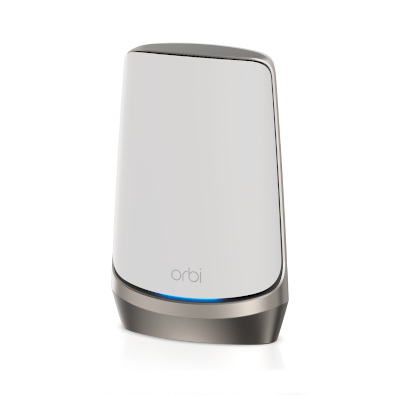
The netgear RBSE960 Orbi WiFi 6E System is a high-end quad-band mesh networking solution designed for large homes, demanding smart homes, and users who need fast, stable WiFi across multiple floors and rooms. Built around WiFi 6E technology, it adds the 6GHz band for cleaner, lower-latency wireless performance, which helps reduce congestion in busy environments and improves the experience for 4K/8K streaming, gaming, video calls, and heavy file transfers. The Orbi platform is especially attractive for users who want enterprise-style coverage without the complexity of traditional networking gear.
This model stands out for its AXE11000-class wireless performance, strong coverage claims, and multi-gig Ethernet support. The satellite unit is designed to extend coverage by up to 3,000 square feet, making it a strong choice for homes where dead zones are a problem. It also includes a powerful quad-core 2.2GHz processor, twelve internal antennas, beamforming support, and one 2.5Gbps Ethernet port plus three Gigabit LAN ports for wired devices. The netgear RBSE960 Orbi WiFi 6E System is best suited for households with many connected devices, power users who want premium mesh networking, and buyers who need both speed and consistency.
Estimated pricing for the satellite unit typically falls in the premium range, with market listings often placing it around the mid-$200s depending on condition, seller, and availability. New retail pricing may vary by region and bundle configuration, and stock can fluctuate because this is a specialized high-end mesh product. For users shopping for a flagship WiFi 6E mesh satellite, it remains a strong option where availability is offered through major networking retailers and online marketplaces.
Specifications for the Netgear RBSE960 Orbi WiFi 6E System
- Product type: Quad-band WiFi 6E mesh satellite
- Wireless class: AXE11000, with combined speeds of 1200 + 2400 + 2400 + 4800 Mbps
- Bands: 2.4GHz, 5GHz, and 6GHz support for WiFi 6E networking
- Coverage: Up to 3,000 sq. ft. per satellite
- Processor: Quad-core 2.2GHz processor
- Antennas: Twelve high-performance internal antennas with high-power amplifiers
- Beamforming: Implicit and explicit beamforming with MU-MIMO support
- Ethernet ports: One 2.5Gbps multi-gig LAN port and three Gigabit LAN ports
- Memory: 512MB NAND flash and 1GB RAM
- Dimensions: 11 x 7.5 x 3.3 inches
- Weight: 3.0 lb
In practical use, the netgear RBSE960 Orbi WiFi 6E System is positioned above mainstream WiFi 6 mesh kits and competes with other premium systems like the Orbi 970 series. Compared with standard dual-band or tri-band mesh products, the extra 6GHz band can improve throughput for compatible devices and reduce interference in dense wireless environments. The 2.5Gbps port also helps users with faster internet plans or multi-gig wired backhaul setups.
Troubleshooting the Netgear RBSE960 Orbi WiFi 6E System
If your Orbi satellite is not connecting, first confirm it is within range of the router and that the firmware is current. A weak backhaul signal is one of the most common causes of slow performance, so relocating the satellite to a more central location often resolves the issue. If devices cannot join the 6GHz band, verify that they support WiFi 6E and that the network name is visible in the router app or admin interface.
- Problem: Slow speeds on wireless devices. Fix: Reboot the satellite, update firmware, and reduce physical obstructions.
- Problem: Satellite shows an amber or disconnected status. Fix: Re-pair the unit, move it closer to the main router, and check the backhaul link.
- Problem: Ethernet device not detected. Fix: Test the cable, confirm the port speed, and try the 2.5Gbps LAN port first for high-speed devices.
- Problem: Devices drop from WiFi. Fix: Restart client devices, disable conflicting extenders, and ensure firmware is updated on all Orbi units.
Common error indicators are usually resolved through pairing resets, firmware updates, or a factory reset followed by reconfiguration. Preventive maintenance includes keeping the system elevated and unobstructed, avoiding crowded wireless channels when possible, and checking for updates regularly. Warranty and support options vary by region and seller, but Netgear typically provides product support through its official support channels, documentation, and registration process. For help, use the Netgear support portal or contact the retailer where the system was purchased for warranty guidance.
Pros and Cons of the Netgear RBSE960 Orbi WiFi 6E System
Pros
- Excellent whole-home coverage for large spaces and multi-floor layouts
- WiFi 6E support adds the 6GHz band for lower congestion and better latency
- Strong AXE11000 performance for streaming, gaming, and remote work
- Multiple Ethernet ports make it useful for TVs, consoles, PCs, and smart hubs
- Premium hardware with a quad-core processor and twelve antennas
- Good fit for users upgrading from older WiFi 5 or basic WiFi 6 mesh systems
Cons
- Pricier than many mainstream mesh alternatives
- Best performance depends on WiFi 6E-compatible devices
- Physical size is large compared with compact mesh nodes
- May be more system than casual users need for smaller apartments
- Value for money is strongest in demanding homes, not budget builds
For buyers comparing premium mesh options, the netgear RBSE960 Orbi WiFi 6E System offers a stronger feature set than many mid-range systems, but newer Orbi generations may be more attractive for users who want the latest platform. It remains a smart buy for performance-focused households that prioritize stability and coverage over cost.
Customer Reviews of the Netgear RBSE960 Orbi WiFi 6E System
Customer feedback for the netgear RBSE960 Orbi WiFi 6E System is generally positive, with many users praising the strong coverage, easy expansion, and reliable performance in large homes. Typical ratings cluster around 4 to 5 stars for users who value speed and seamless roaming between rooms.
- Common praise: “My dead zones disappeared, and the speeds stayed strong upstairs and downstairs.”
- Common praise: “Setup was straightforward, and the wired ports were a great bonus for my gaming console.”
- Common complaint: “It is expensive, especially if you only need coverage for a small home.”
- Common complaint: “The system works best when devices support WiFi 6E, otherwise the 6GHz advantage is limited.”
Most recommendations suggest buying it if you need premium mesh coverage, have a multi-gig internet plan, or want a future-ready WiFi 6E upgrade. For smaller homes or tighter budgets, a lower-cost mesh system may offer better value.
Faqs
How do I set up the netgear RBSE960 Orbi WiFi 6E System for the first time without common installation mistakes?
What should I do if the netgear RBSE960 Orbi WiFi 6E System keeps dropping internet or showing unstable WiFi?
How far can I place satellites in the netgear RBSE960 Orbi WiFi 6E System while still keeping a strong backhaul connection?
Which devices can benefit most from the 6 GHz band on the netgear RBSE960 Orbi WiFi 6E System?
Why is my netgear RBSE960 Orbi WiFi 6E System not showing the fastest WiFi speeds on my laptop or phone?
How do I optimize the netgear RBSE960 Orbi WiFi 6E System for gaming, video calls, and 4K streaming?
What compatibility requirements should I check before buying the netgear RBSE960 Orbi WiFi 6E System?
How should I maintain and update the netgear RBSE960 Orbi WiFi 6E System for long-term reliability?
More netgear manuals
- Netgear RAX200 Nighthawk Tri-Band AX WiFi Router User Manual
- Netgear EX7300 Nighthawk X4 WiFi Mesh User Manual
- Netgear RAX45 Nighthawk AX6 WiFi Router User Manual
- Netgear LB1120 LTE Modem User Manual
- Netgear Nighthawk AX8 8-Stream WiFi Extender EAX80 User Manual
- Netgear RBE771 Tri-Band Mesh Wifi System User Manual
Leave a Comment