
Netgear LB1120 LTE Modem User Manual
Content
Netgear LB1120 LTE Modem Review and Product Manual
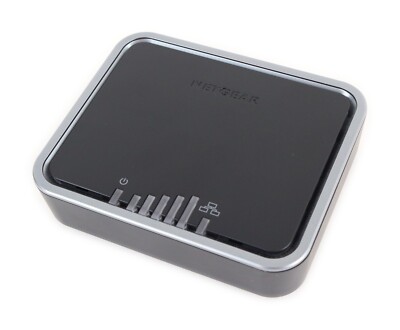
The Netgear LB1120 LTE Modem is a compact 4G LTE broadband modem designed to deliver cellular internet through a wired Ethernet connection. It is built for homes, small offices, cabins, RV setups, and backup internet scenarios where cable or DSL is unavailable or unreliable. With LTE Category 4 support, the device can reach theoretical download speeds up to 150 Mbps, making it a practical choice for light streaming, remote work, point-of-sale systems, and failover connectivity.
One of the biggest advantages of the Netgear LB1120 LTE Modem is its simplicity: insert a compatible micro SIM card, connect it to a router or computer via Gigabit Ethernet, and you are online. Unlike many modern hotspots and gateways, it does not include built-in Wi‑Fi, which can be a benefit for users who already own a high-quality router and want a more stable wired cellular modem. The internal antennas are supplemented by optional TS9 external antenna support, helping improve signal in weak coverage areas.
This model is especially appealing to users who need a dependable LTE modem for AT&T and T-Mobile networks, with limited Verizon compatibility depending on service and band support. Typical market pricing is around $120 to $160, although availability can vary by retailer and region. For users seeking a straightforward, no-frills mobile broadband modem with Ethernet output, the Netgear LB1120 LTE Modem remains a solid and cost-conscious option.
Specifications: Netgear LB1120 LTE Modem Technical Details
- LTE Category 4 modem with theoretical download speeds up to 150 Mbps
- 3G UMTS / DC-HSPA+ support with speeds up to 42 Mbps
- Supported LTE bands: 2, 4, 5, and 12
- Supported UMTS bands: 2 and 5
- One Gigabit WAN Ethernet RJ-45 port for wired internet output
- Micro SIM card slot for cellular service activation
- Internal WWAN antennas with support for optional TS9 external antennas
- Power adapter: 12V DC, 1A
- Dimensions: 4.7 x 3.9 x 1.2 inches
- Weight: 0.4 lb
- Operating temperature: 0° to 40°C
- Storage temperature: -25° to 55°C
- Operating humidity: up to 90% noncondensing
Compared with similar cellular broadband modems, the LB1120 stands out for its Ethernet-only design and compact footprint. The LB1121 adds Power over Ethernet support, while the LB2120 includes two Ethernet ports for broader flexibility. If you only need one wired connection and prefer a simpler setup, the LB1120 is the most streamlined option.
Pros and Cons of the Netgear LB1120 LTE Modem
Pros
- Easy setup with plug-and-play LTE internet access
- Gigabit Ethernet port supports stable wired networking
- Compact and lightweight design for home or travel use
- Supports external TS9 antennas for better signal reception
- No built-in Wi‑Fi means fewer wireless variables and a cleaner router-based setup
- Good value for users who already own a strong router
Cons
- No built-in Wi‑Fi, so a separate router is required for wireless devices
- Limited band support compared with newer LTE and 5G modems
- Only one Ethernet port, which may feel restrictive in multi-device environments
- Performance depends heavily on carrier coverage and signal strength
- Not ideal for users wanting advanced management features or modern mesh integration
For value for money, the Netgear LB1120 LTE Modem is strongest when used as a dedicated cellular WAN device. It is less versatile than newer all-in-one gateways, but it can be a smarter buy for users who only need stable LTE backhaul and already have networking gear in place. Alternatives such as the LB1121 or LB2120 are worth considering if you need PoE or extra ports.
Customer Reviews: What Users Say About the Netgear LB1120 LTE Modem
Customer feedback for the Netgear LB1120 LTE Modem is generally positive, especially from users in rural areas and RV owners who need dependable cellular internet. Many buyers rate it around 4 out of 5 stars, praising the simple setup, solid wired speed, and reliable performance when paired with a good carrier signal. One common compliment is that it “just works” without unnecessary complexity.
Frequent complaints focus on the lack of built-in Wi‑Fi and the limited LTE band support, which can reduce flexibility for some users. A recurring issue is that performance drops noticeably when signal strength is weak, making external antennas almost essential in fringe coverage areas. Still, users who understand its purpose often recommend it as a strong budget-friendly LTE modem for primary or backup internet.
Best for buyers who want a straightforward Ethernet LTE modem. Less suitable for users who need an integrated wireless router or advanced multi-device gateway.
Faqs
How do I set up the netgear LB1120 LTE Modem for the first time with my carrier SIM card?
What APN settings are needed for the netgear LB1120 LTE Modem to connect to the internet?
Why is my netgear LB1120 LTE Modem showing a signal but no internet connection?
Can the netgear LB1120 LTE Modem work with any router or home network setup?
How can I improve the speed and stability of my netgear LB1120 LTE Modem connection?
What should I do if the netgear LB1120 LTE Modem is not detecting my SIM card?
Does the netgear LB1120 LTE Modem need regular maintenance or firmware updates?
What are the main limitations of the netgear LB1120 LTE Modem for home internet use?
More netgear manuals
Leave a Comment