
Netgear 4-Stream WiFi 6 Mesh Extender EAX10 User Manual
Content
Introduction to the NETGEAR 4-Stream WiFi 6 Mesh Extender EAX10
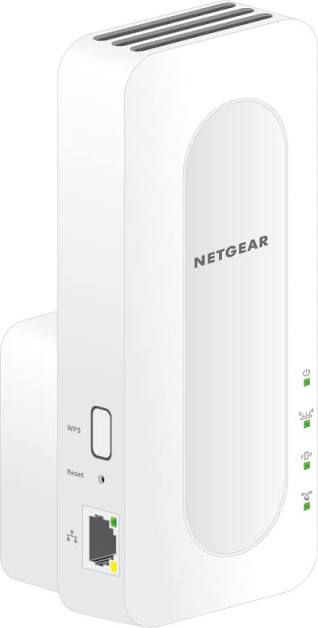
The NETGEAR 4-Stream WiFi 6 Mesh Extender EAX10 is designed to eliminate dead zones and extend fast, reliable wireless coverage throughout your home. Built for users who want stronger whole-home connectivity without replacing their current router, this WiFi 6 mesh extender delivers improved speed, efficiency, and device handling for modern smart homes, streaming setups, and remote work environments.
One of its biggest advantages is mesh-compatible roaming with existing NETGEAR routers and other supported networks, helping devices stay connected as you move from room to room. The EAX10 is especially useful for large homes, multi-story layouts, home offices, and spaces where Wi-Fi signals weaken behind walls or across longer distances. It supports dual-band WiFi 6 performance, making it a smart choice for households with laptops, phones, TVs, tablets, and smart home devices connected at the same time.
For buyers comparing WiFi extenders, the EAX10 typically sits in the mid-range price category, often around the budget-to-mid-tier segment depending on retailer promotions and availability. It is commonly available through major online electronics sellers and network hardware retailers. If you are searching for a practical mesh extender that balances strong performance, easy setup, and broad compatibility, the NETGEAR 4-Stream WiFi 6 Mesh Extender EAX10 is a compelling option for everyday home networking.
Specifications for NETGEAR 4-Stream WiFi 6 Mesh Extender EAX10
- Wireless Standard: WiFi 6 (802.11ax) with dual-band operation for improved efficiency and better multi-device performance.
- Speed Class: AX1800 class networking, combining up to 600 Mbps on 2.4 GHz and up to 1200 Mbps on 5 GHz in ideal conditions.
- Stream Count: 4-stream architecture for better data handling and reduced congestion in busy households.
- Coverage Use: Designed to expand wireless coverage in small to medium homes and improve signal consistency in hard-to-reach areas.
- Compatibility: Works with existing WiFi routers and supports mesh-style roaming with compatible systems.
- Security: Supports modern WiFi security features for safer home networking.
- Setup Options: WPS pairing and browser-based setup are commonly used for installation.
- Benchmark Position: Faster and more efficient than older WiFi 5 extenders, especially in homes with multiple connected devices.
Compared with older range extenders, the EAX10 offers better throughput, stronger capacity for simultaneous connections, and more stable performance for streaming and video calls. Against higher-end mesh systems, it is a more affordable way to improve coverage without replacing your main router.
Detailed Description of the WiFi 6 Mesh Extender
The NETGEAR 4-Stream WiFi 6 Mesh Extender EAX10 works by receiving your existing WiFi signal and rebroadcasting it into areas where coverage is weak. Instead of creating a completely separate network experience, it helps create smoother roaming so phones, laptops, and tablets can stay connected while moving around the house. This makes it especially helpful for bedrooms, basements, garages, offices, and upstairs rooms where the signal often drops.
The extender is built with a practical home-use design and typically features a compact enclosure suitable for wall outlet placement or shelf use. Its build quality is aimed at everyday reliability rather than premium styling, with materials and ventilation suited for continuous operation. User experience is generally straightforward, with clear indicator lights, simple setup steps, and minimal maintenance after installation.
In real-world use, the EAX10 is well suited for HD and 4K streaming, online classes, video conferencing, smart speaker connectivity, and light gaming. It is a strong fit for families that want better signal coverage in multiple rooms without moving the router or running Ethernet cables through the home.
Setup Guide for NETGEAR EAX10 Mesh Extender
- Plug the extender into a power outlet near your router during initial setup.
- Wait for the power light to stabilize before starting configuration.
- Use the WPS button on your router and then press the WPS button on the extender, or open a browser and follow the setup page instructions.
- Select your home WiFi network and enter the correct password carefully.
- Choose whether to keep the same network name for seamless roaming or create a separate extended network name.
- After setup, move the extender to a midpoint location between your router and the weak-signal area.
- Check the signal indicator and adjust placement if performance is poor.
For best results, keep the extender within strong range of the router while configuring it, then relocate it once connected. Avoid placing it near microwaves, thick metal surfaces, or heavy electronic interference. If pairing fails, restart the router and extender, confirm the WiFi password, and try setup again. Never block ventilation openings, and use only a properly rated indoor outlet.
Troubleshooting the NETGEAR 4-Stream WiFi 6 Mesh Extender EAX10
- No connection after setup: Move the extender closer to the router, then reconnect and confirm the router password is correct.
- Weak extended signal: Reposition the extender to a midpoint location rather than placing it at the edge of the dead zone.
- Cannot open the setup page: Make sure your device is connected to the extender’s network, then try a different browser or restart the device.
- Setup failed: Reboot the modem, router, and extender, then repeat the installation process from the beginning.
- Extender not pairing: Press the WPS button again or perform a factory reset using the reset pinhole if the configuration appears corrupted.
- Lights not behaving normally: Check for power issues, move to another outlet, and verify the router is online.
To prevent future issues, keep firmware updated, place the extender in an interference-free location, and avoid frequent unplugging. If hardware support is needed, NETGEAR provides customer assistance through its official support channels, including phone-based help and account support services. Warranty coverage and replacement terms may vary by region and retailer, so keep your proof of purchase available when requesting service.
Pros and Cons of the NETGEAR EAX10
Pros
- Strong WiFi 6 performance for modern households with many connected devices.
- Easy setup options, including WPS and browser-based installation.
- Improves dead-zone coverage without requiring a full mesh router replacement.
- Good value for users who want faster home WiFi on a moderate budget.
- Useful for streaming, remote work, smart home devices, and everyday browsing.
Cons
- Performance depends heavily on where the extender is placed.
- Not a substitute for a full mesh system in very large or complex homes.
- Best results usually require a compatible router and proper installation.
- May not match the top speeds of premium mesh networking products.
Overall, the EAX10 offers a balanced mix of cost and performance. Compared with cheaper WiFi 5 extenders, it provides better capacity and smoother handling of multiple devices. Compared with full mesh kits, it is a more affordable upgrade path for users who only need to extend one existing network.
Customer Reviews of the WiFi 6 Mesh Extender
Customer feedback for the NETGEAR 4-Stream WiFi 6 Mesh Extender EAX10 is generally positive, with many users praising the easier streaming experience and improved signal in upstairs rooms and remote corners of the home. Typical ratings often fall around 4 out of 5 stars, especially among buyers who install it in medium-sized homes with inconsistent WiFi coverage.
Common compliments include simple setup, better video call stability, and improved performance for phones and smart TVs. Frequent complaints usually focus on placement sensitivity, setup problems when the extender is too far from the router, and occasional confusion during first-time configuration. One user summary captures the experience well: “Once I placed it in the right spot, the connection became much more stable across the house.”
For most shoppers, the EAX10 is a strong purchase recommendation if the goal is better coverage rather than a complete network overhaul. It is especially appealing for families looking for a practical WiFi extender that improves everyday connectivity without complicated installation.
Faqs
How do I set up the netgear 4-Stream WiFi 6 Mesh Extender EAX10 for the first time?
Why is my netgear 4-Stream WiFi 6 Mesh Extender EAX10 not connecting to the router?
What routers are compatible with the netgear 4-Stream WiFi 6 Mesh Extender EAX10?
How can I improve speed and reduce dead zones with the netgear 4-Stream WiFi 6 Mesh Extender EAX10?
How do I reset the netgear 4-Stream WiFi 6 Mesh Extender EAX10 if setup goes wrong?
Does the netgear 4-Stream WiFi 6 Mesh Extender EAX10 support both 2.4 GHz and 5 GHz bands?
What should I do if the netgear 4-Stream WiFi 6 Mesh Extender EAX10 keeps dropping the connection?
How do I maintain and care for the netgear 4-Stream WiFi 6 Mesh Extender EAX10 for long-term performance?
More netgear manuals
- Netgear Nighthawk WiFi 7 Tri-Band Router RS500 User Manual
- Netgear Orbi 5G WiFi Mesh System NBR750 User Manual
- Netgear AX1600 4-Stream WiFi 6 Mesh Extender EAX12 User Manual
- Netgear AX6 Nighthawk WiFi Router RAX50 User Manual
- Netgear Orbi Pro Tri-Band Mesh WiFi System Router SRR60 User Manual
- Netgear Nighthawk AX8 8-Stream WiFi Extender EAX80 User Manual
Leave a Comment