
Philips 9900 Prestige Electric Brush User Manual
Content
Philips 9900 Prestige Electric Brush Manual and Product Guide
Introduction
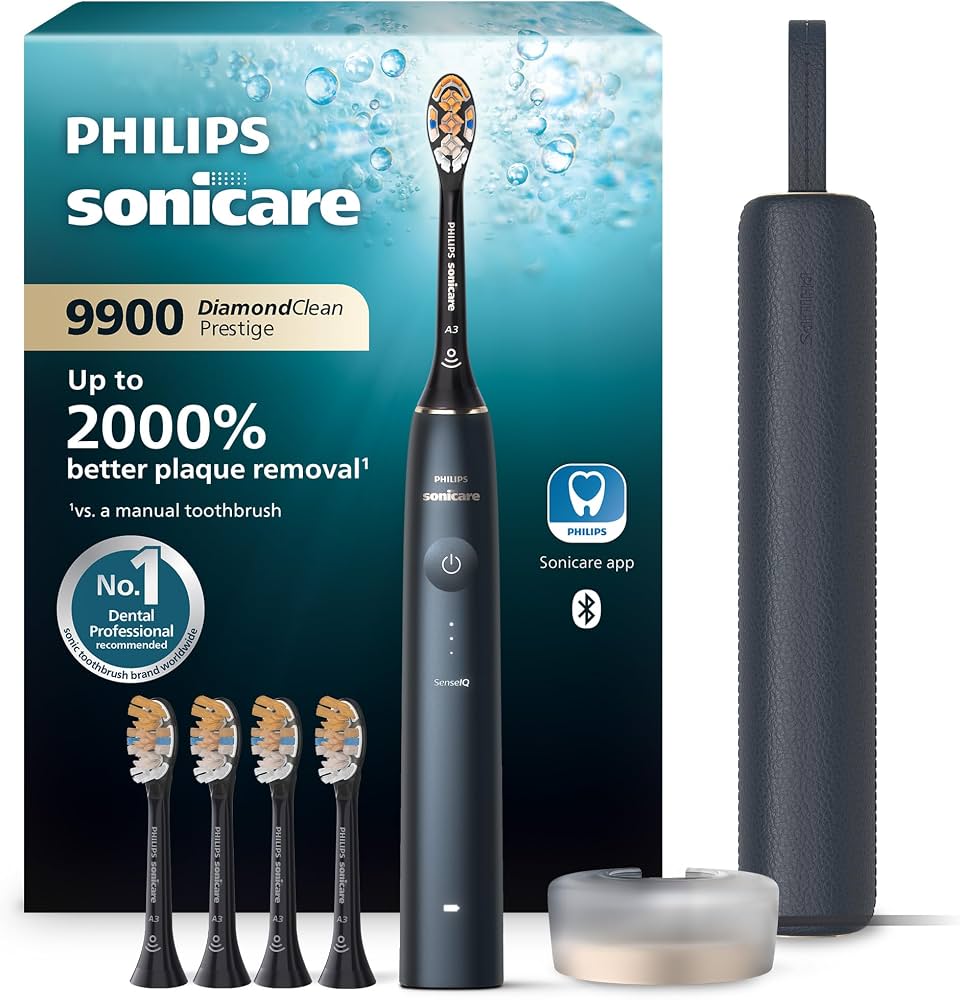
The philips 9900 Prestige Electric Brush is a premium smart toothbrush designed for users who want advanced cleaning performance, guided brushing, and a luxury travel-friendly design. It combines Sonicare’s high-speed sonic cleaning action with SenseIQ-style adaptive support, making it a strong choice for people who want a more personalized brushing experience than a standard electric toothbrush. With a premium build, app connectivity, and a compact charging case, this model is especially appealing to frequent travelers, busy professionals, and anyone upgrading from a basic sonic toothbrush.
One of its biggest advantages is its focus on effortless daily use. The brush is built to adjust to pressure and brushing habits, helping users maintain better technique while protecting gums. It typically includes multiple cleaning modes and intensity levels, making it suitable for sensitive teeth, stain removal, and everyday maintenance. The included brush head is designed for all-in-one cleaning, so it can handle plaque removal, gum care, and polishing in a single routine.
For buyers comparing premium sonic toothbrushes, the philips 9900 Prestige Electric Brush sits near the top of Philips’ lineup and usually sells in the approximate range of $370 to $380, depending on the retailer, color, and bundle. Availability is generally strong through Philips and major retail channels, though package contents may vary by region. It is ideal for users who want a smart electric toothbrush with premium features, wireless charging, and a polished, high-end design.
Specifications for the Philips 9900 Prestige Electric Brush
- Brush technology: Sonic cleaning with up to 62,000 brush movements per minute
- Cleaning performance: Up to 20x more plaque removal than a manual toothbrush
- Gum care: Up to 15x healthier gums with proper use
- Stain removal: Up to 100% more stain removal versus a manual toothbrush
- Modes and intensities: Multiple brushing modes with 3 intensity settings on common variants
- Connectivity: Bluetooth wireless support for connected brushing app features
- Battery: Rechargeable lithium-ion battery
- Battery life: Around 2+ weeks or up to 14 days depending on use
- Charging: Charging base, stand, and USB charging travel case included in many bundles
- Compatibility: Android and iOS support for the companion app on supported versions
- Warranty: Typically 2-year limited warranty
Compared with mid-range Sonicare models, the philips 9900 Prestige Electric Brush offers more advanced smart features, a more premium case, and a stronger focus on adaptive brushing guidance. Against similar flagship brushes, its main strengths are design quality, app integration, and all-in-one brushing convenience rather than the lowest price.
Setup Guide: How to Set Up the Philips 9900 Prestige Electric Brush
Start by fully charging the handle before first use. Place the toothbrush on the charging base and allow the battery to reach full charge for the best first-run performance. Next, rinse the included brush head and snap it onto the handle until it fits securely. If your package includes the travel case, charge it separately before taking the brush on the road.
To enable smart features, download the Philips brushing app on a compatible smartphone and turn on Bluetooth. Follow the on-screen prompts to pair the toothbrush with your device. Once connected, you can configure brushing modes, choose your preferred intensity level, and review brushing feedback. For everyday use, start with a lower intensity if you have sensitive teeth or gums, then increase gradually as needed.
If the brush does not power on, confirm it has enough charge and that the charger is correctly seated. If pairing fails, turn Bluetooth off and back on, restart the app, and move the phone closer to the handle. Safety tip: do not use the brush if the charging components are visibly damaged, and avoid submerging the handle in water beyond normal cleaning.
Troubleshooting the Philips 9900 Prestige Electric Brush
- Brush will not turn on: Charge the handle for at least 24 hours, then try again. Check that the charger and outlet are working.
- Bluetooth will not pair: Restart the phone, re-enable Bluetooth, and remove old pairings before reconnecting.
- Weak cleaning performance: Replace worn brush heads and verify that the selected mode and intensity are appropriate.
- Battery drains quickly: Reduce repeated app syncing, confirm full charging, and inspect for charging contact issues.
- Visible pressure warning: Use lighter pressure and let the brush head do the work instead of pressing harder.
Philips support guidance for this model advises stopping use if the device becomes abnormally hot, changes color, gives off an unusual smell, or takes much longer than normal to charge. In those cases, contact Philips support or an authorized service center. The usual warranty period is two years, and support is typically available through Philips Consumer Care in North America at 1-800-682-7664, with local support available in other regions.
To prevent problems, use genuine Sonicare brush heads, keep the handle dry between uses, and replace brush heads regularly. This helps preserve performance and supports warranty protection.
Pros and Cons of the Philips 9900 Prestige Electric Brush
Pros
- Excellent plaque removal and gum-care performance for daily use
- Premium design with a compact travel case and strong build quality
- Smart app connectivity for brushing feedback and routine guidance
- Multiple modes and intensity levels for sensitive and standard users
- Long battery life that suits travel and busy schedules
Cons
- High price compared with mid-range electric toothbrushes
- Some users may not use all smart features after setup
- Replacement brush heads add to long-term ownership cost
- Premium features may feel excessive for users who only want basic cleaning
For value for money, this model makes the most sense for users who want a luxury electric toothbrush with smart brushing support. Shoppers comparing alternatives may find better savings in older Sonicare models or simpler sonic brushes, but those products usually sacrifice premium materials, app support, and adaptive feedback.
Customer Reviews
Customer feedback for the philips 9900 Prestige Electric Brush is generally very positive, with many buyers rating it around 4.5 out of 5 stars. Users often praise the smooth cleaning feel, the premium charging case, and the noticeable improvement in brushing consistency. A common positive comment is that the brush feels “gentle but powerful,” especially for people with sensitive gums.
Frequent complaints usually focus on the price and the cost of replacement heads. Some users also note that the app features are helpful at first but become less important over time. Another recurring issue is that buyers want clearer bundle differences because package contents can vary by retailer.
Overall, this model is best for buyers who want a premium smart toothbrush and are willing to pay more for convenience, comfort, and advanced cleaning support.
Final Verdict
The philips 9900 Prestige Electric Brush is a high-end sonic toothbrush that delivers strong cleaning performance, smart feedback, and a polished user experience. It is a good fit for users who want a premium electric toothbrush manual-style guide, a travel-ready design, and a connected brushing system that supports better habits over time.
Faqs
How do I set up the philips 9900 Prestige Electric Brush for the first time?
What should I do if my philips 9900 Prestige Electric Brush is not turning on?
Why does the pressure light keep activating on the philips 9900 Prestige Electric Brush?
How many brushing modes does the philips 9900 Prestige Electric Brush have, and which one should I use?
Can I connect the philips 9900 Prestige Electric Brush to a mobile app?
How do I fix reduced brushing power on the philips 9900 Prestige Electric Brush?
What brush heads and accessories are compatible with the philips 9900 Prestige Electric Brush?
How should I clean and maintain the philips 9900 Prestige Electric Brush?
More philips manuals
Leave a Comment