
Philips PET700 Portable DVD Player User Manual
Content
Philips PET700 Portable DVD Player Manual
Introduction
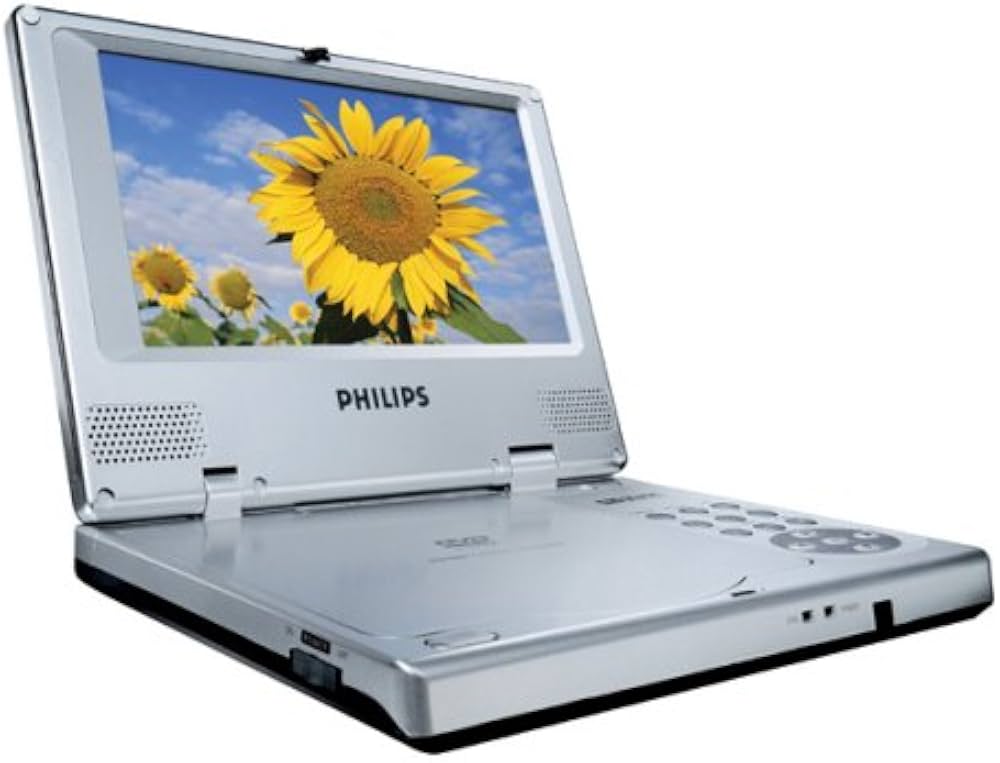
The Philips PET700 Portable DVD Player is a compact travel entertainment system designed for users who want dependable disc playback on the go. Built around a 7-inch color LCD screen, this portable DVD player supports DVD, DVD+R, DVD+RW, VCD, CD, MP3 audio, and JPEG image playback, making it a versatile option for movies, music, and photo viewing in one device. The PET700 is especially useful for families, road trips, long flights, hotel stays, and anyone who wants a simple offline media player without relying on internet access or streaming subscriptions.
One of the biggest advantages of the philips PET700 Portable DVD Player is its combination of portability and broad format support. The player includes NTSC, PAL, and auto video system compatibility, which helps it work across different media sources. Its lightweight design, about 1 kg, makes it easy to carry in a bag or vehicle. The device also offers analog audio and video output, allowing connection to larger displays or home systems when needed. For users who value convenience, straightforward controls, and classic disc-based entertainment, the PET700 remains a practical choice.
In today’s market, the estimated price range for a used or refurbished Philips PET700 Portable DVD Player is typically around $30 to $90, depending on condition, included accessories, and battery health. New stock is limited, so availability is usually strongest through resale marketplaces, refurbished electronics sellers, and specialty manual or parts vendors.
Specifications and Features
- Display: 7-inch TFT LCD color screen with 480 x 234 resolution.
- Disc compatibility: DVD, DVD+R, DVD+RW, VCD, CD, and MPEG2 video playback.
- File support: MP3 audio files and JPEG picture discs.
- Video systems: NTSC, PAL, and AUTO for flexible playback compatibility.
- Audio response: 20 Hz to 20 kHz frequency response for balanced sound reproduction.
- Signal-to-noise ratio: 85 dB or higher for cleaner playback output.
- Power input: DC 9V, 2.2A.
- Power consumption: 20W or less during operation.
- Weight: Approximately 1 kg, making it suitable for travel use.
- Dimensions: 19 x 14.6 x 2.9 cm for a compact footprint.
- Operating temperature: 0°C to 50°C, suitable for normal indoor and vehicle use.
Compared with many modern portable DVD players, the PET700 is simpler and more focused on core media playback rather than streaming or wireless features. Its strength is reliable physical disc support and easy portability, while newer alternatives often add larger screens, rechargeable battery improvements, or HDMI-style output options. For users who mainly need a compact portable DVD player for traveling or kids’ entertainment, the PET700 remains a solid basic model.
Setup Guide: How to Set Up the Philips PET700 Portable DVD Player
Start by placing the player on a stable, dry surface and connect the included or compatible DC 9V 2.2A power adapter. Before inserting a disc, confirm that the disc is clean and free of scratches. Open the disc tray, place the disc label side up, and close the tray gently. The player will automatically begin reading supported media formats. If you are using a TV or external display, connect the analog video and audio outputs to the matching input ports on the television or amplifier.
For best results, select the correct TV system setting if your display requires NTSC or PAL input. Use the on-screen menu to adjust picture, language, and playback preferences. If the unit does not power on, check the adapter connection and verify the outlet is active. If a disc does not play, test another disc format to confirm compatibility. Avoid placing the player in direct sunlight, near heat sources, or in damp environments. Do not block ventilation openings, and never force the disc tray closed.
Troubleshooting Common Problems
If the Philips PET700 Portable DVD Player does not power on, inspect the power adapter, wall outlet, and cable connection. If the screen turns on but no disc plays, the disc may be incompatible, dirty, or damaged. Clean discs with a soft cloth from the center outward, and try another supported format such as DVD, CD, MP3, or JPEG. If the picture appears unstable, check the video system setting and confirm that the cable connection is secure.
Common error conditions usually relate to disc format incompatibility, lens contamination, or weak power supply rather than numeric error codes. If sound is missing, raise the volume, verify headphone use, and test the audio output connection. Preventive maintenance includes storing the unit in a case, handling discs carefully, and keeping the laser area free from dust. Warranty coverage depends on seller and region because the model is older and often purchased secondhand. For help, contact Philips support through the official Philips customer service channels or the retailer that supplied the unit.
Pros and Cons
Pros
- Compact and lightweight design that is easy to carry during travel.
- 7-inch LCD screen offers a practical viewing size for personal entertainment.
- Supports multiple disc and media formats, including DVD, CD, MP3, and JPEG.
- Simple controls make it user-friendly for children, seniors, and casual users.
- Analog audio and video outputs add flexibility for external connection.
- Good value for money on the used market for basic offline playback needs.
Cons
- Lower screen resolution compared with modern portable media devices.
- No streaming, wireless, or smart features.
- Battery performance may be limited on older or used units.
- Availability is often restricted to refurbished or secondhand listings.
- Not ideal for users who want high-definition video or advanced connectivity.
For buyers comparing alternatives, the philips PET700 Portable DVD Player is best for simple disc playback and portability. If you need a more modern experience, newer portable DVD players may offer longer battery life or larger screens, but the PET700 remains appealing for straightforward performance and affordability.
Customer Reviews
Overall customer feedback for the Philips PET700 Portable DVD Player is generally positive, especially from travelers and parents who value a dependable no-frills player. Average sentiment would typically fall around 4 out of 5 stars for basic usability and portability. Common praise includes the compact size, easy setup, and reliable playback of standard discs and music files. Many buyers also like that it works well for road trips and quiet entertainment in cars or hotel rooms.
Common complaints focus on the older display technology, limited battery life on used units, and the lack of modern features such as streaming or USB media support. A typical user comment might read: “Great for travel and simple to use, but the screen is basic by today’s standards.” Another frequent remark is: “Perfect for kids in the car, as long as you have supported discs.” For most shoppers, this model is best when low-cost portable DVD playback matters more than advanced features.
Faqs
How do I set up the Philips PET700 Portable DVD Player for the first time?
Which disc formats are compatible with the Philips PET700 Portable DVD Player?
What should I do if my Philips PET700 Portable DVD Player won’t power on?
Why is there no sound on the Philips PET700 Portable DVD Player, and how can I fix it?
How do I improve picture quality on the Philips PET700 Portable DVD Player?
Can I use the Philips PET700 Portable DVD Player in a car, and what do I need?
How do the dual headphone jacks on the Philips PET700 Portable DVD Player work?
How should I maintain and clean the Philips PET700 Portable DVD Player?
More philips manuals
- Philips 9900 Prestige Electric Brush User Manual
- Philips TAM4205M2 Micro Music System User Manual
- Philips PPM4311 Back and Waist Massager User Manual
- Philips ProtectiveClean Electric Brush 4500 User Manual
- Philips ppM3321 Neck and Shoulder Massager User Manual
- Philips T Line Multi-Touch Display 65BDL3552T User Manual
Leave a Comment