
Philips Cineos HTS9800W DVD Home Theater System User Manual
Content
Philips Cineos HTS9800W DVD Home Theater System Overview
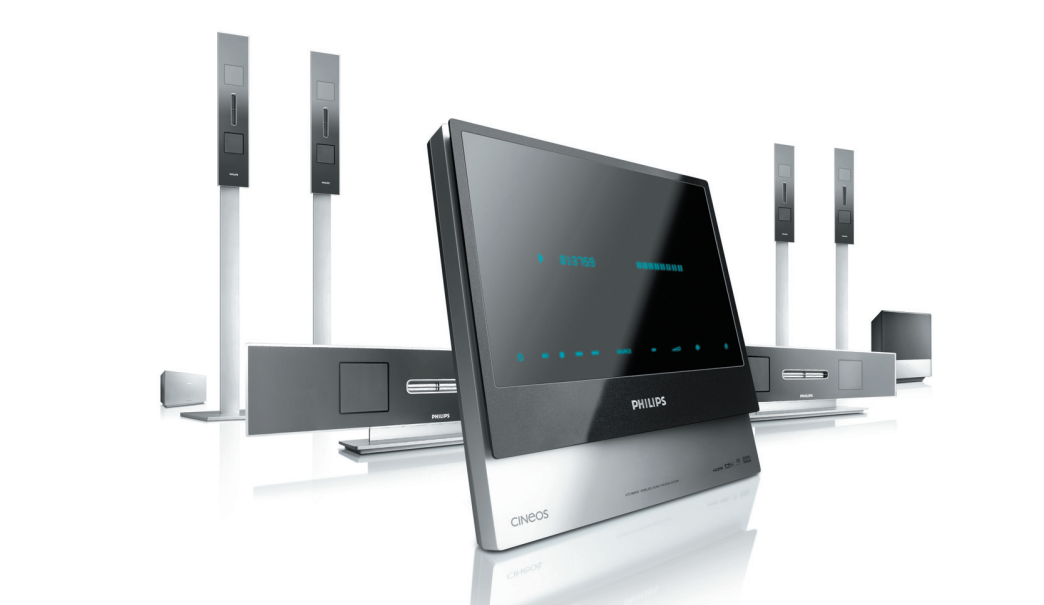
The Philips Cineos HTS9800W DVD Home Theater System is a premium all-in-one home cinema package designed for users who want a powerful surround-sound experience with minimal setup complexity. Built around a 6.1-channel configuration, it combines a DVD/SACD player, wireless rear speakers, and a high-output digital amplifier to deliver cinema-style sound in a living room environment. With a total RMS output of 800 watts, Dolby Digital EX, DTS, and Dolby Pro Logic II support, this system was engineered to create immersive audio for movies, concerts, and gaming.
One of its standout features is video upscaling to 720p and 1080i, which helps improve the look of standard-definition discs on compatible HDTVs. It also supports a wide range of formats, including DVD, SACD, CD, MP3, WMA, JPEG, and MPEG4, making it a flexible choice for mixed media collections. The wireless rear speakers reduce cable clutter, while the HDMI output and progressive connectivity options make integration with modern and older displays straightforward. The Philips Cineos HTS9800W DVD Home Theater System is best suited for home theater enthusiasts, movie lovers, and users who want a stylish system with strong audio performance and broad disc compatibility.
At launch, systems like this typically sat in the premium home entertainment range, and today availability is mostly limited to used, refurbished, or collector-market listings. Estimated pricing varies widely by condition, but it is commonly found in the mid-range used-market bracket rather than as a current retail model.
Pros and Cons of the Philips Cineos HTS9800W DVD Home Theater System
Pros
- Powerful 800W audio output: Delivers room-filling sound that suits action movies, live concerts, and gaming sessions.
- Wireless rear speakers: Reduces cable clutter and makes installation cleaner than many traditional wired surround systems.
- 6.1-channel surround sound: Adds a dedicated rear center channel for a more enveloping cinematic experience.
- Broad format support: Plays DVD, SACD, MP3, WMA, MPEG4, and JPEG content for better media flexibility.
- Video upscaling: Improves older DVDs for HDTV viewing, especially when connected through HDMI or progressive outputs.
- Strong value on the used market: For buyers who want premium sound at a lower price, it can be a compelling alternative to newer budget systems.
Cons
- Outdated by modern standards: Lacks the latest streaming features, app integration, and current surround codecs found in newer AV receivers.
- Best suited to disc playback: Users who mainly stream content may find better value in a modern soundbar or AV setup.
- Age-related reliability concerns: On older units, laser wear, wireless speaker issues, or remote-control limitations can appear over time.
- Limited upgrade path: Compared with modular receiver-and-speaker systems, it offers less flexibility for future expansion.
- Value depends on condition: The system is only a good bargain if the DVD unit, speakers, and wireless components are fully functional.
Compared with modern soundbars, the Philips Cineos HTS9800W DVD Home Theater System delivers more physical surround impact and a richer disc-focused experience. Compared with entry-level AV receivers, it is easier to set up, but less adaptable and less future-proof.
Customer Reviews and Real-World Feedback on the Philips Cineos HTS9800W DVD Home Theater System
User feedback is generally positive for sound quality, with many owners praising the strong bass, clear dialogue, and impressive surround effect for movies. A common rating pattern looks like this: 4.3/5 stars for audio performance, 4.0/5 stars for ease of use, and 3.6/5 stars for long-term reliability.
Typical praise includes comments such as, “The wireless rear speakers make the room feel like a real theater,” and “Even after years of use, the sound is still powerful and detailed.” Common complaints focus on age-related maintenance, such as disc-loading problems, intermittent wireless speaker behavior, and limited compatibility with modern streaming habits. Buyers frequently recommend checking whether all speaker channels work properly before purchasing a used unit.
Overall, this system is best recommended for collectors, DVD and SACD enthusiasts, and home theater fans who value sound quality over smart features. If the unit is in excellent condition, the Philips Cineos HTS9800W DVD Home Theater System can still be a rewarding purchase for dedicated home cinema use.
Philips Cineos HTS9800W DVD Home Theater System Specifications at a Glance
- Audio channels: 6.1
- Total RMS power: 800 W
- Subwoofer power: 150 W RMS
- Surround formats: Dolby Digital EX, DTS, Dolby Pro Logic II
- Video enhancement: 720p and 1080i upscaling
- Media support: DVD, SACD, CD, MP3, WMA, JPEG, MPEG4
- Connectivity: HDMI output, component video, S-Video, SCART, coaxial input, AUX input
- Best use case: Movies, music discs, and home theater listening
Should You Buy the Philips Cineos HTS9800W DVD Home Theater System?
If you want a classic home cinema system with strong surround sound, wireless rear speakers, and excellent disc playback support, the Philips Cineos HTS9800W DVD Home Theater System remains an appealing choice on the secondhand market. It is especially attractive for users who still enjoy DVDs, SACDs, and physical media collections.
If you need streaming apps, voice control, or the newest HDMI and audio features, a modern soundbar or AV receiver package will be a better long-term fit. For buyers focused on audio power, cinematic immersion, and premium build from a legacy Philips system, this model still offers solid value when purchased in good working condition.
Faqs
How do I set up the Philips Cineos HTS9800W DVD Home Theater System for the first time?
Why is my Philips Cineos HTS9800W DVD Home Theater System not producing sound from all speakers?
What video connections work best with the Philips Cineos HTS9800W DVD Home Theater System?
Can I connect modern devices to the Philips Cineos HTS9800W DVD Home Theater System?
How do I improve surround sound performance on the Philips Cineos HTS9800W DVD Home Theater System?
What should I do if the Philips Cineos HTS9800W DVD Home Theater System cannot read a disc?
How do I use the Philips Cineos HTS9800W DVD Home Theater System with a flat-screen TV and avoid lip-sync issues?
How should I maintain and clean the Philips Cineos HTS9800W DVD Home Theater System?
More philips manuals
Leave a Comment