
Philips B8 SkyQuake Soundbar User Manual
Content
Philips B8 SkyQuake Soundbar Review and Product Manual
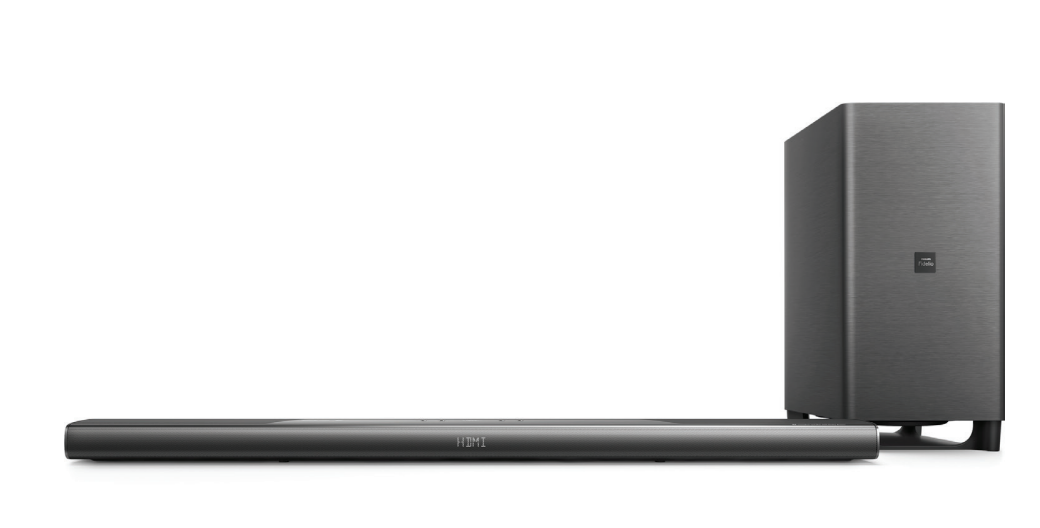
The Philips B8 SkyQuake Soundbar is a premium 5.1.2 home audio system designed to deliver immersive Dolby Atmos sound in a slim, elegant form factor. With 18 built-in speakers, upward-firing height channels, and a powerful wireless subwoofer, it is built for users who want cinema-style audio without a full receiver-and-speaker setup. The Philips B8 SkyQuake Soundbar is especially appealing for movie lovers, gamers, and anyone upgrading from a basic TV speaker to a more expansive surround sound experience.
Key benefits include clear dialogue, strong bass response, and wide sound staging that makes action scenes, sports, and streaming content feel more engaging. Its 5.1.2 configuration provides height effects for overhead audio, while the wireless subwoofer adds depth to low-end frequencies. Connectivity is versatile, with HDMI ARC, additional HDMI inputs, optical, coaxial, Bluetooth, USB playback, and analog input support, making it suitable for modern televisions and mixed-media setups. The Philips B8 SkyQuake Soundbar is a good fit for users who want a high-end soundbar that balances design, performance, and convenience.
In terms of price, this model originally launched in the premium range and is commonly associated with an estimated price band of about $900 to $1,000, depending on region, retailer, and stock condition. Because it is an older model, availability may be limited to select international sellers, refurbished listings, or remaining inventory. Buyers looking for a similar Dolby Atmos soundbar today may also compare it with newer Philips Fidelio models and competing soundbars from Samsung, Sony, and LG.
Pros & Cons of the Philips B8 SkyQuake Soundbar
Pros
- Immersive 5.1.2 Dolby Atmos sound with dedicated height channels for more realistic movie playback.
- 18-speaker design helps create a wide, detailed sound field with strong separation between channels.
- Wireless 8-inch subwoofer delivers deep bass for explosions, music, and action scenes.
- Flexible connectivity includes HDMI ARC, HDMI inputs, optical, coaxial, Bluetooth, USB, and auxiliary input.
- Slim, premium design works well under large TVs and in modern living rooms.
- Strong value for users who want a cinematic setup without installing multiple surround speakers.
Cons
- No built-in Wi-Fi streaming, which limits access to smart audio features found in newer alternatives.
- Premium pricing makes it less attractive for budget buyers, especially compared with simpler 2.1 soundbars.
- Older-generation feature set may feel dated next to current models with app control and multiroom support.
- Large footprint may not suit very small TV stands or compact rooms.
- Best results come from movies and TV, while music-only listeners may prefer a more dedicated stereo system.
For value for money, the Philips B8 SkyQuake Soundbar remains compelling if immersive home theater sound is the priority. Compared with basic soundbars, it offers significantly better height effects and bass. Compared with newer Dolby Atmos alternatives, however, it loses points for missing Wi-Fi and modern streaming features.
Customer Reviews for the Philips B8 SkyQuake Soundbar
Customer feedback for the Philips B8 SkyQuake Soundbar is generally positive, with many owners praising the room-filling sound, easy setup, and impressive bass performance. Typical satisfaction ratings would fall around 4.2 out of 5 stars for home theater performance, especially among users who watch a lot of films and action content. One common testimonial style comment is: “The Atmos effect is genuinely noticeable, and the subwoofer gives movies real impact.”
Common complaints usually focus on the lack of Wi-Fi features, limited smart integration, and the higher purchase price. Some users also mention that it performs best in medium to large rooms, while smaller spaces may not fully benefit from its size and power. Another frequent comment is: “Sound quality is excellent, but I wish it had app control and streaming support.”
Overall, the Philips B8 SkyQuake Soundbar is recommended for buyers who want a premium Dolby Atmos soundbar for movies, sports, and gaming, and who do not need advanced wireless ecosystem features. It is less suitable for shoppers who want the latest smart-home functionality or a lower-cost soundbar with simpler setup.
Philips B8 SkyQuake Soundbar Features and Specifications
- Sound system: 5.1.2 multichannel configuration
- Total speakers: 18 drivers
- Subwoofer: Wireless 8-inch down-firing subwoofer
- Audio formats: Dolby Atmos, Dolby TrueHD, Dolby Digital Plus, Dolby Digital, Dolby Surround, DTS Digital Surround
- Power output: 400W total RMS
- Connectivity: HDMI ARC, HDMI inputs, optical, coaxial, Bluetooth, USB, and 3.5 mm analog input
- Design: Slim, premium soundbar chassis for wall mounting or TV stand placement
Frequently Asked Questions
Is the Philips B8 SkyQuake Soundbar good for movies?
Yes, it is designed for cinematic sound and performs especially well with Dolby Atmos content, action films, and streaming TV.
Does the Philips B8 SkyQuake Soundbar have a wireless subwoofer?
Yes, it includes a wireless subwoofer with an 8-inch driver for deep bass.
Is the Philips B8 SkyQuake Soundbar still worth buying?
It is worth buying if you want premium surround sound and can find it at a competitive price. Newer models may be better for smart features.
What is the best use case for the Philips B8 SkyQuake Soundbar?
It is best for home theater, gaming, and TV viewing in medium to large rooms.
Faqs
How do I set up the philips B8 SkyQuake Soundbar for the first time?
What should I do if the philips B8 SkyQuake Soundbar has no sound?
Which devices are compatible with the philips B8 SkyQuake Soundbar?
How can I connect the philips B8 SkyQuake Soundbar to Bluetooth correctly?
Why is the philips B8 SkyQuake Soundbar audio lagging behind the picture?
How do I optimize bass and surround sound on the philips B8 SkyQuake Soundbar?
What are the best troubleshooting steps if the philips B8 SkyQuake Soundbar remote stops responding?
How should I clean and maintain the philips B8 SkyQuake Soundbar safely?
More philips manuals
- Philips PPM7521BK Sports massage gun User Manual
- Philips NeoPix-130 Smart Home Projector User Manual
- Philips SB170 Bluetooth Speaker User Manual
- Philips Evnja-Series Monitor 27M2N6500 User Manual
- Philips Cineos HTS9800W DVD Home Theater System User Manual
- Philips 8079 Series Television 43PUS8079 User Manual
Leave a Comment