
Philips Evnja-Series Monitor 27M2N6500 User Manual
Content
Philips Evnia-Series Monitor 27M2N6500: Comprehensive Product Manual and Buying Guide
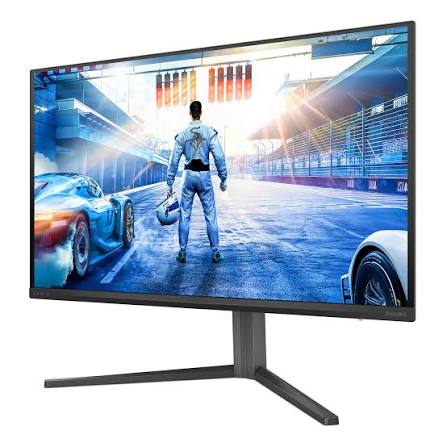
The Philips Evnia-Series Monitor 27M2N6500 is a premium 26.5-inch QD-OLED gaming display built for users who want fast response times, rich color, and smooth performance in one package. With QHD resolution, a 240Hz refresh rate over DisplayPort, and an ultra-fast 0.03 ms response time, it is designed to deliver sharp motion clarity for competitive gaming while also offering the deep blacks and wide color gamut that creative users appreciate. The panel supports 2560 x 1440 resolution, 10-bit color, and wide viewing angles, making it a strong option for gamers, streamers, and content creators who want a display that performs well across multiple scenarios.
One of the biggest strengths of the Philips Evnia-Series Monitor 27M2N6500 is its QD-OLED technology, which combines the contrast benefits of OLED with enhanced brightness and color volume. This makes games look more immersive and HDR content stand out with better depth and color accuracy. It also includes low input lag, flicker-free operation, and adaptive sync support, all of which contribute to a smoother and more comfortable experience during long sessions. Typical connectivity includes DisplayPort and HDMI inputs, with gaming-focused features that suit PC and console setups.
This monitor is best suited for competitive gamers, enthusiasts, and anyone upgrading from a standard IPS or VA display to a premium OLED gaming monitor. It also works well for users who want excellent image quality for media consumption and light creative work. The Philips Evnia-Series Monitor 27M2N6500 typically sits in the upper mid-range to premium price segment, with pricing often landing around the high hundreds depending on region, retailer, and model variant. Availability can vary by market, but it is generally sold through major electronics stores, gaming retailers, and online marketplaces.
Pros and Cons of the Philips Evnia-Series Monitor 27M2N6500
Pros
- QD-OLED panel delivers excellent contrast, deep blacks, and vivid color performance, which is ideal for gaming and HDR media.
- 240Hz refresh rate and 0.03 ms response time create very smooth motion for fast-paced shooters, racing games, and esports titles.
- QHD resolution offers a strong balance between image sharpness and high frame-rate performance on modern GPUs.
- Wide color coverage and 10-bit support make it appealing for photo, video, and content viewing tasks.
- Premium visual quality makes it a compelling value compared with many high-refresh IPS monitors that cannot match OLED contrast.
Cons
- Premium pricing places it above many 27-inch QHD gaming monitors, so it is not the best budget choice.
- OLED panels may raise concern for users who leave static desktop content on-screen for long periods.
- Brightness can be less aggressive than some high-end mini-LED alternatives in full-screen bright scenes.
- Console users may not always benefit from the full 240Hz experience, depending on device and connection limits.
- Compared with IPS alternatives, the Philips Evnia-Series Monitor 27M2N6500 is more specialized for image quality than general office use.
For buyers comparing alternatives, this model competes well against 27-inch QHD OLED monitors from other premium gaming brands. It is especially attractive if contrast, motion clarity, and color quality matter more than getting the lowest possible price. For value-conscious users, a high-refresh IPS display may cost less, but it will not match the visual impact of this monitor.
Customer Reviews for Philips Evnia-Series Monitor 27M2N6500
Customer feedback for the Philips Evnia-Series Monitor 27M2N6500 is generally very positive, with many buyers rating it around 4.5 out of 5 stars for image quality and gaming performance. Users often praise the “stunning blacks,” “super smooth gameplay,” and “instant response” that make fast titles feel more responsive. One common testimonial style comment is, “The OLED picture looks incredible, and 240Hz makes competitive gaming feel effortless.”
Common complaints usually focus on price, brightness in very bright rooms, and the usual concerns associated with OLED care. Some users also mention that they would like more ergonomic or connectivity extras for the money. A recurring recommendation is that this monitor is best for gamers who can fully use its high refresh rate and want premium picture quality rather than a basic productivity screen.
Most reviewers recommend it to PC gamers, especially those upgrading from standard 144Hz IPS monitors. If you want a display for gaming, streaming, and immersive entertainment, the Philips Evnia-Series Monitor 27M2N6500 is widely seen as a worthwhile premium purchase.
Philips Evnia-Series Monitor 27M2N6500 Key Features at a Glance
- 26.5-inch QD-OLED panel for deep contrast and vivid colors
- 2560 x 1440 QHD resolution for sharp detail and strong gaming performance
- 240Hz refresh rate for ultra-smooth motion on compatible systems
- 0.03 ms response time for reduced blur and fast pixel transitions
- Wide viewing angles for consistent image quality from different positions
- Gaming-focused design suitable for esports, AAA titles, and HDR entertainment
Who Should Buy the Philips Evnia-Series Monitor 27M2N6500?
- Competitive gamers who want fast refresh and low response time
- PC users seeking a premium QHD OLED gaming monitor
- Content consumers who value rich color and contrast for movies and streaming
- Creators who want accurate-looking visuals in a versatile display
- Buyers willing to pay more for premium panel technology and top-tier motion clarity
Final Verdict
The Philips Evnia-Series Monitor 27M2N6500 stands out as a premium gaming monitor that balances speed, visual quality, and modern display technology. If you want a high-end 27-inch QHD OLED screen with excellent gaming performance and strong HDR appeal, it is one of the most compelling options in its class.
Faqs
How do I set up the philips Evnja-Series Monitor 27M2N6500 for the first time?
What should I do if the philips Evnja-Series Monitor 27M2N6500 is not displaying a signal?
Which devices are compatible with the philips Evnja-Series Monitor 27M2N6500?
How can I optimize gaming performance on the philips Evnja-Series Monitor 27M2N6500?
How do I adjust picture settings on the philips Evnja-Series Monitor 27M2N6500 for office work and reading?
Why does the philips Evnja-Series Monitor 27M2N6500 look blurry, and how do I fix it?
How do I clean and maintain the philips Evnja-Series Monitor 27M2N6500 safely?
What are the best troubleshooting steps if the philips Evnja-Series Monitor 27M2N6500 has flickering or color issues?
More philips manuals
Leave a Comment