
Philips VLT5-B1 Roku TV User Manual
Content
Philips VLT5-B1 Roku TV Manual: Setup, Features, Troubleshooting, and Buying Guide
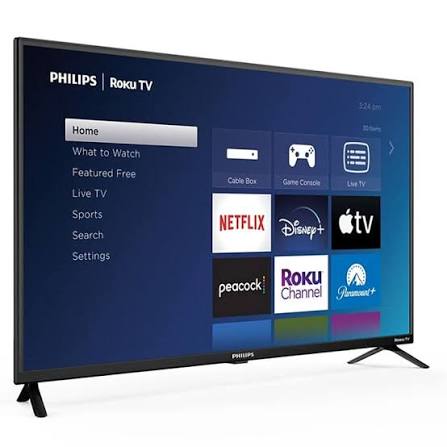
The Philips VLT5-B1 Roku TV is a 55-inch 4K Ultra HD smart television designed to deliver simple streaming, sharp picture quality, and easy everyday use. Built around Roku TV software, it gives viewers fast access to popular apps, live TV options, and a streamlined home screen that is ideal for families, casual streamers, and anyone upgrading from an older HD set. The 4K Ultra HD panel with HDR support offers improved detail, brighter highlights, and richer color than standard 1080p televisions, while the LED LCD design keeps the set slim and practical for wall mounting or stand placement.
This model is especially appealing to users who want a no-fuss smart TV experience without paying premium OLED or high-end QLED prices. It works well in living rooms, bedrooms, dorms, and secondary entertainment spaces where reliable streaming and broad compatibility matter more than advanced gaming features. Common use cases include Netflix and YouTube streaming, antenna TV viewing, console gaming at 4K 60Hz, and home entertainment with external sound systems.
Estimated pricing for the Philips VLT5-B1 Roku TV typically falls in the mid-range value category, often around $300 to $500 depending on retailer, promotions, and availability. Availability may vary by region, with the model or closely related Philips Roku TV variants appearing through major online stores, electronics retailers, and seasonal clearance events. For shoppers comparing smart TVs, this model stands out for its simple Roku interface, solid 4K performance, and strong value for money.
Key Specifications and Features of the Philips VLT5-B1 Roku TV
- Display size: 55-inch screen with 54.6-inch visible diagonal
- Resolution: 3840 x 2160p 4K Ultra HD LCD display
- Aspect ratio: Widescreen 16:9
- Backlight: LED
- HDR support: HDR10 and HLG
- Picture processing: Dynamic contrast, digital noise reduction, MPEG artifact reduction, and 120 PMR
- Viewing angle: 178° horizontal and 178° vertical
- Response time: 16 ms typical
- Contrast ratio: 1000:1 typical
- HDMI inputs: 3 with HDCP 2.2 support
- USB ports: 1 USB 2.0
- Wireless connectivity: 802.11ac MIMO Wi-Fi
- Audio output: 2 x 8W RMS speakers
- Other connections: Ethernet, optical audio out, composite AV input, headphone jack
- Power consumption: 127W to 145W depending on configuration
- Standby power: less than 0.5W
- Main power: 120V / 60Hz
Compared with similarly sized budget 4K Roku TVs, the Philips VLT5-B1 Roku TV offers a competitive feature set with standard 4K HDR playback, multiple HDMI ports, and a familiar Roku interface. It is best matched against entry-level 55-inch Roku TVs from other brands rather than premium models with Dolby Vision, higher refresh rates, or advanced gaming features.
Philips VLT5-B1 Roku TV Troubleshooting Guide: Common Problems and Fixes
If the TV will not power on, first confirm the wall outlet works, check the power cable, and unplug the set for 60 seconds before reconnecting it. If the screen is on but there is no picture, verify the correct HDMI input is selected and test a different HDMI port or cable. If streaming apps freeze, restart the TV from the settings menu or perform a full power cycle by unplugging it from the wall.
Common Roku-related errors often clear with a software restart, network reset, or update. If the TV displays a network connection error, restart the router, move the TV closer to the access point, or reconnect using the Ethernet port. For buffering, switch to the 5GHz Wi-Fi band when available and reduce interference from nearby devices. If you see a blank screen after switching sources, disable any connected device's sleep mode and check for HDCP handshake issues by reconnecting the HDMI cable.
Preventive maintenance helps reduce future problems. Keep the software updated, avoid blocking ventilation openings, use a surge protector, and clean the ports periodically. Philips Roku TV products commonly include manufacturer warranty coverage, and support is generally available through Philips customer care and Roku support channels. In the United States and Canada, Philips customer support can be reached at 1-833-978-3323 for assistance, while Roku’s support resources provide setup and troubleshooting guidance for Roku TV systems.
Philips VLT5-B1 Roku TV Pros and Cons: Is It Worth Buying?
Pros
- Easy-to-use Roku interface with fast access to popular streaming apps
- 4K Ultra HD resolution delivers clear detail for movies, sports, and TV shows
- HDR10 and HLG improve contrast and color in supported content
- Three HDMI ports make it practical for consoles, soundbars, and cable boxes
- Built-in Wi-Fi and Ethernet improve connection flexibility
- Good value for buyers seeking an affordable 55-inch smart TV
- Works well as a family TV, bedroom TV, or secondary entertainment display
Cons
- 2 x 8W speakers are adequate but not ideal for cinematic audio without a soundbar
- Standard 60Hz-class performance is less appealing for competitive gaming
- Contrast and brightness are solid for the price but not in premium territory
- No advanced panel features like Dolby Vision or high refresh rate gaming modes
- Better alternatives exist for buyers wanting stronger HDR performance or superior sound
For budget-conscious shoppers, the Philips VLT5-B1 Roku TV offers strong value because it balances price, 4K resolution, and simple streaming features. Compared with higher-end alternatives, it sacrifices premium picture processing and audio power, but it remains a sensible choice for everyday home entertainment.
Customer Reviews and User Feedback on the Philips VLT5-B1 Roku TV
Typical customer feedback trends positive, with many users giving the Philips VLT5-B1 Roku TV around 4 out of 5 stars for ease of use and streaming convenience. Buyers often praise the Roku home screen, quick app access, and clear 4K picture for the price. One common comment is that setup is straightforward and remote navigation feels familiar even for first-time smart TV users.
Frequent complaints focus on built-in sound quality and occasional Wi-Fi or app lag, especially when the TV is placed far from the router. Some users also note that the picture is best after adjusting the picture mode and brightness settings. Overall, reviewers recommend this model to shoppers who want an affordable 55-inch Roku TV for streaming, casual viewing, and general household use.
Final Buying Summary for Philips VLT5-B1 Roku TV
The Philips VLT5-B1 Roku TV is a practical choice for anyone who wants a simple, affordable 4K smart TV with an easy streaming platform and flexible connectivity. It is best suited to everyday viewers who value usability, dependable performance, and solid picture quality over premium extras.
If the goal is a straightforward 55-inch Roku TV for movies, streaming, and family viewing, this model delivers a strong balance of features and price.
Faqs
How do I set up philips VLT5-B1 Roku TV for the first time?
Why is my philips VLT5-B1 Roku TV not connecting to Wi-Fi?
How can I improve picture quality on philips VLT5-B1 Roku TV?
What should I do if philips VLT5-B1 Roku TV has no sound?
Can I connect game consoles and streaming devices to philips VLT5-B1 Roku TV?
How do I fix a slow or laggy philips VLT5-B1 Roku TV interface?
What features make philips VLT5-B1 Roku TV different from a regular smart TV?
How should I clean and maintain philips VLT5-B1 Roku TV safely?
More philips manuals
Leave a Comment