
Philips Evnja Series Monitor 27M2C5501 User Manual
Content
Philips Evnia Series Monitor 27M2C5501: Product Manual and Buying Guide
Introduction
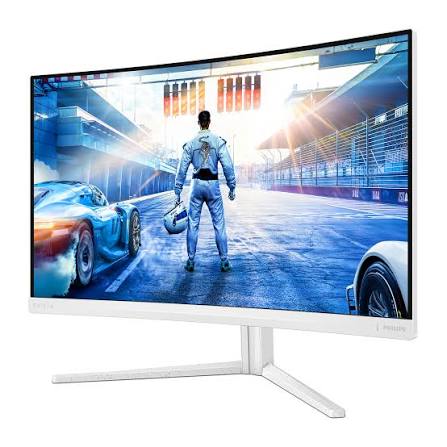
The Philips Evnia Series Monitor 27M2C5501 is a 27-inch curved gaming monitor designed for users who want a sharp QHD image, fast response, and an immersive viewing experience. Built around a Fast VA panel with a 1500R curve, it combines 2560 x 1440 resolution, a 180Hz refresh rate over DisplayPort, and 1ms gray-to-gray response time for smooth gameplay and reduced motion blur. The monitor also supports HDR10, Adaptive Sync, and a wide color gamut, making it suitable not only for competitive gaming but also for cinematic content, creative multitasking, and everyday productivity.
One of the biggest strengths of the Philips Evnia Series Monitor 27M2C5501 is its balance between performance and visual quality. The high contrast ratio delivers deep blacks, while the 300 cd/m² brightness and rich color coverage help images look lively and detailed. The curved screen improves focus in racing, RPG, and action titles, and the ergonomic stand with height adjustment adds comfort during long sessions. With two HDMI 2.0 ports and one DisplayPort 1.4 input, it works well with PCs, consoles, and mixed-device setups.
This monitor is a strong fit for gamers, streamers, office users who want a premium display, and buyers looking for a high-refresh QHD monitor without entering flagship pricing. The estimated price range in 2026 is typically around $130 to $230, depending on region, seller, and promotions, with availability through major electronics retailers and online marketplaces.
Key Features of Philips Evnia Series Monitor 27M2C5501
- 27-inch curved Fast VA display with 1500R curvature
- QHD resolution for sharper detail and more workspace
- 180Hz refresh rate via DisplayPort and 144Hz via HDMI
- 1ms gray-to-gray response time for fast-paced gaming
- Adaptive Sync support for reduced screen tearing
- HDR10 support for improved contrast in compatible content
- Height-adjustable stand and VESA mount support
Pros and Cons of Philips Evnia Series Monitor 27M2C5501
The Philips Evnia Series Monitor 27M2C5501 offers excellent value for users who want a curved QHD gaming display with high refresh performance. Compared with many 27-inch alternatives in the same class, it delivers stronger contrast than IPS-based models and often costs less than premium esports monitors with similar refresh rates. It is especially appealing for players who prefer immersive single-player games, simulators, and general-use productivity with better screen real estate.
- Pros: Sharp QHD resolution that improves text clarity and gaming detail.
- Pros: 180Hz refresh rate provides smoother motion than standard 60Hz or 75Hz displays.
- Pros: Fast VA panel offers deep blacks and strong contrast for movies and dark scenes.
- Pros: Curved 1500R design enhances immersion, especially in racing and open-world games.
- Pros: Good value for money versus premium IPS gaming monitors with similar size and resolution.
- Cons: VA panels can show some dark-level smearing in fast motion compared with top-tier IPS or OLED models.
- Cons: Brightness is solid but not ideal for very bright rooms or advanced HDR expectations.
- Cons: Console users may not always benefit from the full 180Hz refresh rate, depending on device support.
For buyers comparing alternatives, IPS monitors may offer wider viewing angles and slightly cleaner motion, while OLED models provide superior contrast but cost significantly more. For most users, the Philips Evnia Series Monitor 27M2C5501 remains a practical middle ground between affordability and performance.
Customer Reviews for Philips Evnia 27M2C5501 Monitor
User feedback on the Philips Evnia Series Monitor 27M2C5501 is generally positive, with many buyers praising the sharp QHD image, curved design, and smooth 180Hz performance. Common ratings cluster around 4.3 out of 5 stars, especially among gamers who value responsive gameplay and strong contrast. One typical review says, “The monitor feels premium, the curve is comfortable, and games look noticeably smoother than on my old 60Hz display.”
Frequent compliments include easy assembly, attractive design, and strong value for the price. The most common complaints mention modest HDR performance and occasional VA ghosting in darker scenes. Another recurring comment is, “Fantastic for the price, but I would not buy it if you mainly want perfect competitive-motion clarity.” Overall, it is a recommended purchase for gamers and general users who want a well-rounded curved gaming monitor rather than a specialist esports panel.
Who Should Buy the Philips Evnia 27M2C5501?
- Gamers who want a smooth 180Hz QHD experience
- Users who prefer a curved screen for immersion
- Buyers seeking strong contrast and vivid visuals
- Professionals who need extra screen space for multitasking
- Value-focused shoppers comparing mid-range gaming monitors
Setup and Usage Tips
- Use DisplayPort to unlock the full 180Hz refresh rate on compatible PCs.
- Enable Adaptive Sync in your system or graphics settings for smoother gameplay.
- Adjust the height and tilt so the center of the screen aligns with eye level.
- Choose QHD native resolution for the sharpest image quality.
- Lower brightness slightly in dark rooms to reduce eye strain during long sessions.
Final Verdict
The Philips Evnia Series Monitor 27M2C5501 is a well-rounded curved gaming monitor that combines QHD clarity, fast refresh performance, and strong contrast in a design that feels premium without being overpriced. It is a smart choice for users who want a versatile display for gaming, entertainment, and daily work. If you want a balanced monitor with good gaming credentials and strong everyday usability, the Philips Evnia Series Monitor 27M2C5501 is an easy recommendation.
Faqs
How do I set up the philips Evnja Series Monitor 27M2C5501 for the first time?
What should I do if the philips Evnja Series Monitor 27M2C5501 has no signal after connecting my laptop or PC?
Which devices are compatible with the philips Evnja Series Monitor 27M2C5501?
How can I get the best gaming performance from the philips Evnja Series Monitor 27M2C5501?
How do I adjust brightness, contrast, and color on the philips Evnja Series Monitor 27M2C5501?
Why does the philips Evnja Series Monitor 27M2C5501 look blurry or stretched?
What maintenance and cleaning steps should I follow for the philips Evnja Series Monitor 27M2C5501?
How do I fix eye strain when using the philips Evnja Series Monitor 27M2C5501 for long hours?
More philips manuals
Leave a Comment