
Philips 346B1 B-Line Monitor User Manual
Content
Philips 346B1 B-Line Monitor: UltraWide Productivity with USB-C Convenience
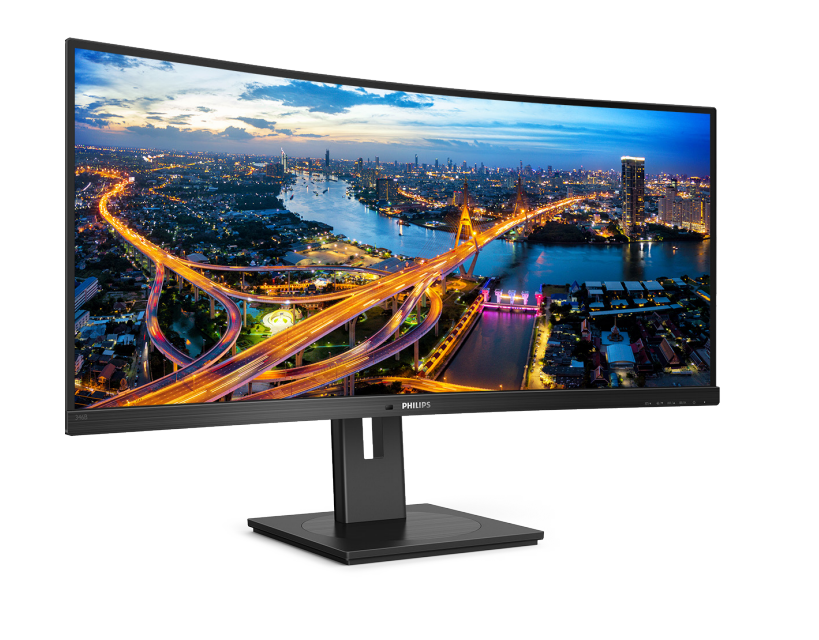
The Philips 346B1 B-Line Monitor is a 34-inch curved ultrawide display built for professionals who want more screen space, better multitasking, and a cleaner desk setup. With a 3440 x 1440 WQHD resolution, 21:9 aspect ratio, and a 1500R curve, it delivers a wide, immersive workspace that is especially useful for office work, content creation, spreadsheets, coding, and video editing. The VA panel offers strong contrast, while the 100Hz refresh rate makes scrolling, window movement, and general navigation feel noticeably smoother than standard 60Hz business monitors.
One of its biggest strengths is USB-C connectivity with up to 90W power delivery, which allows a laptop to charge, transfer data, and output video through a single cable. This makes the Philips 346B1 B-Line Monitor a strong choice for hybrid workers, remote professionals, and anyone using a modern USB-C laptop dock-style setup. It also includes integrated USB ports, DisplayPort, HDMI, and ergonomic features that support long work sessions.
In terms of pricing, the monitor has typically been positioned in the mid-range business ultrawide category, with estimated street prices often falling around $350 to $550 depending on region, retailer, and stock condition. Availability can vary because this model is sold in different market variants and may be easier to find through online marketplaces, refurbishers, and business resellers than major retail shelves. For users seeking a productivity-focused ultrawide with docking features, the Philips 346B1 B-Line Monitor remains a compelling value option.
Pros and Cons of the Philips 346B1 B-Line Monitor
Pros
- Excellent ultrawide productivity space for side-by-side apps, timelines, and spreadsheets.
- USB-C with 90W charging reduces cable clutter and simplifies laptop docking.
- 100Hz refresh rate feels smoother than typical business monitors.
- VA panel provides deep contrast for documents, media, and general office use.
- Strong value for money compared with premium ultrawide alternatives that cost significantly more.
- Useful for office multitasking, software development, finance, and remote work setups.
Cons
- Not ideal for competitive gaming, where faster response and higher refresh options are preferred.
- Color accuracy is good for productivity, but creative professionals may prefer a higher-end IPS panel.
- The 34-inch curved form factor requires more desk depth than standard monitors.
- Built-in speakers and extra features are functional, but not a replacement for dedicated audio gear.
- Some alternatives from Dell, LG, and Samsung offer newer panel tuning or higher-end factory calibration at a higher price.
Overall, the Philips 346B1 B-Line Monitor offers strong everyday productivity performance and a very practical feature set for the price. It is best viewed as a business-first ultrawide rather than a premium creator or gaming display.
Customer Reviews: What Buyers Say About the Philips 346B1 B-Line Monitor
Customer feedback for the Philips 346B1 B-Line Monitor is generally positive, especially among professionals who use USB-C laptops and multiple windows at once. Many users praise the 34-inch ultrawide layout, dock-like connectivity, and smooth 100Hz experience, often describing it as a major upgrade over dual-monitor setups. A common positive sentiment is: “One cable to the laptop, more room on the screen, and less desk clutter.”
Typical ratings cluster around 4 to 4.5 stars out of 5 for productivity buyers. Praise often focuses on the value, the curved 21:9 screen, and the convenience of the built-in USB hub. Complaints usually mention that the speakers are average, the monitor is large for small desks, and the VA panel is not the best choice for color-critical design work. Some users also note that setup can take time if they want to fine-tune picture settings for office use.
For most buyers, it is a smart purchase if the goal is a reliable ultrawide office monitor with USB-C docking and strong multitasking support. Users who prioritize gaming performance or professional-grade color work may want to compare it with newer IPS ultrawides before buying.
Philips 346B1 B-Line Monitor Specifications for Productivity and Office Use
- Screen size: 34-inch ultrawide curved display
- Resolution: 3440 x 1440 WQHD
- Aspect ratio: 21:9
- Panel type: VA
- Curve: 1500R
- Refresh rate: 100Hz
- Response time: around 4ms
- Brightness: 300 nits typical
- Contrast ratio: 3000:1 typical
- Connectivity: USB-C, HDMI, DisplayPort, USB hub
- USB-C power delivery: up to 90W
Who Should Buy the Philips 346B1 B-Line Monitor?
This monitor is best for office professionals, remote workers, developers, analysts, and anyone who wants a cleaner single-cable desktop setup. It is also a strong fit for users who manage multiple applications at once and want the benefits of an ultrawide monitor without moving into the premium price tier. If your workflow involves documents, dashboards, spreadsheets, and video calls, the Philips 346B1 B-Line Monitor is designed for exactly that kind of use.
Final Verdict on the Philips 346B1 B-Line Monitor
The Philips 346B1 B-Line Monitor stands out as a practical, well-equipped ultrawide that delivers real productivity benefits. Its combination of WQHD resolution, USB-C docking, 90W charging, and 100Hz refresh makes it a dependable choice for modern workspaces. For buyers who want a business-focused ultrawide with strong value and convenient connectivity, this monitor remains one of the more appealing options in its class.
Faqs
How do I set up the philips 346B1 B-Line Monitor for the first time on a desk with limited space?
What is the best way to connect the philips 346B1 B-Line Monitor to a laptop with USB-C?
Why is the philips 346B1 B-Line Monitor not displaying the full screen correctly in ultrawide apps and games?
Which devices are most compatible with the philips 346B1 B-Line Monitor for work and multitasking?
How can I improve text clarity and reduce eye strain on the philips 346B1 B-Line Monitor?
What should I do if the philips 346B1 B-Line Monitor has no signal after connecting my PC?
How do I use picture-in-picture or split-screen features on the philips 346B1 B-Line Monitor?
How should I clean and maintain the philips 346B1 B-Line Monitor safely over time?
More philips manuals
Leave a Comment