
Philips SB170 Bluetooth Speaker User Manual
Content
Philips SB170 Bluetooth Speaker Manual: Complete Guide for Everyday Listening
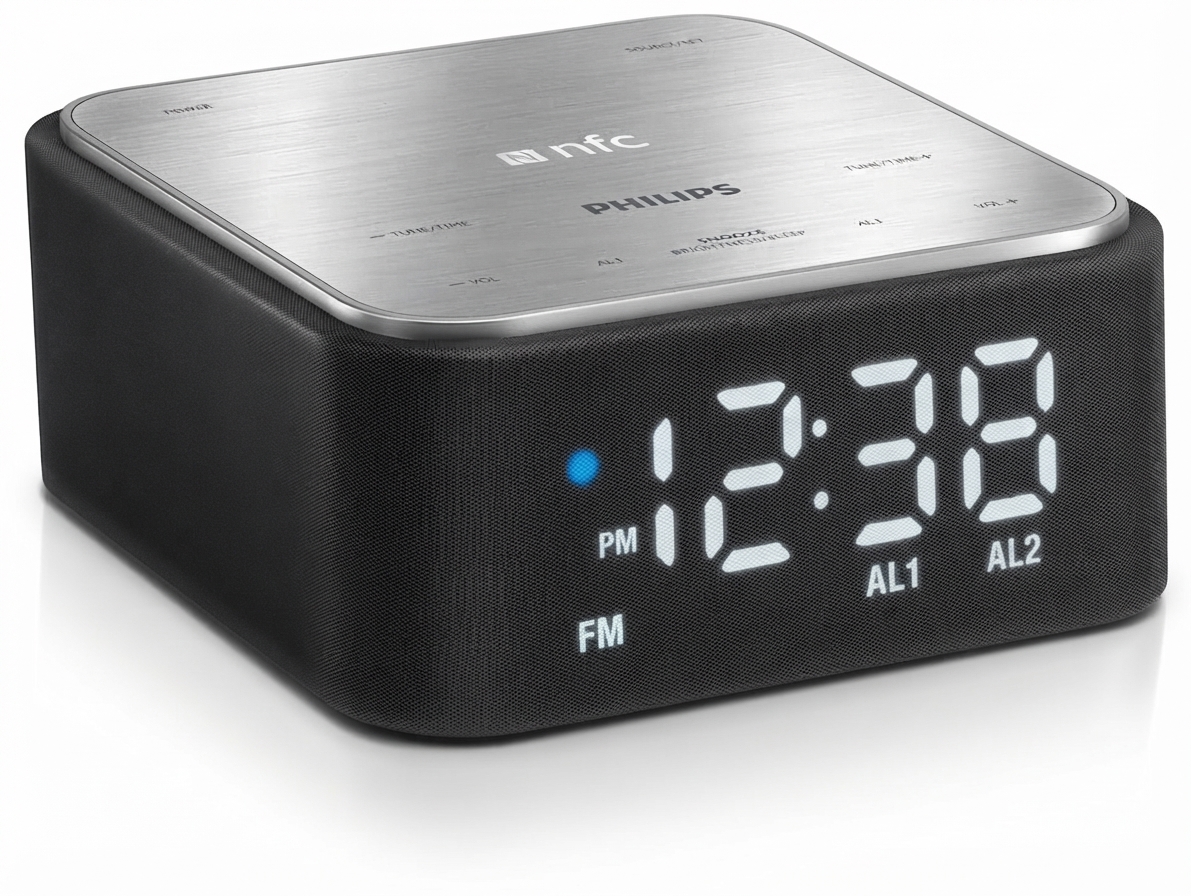
The Philips SB170 Bluetooth Speaker is a compact, clock-radio-style wireless speaker designed for users who want simple Bluetooth playback, bedside convenience, and easy charging in one device. It combines stereo sound, NFC tap-to-pair support, a digital clock display, FM radio functions, and a USB charging port, making it a practical choice for bedrooms, offices, dorm rooms, and small apartments. For shoppers looking for a straightforward all-in-one audio accessory, the Philips SB170 Bluetooth Speaker stands out for its ease of use and space-saving design.
This model is best suited for casual listeners who value convenience over high-power audio. It supports Bluetooth streaming from smartphones, tablets, and other Bluetooth-enabled devices, and also includes a 3.5 mm audio input for wired playback. The 6W RMS output is suitable for near-field listening, such as alarms, podcasts, radio, and background music. Its integrated clock and alarm features add bedside functionality, while NFC pairing makes initial setup quick and user-friendly on compatible devices.
Estimated availability is limited because this product is listed as discontinued in some support channels, so buyers may mainly find remaining stock through third-party retailers or resellers. Typical pricing for older or renewed units has historically fallen in the budget range, often around the low-to-mid $30 to $50 range depending on condition, seller, and region. If you want a compact speaker with clock radio features rather than a premium bass-heavy Bluetooth speaker, the Philips SB170 Bluetooth Speaker remains a sensible, value-focused option.
Philips SB170 Bluetooth Speaker Specifications and Key Features
- Audio output: 6W RMS total output power with stereo sound for small-room listening.
- Bluetooth: Bluetooth 2.1 support with A2DP, AVRCP, and SPP profiles.
- Wireless range: Up to 10 meters in line-of-sight conditions.
- Pairing: NFC tap-to-pair support on compatible Android and Windows devices.
- Wired input: 3.5 mm audio-in port for non-Bluetooth devices.
- Charging: USB port with 5V/1A output for charging a mobile device.
- Clock features: Digital clock display with 12/24-hour format support.
- Power supply: 100–240VAC, 50/60Hz input for broad compatibility.
- Product dimensions: 137 x 141 x 62 mm, making it compact for bedside or desktop use.
- Weight: 0.88 kg including packaging.
In comparison with modern portable Bluetooth speakers, the Philips SB170 Bluetooth Speaker is more of a desktop companion than a travel speaker. It does not offer the deep bass, waterproofing, or advanced codec support found in newer rivals, but it provides a useful blend of speaker, alarm clock, and charger. Compared with similar budget clock radios, it offers a clean setup and practical daily features rather than high-end audio performance.
Philips SB170 Bluetooth Speaker Pros and Cons
Pros
- All-in-one convenience: Combines Bluetooth speaker, digital clock, alarm-style bedside utility, and USB charging in one compact unit.
- Easy pairing: NFC support simplifies setup for compatible phones, while standard Bluetooth works with most devices.
- Good value for basic use: Ideal for podcasts, music at moderate volume, and wake-up routines.
- Compact footprint: Fits neatly on nightstands, desks, and shelves without taking much space.
- Wired backup: The 3.5 mm input helps when Bluetooth is unavailable.
Cons
- Limited power: 6W RMS is adequate for personal listening but not for large rooms or parties.
- Older Bluetooth version: Bluetooth 2.1 is dated compared with newer speakers that support more efficient wireless performance.
- No modern extras: Lacks water resistance, voice assistant support, and advanced sound tuning.
- Discontinued status: Availability may be inconsistent, and replacement support can be limited.
- Best for simple needs: Users seeking strong bass or premium audio quality may prefer newer alternatives.
For the price, the Philips SB170 Bluetooth Speaker is strongest as a practical bedside companion rather than a performance speaker. If your priority is affordability, simplicity, and extra convenience features, it offers solid value. If you want richer sound or modern wireless features, newer compact speakers may be a better match.
Philips SB170 Bluetooth Speaker Customer Reviews and User Feedback
Customer feedback for the Philips SB170 Bluetooth Speaker is generally positive among users who want a straightforward clock radio with wireless streaming. Common praise centers on easy setup, compact design, and the usefulness of having Bluetooth, FM radio, and USB charging in one device. Many owners rate it around 4 out of 5 stars for bedside convenience and everyday reliability.
Typical complaints focus on limited volume output, modest bass response, and the older Bluetooth standard. Some users also mention that the speaker is best suited for small spaces rather than open living areas. A common recommendation is to buy it if you want a practical alarm-clock speaker for a bedroom or office, but skip it if you need louder sound or modern portable-speaker features.
- Praise: “Perfect for my nightstand and easy to pair with my phone.”
- Praise: “Great for podcasts, FM radio, and charging my phone overnight.”
- Complaint: “Sound is clear, but it does not get very loud.”
- Complaint: “Bass is light compared with newer Bluetooth speakers.”
Overall, the Philips SB170 Bluetooth Speaker is a good purchase for users who prioritize convenience, compact size, and multi-function bedside use over powerful audio output.
Faqs
How do I set up philips SB170 Bluetooth Speaker for the first time?
Why is my philips SB170 Bluetooth Speaker not pairing with my phone?
Can philips SB170 Bluetooth Speaker connect to a laptop, TV, or tablet?
What should I do if the philips SB170 Bluetooth Speaker has low volume or weak sound?
How long does the philips SB170 Bluetooth Speaker battery last on a full charge?
How can I improve Bluetooth range and connection stability on philips SB170 Bluetooth Speaker?
Does philips SB170 Bluetooth Speaker support hands-free calling or voice assistant use?
How should I clean and maintain philips SB170 Bluetooth Speaker for long-term use?
More philips manuals
Leave a Comment