
Philips DVD Video Player DVP642 User Manual
Content
Philips DVD Video Player DVP642 Overview
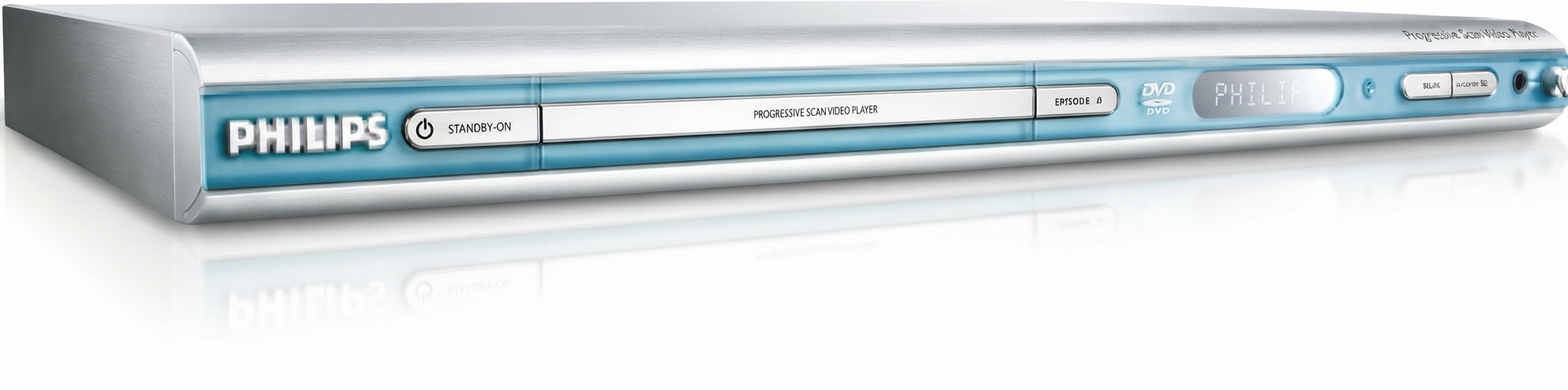
The Philips DVD Video Player DVP642 is a compact, value-focused DVD player designed for users who want dependable disc playback with strong legacy format support. Known for its slim silver chassis, progressive scan output, and DivX compatibility, the Philips DVD Video Player DVP642 remains a practical choice for home theaters, secondary TVs, and anyone preserving a library of DVDs, CD-Rs, MP3 discs, or picture CDs. It is especially useful for households that still rely on physical media and want a simple, no-fuss player that can handle both standard DVDs and a wide mix of file formats.
This model stands out for its 4x video upsampling, 192 kHz/24-bit audio DAC, Dolby Digital support, and PAL/NTSC playback compatibility, making it attractive for older disc collections and mixed-region setups. The Philips DVD Video Player DVP642 also includes multiple outputs such as component video, S-Video, composite video, coaxial digital audio, and optical digital audio, giving users flexibility when connecting to older and newer displays. Its compact footprint and tray-loading design make it easy to place in tight entertainment centers.
For shoppers searching for an affordable DVD player with broad compatibility, the Philips DVD Video Player DVP642 is typically found on the used market, often priced around $40 to $70 depending on condition, accessories, and seller. New units are uncommon, so availability is usually strongest through resale marketplaces and surplus electronics sellers. It is a sensible option for budget-minded buyers, retro AV enthusiasts, and users who want a reliable standalone DVD player without modern streaming complexity.
Pros and Cons of the Philips DVP642 DVD Player
Pros
- Supports a wide range of media, including DVD, CD-R, CD-RW, MP3-CD, Picture CD, SVCD, Video CD, and DivX formats.
- Progressive scan and 4x video upsampling can improve image quality on compatible televisions.
- Multiple audio and video outputs make setup flexible for home theater systems and older TVs.
- Compact design works well in small media cabinets and secondary viewing areas.
- Strong value for money on the used market, especially for users who need dependable DVD playback rather than smart features.
Cons
- It lacks modern features such as HDMI, USB playback, Wi-Fi, and streaming apps.
- Availability is mostly limited to used or refurbished units, so condition can vary widely.
- Some users report reliability concerns with older units, especially if they have seen heavy use.
- It is not the best choice if you want a premium upscaling experience compared with newer Blu-ray players or modern multi-format media players.
Compared with newer alternatives, the Philips DVD Video Player DVP642 offers better legacy-format flexibility than many basic entry-level DVD players, but it trails modern models in connectivity and long-term support. For buyers who only need simple disc playback, it still delivers excellent value.
Customer Reviews and User Feedback
User feedback for the Philips DVD Video Player DVP642 is generally positive, with many owners rating it around 4 out of 5 stars for format support and ease of use. Praise commonly focuses on its DivX compatibility, reliable DVD playback, and straightforward setup. One frequent testimonial theme is that it is a “great little player for older media collections” and a strong fit for people who want a simple plug-and-play device.
Common complaints include occasional long-term reliability issues, limited modern connectivity, and the lack of HDMI output. Some reviewers also note that while the picture quality is solid for standard-definition content, it cannot compete with newer upscaling players on high-definition displays. Despite that, many buyers recommend it for second rooms, older televisions, and archive playback.
For best results, this model is recommended for users who value compatibility and simplicity over smart features. It is especially appealing to collectors, families with DVD libraries, and anyone needing an affordable replacement DVD player.
Philips DVD Video Player DVP642 Key Features
- Progressive scan video output for smoother playback on compatible displays.
- 4x video upsampling for improved standard-definition image processing.
- 192 kHz/24-bit audio DAC for enhanced analog audio performance.
- Dolby Digital support for better home theater sound integration.
- Compatibility with DVD, CD, MP3, Picture CD, SVCD, Video CD, and DivX formats.
- PAL and NTSC playback support for broader disc compatibility.
- Component, composite, S-Video, coaxial, and optical outputs for versatile setup options.
Who Should Buy the Philips DVP642?
The Philips DVD Video Player DVP642 is best for buyers who want a practical, affordable DVD player for everyday viewing. It is a strong choice for older TVs, secondary entertainment setups, and users with extensive physical media collections. If you need a simple disc player with broad format support and easy installation, the Philips DVD Video Player DVP642 remains a useful and budget-friendly option.
If your priority is HDMI output, Blu-ray playback, or streaming support, a newer media player or smart DVD/Blu-ray combo unit will be a better fit. For classic DVD playback and legacy format support, however, this Philips model continues to deliver solid value.
Faqs
How do I set up the philips DVD Video Player DVP642 for the first time?
Why is the philips DVD Video Player DVP642 not reading discs, and how can I fix it?
Which disc formats and file types are compatible with the philips DVD Video Player DVP642?
How do I improve picture and sound quality on the philips DVD Video Player DVP642?
What should I do if the philips DVD Video Player DVP642 has no picture or no sound?
How do I clean and maintain the philips DVD Video Player DVP642 safely?
Can the philips DVD Video Player DVP642 work with older TVs and home audio systems?
How do I reset the philips DVD Video Player DVP642 when the menus freeze or settings become wrong?
More philips manuals
Leave a Comment