
Philips HTS3544 Home Theater System User Manual
Content
Philips HTS3544 Home Theater System Overview
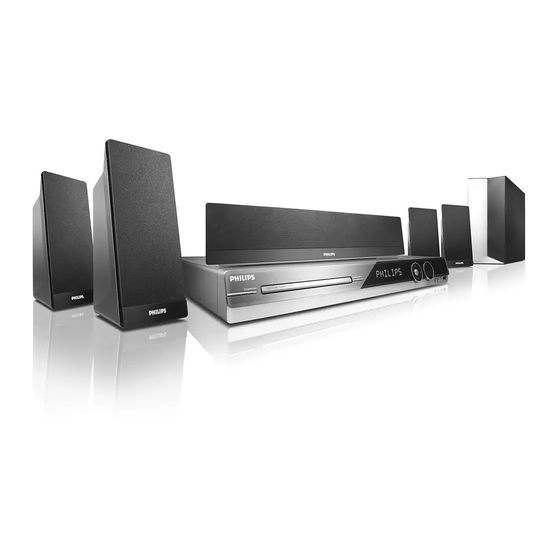
The Philips HTS3544 Home Theater System is a 5.1-channel DVD home cinema set designed to bring immersive surround sound to everyday living rooms. With a claimed total home theater output of up to 1000W and support for Dolby Digital, DTS, and Dolby Pro Logic II, it delivers a strong cinematic experience for movies, music, and TV. The system combines a built-in DVD player, HDMI output, USB playback, and multiple analog and digital inputs, making it a practical all-in-one solution for users who want simple setup without buying separate components.
The Philips HTS3544 Home Theater System is especially appealing to budget-conscious buyers, first-time home theater owners, and anyone upgrading from basic TV speakers. It is also a solid fit for small to medium-sized rooms where space-saving and straightforward operation matter more than advanced audiophile tuning. In real-world use, the system works well for casual movie nights, gaming, and music playback, with the 8-inch subwoofer adding noticeable low-end impact and the satellite speakers handling dialogue and surround effects clearly.
As a discontinued model, availability is now mainly limited to refurbished, used, or remaining old-stock units. Typical market pricing varies widely depending on condition, accessories, and seller, but it usually falls in the low-budget range for secondhand home theater systems. For shoppers seeking a classic DVD-based surround sound package with HDMI connectivity and easy setup, the Philips HTS3544 Home Theater System remains a recognizable value option.
Philips HTS3544 Home Theater System Specifications and Key Features
- System type: 5.1-channel DVD home theater system
- Total output power: up to 1000W home theater mode; 510W FTC output power
- Speaker setup: 4 satellite speakers, 1 center speaker, 1 subwoofer
- Speaker frequency response: satellites and center 150 Hz to 20 kHz; subwoofer 40 Hz to 150 Hz
- Amplifier frequency response: 180 Hz to 14 kHz
- Audio formats: Dolby Digital, DTS, Dolby Pro Logic II, stereo
- Disc support: DVD-Video, DVD+R, DVD+RW, DVD-R, DVD-RW, Video CD, SVCD, Audio CD, CD-R, CD-RW
- Media playback support: DivX, MPEG1, MPEG2, MP3, WMA, JPEG
- Connectivity: HDMI output, component video, composite video, S-Video, USB, AUX, coaxial digital input, line-in
- Tuner: AM/FM with preset support
- Power consumption: around 180W; standby power under 1W
Performance-wise, the Philips HTS3544 Home Theater System sits in the category of entry-to-mid-range all-in-one home theater packages rather than premium separates. Compared with compact soundbar systems, it offers fuller surround separation and a more physical speaker layout. Compared with newer AV receiver-based systems, it is simpler to install but far less expandable. Its built-in DVD player and broad format support make it especially practical for users with large disc collections.
Pros and Cons of the Philips HTS3544 Home Theater System
Pros
- Powerful surround sound: The 1000W home theater mode gives movies and games a bigger, more dynamic feel than basic TV audio.
- All-in-one convenience: Built-in DVD playback reduces cable clutter and setup complexity.
- Good format compatibility: Supports common disc and media formats, including MP3, WMA, JPEG, and DivX.
- Multiple inputs and outputs: HDMI, USB, AUX, and video outputs make it flexible for older and newer TVs.
- Strong value for money: On the used market, it is often cheaper than replacing a TV sound setup with a full receiver-and-speaker package.
Cons
- Discontinued product: Limited availability means buyers must rely on used or refurbished units.
- No modern streaming features: It lacks built-in Wi-Fi, Bluetooth, and app-based playback found in newer alternatives.
- Less flexible than AV receiver systems: Speaker and upgrade options are more limited than a modular home theater setup.
- Older connectivity standards: Although HDMI is included, the overall design reflects an earlier generation of home cinema hardware.
For buyers comparing alternatives, the Philips HTS3544 Home Theater System offers better physical surround sound than most soundbars at a similar used price, but it cannot match the convenience and streaming features of modern wireless audio systems.
Customer Reviews and User Feedback
User feedback for the Philips HTS3544 Home Theater System is generally positive, with many owners praising the loud output, easy setup, and satisfying bass response. A common rating pattern from buyers is around 4.0 out of 5 stars for performance and value in the used market. One typical comment is that it “fills the room with clear sound and strong bass without needing extra components.”
Frequent complaints focus on the lack of modern features such as Bluetooth and streaming support, plus the risk of buying an older unit with worn speakers or missing accessories. Some users also mention that the system is best suited for DVDs and local media rather than today’s smart-home setups.
Overall, the Philips HTS3544 Home Theater System is recommended for buyers who want affordable surround sound, simple operation, and compatibility with physical media. It is a smart purchase for retro media users, casual movie fans, and anyone looking for a budget-friendly home theater upgrade.
Faqs
How do I set up the philips HTS3544 Home Theater System for the first time?
Why is my philips HTS3544 Home Theater System not producing sound from all speakers?
What devices are compatible with the philips HTS3544 Home Theater System?
How can I improve the surround sound performance of the philips HTS3544 Home Theater System?
Why does the philips HTS3544 Home Theater System keep losing connection to the TV?
How do I clean and maintain the philips HTS3544 Home Theater System safely?
Can I play USB media on the philips HTS3544 Home Theater System, and what file types work best?
What should I do if the philips HTS3544 Home Theater System remote control is not responding?
More philips manuals
Leave a Comment