
Philips HTS8100 Home Cinema User Manual
Content
Philips HTS8100 Home Cinema Manual
Introduction
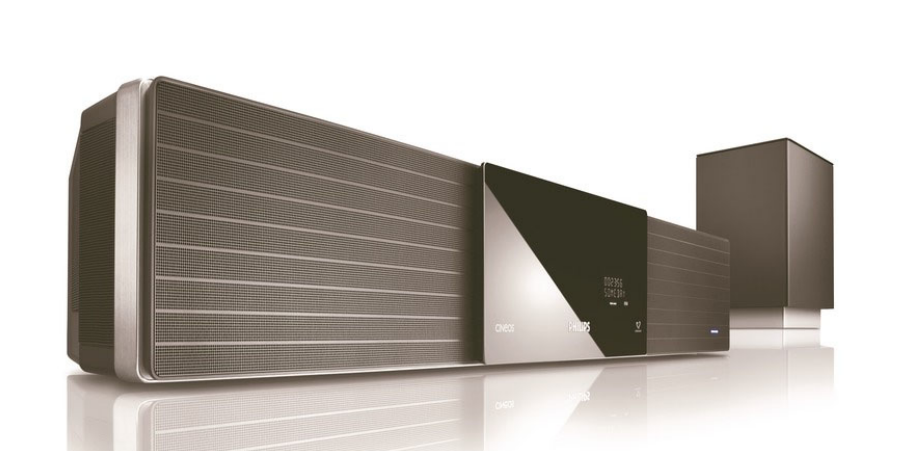
The Philips HTS8100 Home Cinema is a distinctive SoundBar-style DVD home theater system designed for users who want a clean, space-saving setup without sacrificing immersive audio. Built around Philips Ambisound technology, the system creates a convincing surround effect from a single main unit, making it especially appealing for apartments, living rooms, and minimalist entertainment spaces. The Philips HTS8100 Home Cinema also includes HDMI 1080p upscaling, which helps improve the clarity of DVDs on modern HDTVs, along with USB Direct and MP3 line-in support for easy playback of music and photos from portable devices.
This model is well suited for movie lovers, casual gamers, and users who want an all-in-one DVD home theater system with a premium look and flexible connectivity. Key strengths include Dolby Digital and DTS audio support, DoubleBass enhancement, Smart Surround processing, and compatibility with multiple disc and media formats. The system is also attractive to buyers who prefer fewer cables and less clutter than a traditional multi-speaker setup. Typical pricing for the Philips HTS8100 Home Cinema varies widely today because it is an older discontinued model, with used and refurbished units often appearing in the approximate range of $80 to $250 depending on condition, accessories, and region. Availability is generally limited to resale marketplaces, specialty electronics sellers, and occasional refurbished stock.
Troubleshooting Common Philips HTS8100 Home Cinema Problems
If the system does not power on, first confirm the main power cable is connected securely and that the interconnect cable between the subwoofer and main unit is firmly attached. If there is no sound, check the selected input source, volume level, and speaker connections, and make sure Ambisound or surround settings are not muted or misconfigured. If video is missing, verify the HDMI or component cable connection and confirm the TV is set to the correct input. If a disc will not play, clean the disc, check for unsupported formats, and ensure the disc is inserted correctly. Some units may display generic read or playback errors rather than detailed codes, so simple checks often resolve the issue.
Preventive care can reduce failures: keep vents dust-free, avoid overheating, use quality HDMI and audio cables, and do not force discs into the tray. For support, the Philips support page for the HTS8100/12 remains available in some regions, and older manuals commonly direct users to Philips consumer care. In the United States, Philips support has historically used 1-888-PHILIPS (1-888-744-5477) for consumer assistance. Warranty coverage depends on the seller and whether the product is refurbished or used, so buyers should confirm coverage before purchase.
Pros and Cons of the Philips HTS8100 Home Cinema
Pros
- Space-saving all-in-one design that reduces cable clutter and works well in smaller rooms.
- Ambisound virtual surround sound delivers a wider audio field than a standard TV speaker setup.
- 1080p HDMI upscaling improves the look of standard DVDs on high-definition TVs.
- USB Direct and MP3 line-in add convenient playback options for music and photos.
- Solid feature set for its class, including Dolby Digital, DTS, DoubleBass, and Smart Surround.
- Good value on the secondhand market for users seeking a stylish DVD home theater system.
Cons
- As an older model, it lacks modern streaming apps, wireless audio, and current smart TV integration.
- Virtual surround sound is not as precise as a true multi-speaker 5.1 system.
- Replacement parts and official support can be harder to find than for newer models.
- Performance depends heavily on room layout, wall reflections, and TV placement.
- For some buyers, a newer soundbar with Bluetooth or eARC may offer better overall value for money.
Customer Reviews and User Feedback
User feedback for the Philips HTS8100 Home Cinema is generally positive, especially from owners who value design and simplicity. Many users rate it around 4 out of 5 stars for its strong sound, attractive styling, and easy setup. Praise is commonly directed at the immersive Ambisound effect, clean installation, and dependable DVD playback. A typical testimonial would be: “It transformed my living room without needing five separate speakers.”
Common complaints include limited modern connectivity, difficulty finding replacement accessories, and less accurate surround separation compared with newer systems. Some users mention that room acoustics strongly affect performance. Buyers who want a compact DVD home theater system with a premium look often recommend it, while those expecting smart features or wireless streaming usually prefer a newer soundbar package. Overall, it remains a practical choice for DVD-focused home cinema use, especially when found at the right price.
Faqs
How do I set up philips HTS8100 Home Cinema for the first time?
Why is my philips HTS8100 Home Cinema not giving sound from the TV?
What devices are compatible with philips HTS8100 Home Cinema?
How can I fix distorted or low-quality sound on philips HTS8100 Home Cinema?
What are the best sound settings for movies on philips HTS8100 Home Cinema?
How do I troubleshoot HDMI or video connection problems on philips HTS8100 Home Cinema?
How do I clean and maintain philips HTS8100 Home Cinema safely?
What should I do if philips HTS8100 Home Cinema stops responding or freezes?
More philips manuals
Leave a Comment