
Philips E-Line Monitor 321E1 User Manual
Content
Philips E-Line Monitor 321E1 Product Manual
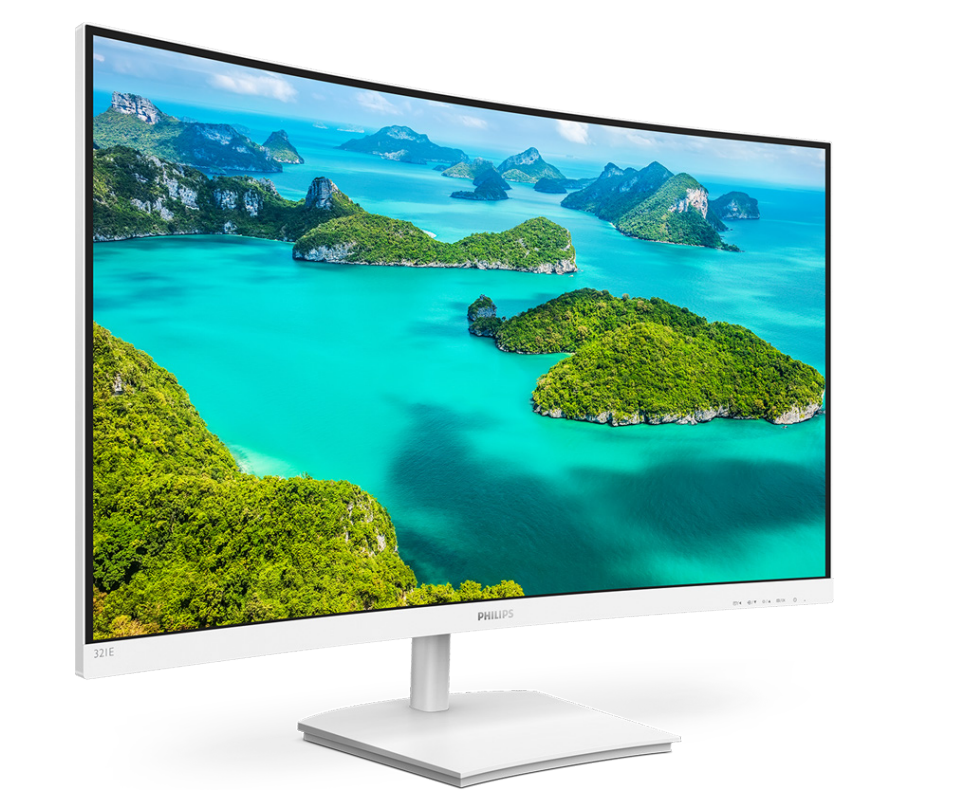
Introduction
The Philips E-Line Monitor 321E1 is a large-format 31.5-inch Full HD display designed for users who want an expansive screen without moving into a premium price tier. Built around a VA panel with a W-LED backlight, it delivers strong contrast, wide viewing comfort, and a clean, modern design that fits home offices, entertainment setups, and everyday productivity. The 16:9 aspect ratio and 1920 x 1080 resolution make it a practical choice for web browsing, document work, streaming, and casual gaming, while the monitor’s large viewing area helps multitasking feel more comfortable than on a smaller desktop screen.
One of the key advantages of the philips E-Line Monitor 321E1 is its value-focused positioning. It is aimed at users who need a big screen for work-from-home use, basic content creation, or media consumption, but do not require high-end features such as 4K resolution, USB-C docking, or ultra-high refresh rates. The VA panel is especially appealing for movie watching and dark-room use because it typically offers deeper blacks and stronger contrast than many IPS alternatives. Depending on region, the estimated price range is generally in the budget-to-midrange segment, and availability is usually best through major online retailers and electronics stores, though stock can vary by market. For buyers comparing large Full HD monitors, the philips E-Line Monitor 321E1 stands out as a straightforward, dependable option that prioritizes screen size, comfort, and affordability over advanced premium extras.
Pros & Cons
Pros
- Large 31.5-inch display: Excellent for split-screen work, spreadsheets, video streaming, and everyday multitasking.
- Strong contrast from VA technology: Better black levels than many entry-level IPS monitors, which is useful for movies and darker content.
- Good value for money: Offers a big-screen experience at a price that is usually lower than higher-resolution alternatives.
- Simple setup and practical design: A good fit for users who want an uncomplicated monitor for home or office use.
- Competitive against alternatives: Often more affordable than 32-inch QHD or 4K models, while still providing a comfortable desktop workspace.
Cons
- Full HD resolution only: On a 31.5-inch panel, text and fine detail are less sharp than on QHD or 4K monitors.
- Not ideal for demanding gaming: Best suited for casual play rather than high-refresh competitive gaming displays.
- Fewer premium features: Lacks advanced productivity extras found on more expensive monitors, such as USB-C and higher-end ergonomic adjustments.
- Best for specific use cases: Users who want sharper image quality for design work may prefer a higher-resolution alternative.
Overall, the philips E-Line Monitor 321E1 offers strong value for users who want a big, comfortable display without paying for premium resolution or workstation-grade features.
Customer Reviews
Customer feedback for the philips E-Line Monitor 321E1 is generally positive, with many buyers rating it around 4 out of 5 stars for size, comfort, and price. A common praise is the immersive feel of the 31.5-inch screen, especially for movies, office tasks, and general home use. One typical testimonial is, “The screen size makes working on documents much easier, and the picture looks rich and comfortable for long sessions.”
Frequent complaints usually focus on the Full HD resolution at this size, which some users feel is less sharp than expected, especially when sitting close to the display. Other comments mention that it is not the best choice for high-end gaming or color-critical creative work. A recurring recommendation is to buy it if the goal is a large, affordable monitor for everyday productivity and entertainment. Users who want sharper text or more advanced features often suggest looking at QHD alternatives instead.
For shoppers who value size, simplicity, and price, the philips E-Line Monitor 321E1 remains a solid purchase choice.
Faqs
How do I set up the philips E-Line Monitor 321E1 for the first time?
What should I do if the philips E-Line Monitor 321E1 shows no signal?
Which devices are compatible with the philips E-Line Monitor 321E1?
How can I get the best picture quality from the philips E-Line Monitor 321E1?
Why does the philips E-Line Monitor 321E1 look blurry or stretched?
What are the main features of the philips E-Line Monitor 321E1 for everyday use?
How do I clean and maintain the philips E-Line Monitor 321E1 safely?
Can the philips E-Line Monitor 321E1 be used for gaming and video streaming?
More philips manuals
Leave a Comment