
Philips HTL1170B SoundBar User Manual
Content
Philips HTL1170B SoundBar Manual and Product Overview
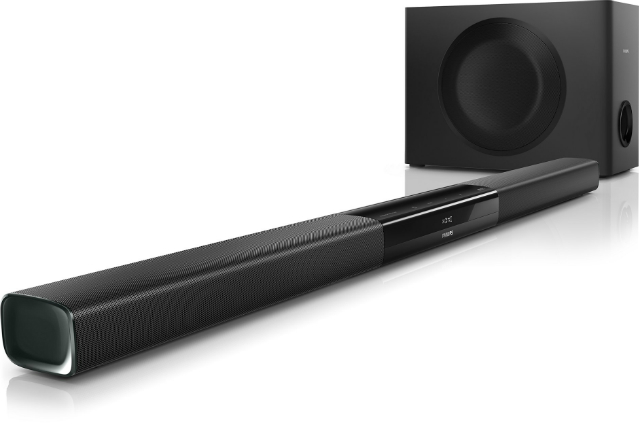
The Philips HTL1170B SoundBar is a compact 2.0-channel audio solution designed to improve TV sound without the complexity of a full home theater setup. With 40W RMS total output, Dolby Digital decoding, and virtual surround sound, it delivers clearer dialogue, fuller mids, and a more immersive listening experience for movies, sports, and everyday streaming. The slim profile makes it easy to place under a television or mount on the wall, which is ideal for apartments, bedrooms, dorm rooms, and smaller living rooms where space is limited.
This soundbar is aimed at users who want a straightforward upgrade from built-in TV speakers. It supports Bluetooth, AUX, optical, coaxial, and USB playback, giving it broad compatibility with older and newer TVs, set-top boxes, and mobile devices. Built-in sound controls such as treble, bass, virtual surround, and night mode help users tailor the output for different content and listening times. The Philips HTL1170B SoundBar is especially appealing to budget-conscious buyers who want useful features without paying for premium multi-speaker systems.
Estimated market pricing for the Philips HTL1170B SoundBar typically falls in the budget-friendly range, often around $50 to $120 depending on condition, seller, and regional availability. Because it is an older model, it is commonly found through third-party retailers, refurbished listings, and resale marketplaces rather than mainstream new-stock channels. For shoppers seeking an affordable TV sound upgrade with simple setup and dependable everyday performance, this model remains a practical choice.
Pros and Cons of the Philips HTL1170B SoundBar
Pros
- Compact and wall-mountable: The slim 865 mm design fits neatly under most TVs and works well in smaller rooms.
- Easy connectivity: Bluetooth, optical, coaxial, AUX, and USB inputs make it flexible for many home entertainment setups.
- Clearer TV audio: Dolby Digital support and virtual surround sound improve dialogue clarity and overall immersion.
- Useful sound controls: Treble, bass, and night mode help fine-tune audio for movies, music, and late-night viewing.
- Good value for money: As a budget soundbar, it offers more features than basic TV speakers and many entry-level alternatives.
Cons
- No dedicated subwoofer: Bass is improved over TV speakers but will not match the deep low-end of 2.1-channel systems.
- Modest power output: The 40W RMS rating is best suited for small to medium rooms, not large living spaces.
- Older Bluetooth standard: Bluetooth 2.1 + EDR is functional but less modern than current wireless audio implementations.
- Limited premium features: There is no HDMI ARC, voice assistant integration, or app-based control.
- Best compared with entry-level models: It competes mainly with basic soundbars from TCL, Vizio, and Sony’s lower-priced ranges rather than newer premium bars.
For buyers who want a simple soundbar for everyday TV use, the Philips HTL1170B SoundBar offers strong value. However, users seeking cinematic bass or advanced smart features should consider newer alternatives with a wireless subwoofer or HDMI ARC support.
Customer Reviews and Real-World User Feedback
Customer feedback for the Philips HTL1170B SoundBar is generally positive, with many owners giving it around 4 out of 5 stars for ease of use and improved dialogue clarity. A common testimonial is that it “makes TV voices easier to hear without turning the volume up too high,” which is especially useful for news, dramas, and streaming content. Users also praise the compact design and simple remote control, noting that setup is quick and straightforward.
Common complaints usually focus on bass performance and age-related limitations. Some buyers say the low-end output is acceptable but not powerful enough for action movies or music-heavy listening. Others mention that the older wireless technology and lack of HDMI ARC can make it feel dated compared with newer soundbars. Still, most reviews agree that the Philips HTL1170B SoundBar is a solid purchase for anyone wanting better sound on a budget. It is a good recommendation for casual viewers, bedroom TVs, and secondary entertainment setups.
Philips HTL1170B SoundBar Key Specifications
- Audio channels: 2.0
- Total output power: 40W RMS
- Sound features: Dolby Digital, virtual surround sound, treble and bass control, night mode
- Connectivity: Bluetooth, AUX, optical input, coaxial input, USB, 3.5 mm audio in
- Speaker drivers: 2 x 2-inch full-range woofers per side configuration
- Dimensions: 865 x 68 x 86 mm
- Weight: 1.8 kg
- Power consumption: 25W
- Standby power consumption: less than 0.5W
Setup Tips for Better Sound Performance
- Place the soundbar directly below the TV for the clearest front-facing audio image.
- Use the optical or coaxial connection for a more stable TV audio signal.
- Enable bass or virtual surround settings when watching movies, then lower them for spoken content if voices sound muddy.
- Use night mode in shared spaces to reduce harsh volume spikes during late-night viewing.
- Keep Bluetooth playback close to the soundbar to avoid interference and dropouts.
Who Should Buy the Philips HTL1170B SoundBar?
The Philips HTL1170B SoundBar is best for users who want a simple, affordable upgrade from weak built-in television speakers. It suits small rooms, casual streaming setups, and households that value easy installation over advanced features. If the goal is clearer dialogue, compact design, and dependable everyday performance, this model remains a sensible option. If deep bass, HDMI ARC, or modern smart features are a priority, a newer 2.1 soundbar may be a better fit.
Faqs
How do I set up philips HTL1170B SoundBar for the first time with a TV?
Why is my philips HTL1170B SoundBar not producing any sound after setup?
What devices are compatible with philips HTL1170B SoundBar?
How can I get better bass and clearer sound from philips HTL1170B SoundBar?
What should I check if philips HTL1170B SoundBar has audio delay or lip sync problems?
Can philips HTL1170B SoundBar work with older TVs that do not have HDMI ARC?
How do I clean and maintain philips HTL1170B SoundBar safely?
Why does philips HTL1170B SoundBar keep switching inputs or not remember my settings?
More philips manuals
Leave a Comment