
Philips HTL2101A Soundbar User Manual
Content
Philips HTL2101A Soundbar Review and Product Manual
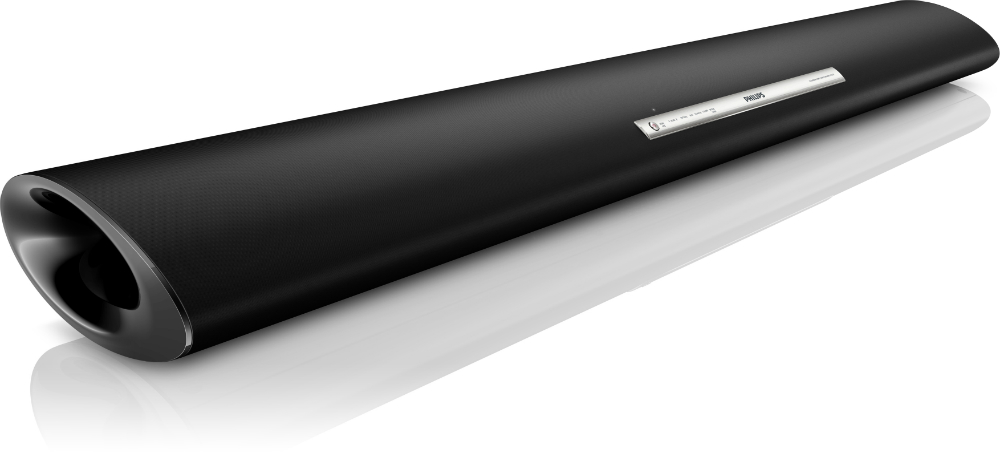
The Philips HTL2101A Soundbar is a compact 2.0-channel audio system designed to improve TV sound without the complexity of a full home theater setup. With 40W RMS total output, dual full-range drivers, and support for digital and analog inputs, it is a practical choice for bedrooms, apartments, and smaller living rooms where clear dialogue and simple connectivity matter most. The slim profile makes the Philips HTL2101A Soundbar easy to place under a television or mount on the wall, while its understated design blends well with most modern TV setups.
One of its biggest strengths is ease of use. The soundbar supports optical, coaxial, AUX, and USB input options, making it compatible with many TVs and older media sources. It also offers a frequency response of 20 Hz to 20 kHz and standby power consumption of less than 0.5 W, which appeals to users looking for a low-maintenance, energy-efficient audio upgrade. For many buyers, the Philips HTL2101A Soundbar delivers a noticeable improvement in vocal clarity and overall sound fullness compared with built-in TV speakers.
This model is best suited for budget-conscious shoppers, casual movie watchers, and users who want a simple soundbar for everyday TV viewing. Typical market pricing often falls in the budget category, roughly around $50 to $100 depending on condition, region, and seller availability. Because this is an older model, new stock may be limited, but it is still commonly found through online marketplaces, refurbished electronics sellers, and occasional retail listings. If you want an affordable entry-level soundbar with straightforward setup, the Philips HTL2101A Soundbar remains a reasonable option.
Pros and Cons of Philips HTL2101A Soundbar
Pros
- Affordable entry-level audio upgrade with strong value for money, especially for users replacing weak TV speakers.
- Simple connectivity with optical, coaxial, AUX, and USB inputs, which makes setup easy across older and newer devices.
- Compact design fits neatly under most televisions and can be wall-mounted for flexible installation.
- Clearer dialogue performance than standard TV audio, making it useful for news, streaming shows, and talk-based content.
- Low standby power consumption helps reduce energy usage over time.
Cons
- No separate subwoofer, so bass impact is limited compared with 2.1 soundbars or larger home theater systems.
- 40W RMS output is adequate for small rooms but may feel underpowered in larger spaces.
- Older model status means fewer modern features such as Bluetooth, HDMI ARC, or app-based controls.
- Best for basic TV enhancement rather than cinematic surround sound.
Compared with modern Bluetooth soundbars, the Philips HTL2101A Soundbar is more limited in wireless convenience, but it can be a smarter buy for users who prioritize wired reliability and low cost. Against similarly priced compact soundbars, it stands out for its straightforward controls and practical input selection, though newer alternatives may offer richer bass and smarter features.
Customer Reviews and User Feedback for Philips HTL2101A Soundbar
Average user sentiment for the Philips HTL2101A Soundbar is generally positive, especially among buyers who wanted a basic and inexpensive TV audio upgrade. Many users rate it around 4 out of 5 stars for clear mids, easy setup, and compact size. One common positive comment is: “It improved dialogue instantly and took only minutes to connect.” Another frequent praise is its good performance for everyday TV watching in smaller rooms.
Common complaints usually focus on the limited bass and the lack of modern wireless features. Some users mention that it is not the best choice for action movies or music-heavy listening because it does not deliver deep low-end sound. A typical critical remark is: “It sounds clean, but don’t expect theater-level bass.” For buyers seeking a simple plug-and-play solution, the Philips HTL2101A Soundbar is often recommended. For more immersive sound or stronger bass, users typically suggest stepping up to a newer 2.1 soundbar with a wireless subwoofer.
Philips HTL2101A Soundbar Specifications at a Glance
- Audio channels: 2.0 stereo
- Total output power: 40W RMS
- Speaker drivers: 2 x 2-inch full-range drivers
- Frequency response: 20 Hz to 20 kHz
- Inputs: Optical, coaxial, AUX, USB, 3.5 mm audio-in
- Power consumption: 40W
- Standby power: 0.5W or less
- Approximate size: 845 x 72 x 93 mm
Is the Philips HTL2101A Soundbar Worth Buying?
The Philips HTL2101A Soundbar is worth considering if you want a compact, affordable, and easy-to-use soundbar for improving basic TV audio. It is not built for users who want deep bass, surround effects, or advanced smart features, but it does offer dependable performance for everyday viewing. For a budget soundbar, it delivers solid clarity, flexible wired connections, and a slim design that works well in smaller spaces.
If your priority is value, simplicity, and better dialogue from TV speakers, the Philips HTL2101A Soundbar remains a practical choice. If your priority is cinematic sound, wireless streaming, or room-filling bass, a newer model will be a better long-term investment.
Faqs
How do I set up philips HTL2101A Soundbar for the first time with my TV?
Why is my philips HTL2101A Soundbar not producing sound even though it is powered on?
What devices are compatible with philips HTL2101A Soundbar and what connections work best?
How can I improve bass and overall sound quality on philips HTL2101A Soundbar?
Why does philips HTL2101A Soundbar have distorted sound or crackling audio?
Does philips HTL2101A Soundbar need special TV settings for external audio output?
How do I clean and maintain philips HTL2101A Soundbar safely?
What should I check if philips HTL2101A Soundbar remote control stops responding?
More philips manuals
Leave a Comment