
Philips DVP3005 DVD Video Player User Manual
Content
Philips DVP3005 DVD Video Player: A Practical, Reliable DVD Player for Classic Home Entertainment
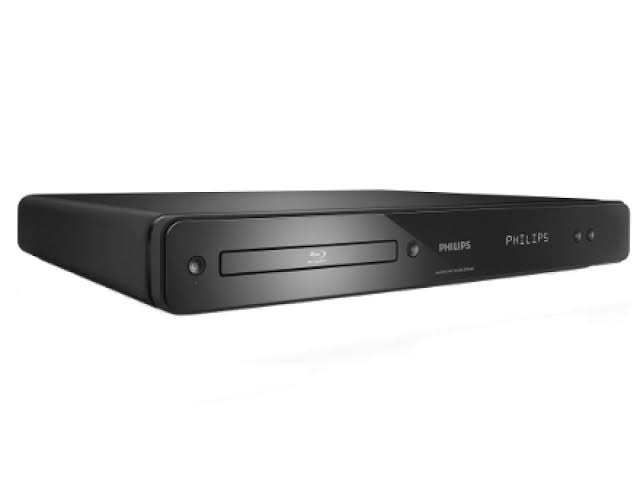
The Philips DVP3005 DVD Video Player is a compact and straightforward DVD player designed for users who want dependable playback without unnecessary complexity. Built for DVD-Video, CD, VCD, SVCD, and recordable disc formats, it offers solid compatibility for everyday movie watching, music playback, and legacy disc libraries. Its Progressive Scan output, 12-bit/108 MHz video processing, and Dolby Digital audio support help deliver a smoother viewing experience on compatible televisions, especially for standard-definition content.
This model is a strong fit for households that still rely on physical media, retro entertainment setups, classrooms, small offices, and anyone looking for a simple secondary player. The Philips DVP3005 DVD Video Player includes useful connections such as component video, composite video, analog stereo output, and coaxial digital audio, making it flexible enough for older and newer AV systems. It also supports NTSC and PAL playback, which is helpful for users with mixed-region disc collections. Typical specifications include a 10 W power draw, low standby consumption below 0.8 W, and a slim chassis measuring 360 x 37 x 265 mm.
As an older model, the Philips DVP3005 DVD Video Player is usually found through third-party sellers, refurbished listings, or remaining stock in select regions. Estimated pricing is generally in the budget range, often around $20 to $60 depending on condition, accessories, and seller availability. For buyers who want a no-frills DVD player with practical compatibility and dependable basic performance, it remains a sensible value option.
Pros and Cons of Philips DVP3005 DVD Video Player
Pros
- Supports a wide range of discs, including DVD-Video, CD, CD-R/CD-RW, Video CD, SVCD, and DVD±R/±RW formats, which is useful for mixed home collections.
- Progressive Scan and 12-bit/108 MHz video processing can improve picture stability on compatible displays.
- Dolby Digital and coaxial digital audio output make it suitable for basic home theater setups.
- Compact design saves shelf space and fits easily into entertainment centers.
- Good value for money if purchased refurbished or used, especially compared with higher-priced universal media players.
Cons
- Does not offer modern streaming, USB media playback, or smart TV features, so it is limited to physical discs.
- As an older DVD player, availability is inconsistent and condition varies widely between sellers.
- Best suited for standard-definition use, so it is not ideal for users expecting Blu-ray or 4K quality.
- Compared with newer alternatives, it lacks advanced audio/video processing and newer convenience features.
For users comparing it with newer budget DVD players, the Philips DVP3005 DVD Video Player stands out for its broad disc support and practical AV connections, but it loses points on modern features. Its best strength is straightforward performance at a low cost.
Philips DVP3005 DVD Player Customer Reviews and User Feedback
Owner feedback for the Philips DVP3005 DVD Video Player is generally positive, especially from users who want a simple disc player that “just works.” Many buyers rate it around 4.2 out of 5 stars for dependable playback, compact size, and easy setup. One common praise is that it handles older DVDs and recordable discs well, making it a useful choice for family archives and legacy media collections.
Frequently mentioned complaints include the lack of modern features such as HDMI, USB playback, and streaming support. Some users also note that image quality depends heavily on the TV and cable type used. A typical testimonial is: “Great little player for old DVDs and CDs, easy to connect, and very reliable.” Another frequent comment is: “Perfect for basic use, but not for anyone looking for modern extras.”
Overall, the Philips DVP3005 DVD Video Player is recommended for buyers who want an affordable, no-nonsense DVD player for discs, not digital media. It is especially appealing for secondary rooms, backup use, and retro AV setups.
Key Specifications: Philips DVP3005 DVD Video Player at a Glance
- Supported media: DVD-Video, CD, CD-R/CD-RW, Video CD, SVCD, DVD+R, DVD+RW, DVD-R, DVD-RW
- Video features: Progressive Scan, PAL/NTSC playback
- Audio features: Dolby Digital, analog stereo output, coaxial digital output
- Video processing: 12-bit, 108 MHz D/A converter
- Power consumption: 10 W, standby below 0.8 W
- Dimensions: 360 x 37 x 265 mm
- Weight: 1.98 kg
Who Should Buy the Philips DVP3005 DVD Video Player?
This DVD player is best for users who value simplicity, reliability, and broad disc compatibility over modern connectivity. It is a practical pick for home users with large DVD collections, educators needing a basic playback device, and anyone restoring or maintaining an older entertainment setup. If your priority is affordable DVD playback with solid compatibility, the Philips DVP3005 DVD Video Player remains a worthwhile option.
Faqs
How do I set up the philips DVP3005 DVD Video Player for the first time?
Why is my philips DVP3005 DVD Video Player not reading discs?
Which disc formats are compatible with the philips DVP3005 DVD Video Player?
How do I improve picture quality on the philips DVP3005 DVD Video Player?
What should I do if the philips DVP3005 DVD Video Player has no sound?
Can the philips DVP3005 DVD Video Player work with older TVs and home theater systems?
How do I fix remote control problems with the philips DVP3005 DVD Video Player?
How should I clean and maintain the philips DVP3005 DVD Video Player?
More philips manuals
Leave a Comment