
Philips 27M2N8500 Evnja Monitor User Manual
Content
Philips 27M2N8500 Evnja Monitor Review and User Manual
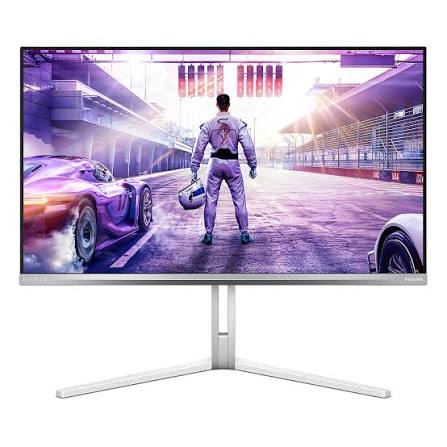
The Philips 27M2N8500 Evnia Monitor is a 27-inch QD-OLED gaming display built for players who want ultra-fast motion handling, vivid HDR performance, and premium image quality in a compact QHD format. With a 2560 x 1440 resolution and a 360Hz refresh rate, it targets competitive gamers who value speed as much as visual fidelity. The QD-OLED panel delivers deep blacks, excellent contrast, and rich color coverage, while the 0.03ms response time helps reduce motion blur in fast-paced shooters, racing games, and esports titles.
Beyond gaming, the Philips 27M2N8500 Evnia Monitor works well for creators who want accurate-looking colors, strong HDR highlights, and wide viewing angles for editing, streaming, and entertainment. Connectivity is also strong, with HDMI 2.1, DisplayPort 1.4, USB hub support, and headphone output, making it flexible for modern PCs and consoles. Ambiglow-style lighting adds an immersive touch for desktop setups, while ergonomic adjustments help users find a comfortable viewing position.
In terms of pricing, the Philips 27M2N8500 Evnia Monitor is generally positioned as a premium but value-focused OLED gaming monitor. Typical market pricing has been seen around the mid-range premium segment, roughly $550 to $650 depending on region, retailer, and promotions. Availability is broad in many major markets, though stock levels may fluctuate because OLED gaming monitors are often in high demand. For buyers seeking a fast 1440p esports monitor with OLED contrast and a competitive price compared with many rival 360Hz OLED models, this monitor stands out as a strong option.
Pros and Cons of the Philips 27M2N8500 Evnia Monitor
Pros
- Ultra-smooth 360Hz refresh rate with a 0.03ms response time, ideal for competitive gaming and fast aim tracking.
- QD-OLED panel delivers outstanding contrast, near-instant pixel response, and excellent HDR impact.
- 2560 x 1440 resolution offers a sharp balance between performance and image clarity for modern gaming PCs.
- Strong color volume and wide viewing angles make it useful for content creation, streaming, and cinematic use.
- HDMI 2.1 support improves compatibility with current-generation consoles and high-end graphics cards.
- Often priced below many competing 360Hz OLED monitors, making the Philips 27M2N8500 Evnia Monitor a strong value choice.
Cons
- OLED care habits are still relevant, including avoiding static UI elements for long periods to reduce burn-in risk.
- Brightness is strong for OLED, but it may still trail the peak luminance of the brightest mini-LED alternatives in some scenes.
- 27-inch 1440p is excellent for gaming, but users wanting 4K productivity clarity may prefer a different class of monitor.
- Premium features can make it more expensive than fast IPS monitors, even though the image quality is significantly better.
- Some users may prefer rivals with more aggressive factory calibration or different stand/OSD features.
Compared with fast IPS alternatives, the Philips 27M2N8500 Evnia Monitor offers superior contrast, deeper blacks, and faster perceived motion clarity. Compared with other 360Hz OLED monitors, it often competes very well on price, which improves its value for money. Buyers who want the cheapest high-refresh monitor may still choose IPS, but users seeking the best blend of speed and picture quality are likely to appreciate this model.
Customer Reviews for the Philips 27M2N8500 Evnia Monitor
Customer feedback is broadly positive, with many users giving the Philips 27M2N8500 Evnia Monitor an average impression around 4.5 out of 5 stars. Gamers frequently praise the 360Hz refresh rate, saying motion feels exceptionally clean and responsive in competitive titles. One common theme is that the monitor feels “fast enough to remove distraction,” especially for esports players who spend long sessions in shooters or battle royale games.
Typical praise includes excellent black levels, strong HDR punch, and a premium-looking design. Common complaints usually focus on OLED-specific concerns such as brightness variation in large bright windows, sensitivity to static desktop use, and the need for careful settings management. Some buyers also note that the stand and on-screen controls are good rather than exceptional.
Overall, the Philips 27M2N8500 Evnia Monitor is recommended for users who want a high-end gaming display with a strong price-to-performance ratio. It is especially appealing for competitive gamers, OLED enthusiasts, and mixed-use buyers who want a monitor that performs well in both gameplay and media consumption.
Philips 27M2N8500 Evnia Monitor: Key Features at a Glance
- 27-inch QD-OLED gaming monitor
- 2560 x 1440 QHD resolution
- 360Hz refresh rate for esports-level smoothness
- 0.03ms gray-to-gray response time
- HDMI 2.1 and DisplayPort connectivity
- USB hub and headphone output
- Deep contrast and vivid color performance
- Suitable for gaming, streaming, and content creation
Who Should Buy the Philips 27M2N8500 Evnia Monitor?
This monitor is best for competitive gamers who want the fastest possible feel without giving up OLED image quality. It is also a strong fit for PC players with powerful hardware who can consistently drive high frame rates at 1440p. The Philips 27M2N8500 Evnia Monitor is a smart choice for users who want a premium gaming monitor that also handles movies, streaming, and creative work with impressive visual quality.
If you want a monitor that combines esports speed, QD-OLED contrast, and a relatively competitive price, the Philips 27M2N8500 Evnia Monitor is one of the most compelling options in its class.
Faqs
How do I set up the philips 27M2N8500 Evnja Monitor for the first time?
Why is my philips 27M2N8500 Evnja Monitor not displaying the full refresh rate?
What is the best way to configure gaming settings on the philips 27M2N8500 Evnja Monitor?
Can the philips 27M2N8500 Evnja Monitor work with a laptop, PS5, or Xbox?
How do I fix blurry text or scaling issues on the philips 27M2N8500 Evnja Monitor?
What should I do if the philips 27M2N8500 Evnja Monitor shows no signal?
How can I improve color accuracy on the philips 27M2N8500 Evnja Monitor for photo or video work?
How should I clean and maintain the philips 27M2N8500 Evnja Monitor safely?
More philips manuals
Leave a Comment