
Philips BDP7700 DVD Player User Manual
Content
Philips BDP7700 DVD Player Manual and Product Overview
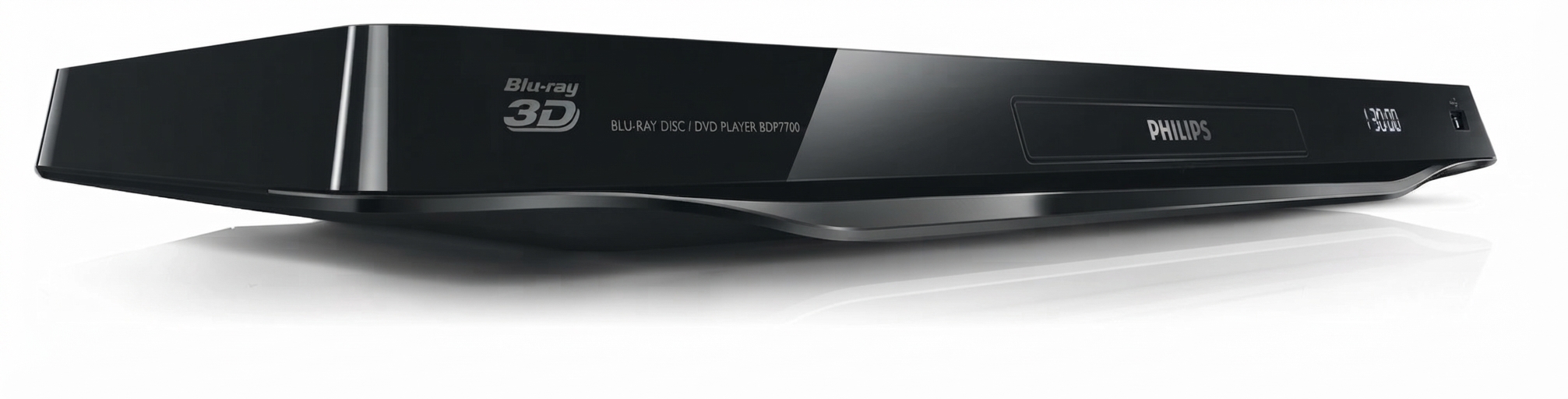
The Philips BDP7700 DVD player is a 7000-series Blu-ray Disc and DVD player built for users who want strong picture quality, flexible connectivity, and premium home entertainment features in one compact unit. It supports Blu-ray, DVD, CD, and digital media playback, making it a practical choice for movie collectors, home theater fans, and anyone upgrading from a basic DVD player. With built-in Wi-Fi on many versions, HDMI output, USB 2.0 connectivity, and support for SD/SDHC cards, the BDP7700 is designed for convenient playback from discs and external storage.
One of its biggest advantages is its versatile audio and video output options. Depending on the configuration, it can provide analog 5.1-channel audio, coaxial and optical digital audio, and HDMI output up to 1080p with 24Hz support. This makes it suitable for both modern HDTV setups and older surround sound systems. The player is also known for supporting high-quality audio formats such as Dolby Digital, Dolby TrueHD, DTS Digital Surround, and DTS-HD, which adds value for users building a more cinematic setup.
The Philips BDP7700 DVD player is best suited for users who want a feature-rich disc player with a premium design and broad compatibility. It is especially useful for home theater systems, secondary living rooms, and collections that include Blu-ray, DVD, and SD card content. In today’s market, availability is limited because it is an older model, but it may still be found through used electronics sellers, refurbished marketplaces, or remaining retail stock. Typical pricing for a unit in good condition usually falls in the lower-to-mid range for legacy Blu-ray players, often around $50 to $170 depending on condition, region, and included accessories.
Pros & Cons of the Philips BDP7700 DVD Player
Pros
- Excellent connectivity, including HDMI, USB 2.0, Ethernet, optical output, coaxial output, and SD/SDHC card support.
- Strong audio support for home theater users, with compatibility for Dolby and DTS surround formats.
- Flexible setup options for both modern flat-screen TVs and older AV receivers.
- Built-in Wi-Fi on many versions adds convenience for streaming and network features.
- Good value for buyers seeking a used Blu-ray player with premium features at a lower price than newer models.
Cons
- Discontinued model, so new-unit availability is limited and support may be harder to find.
- Interface and smart features are dated compared with newer streaming players.
- Best value is usually on the used market, which means condition can vary widely.
- Some users may prefer newer alternatives with faster app support and more modern streaming ecosystems.
For buyers comparing the Philips BDP7700 DVD player with newer Blu-ray players, its biggest strength is hardware flexibility rather than modern smart features. It offers solid value for money if the goal is disc playback and home theater audio, but it is less appealing for users who want the latest streaming apps or voice control.
Customer Reviews and User Feedback
User feedback for the Philips BDP7700 DVD player is generally positive, especially among home theater enthusiasts. Average impressions are often around 4 out of 5 stars, with many users praising the sharp Blu-ray playback, reliable disc handling, and wide range of audio outputs. One common testimonial style comment is: “Great picture and excellent sound options for my older receiver setup.”
Common complaints usually focus on its age rather than its core playback quality. Buyers sometimes mention that the menu system feels outdated, startup speed is slower than newer players, and smart features are limited by current standards. A recurring issue is that some owners need extra time to configure audio outputs correctly, especially when using analog surround or older AV equipment.
Overall, the Philips BDP7700 DVD player is a strong recommendation for users who want a dependable disc player for movies, concerts, and legacy media. It is less suitable for buyers who want a modern streaming-first device, but it remains a practical purchase for home theater setups and collectors who value picture quality and connectivity.
Faqs
How do I set up the philips BDP7700 DVD Player for the first time?
Why is my philips BDP7700 DVD Player not reading discs, and how can I fix it?
What video and audio features does the philips BDP7700 DVD Player support?
How do I connect the philips BDP7700 DVD Player to a smart TV or home theater system?
Why is the picture on my philips BDP7700 DVD Player blurry or unstable?
Can the philips BDP7700 DVD Player play region-coded or international discs?
How do I update or optimize the philips BDP7700 DVD Player for better performance?
What is the best way to clean and maintain the philips BDP7700 DVD Player?
More philips manuals
Leave a Comment