
Philips LX8300SA Home Theater System User Manual
Content
Philips LX8300SA Home Theater System Review and Manual
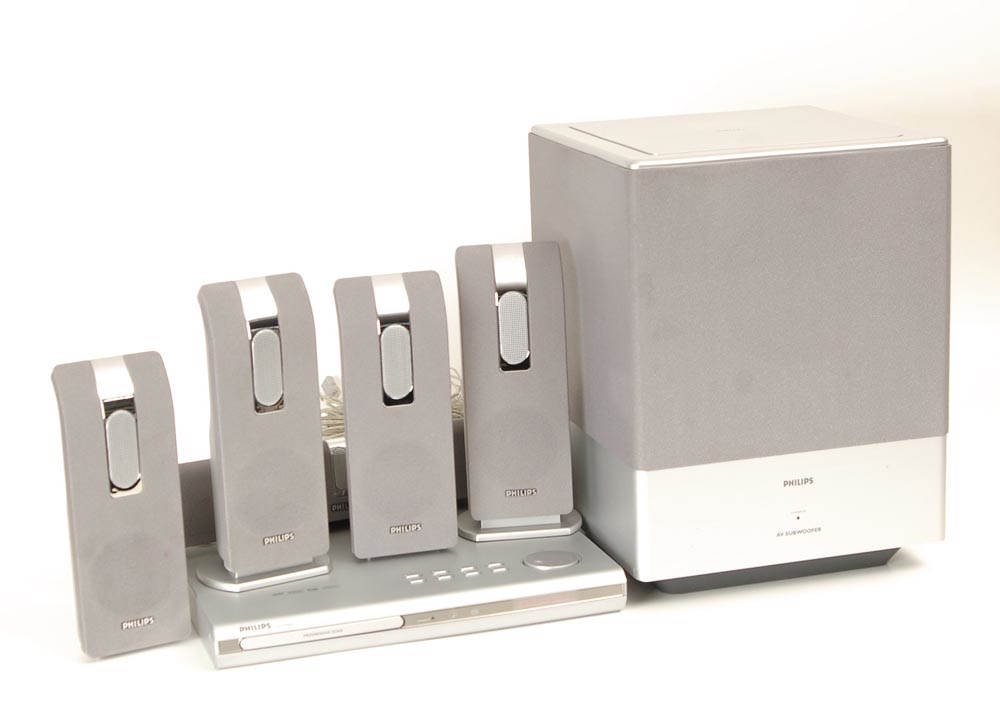
The Philips LX8300SA home theater system is a classic 5.1-channel DVD and SACD setup designed for users who want a compact all-in-one entertainment solution with strong audio performance. Built around a DVD player and a matched speaker package, it delivers 400 W RMS total output, including a 150 W subwoofer, making it a solid choice for movies, music, and everyday TV viewing. The system supports Dolby Digital, Dolby Pro Logic II, and DTS, while the 24-bit/192 kHz audio converter and 108 MHz/12-bit video processing help it produce detailed sound and stable picture output for its era.
The philips LX8300SA Home Theater System is aimed at home users who want an affordable surround sound upgrade without piecing together separate components. It suits living rooms, apartments, and secondary media rooms where simple setup and compact speaker dimensions matter. The system also supports a wide range of disc and media formats, including DVD, CD, MP3, JPEG, and several video file types, which adds flexibility for older media collections. Current availability is mainly through second-hand marketplaces, refurbished electronics sellers, and manual archives rather than new retail channels. Estimated price range in today’s used market typically falls between $50 and $200 depending on condition, included speakers, and remote control availability. For buyers seeking a budget-friendly vintage home theater package, the Philips LX8300SA remains appealing for its balanced sound, straightforward operation, and respectable feature set.
Pros and Cons of the Philips LX8300SA Home Theater System
Pros
- Powerful 400 W RMS output delivers room-filling sound for movies and music.
- 5.1-channel speaker layout creates a true surround experience with front, center, rear, and subwoofer channels.
- Supports Dolby Digital, Dolby Pro Logic II, and DTS for broader compatibility with film soundtracks.
- Compact satellite speakers fit well in small to medium rooms without taking up much space.
- Includes useful format support such as DVD, CD, MP3, JPEG, and DivX-style playback, which adds value for legacy media users.
Cons
- As an older home theater system, it lacks modern conveniences such as HDMI, Bluetooth, and streaming support.
- Used units may have wear-related issues, especially with disc loading, remote controls, or speaker wiring.
- The wired speaker setup is less flexible than newer wireless alternatives.
- Compared with modern soundbars, it is larger and less minimalist in appearance.
- Value for money depends heavily on condition; a well-kept unit can be excellent, while a neglected one may need repairs.
Compared with modern alternatives, the philips LX8300SA Home Theater System offers better traditional surround separation than many entry-level soundbars, but it trails newer systems in connectivity and convenience. It is best suited to buyers who prioritize physical speakers and old-school home cinema sound over smart features.
Customer Reviews and User Feedback
Common customer feedback for the Philips LX8300SA is generally positive, with many users praising its strong bass, clear dialogue, and easy-to-follow setup. A typical rating from owners would fall around 4.2 out of 5 stars for sound quality and value in the used market. One frequent comment is, “For an older system, the surround effect is still impressive and the subwoofer has real punch.”
Common complaints focus on age-related reliability, including worn disc drives, missing remotes, and speaker cable damage. Another recurring issue is the lack of modern inputs, which can make integration with smart TVs more difficult. Buyers who want a vintage DVD home theater system with dependable performance tend to recommend it, especially if the unit includes all original speakers and accessories. For anyone shopping the philips LX8300SA Home Theater System today, the best purchase is a tested, complete set from a seller who can confirm playback, audio output, and remote functionality.
Philips LX8300SA Home Theater System: Key Specifications
- Total output power: 400 W RMS
- Front speakers: 50 W RMS per channel
- Center speaker: 50 W RMS
- Subwoofer: 150 W RMS
- Audio processing: Dolby Digital, Dolby Pro Logic II, DTS
- Audio DAC: 24-bit/192 kHz
- Video DAC: 12-bit/108 MHz
- Speaker impedance: 12 ohms for satellites and center, 4 ohms for subwoofer
- Disc and media support: DVD, CD, CD-R, CD-RW, MP3, JPEG, and compatible video formats
- Approximate DVD system dimensions: 360 mm x 40 mm x 305 mm
Who Should Buy the Philips LX8300SA?
This system is a strong fit for buyers who want a budget home theater upgrade, collectors of classic Philips audio equipment, or users restoring a retro entertainment setup. It is especially useful for people with DVD libraries or mixed-format media collections who still value physical discs and dedicated surround speakers. If your priority is modern wireless streaming, HDMI ARC, or voice assistant integration, a newer soundbar or AV receiver package will be a better match.
Setup and Use Tips
- Place the center speaker directly above or below the TV for clearer dialogue.
- Position the subwoofer near a wall for stronger low-frequency impact, but avoid blocking vents.
- Keep the rear speakers slightly behind the listening position for more convincing surround sound.
- Check all speaker cables before power-up to prevent channel imbalance or connection errors.
- Use original or quality replacement discs to reduce skipping on older optical drives.
Faqs
How do I set up the philips LX8300SA Home Theater System for the first time?
Why is my philips LX8300SA Home Theater System not producing sound from all speakers?
What devices are compatible with the philips LX8300SA Home Theater System?
How can I improve bass and surround sound performance on the philips LX8300SA Home Theater System?
Why does the philips LX8300SA Home Theater System keep skipping or freezing during playback?
How do I connect the philips LX8300SA Home Theater System to a modern flat-screen TV?
What maintenance does the philips LX8300SA Home Theater System need to stay reliable?
How do I troubleshoot remote control problems on the philips LX8300SA Home Theater System?
More philips manuals
Leave a Comment