
Philips PD9000 DVD player User Manual
Content
Philips PD9000 DVD Player: Portable Entertainment for Travel and Home Use
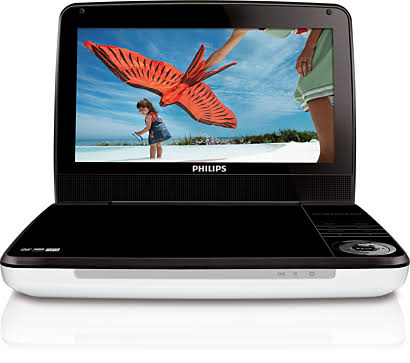
The Philips PD9000 DVD player is a portable DVD player designed for users who want reliable movie playback on the go, in the car, or at home. With a 9-inch TFT LCD screen, built-in speakers, and support for a wide range of disc formats, it offers a practical viewing solution for families, travelers, and anyone who still values physical media. The compact form factor makes it easy to carry, while the built-in battery provides up to 5 hours of playback for flexible use during road trips, flights, and downtime away from a TV.
This model stands out for its broad format support, including DVD, DVD-R/RW, DVD+R/+RW, CD, CD-R/RW, SVCD, VCD, Picture CD, and MP3-CD playback. It also supports both PAL and NTSC video systems, which makes it useful for multi-region viewing setups. The Philips PD9000 DVD player includes a headphone jack, composite AV output, and car power compatibility, making it a versatile choice for personal entertainment. Its 640 x 220 resolution and 9-inch display are modest by modern tablet standards, but they remain suitable for casual video playback and family use.
At the time of current market listings, the Philips PD9000 DVD player is typically found through third-party sellers, refurbished marketplaces, and specialty electronics retailers rather than mainstream big-box stores. Pricing can vary widely based on condition, seller, and region, but buyers should generally expect a budget-friendly used or refurbished price range rather than a premium new-product cost. It is best suited for parents, frequent travelers, and users looking for a simple portable DVD solution instead of streaming-based devices.
Pros and Cons of the Philips PD9000 DVD Player
Pros
- Portable 9-inch LCD screen offers a comfortable viewing size for movies, cartoons, and travel entertainment.
- Supports many disc formats, including DVD, CD, MP3, SVCD, VCD, and recordable DVD formats.
- Built-in battery gives up to 5 hours of playback, which is useful for road trips and flights.
- Includes headphone support and AV output, making it easy to connect to headphones or external displays.
- Car power compatibility adds real value for families who need entertainment on long drives.
Cons
- The 640 x 220 display resolution is basic compared with modern tablets and portable media devices.
- Built-in speakers are functional but not especially powerful, so headphones often provide a better experience.
- Older hardware means limited appeal for users who rely on streaming apps or wireless media playback.
- Availability is often limited to used or refurbished listings, which can affect warranty coverage and condition.
- Compared with newer portable media players, it offers fewer smart features and less convenience.
For buyers focused on disc playback, the Philips PD9000 DVD player offers solid value for money. Compared with modern portable tablets or streaming devices, it lacks app support, but it remains a dependable choice for physical media fans and parents who want offline entertainment.
Customer Reviews and User Feedback on the Philips PD9000 DVD Player
Customer feedback is generally mixed to positive, with many users praising the portability, format compatibility, and travel-friendly design. Common star ratings from marketplace listings tend to fall around 3 to 4 stars, reflecting satisfaction with basic performance but some disappointment with screen quality and aging hardware.
Typical praise includes comments such as: “Great for long car rides and easy to use,” and “Battery life is decent for a portable DVD player.” Common complaints mention that the display is not sharp by modern standards and that the built-in speakers sound average. Some buyers also note that availability and condition vary because many units are sold through secondary markets.
Purchase is recommended for users who need a simple, reliable disc player for travel, kids, or backup entertainment. It is less suitable for anyone expecting streaming features, high-definition playback, or premium audio. For the best experience, buyers should look for a well-tested refurbished unit with included charger, remote, and battery in good condition.
Key Features and Technical Highlights
- 9-inch TFT LCD screen for portable viewing
- Resolution of 640 x 220 for basic DVD playback
- Supports DVD, CD, DVD-R/RW, DVD+R/+RW, SVCD, VCD, and MP3-CD
- Built-in speakers and 3.5 mm headphone jack
- Composite AV output for external connection
- Built-in battery with up to 5 hours of playback
- PAL and NTSC support for broader disc compatibility
- Car adapter support for in-vehicle use
Who Should Buy the Philips PD9000 DVD Player?
The Philips PD9000 DVD player is ideal for families who need a portable screen for children, travelers who prefer offline movies, and collectors with large DVD libraries. It is also a practical choice for users who want a straightforward, no-frills disc player without the complexity of modern smart devices.
If your priority is streaming, Full HD video, or wireless connectivity, a newer tablet or portable media player will be a better fit. If you want dependable portable DVD playback with simple controls and broad disc support, the Philips PD9000 DVD player remains a worthwhile option.
Faqs
How do I set up the philips PD9000 DVD player for the first time?
What should I do if the philips PD9000 DVD player is not reading discs?
Which disc formats work best with the philips PD9000 DVD player?
How can I improve picture and sound quality on the philips PD9000 DVD player?
Can the philips PD9000 DVD player be used while traveling or in a car?
Why does the philips PD9000 DVD player keep stopping during playback?
How do I clean and maintain the philips PD9000 DVD player safely?
What should I check if the philips PD9000 DVD player battery drains too quickly?
More philips manuals
- Philips SHB4205 Wireless Bluetooth Neckband Headphones User Manual
- Philips SHC5100 Indoor Wireless Headphones User Manual
- Philips PPM7322 Sports Massage Gun User Manual
- Philips PPM3304 Neck massager User Manual
- Philips F20 Amara Minimal Contact Full-Face Mask User Manual
- Philips 227E7 Monitor User Manual
Leave a Comment